Free WiFi QR Code Generator
Turn your network name and password into a code guests scan to connect to your WiFi instantly. No typing, no misspelled passwords, no app needed. Runs entirely in your browser.
Static and permanent: your WiFi QR image never expires, the credentials are baked into the pixels, so there is no server behind it and nothing to deactivate. Many QR apps kill codes when a free trial ends; a code you download here is yours forever.
Exactly as it appears in your router settings, capitalization matters.
Everything runs in your browser. Your WiFi name and password never leave this page. The recent-networks list below remembers names only, passwords are never stored.
Fill in your network details and click Generate. Guests scan the code and join, no typing.
Sharing links alongside your WiFi code?
Create Flyn short links and see total clicks free; Pro adds full country, device, and referrer breakdowns. Perfect for the menu, house guide, or review page next to your WiFi QR code sign.
Need a QR code for a URL, email, SMS, or plain text instead? Use the all-purpose QR code generator. This page is purpose-built for WiFi networks.
How to Make a WiFi QR Code in 3 Steps
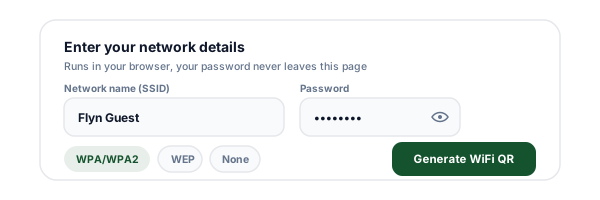
Enter your network details
Type your network name (SSID) exactly as it appears in your router settings, pick the security type, and enter the password. WPA/WPA2 is the right choice for nearly every modern network.
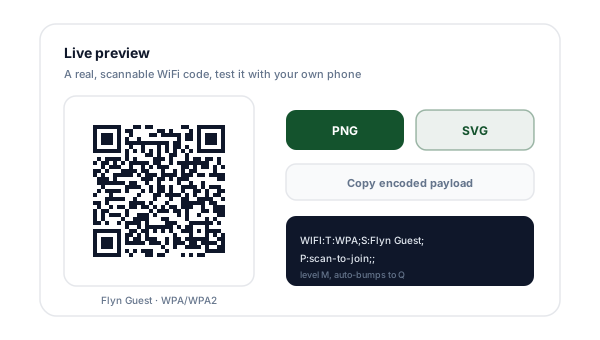
Generate and preview the code
Click Generate and a scannable code appears instantly. The whole tool runs in your browser, your credentials never leave the page. Point your own phone at the screen to test it before printing.
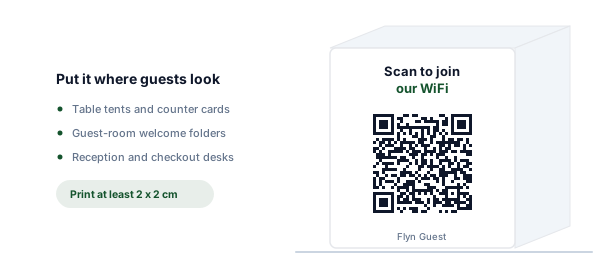
Download and print it
Grab a print-ready PNG or an infinitely scalable SVG. Print at least 2 x 2 cm with the white margin intact, then place it where guests naturally look: table tents, the counter, the guest-room folder.
What Is a WiFi QR Code?
A WiFi QR code packs your network name, security type, and password into a single scannable image. It is the fastest way to share a WiFi password: a guest points their phone camera at it, the phone reads the credentials, and offers a one-tap "Join network" prompt. No hunting through a network list, no reading a password off a chalkboard, no "is that a capital i or a lowercase L" back-and-forth.
That makes a WiFi QR code with the password embedded the standard fixture for cafes, offices, Airbnbs, and home guest rooms: print the code once, put it where people sit, and WiFi questions disappear. Both iPhone (iOS 11 and later) and Android (10 and later) recognize a QR code for WiFi natively in the camera app, so it works for virtually every guest without installing anything.
How the WIFI: Format Works
Under the hood, the QR code contains a short text string in a standard format phones understand.
WIFI:T:WPA;S:MyCafe-Guest;P:scan-to-join;H:true;;WIFI:The scheme prefix. Tells the phone this is a network join payload, not a URL or plain text.
T:WPA;The security type: WPA (covers WPA2/WPA3), WEP, or nopass for open networks.
S:MyCafe-Guest;The network name (SSID), exactly as the router broadcasts it. Case-sensitive.
P:scan-to-join;The password, in plain text. Omitted entirely for open networks.
H:true;Optional flag for hidden networks whose SSID is not broadcast. Left out otherwise.
;;The terminator that closes the payload. Special characters inside values (\ ; , : ") are escaped with a backslash.
WPA vs WEP vs Open: Which to Pick
The security setting in the code must match what your router actually uses. A WPA QR code covers WPA2 and WPA3 networks too, phones negotiate the strongest protocol the router offers.
WPA/WPA2 (and WPA3)
Nearly every network made after 2006. The default choice.
Phones treat the WPA setting as "modern secured network" and negotiate the strongest protocol the router offers, including WPA3.
WEP
Legacy routers from the early 2000s only.
WEP encryption is broken and crackable in minutes. If your router only offers WEP, replacing it is a better security upgrade than any QR code.
None (open)
Genuinely passwordless networks, like some venue guest WiFi.
The code then only stores the network name, guests still join in one scan instead of hunting through a network list.
Static WiFi QR vs Dynamic QR: When Each Wins
A WiFi code must be static, the phone needs the credentials offline at scan time. For everything else you print, a dynamic QR is usually the smarter choice.
| Static WiFi QR (this tool) | Dynamic QR (Flyn short link) | |
|---|---|---|
| What it encodes | Your credentials, directly in the image | A short link that redirects to any destination |
| Works with no internet | Yes, joining WiFi needs no connection | No, the scan resolves through a redirect |
| Change after printing | No, new password means new print | Yes, re-point the destination anytime |
| Scan tracking | None, there is no server involved | Total scans counted free, full breakdowns on Pro |
| Best for | WiFi access, one job forever | Menus, house guides, promos, booking pages |
Most hosts end up printing both: a static WiFi code so guests get online, and a dynamic QR code next to it for the menu or house guide, one you can re-point after printing and measure scans on.
How Big Should You Print It?
The working minimum is 2 x 2 cm for a code scanned at arm's length, roughly a table tent or counter card. The general rule: print width should be at least one tenth of the scanning distance. A code on a wall poster read from 1 meter away should be 10 cm wide. When in doubt, go bigger, oversized codes never fail, undersized ones fail constantly.
Always keep the white quiet zone around the code (this tool includes it in every download), print dark modules on a light background, and prefer matte over glossy finishes to avoid glare. For the full sizing math, including distance tables for posters and shelf labels, see our QR code size guide.
Why WiFi QR Codes Fail to Scan
WiFi QR code not working? Six failure modes cover nearly every report. Check them in order.
Printed too small
Below 2 x 2 cm, phone cameras struggle to resolve the modules at a normal scanning distance. Scale up, especially for wall posters scanned from farther away.
Quiet zone cropped
The white border around the code is part of the spec, not empty space to trim. Crop it and many scanners cannot find the code edges.
Low contrast or inverted colors
Dark modules on a light background scan best. Light-on-dark (inverted) codes fail on many phones, and pastel-on-white lacks the contrast cameras need.
Glare from lamination
Glossy lamination reflects overhead light straight into the camera. Use matte lamination or place the code away from direct light sources.
Wrong SSID or stale password
The code fails silently if the network name has a typo or the password changed after printing. Verify with your own phone every time you reprint.
Router blocks new devices
MAC filtering or a guest-device cap on the router can reject a phone even when the code is perfect. Check the router settings if scans succeed but joining fails.
Still stuck? Our full troubleshooting guide walks through every fix with photos: why your QR code is not scanning.
Guest WiFi QR Codes: Airbnb, Cafe, and Office
The same three-field code adapts to every place guests ask for the password.
Airbnb and vacation rentals
An Airbnb WiFi QR code in the house guide or framed on the fridge answers the most-asked question in hosting before it is asked. Guests are online before their bags are unpacked.
Cafes and restaurants
A cafe or restaurant WiFi QR code on a table tent, menu corner, or counter sign means staff never spell the password out mid-rush. Laminate it matte to avoid glare.
Office guest network
Print a code for the office guest network in reception and meeting rooms. Visitors connect in seconds, and your internal network stays untouched.
Home guest room
A small WiFi QR code sign on the guest-room nightstand beats texting the password to every visiting relative, and it still works when your phone is elsewhere.
Always point it at a guest network
Because the QR code hands out your password in plain text, the smart move for any business (and most homes) is to point it at a dedicated guest network. Nearly every modern router supports one: guests get internet, but they are isolated from your main network, your POS system, your printers, and your laptops. If a guest device is compromised, the blast radius is the guest VLAN, not your business.
A guest network also makes password rotation painless: change the guest password quarterly, reprint one card, and your main network credentials never circulate at all. For a deeper walkthrough, including router-by-router setup and printable sign ideas, read our complete WiFi QR code guide.
WiFi Sorted. Now Track What Guests Do Next
The WiFi code gets guests online. Flyn's dynamic QR codes and short links handle everything else you print: menus, house guides, review pages, booking links.
Re-pointable QR codes
Dynamic codes encode a Flyn short link, so you can change the destination after printing.
Scan analytics
Every scan counted free. Full country, device, and referrer breakdowns on Pro, so you know which sign actually works.
Never deactivated
Links in your Flyn account are never deactivated over plans or billing. What you print keeps working, on the free plan too.
Free to start
25 links a month with QR codes and total click counts, no card required. Pro adds 3 custom domains.
Frequently Asked Questions
How does a WiFi QR code work?
Is it safe to put my WiFi password in a QR code?
Does the QR code stop working if I change my WiFi password?
Which security type should I pick: WPA, WEP, or None?
Do WiFi QR codes work on both iPhone and Android?
Do guests need an app to scan the code?
Does this tool store my WiFi password?
What if my network name or password contains special characters?
How big should I print a WiFi QR code?
Can I make a QR code for a hidden network?
Why is my WiFi QR code not working?
Does a WiFi QR code expire?
What is the easiest way to share a WiFi password with guests?
More Free QR Tools
Everything you print deserves a working code. All free, instant, no sign-up required.
vCard QR Code Generator
A scannable business card that saves your contact in one tap.
QR Code with Logo
Put your brand mark in the center of a still-scannable code.
Dynamic QR Code Generator
A code you can re-point after printing, with scan counts.
QR Code Generator
URLs, text, email, phone, SMS, and vCards in one tool.
Print once, welcome guests forever
Your WiFi code is ready above, free and permanent. When you want codes you can re-point and measure, Flyn gives you dynamic QR codes, branded short links, and scan analytics in one place.