Free Google Maps Link Generator
One link that opens directions on any device. Build a shareable Google Maps URL for any address, route, or GPS coordinate, no API key, no sign-up.
Anything you would type into the Google Maps search box: a business name, a full address, or both.
Sharing this link on print, SMS, or social?
Create Flyn short links and see total clicks and scans free, with full country, device, and referrer breakdowns on Pro. Every Maps link becomes a data point you control.
How to Create a Google Maps Link in 3 Steps
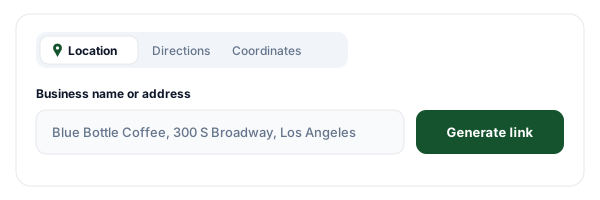
Pick a link type and enter the place
Choose Location for a pinned place, Directions for a tap-to-navigate route, or Coordinates for an exact GPS point. Then type the business name, address, or latitude and longitude.
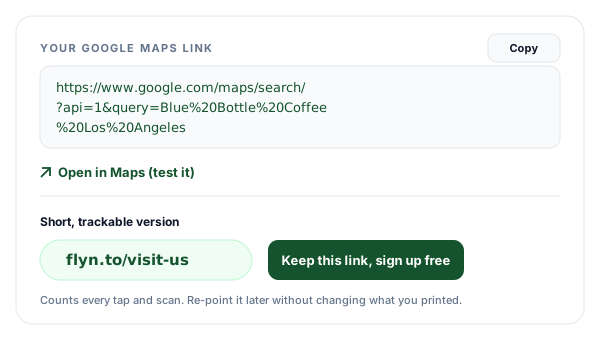
Generate and copy your link
The tool assembles the official Google Maps URL (api=1 format) that works on iPhone, Android, and desktop. Copy it with one click, or open it in a new tab to test where it lands.
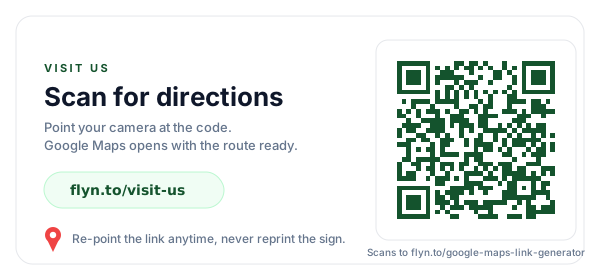
Shorten it for print and QR
Raw Maps URLs are long and ugly on signage. Shorten yours into a clean Flyn link, put it on posters, menus, and QR codes, and count every tap and scan.
What Is a Google Maps Link Generator?
A Google Maps link generator builds a share location link: a URL that opens Google Maps at exactly the place or route you choose. Instead of telling customers to "search for us on Maps" and hoping they find the right branch, you hand them a direct link to a Google Maps location that drops a pin or starts navigation immediately. Everything runs on Google's official cross-platform URL scheme (which is why some people call this a Google Maps URL generator), so whether you need a location pin, a Google Maps directions link, or a lat long coordinates link, it behaves predictably on every device.
The most common users are owners creating a Google Maps link for a business, whether that is a "Get directions" maps link for a website contact page or a Google Business Profile, marketers adding location links to emails and SMS campaigns, and event organizers printing signage. In every one of those cases the raw URL works, but it is long. Pair it with our Google Maps link shortener and you get something short enough to print, plus a click count for every surface you put it on.
Anatomy of the Official Google Maps URL
Every link this tool builds follows Google's documented Maps URLs format. Here is what each part does.
Location link
https://www.google.com/maps/search/?api=1&query=Blue+Bottle+Coffee+Los+AngelesDirections link
https://www.google.com/maps/dir/?api=1&destination=Central+Park+Zoo&travelmode=walking| Parameter | What it does | Details |
|---|---|---|
| api=1 | Version marker, always required | Tells Google to treat this as an official cross-platform Maps URL. Without it the URL falls back to legacy behavior that differs per device. |
| query= | The place to show (search links) | A URL-encoded business name, address, or "lat,lng" pair. Used with /maps/search/. Google centers the map on the best match and drops a pin. |
| destination= | Where the route ends (directions links) | A URL-encoded place or coordinate pair. Used with /maps/dir/. Required for every directions link. |
| travelmode= | Default transport mode | One of driving, walking, bicycling, or transit. Optional, the visitor can still switch modes after opening the link. |
| origin= | Where the route starts | Optional. Leave it out and Google Maps starts from the visitor's current location, which is what most signage and invites want. |
Note the base paths: location and coordinate links use /maps/search/, while a directions URL uses /maps/dir/. Spaces and commas are percent-encoded automatically by this tool, which is the part people most often get wrong by hand.
Location vs Directions vs Coordinates: Which Link Type?
All three open Google Maps, but they put the visitor in a different starting state. Pick based on what you want the person to do next.
Location
You want people to see where something is: your shop, an office, a venue.
Typical surfaces: Store pages, contact pages, social bios, "find us" buttons.
Directions
You want people to start navigating with one tap, usually from wherever they are.
Typical surfaces: Parking signs, wedding invites, event emails, delivery notes.
Coordinates
The spot has no street address, or the address geocodes to the wrong place.
Typical surfaces: Trailheads, festival gates, beach entries, rural properties.
How the Link Behaves on iPhone, Android, and Desktop
iPhone
Opens the Google Maps app if installed (universal link). Without the app, Maps opens in Safari, fully usable, no install prompt wall.
Android
Opens the Google Maps app directly, it ships preinstalled on nearly every Android phone. Directions links land one tap away from navigation.
Desktop
Opens Google Maps in a browser tab with the pin or route ready. Handy for people planning a trip before they leave.
This is the practical reason to use the api=1 format instead of copying whatever is in your browser address bar: address-bar URLs carry session data and map viewport state that may not reproduce for other people, while the official scheme is stateless and renders the same intent everywhere.
Print and QR Signage Best Practices
A Maps URL on a poster has two jobs: be scannable and stay correct. Never print the raw URL, it is 80+ characters of percent-encoding that nobody will type. Shorten it first, then print the short link as text alongside a QR code so people can choose to scan or type. Generate the code from the short link, not the raw URL: shorter payloads produce coarser, more forgiving QR patterns that scan reliably from further away and at smaller print sizes. And caption the code with a clear action, "Scan for directions" beats a bare QR square, because people scan when they know exactly what they will get.
The bigger win is editability. Print the raw Google URL and the sign is frozen: move to a new address and every poster, menu, and window decal is wrong. Print a Flyn short link instead and the printed artwork never has to change, you just re-point the link at the new Maps URL. Add a logo to the code with our QR code generator with logo so the sign looks branded rather than generic.
Honest note before you print: many QR services deactivate your codes when a trial ends, which kills the printed sign. Links in a Flyn account are never deactivated over plans or billing; only anonymous trial links (made without an account) expire after 24 hours, so claim yours with a free account before you print.
Google Business Profile Share Link vs a Generated Link
If you manage a Google Business Profile, the Share button in Google Maps already gives you a link, a short maps.app.goo.gl code. It works fine, so here is the honest comparison. The share link is opaque: Google generates the code, you cannot predict it, rebuild it in a template, or change what it opens. A generated api=1 link is deterministic: it is built from your own text, so you can construct it in a spreadsheet for 50 locations, keep it in version control, or regenerate it any time.
Neither one, on its own, gives you click data or editability. That layer comes from shortening: wrap either URL in a Flyn short link and the destination becomes editable and every click is counted. For collecting reviews rather than visits, the same logic applies to your review URL, our Google review link generator builds the direct leave-a-review link for your business.
What People Put Google Maps Links On
Four places a one-tap directions link earns its keep.
Store signage and menus
Put a short link or QR on window decals, table tents, and flyers so customers can pull up directions to your other locations in one tap.
Event parking
A directions link with no origin starts navigation from wherever each guest currently is. Print it on tickets and yard signs near the venue.
Delivery instructions
Coordinates pin the exact gate, loading dock, or building entrance, so drivers stop calling to ask where the entrance actually is.
Real estate listings
Each listing gets a Maps link on the flyer and sign rider. Shorten them with Flyn and you see which properties get the most drive-by interest.
Maps Link + Flyn Short Link: Better Together
Generate the Maps URL here, then shorten it with Flyn to make it printable, brandable, editable, and measurable.
Edit after printing
Moved locations? Re-point the short link to the new Maps URL, every printed sign keeps working.
Count every tap and scan
Total clicks and scans are free on every link; Pro adds country, device, and referrer breakdowns so you know which sign or campaign drives visits.
Built-in QR codes
Every Flyn link comes with a downloadable QR code, dynamic by design because it rides on the redirect.
Branded domains
Put your own domain on the short link so the sign says you, not a random shortener. Add your own domain on Pro, 3 included.
Frequently Asked Questions
What is a Google Maps link generator?
Do I need a Google API key to create these links?
Will this make a maps link that opens the app on phones?
How do I make a Google Maps directions link that starts from the visitor's current location?
What travel modes can I set in a directions link?
When should I use a lat long coordinates link instead of an address?
Is this the same as the Google Maps share link from the Share button?
Can I put a Google Maps link on a printed sign or QR code?
Why should I shorten a Google Maps link?
Does the generated link work in other countries and languages?
Can I track how many times people click my Maps link?
Are Plus Codes a good alternative to a coordinates link?
Why is my Google Maps link not working?
Does this tool store the addresses I enter?
More Free Tools
More free link tools from Flyn, instant, no sign-up required.
Google Review Link Generator
Build a direct leave-a-review link for your business profile.
Google Maps Link Shortener
Turn a long Maps URL into a short, trackable link.
QR Code Generator with Logo
Branded QR codes for signage, menus, and packaging.
YouTube Timestamp Link Generator
Link straight to the exact second in any video.
Ready to put directions one tap away?
Generate your Maps link for free, then shorten it with Flyn for clean signage, built-in QR codes, and a click count for every surface you share it on.