Free YouTube Timestamp Link Generator
Send viewers to the exact moment. Paste any YouTube URL, pick a start time, and get a clean youtu.be timestamp link with the t parameter, playlist included if you want it.
This tool builds a YouTube link with a timestamp. Just shortening a video URL? Use the YouTube Link Shortener. Making a channel subscribe link? Try the YouTube Subscribe Link Generator.
Any form works: youtube.com/watch, youtu.be, Shorts, Live, or embed. If the URL already has a ?t= we prefill the time below.
Overflow is fine: 90 seconds becomes 1:30 automatically.
We read hh:mm:ss, mm:ss, plain seconds, and 1h2m3s formats.
Want to know how many clicks it actually gets?
Wrap your timestamped links in Flyn short links and see total clicks free on every placement. Full country, device, and referrer breakdowns come with Pro.
How to Link to a YouTube Moment in 3 Steps
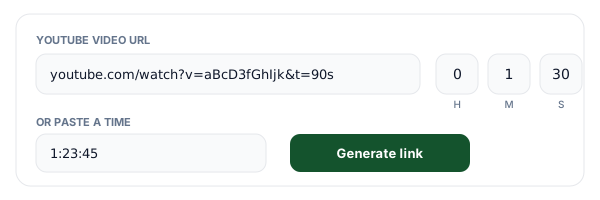
Paste a YouTube URL and set the time
Every real URL form works: youtube.com/watch, youtu.be, Shorts, Live, and embed links, with any extra parameters. Set hours, minutes, and seconds, or paste a time in any format (1:23:45, 12:45, 90s, 1h2m3s). If the URL already has a t parameter, we prefill the time for you.
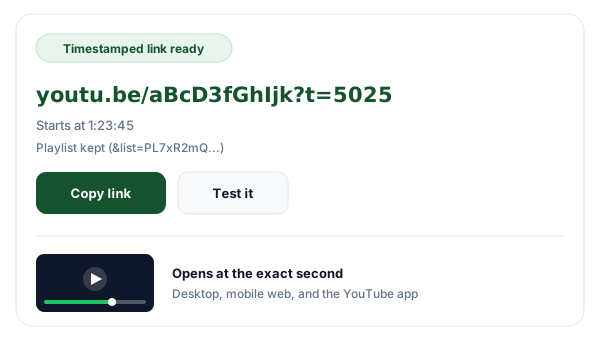
Generate your timestamped link
You get a clean youtu.be link with the start time converted to plain seconds, the form that works on desktop, mobile web, and in the YouTube app. If your original URL carried a playlist, the Keep playlist toggle preserves it. Copy the link or open it in a new tab to verify the landing spot.
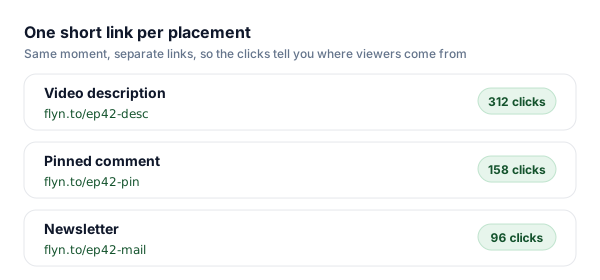
Share a trackable link per placement
Shorten the result with Flyn right below the output. Mint a separate short link for the description, the pinned comment, and your newsletter, and the click counts tell you which placement actually drives plays. Short links stay editable, so a re-upload never breaks what you already posted.
How the YouTube t Parameter Works
The t query parameter tells the YouTube player where to begin playback, measured in seconds from the start of the video. A link like youtu.be/aBcD3fGhIjk?t=765 opens the video and jumps straight to 12:45. It is the same mechanism YouTube uses when you tick "Start at" in the share dialog, and it rides along happily with other parameters like list (playlists) on both youtu.be and youtube.com/watch URLs. That is all a YouTube start time link is: a normal video URL plus one parameter, and it is the only official way to make a YouTube link that starts at a certain time.
You may remember the old #t=1m30s hash form from years ago. That fragment syntax is deprecated: many surfaces ignore everything after the #, and some apps strip it entirely. YouTube still accepts unit notation as a query parameter (?t=1m30s), but plain seconds is the one form that works in every context that honors the parameter at all, which is why this generator always converts your hours, minutes, and seconds into a single seconds value.
One honest caveat: timestamps only work on normal watch pages. The Shorts player and live streams ignore start positions (details in the table below), and iframe embeds use a different parameter (start=) altogether. When you paste a Shorts, Live, or embed URL, we extract the video ID and emit a watch-style youtu.be link so the timestamp has the best possible chance of being honored, but a video that YouTube forces back into the Shorts feed will still start from the beginning.
Which YouTube URL Forms Support Timestamps?
Paste any of these into the generator, we extract the video ID either way and output the form that works.
| URL form | Example | t works? | Notes |
|---|---|---|---|
| youtube.com/watch?v=ID | youtube.com/watch?v=aBcD3fGhIjk&t=765 | Yes | The canonical watch page. t works everywhere: desktop, mobile web, and the app. |
| youtu.be/ID | youtu.be/aBcD3fGhIjk?t=765 | Yes | YouTube's official short domain, same player as watch. This is what our tool outputs. |
| youtube.com/shorts/ID | youtube.com/shorts/aBcD3fGhIjk | No | The Shorts player ignores t and always starts at 0:00. We convert Shorts URLs to watch-style links. |
| youtube.com/embed/ID | youtube.com/embed/aBcD3fGhIjk?start=765 | Partial | Iframe embeds use start= (plain seconds) instead of t. A t parameter on an embed is ignored. |
| youtube.com/live/ID | youtube.com/live/aBcD3fGhIjk | After the stream | No effect while live. Once archived, the video behaves like a normal watch page and t works. |
Building a Chapter List for Your Description
Inside a video's own description and comments, you do not need generated links at all: type plain times like 0:00 Intro, 2:14 Setup, 10:05 Results, and YouTube auto-links them. Start the list at 0:00 with at least three ascending entries and YouTube also turns them into chapters on the progress bar. Where generated timestamp links earn their keep is everywhere YouTube's auto-linking does not reach: another video's description, community posts, newsletters, blog posts, docs, and chat apps. We covered description strategy in depth in our guide to YouTube description links.
A practical workflow: build your chapter list in the description first, then use this generator to produce shareable links for the three or four moments people ask about most. Pair it with our YouTube link shortener for the video itself and a subscribe link for your channel, and every touchpoint in your funnel becomes a link you can measure.
Timestamps for Podcast Show Notes
If you publish full podcast episodes on YouTube, timestamped links are the backbone of good show notes. Generate a YouTube link with a timestamp for each segment (the guest intro, the main topic, the audience questions), then paste them into your episode page, newsletter, and social posts. Listeners click through to the exact conversation they care about instead of bouncing off a two-hour wall of video.
The upgrade on top: shorten each segment link before publishing. A raw youtu.be?t= link tells you nothing once it leaves your hands; a short link counts every click, so after a few episodes you know whether your audience jumps to interviews or to Q&A, and which channel (newsletter vs. episode page) sends the most engaged listeners. Our guide to podcast show notes link optimization walks through the full setup.
Where Timestamped Links Shine
Any time the answer lives at a specific minute, a YouTube time link takes your audience straight there.
Tutorials and how-to videos
Answer a support question or forum thread with a link that jumps straight to the fix, no "skip to 14:32" instructions your reader has to follow by hand.
Reaction and commentary content
Point your audience at the exact clip you are responding to. A timestamped link is fair, precise, and keeps the original creator's view counter running.
Courses and cohort programs
Link each lesson module or syllabus row to the exact chapter of a longer recording, so students land on the right concept instead of scrubbing a 2-hour video.
Support docs and knowledge bases
Give every help article a video deep link to the exact time. When the answer lives at 07:41 of your walkthrough, send readers to 07:41.
Timestamp Links + Flyn: Links You Can Measure
The generator is free forever. Add Flyn when you want each placement of a link to report back.
Editable destinations
Re-point a short link anytime. If you re-upload a video, fix every posted link with one edit.
Per-placement analytics
Total clicks free on every link; full country, device, and referrer breakdowns on Pro.
QR codes included
Turn a timestamped link into a QR code for slides and printed materials, free on every link.
A free plan that lasts
25 links a month with total click counts and QR codes. No trial countdown. Custom domains come with Pro.
Frequently Asked Questions
How do I link to a specific time in a YouTube video?
What does the t parameter in a YouTube URL do?
Does the t parameter use seconds or minutes?
Can I make a timestamp link for YouTube Shorts?
Do timestamps work on live streams?
What is the difference between youtu.be and youtube.com/watch links?
Can I keep the playlist when sharing a timestamped link?
How do I add clickable timestamps to a YouTube description or comment?
What is the difference between YouTube chapters and timestamp links?
Do timestamped links work in the YouTube mobile app?
Can I track how many times people click my timestamp links?
Is this tool free, and do you store my URLs?
Why does my timestamp link start from the beginning?
More Free Tools
More free link tools from Flyn, instant, no sign-up required.
YouTube Link Shortener
Short, trackable links for videos, channels, and playlists.
YouTube Subscribe Link Generator
One-click subscribe links with the confirmation prompt built in.
YouTube Playlist Link Generator
Turn a pile of video URLs into one playlist link, up to 50 videos, no account.
YouTube Embed Code Generator
Responsive iframe code with start and end times, plus true single video looping.
Ready to send viewers to the good part?
Generate timestamped links for free, then shorten them with Flyn to see which description, comment, or newsletter actually drives plays. Analytics, QR codes, and editable links included.