Free YouTube Subscribe Link Generator
Turn your channel URL or @handle into a one-click subscribe link that pops the Subscribe dialog, plus copy-paste HTML and Markdown. No coding, 100% in your browser.
Paste your channel URL or just your @handle. We add ?sub_confirmation=1 so clicking pops the Subscribe dialog.
Want to know which video drives the most subscribers?
Shorten your subscribe link with Flyn and get a clean branded URL plus click analytics, see exactly which placement converts viewers into subscribers.
How to Make a Subscribe Link in 3 Steps
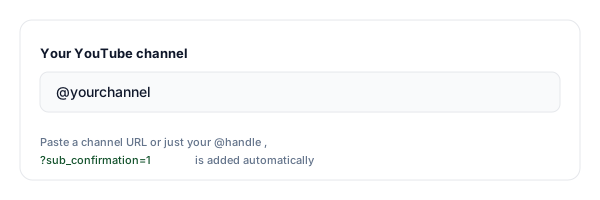
Paste your channel URL or @handle
Enter your YouTube channel address or just your @handle. The tool handles modern @handles and legacy /channel/, /c/, and /user/ URLs.
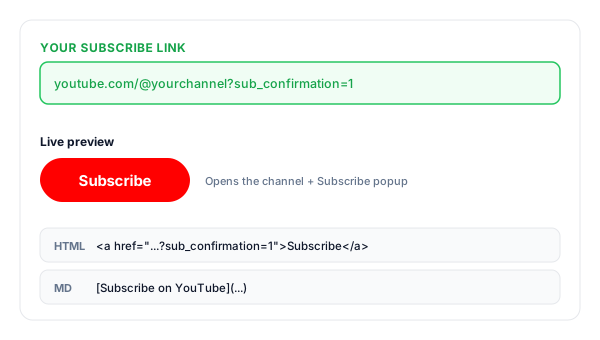
Copy your subscribe link
We add ?sub_confirmation=1 and give you the ready-to-share link, plus an HTML "Subscribe" button and a Markdown version for show notes.
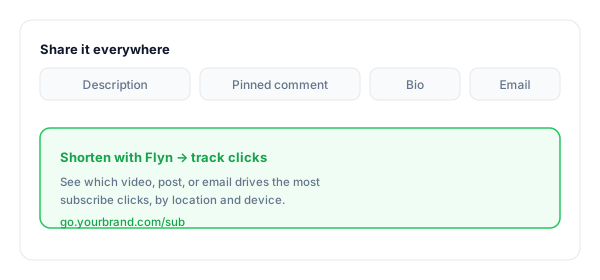
Share it everywhere
Drop it into descriptions, pinned comments, your bio, and emails. Shorten it with Flyn to track which placement drives the most subscribers.
What Is a YouTube Subscribe Link?
A YouTube subscribe link is your normal channel URL with a special parameter, ?sub_confirmation=1, added to the end. Clicking it opens your channel and instantly shows YouTube's built-in Subscribe popup.
That one extra step removed is the whole point: instead of asking viewers to find your channel and hunt for the Subscribe button, they confirm in a single tap. It is an official, supported YouTube parameter, the same one creators put in descriptions, end screens, and link-in-bio pages.
You will see the same thing called an auto subscribe link or an auto subscribe link generator. It is the identical ?sub_confirmation=1 link: "auto" describes the Subscribe dialog opening on its own, not anyone being subscribed without asking. A viewer still taps Confirm, which is why this is safe to put in front of an audience, unlike a free subscriber generator, which cannot exist without bots or sub4sub and puts your channel at risk.
A complete subscribe link:
https://www.youtube.com/@yourchannel?sub_confirmation=1Where to Put Your Subscribe Link
The link only works if people see it. These are the highest-converting places to put it, and the ones to track if you want to know what is actually working.
| Placement | Why it works |
|---|---|
| Video description | The highest-intent spot, viewers who just finished a video are the most likely to subscribe. Put it near the top. |
| Pinned comment | Stays visible at the top of the comments on every video, even for people skimming on mobile. |
| Channel banner & About | A permanent subscribe call-to-action on your channel home page for first-time visitors. |
| End screen & cards | Catches viewers in the final seconds when they are already deciding whether to subscribe. |
| Email & newsletter | Turn your existing audience into subscribers with a single click from any campaign. |
| Other social bios | Funnel your Instagram, X, and TikTok followers straight to a YouTube subscribe prompt. |
Pro tip
Use a different Flyn short link for each placement (one for descriptions, one for your bio, one for email). Same destination, separate click counts, so you can see which one actually earns subscribers instead of guessing.
Subscribe Link Best Practices
Do
Don't
Use your channel URL (with the parameter)
Add sub_confirmation to a /watch video link
Shorten + brand it for saying on camera
Read a long raw ?sub_confirmation=1 URL aloud
Place it near the top of every description
Bury it beneath ten other links
Track clicks to find your best placement
Guess which video actually drives subs
Pair the link with a spoken call to action
Assume viewers know to subscribe
Test the link in an incognito window
Only test it while already subscribed
Turn Subscribe Clicks Into Insight
See what drives subs
Shorten the link with Flyn and track clicks by video, post, and placement, find your best subscribe source.
Branded & memorable
Turn the long ?sub_confirmation=1 URL into go.yourbrand.com/sub, clean enough to say on camera.
Opens in the app
Most viewers are on mobile; Flyn links route cleanly toward the YouTube app where the prompt appears.
A/B test placements
Split-test where your subscribe link converts best, description vs pinned comment vs end screen (Pro).
Frequently Asked Questions
What is a YouTube subscribe link?
How does the ?sub_confirmation=1 parameter work?
How do I make a one-click subscribe link for my channel?
Where do I find my channel URL or handle?
Does the subscribe link work on mobile and in the YouTube app?
Can I put a subscribe link in my video description?
Is using a subscribe link allowed by YouTube?
Why is the Subscribe popup not showing when I click my link?
Can I use a subscribe link with a custom or branded short link?
What is the difference between a channel link and a subscribe link?
Can I track how many times people click my subscribe link?
Is this an auto subscribe link generator?
Is this a free subscriber generator?
Does it work with old /channel/, /c/, and /user/ URLs?
More Free Link Tools
Explore other free tools from Flyn to build, share, and track your links.
YouTube Membership Link
Send fans straight to your channel membership Join page with a youtube.com/@you/join link.
YouTube Link Shortener
Shorten and brand any YouTube video, channel, or playlist URL with click tracking.
Deep Link Generator
Make links open directly in the YouTube app instead of the in-app browser.
YouTube Timestamp Link
Send viewers to the exact moment in a video with a start-at link.
YouTube Playlist Link
Paste up to 50 video URLs and get one link that YouTube opens as a real playlist.
Grow your channel with trackable links
A subscribe link makes subscribing one click. A Flyn link tells you which video, post, or email actually earned the subscriber, so you can do more of what works.