Free YouTube Membership Link Generator
Turn your channel URL or @handle into a direct join link that opens your membership page, plus copy-paste HTML and Markdown. Works on channels with memberships enabled. No coding, 100% in your browser.
Paste your channel URL or just your @handle. We add /join so the link opens your membership join page.
Want to know which post turns fans into members?
Shorten your membership link with Flyn and get a clean branded URL plus click analytics, see exactly which video, post, or email sends fans to your join page.
How to Make a Membership Link in 3 Steps
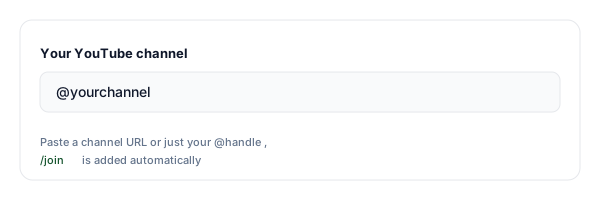
Paste your channel URL or @handle
Enter your YouTube channel address or just your @handle. The tool handles modern @handles and legacy /channel/, /c/, and /user/ URLs.
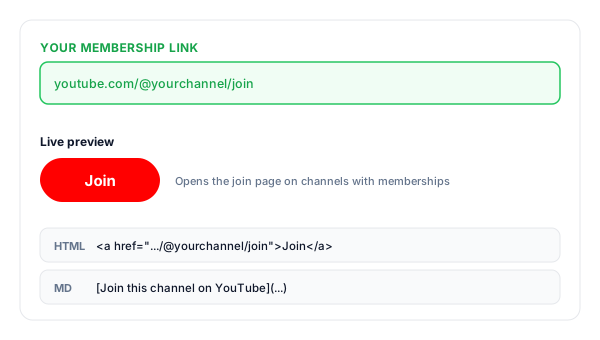
Copy your membership link
We add /join and give you the ready-to-share link, plus an HTML "Join" snippet and a Markdown version for community posts and show notes.
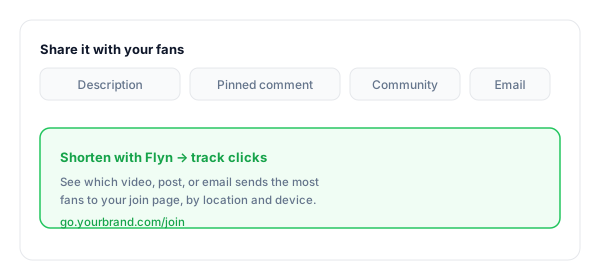
Share it with your fans
Drop it into descriptions, pinned comments, community posts, and emails. Shorten it with Flyn to track which placement sends the most fans to your join page.
What Is a YouTube Membership Link?
A YouTube membership link is a direct URL to your channel's join page: your normal channel address with /join added to the end. Clicking it opens your channel and shows YouTube's membership dialog, where fans pick a tier and become paying monthly members, the same page the official Join button leads to. YouTube's own name for the feature is channel memberships, which is the wording you will see in YouTube Studio and in YouTube's help pages.
One honest caveat before you share it: the join dialog only appears on channels that have memberships enabled, the ones showing a Join button next to Subscribe. If your channel is not in the YouTube Partner Program or has not turned memberships on in YouTube Studio, the link simply opens your channel page with no join prompt. Enable memberships first, then share the link.
Think of it as the paid-tier sibling of a subscribe link. A subscribe link, built with our free YouTube Subscribe Link Generator, asks for a free follow; a membership link asks your warmest fans for monthly support. Sharing each with the right audience, subscribe links broadly and join links to engaged viewers, is what makes both convert.
A complete membership link:
https://www.youtube.com/@yourchannel/joinWhere to Share Your Membership Link
A join link converts best in front of people who already watch you. These are the highest-intent places to put it, and the ones to track if you want to know what is actually working.
| Placement | Why it works |
|---|---|
| Video description | Viewers who just finished a video are your warmest audience. Put the join link near the top with one concrete perk. |
| Pinned comment | Stays visible at the top of the comments on every video, even for people skimming on mobile. |
| Community posts | Community posts reach subscribers directly in their feed, a natural place to pitch members-only perks. |
| Live streams | Live viewers are your most committed fans. Drop the join link in chat and the description when engagement peaks. |
| Email & newsletter | Your email list already opted in once. A short pitch plus a join link converts better than any cold audience. |
| Other social bios | Funnel Instagram, X, and TikTok superfans straight to your YouTube join page. |
Pro tip
Use a different Flyn short link for each placement (one for descriptions, one for community posts, one for email). Same join page, separate click counts, so you can see which one actually sends fans to your membership page instead of guessing.
Membership Link Best Practices
Do
Don't
Confirm memberships are enabled first
Share a /join link with no Join button live
Pitch one specific perk next to the link
Post the bare URL with no reason to join
Shorten + brand it for saying on camera
Read the raw /join URL aloud
Aim it at engaged fans (live chat, community)
Blast it at brand-new viewers
Track clicks to find your best placement
Guess which video drives members
Keep a subscribe link for everyone else
Replace every channel link with /join
Turn Join Clicks Into Insight
See what drives joins
Shorten the link with Flyn and track clicks by video, post, and placement, find where member intent comes from.
Branded & memorable
Turn the raw /join URL into go.yourbrand.com/join, clean enough to say on camera.
Opens in the app
Most viewers are on mobile; Flyn links route cleanly toward the YouTube app where the join page lives.
One link, many placements
Use one short link in descriptions, pinned comments, and community posts, or one per placement, and read the click counts. Counting clicks is free on every Flyn link.
Frequently Asked Questions
What is a YouTube membership link?
What is the URL format for a YouTube join link?
Why does my membership link just open my channel with no join dialog?
How do I enable memberships on my channel?
What is the difference between subscribing and becoming a member?
Does the membership link work on mobile and in the YouTube app?
Is sharing a join link allowed by YouTube?
Can this tool get me more channel members?
Does it work with /channel/, /c/ and /user/ URLs?
Can I track clicks on my membership link or brand it?
More Free Link Tools
Explore other free tools from Flyn to build, share, and track your links.
YouTube Subscribe Link
The free-tier sibling: a one-click subscribe link that pops the Subscribe dialog.
Twitter Follow Link
Turn your X handle into a one-click follow link for bios, emails, and posts.
Click to Tweet Link Generator
Create pre-filled tweet links so fans can share your channel in one click.
Instagram DM Link
Let fans open a DM to your Instagram in one tap, great for member questions.
Turn superfans into members with trackable links
A membership link makes joining one click. A Flyn link tells you which video, post, or email actually sent the fan, so you can do more of what works.