Free Click to Tweet Link Generator
Build one-click pre-filled tweet links for X (Twitter) with text, a URL, hashtags, and a via handle. Live 280-character counter. Copy the link, HTML, or Markdown, 100% in your browser.
Track clicks on the link inside your tweet
Wrap your destination URL in a Flyn short link before adding it here, then see how many people clicked, from where, on what device.
How to Create a Click to Tweet Link in 3 Steps
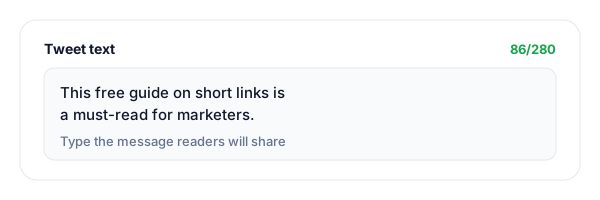
Write your tweet
Type the message you want readers to share. The live counter tracks all 280 characters, turning amber then red as you approach the limit, and reminds you that a link costs 23 chars.
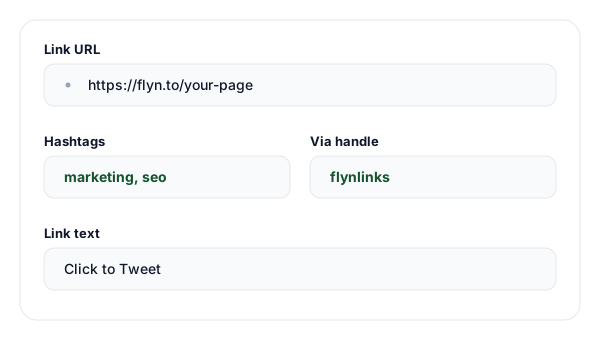
Add link, hashtags, and via
Optionally add a URL, one or two hashtags (no # needed), and a via handle for credit. Everything is URL-encoded automatically, so emoji and punctuation survive.
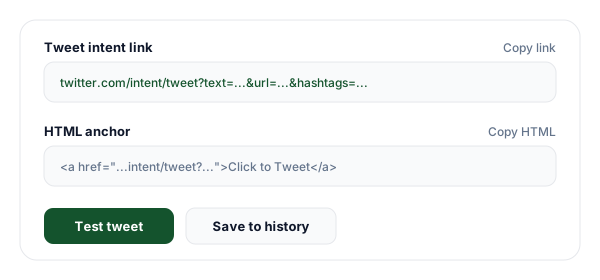
Copy the link, HTML, or Markdown
Copy the raw tweet intent link for buttons and email, the HTML anchor for a webpage, or the Markdown snippet for docs. Or click Test tweet to preview it live on X.
What is a Click to Tweet Link?
A click to tweet link is a URL that opens X (formerly Twitter) with a tweet already written, so the only thing left for your reader to do is press Post. It is powered by the official tweet intent endpoint, https://twitter.com/intent/tweet, which has been a documented, stable part of the platform for over a decade and still works under the x.com brand.
The full format this tool builds is https://twitter.com/intent/tweet?text=TEXT&url=URL&hashtags=H1,H2&via=HANDLE. Each value is URL-encoded with encodeURIComponent so spaces become %20, emoji survive as UTF-8 byte sequences, and ampersands inside your text do not break the query string. You can include any combination of the four parameters; all of them are optional except that an empty link is not very useful.
The reason click to tweet links convert so well is friction. Asking someone to "share this on Twitter" means they have to switch apps, think of wording, find your link, and remember to tag you. A pre-filled intent link collapses all of that into a single tap, and the tweet still goes out from their account, with full reach to their followers, because they review and post it themselves.
One important note about the link inside your tweet: X rewrites every URL through its t.co wrapper, which always counts as 23 characters no matter how long the real URL is. That is why our live counter charges 23 characters the moment you add a URL, your preview matches exactly what X will post, with no surprise truncation.
Tweet Intent URL Parameters
Every click to tweet link can combine these parameters. The first one starts with ?; the rest are joined with &. The base endpoint is twitter.com/intent/tweet (or x.com/intent/tweet).
| Parameter | Required | Purpose | Example |
|---|---|---|---|
| text | Optional | The tweet body, pre-filled in the compose box. Counts toward the 280-character limit. URL-encoded for you. | ?text=Loved%20this%20guide |
| url | Optional | A link appended to the tweet. Always counts as 23 chars because X wraps it in t.co. Joined with &. | &url=https%3A%2F%2Fflyn.to |
| hashtags | Optional | Comma-separated hashtags WITHOUT the # symbol. X renders each as a clickable tag. | &hashtags=seo,marketing |
| via | Optional | Account handle (no @) credited as "via @handle" in the tweet. May be dropped if the reader is logged out. | &via=flynlinks |
Common Click to Tweet Use Cases
Pull quotes in blog posts
Highlight a punchy stat or sentence and put a "Click to Tweet" button beside it, pre-filled with the quote and a link back to the post.
Email newsletter shares
Add a one-tap tweet link to your newsletter so subscribers can amplify your latest issue without leaving their inbox.
Product launches
Give early users a ready-made tweet announcing your launch, complete with hashtags and your via handle for a coordinated push.
Webinar and event promotion
Drop a pre-written tweet on the registration page so attendees can invite their network in one click.
Docs and GitHub READMEs
Use the Markdown output to add a click-to-tweet badge to open-source projects and documentation.
Influencer and partner kits
Hand partners a pre-filled tweet so on-message copy goes out exactly as you intended, with consistent hashtags.
Click to Tweet vs Asking Readers to Tweet
A pre-filled intent link beats a plain "please share" on almost every axis. The only thing both need is for the reader to be logged in at post time.
| Aspect | Click to Tweet Link | Manual Ask |
|---|---|---|
| Reader effort | One tap, tweet is pre-written | Must write tweet from scratch |
| Message control | You set the exact wording | Reader improvises (off-message risk) |
| Credit / via handle | Auto-attributed with via= | Reader must remember to tag you |
| Hashtags | Pre-loaded and consistent | Inconsistent or forgotten |
| Needs an account | Only the reader, at post time | Reader, at post time |
| Trackable clicks | Yes, wrap the URL in a short link | No reliable way |
Why Use Flyn's Click to Tweet Generator?
100% Client-side
Everything is built in your browser. We never call X and never store your tweet text.
Live 280 counter
See the real character count update as you type, with the 23-char link cost baked in.
Link, HTML & Markdown
Copy the raw intent URL, an HTML anchor, or a Markdown snippet for docs and READMEs.
Hashtags & via
Add clickable hashtags and a via handle for consistent, on-brand, credited shares.
Frequently Asked Questions
What is a click to tweet link?
A click to tweet link is a URL that opens X (formerly Twitter) with a tweet already written, so a reader only has to press Post. It uses the official tweet intent endpoint, https://twitter.com/intent/tweet, with the message passed in the URL. You drop the link on a blog post, in an email, or behind a button, and one click pre-loads the tweet text, a link, hashtags, and an optional credit handle. It is the lowest-friction way to turn readers into sharers.
What URL format does this generator build?
It builds https://twitter.com/intent/tweet?text=TEXT&url=URL&hashtags=H1,H2&via=HANDLE. Every value is URL-encoded for you with encodeURIComponent, so spaces, emoji, and punctuation survive. The x.com domain works identically (x.com/intent/tweet), since X kept the legacy twitter.com intent routes alive. You can omit any parameter you do not need.
Does twitter.com/intent/tweet still work, or do I need x.com?
Both work. After the rebrand to X, the company kept the twitter.com/intent/tweet endpoint functioning and redirecting, and x.com/intent/tweet resolves to the same compose screen. We generate the twitter.com form because it has the longest track record and the widest client support, but you can safely swap the domain to x.com if you prefer the current brand. Either way, the parameters behave the same.
How does the character counter work?
X allows 280 characters per tweet, and our counter mirrors how the compose box counts. Any link counts as exactly 23 characters because X wraps every URL in its t.co shortener, no matter the real length. Hashtags and the via handle are appended to the visible tweet, so they count too. If the total goes over 280 the counter turns red and warns you before you ship a tweet that X would truncate.
Why does a link count as 23 characters even if it is short?
X automatically rewrites every URL in a tweet through its t.co link wrapper, which has a fixed length. As of the current t.co configuration that is 23 characters for any link, whether it is five characters or five hundred. That is why shortening a URL before tweeting does not buy you more space in the tweet body. Our counter bakes in the 23-character cost so your preview matches what X will actually post.
How do I add hashtags to the tweet link?
Type your hashtags in the Hashtags field without the # symbol and separate them with commas or spaces, for example marketing, seo. We strip any stray # you paste, join them with commas, and pass them as the hashtags parameter. X then renders each as a real clickable hashtag in the composed tweet. Keep it to one or two relevant tags; cramming in five looks spammy and eats your 280-character budget.
What does the via parameter do?
The via parameter appends "via @yourhandle" to the tweet, crediting the account you specify, usually yours or your brand. Enter the handle without the @ (we strip it if you add one). When the reader posts, X attributes the tweet to your account, which can drive new followers and mentions. Note that X sometimes drops the via attribution if the reader is not logged in or if the handle is invalid, so treat it as a nice-to-have rather than a guarantee.
Can I pre-fill the tweet body with a link AND text together?
Yes. Put your message in the Tweet text field and the URL in the Link URL field. We pass them as separate text and url parameters, and X places the link at the end of the composed tweet. Remember both count toward 280 characters (the link as 23), so the counter shows your true remaining space. Keeping the text to roughly 240 characters leaves room for the link and a hashtag.
Do I need a Twitter or X account to create the link?
No. Generating the link is 100% client-side in your browser; we never call X and never store anything. Anyone can build and share the link. The reader who clicks it will need to be logged in to X (or will be prompted to log in) before they can post the pre-filled tweet. So you can create campaigns without an account, but your audience posts from their own.
Will the pre-filled tweet post automatically when someone clicks?
No, and that is by design. The intent link only opens the X compose screen with everything filled in; the reader still has to press Post themselves. This keeps you compliant with X automation rules and respects the user, since they can edit the text before sharing. It also means click to tweet links are safe to put anywhere without risk of spamming on someone else’s behalf.
What is the difference between the link, HTML anchor, and Markdown output?
The raw intent link is the plain URL, useful for buttons, email, or anywhere you paste a URL. The HTML anchor wraps it in an <a href> tag with target="_blank" so it opens in a new tab on a webpage. The Markdown output is the same link in [text](url) form for README files, docs, Notion, and static-site blog posts. Copy whichever matches where you are publishing.
Does the link work on mobile and inside apps?
Yes. On phones, tapping the intent link opens the X app compose screen if the app is installed, or the mobile web compose screen if it is not. Inside in-app browsers (Instagram, Facebook, LinkedIn), the link usually still opens X, though some apps route through their own browser first. The tweet text, link, hashtags, and via handle all carry over the same way across desktop and mobile.
How is this better than just telling readers to tweet about my post?
Asking readers to write their own tweet adds friction: they have to think of wording, find your link, and tag you. A click to tweet link removes all of that, one tap and the tweet is composed for them, which dramatically lifts share rates. You also control the messaging and get the via credit. Wrap the destination URL in a Flyn short link first and you can even measure exactly how many clicks each placement drives.
Related Tools
Facebook Link Shortener
Shorten and brand Facebook links, then track clicks across your posts and ads.
LinkedIn Link Shortener
Create clean, trackable LinkedIn short links for posts, profiles, and outreach.
URL Shortener
Wrap the link inside your tweet in a Flyn short link to measure every click.
UTM Builder
Tag the URL in your tweet with UTM parameters for full campaign attribution.
Ready to level up your links?
Use our free tools to build share and contact links, then wrap your destinations in Flyn short links to see exactly how many people click, from where, and on what device.