Free Twitter Follow Link Generator
Turn your @username or profile URL into a one-click follow link using the official X Web Intent, plus copy-paste HTML and Markdown. Works whether your audience says Twitter or X, 100% in your browser.
Paste your profile URL or just your @username. We build the official x.com/intent/follow link that opens a Follow prompt.
Want to know which placement earns you followers?
Shorten your follow link with Flyn and get a clean branded URL plus click analytics, see exactly whether your email, website, or bio sends the most people to your follow prompt.
How to Make a Follow Link in 3 Steps
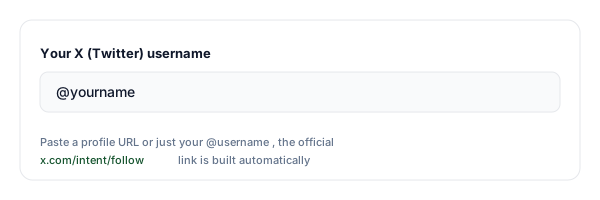
Paste your @username or profile URL
Enter your X (Twitter) @username or paste your profile URL. The tool accepts @handles, bare usernames, and x.com or twitter.com profile links.
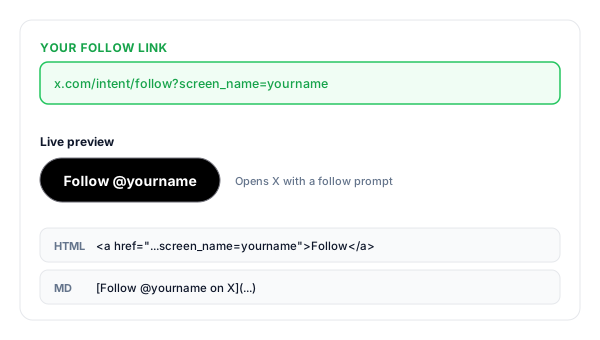
Copy your follow link
We build the official x.com/intent/follow?screen_name= link and give you the ready-to-share URL, plus an HTML "Follow" button and a Markdown version for newsletters.
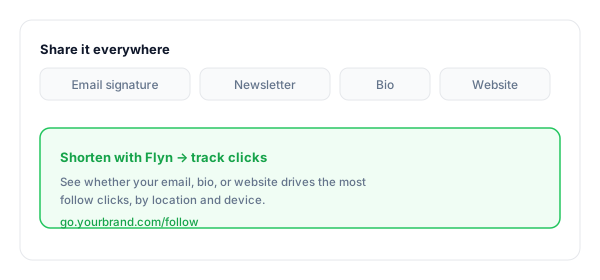
Share it everywhere
Drop it into your email signature, newsletter, website, and other bios. Shorten it with Flyn to track which placement drives the most follow clicks.
What Is a Twitter Follow Link?
A Twitter follow link is a URL built on the official follow Web Intent: x.com/intent/follow?screen_name=USERNAME. Clicking it opens X with a prompt asking the visitor to follow that account, one tap and done.
That one removed step is the whole point: instead of asking people to search for your profile and hunt for the Twitter follow button, they confirm in a single tap. Web Intents are official, documented X features, the same mechanism behind the embedded "Follow @name" buttons you see on websites, so this is fully within the rules.
Two honest caveats worth knowing. First, the person must be signed in to X; signed-out visitors are asked to log in before the prompt appears. Second, nobody is ever followed automatically, the prompt always asks for confirmation, which is exactly why the link is safe to put in front of an audience. And since Twitter is now X, twitter.com intent links redirect to x.com; this tool generates the current x.com form so your link skips the extra hop.
A complete follow link:
https://x.com/intent/follow?screen_name=yournameWhere to Put Your Follow Link
The link only works if people see it. These are the highest-converting places to put it, and the ones to track if you want to know what is actually growing your following.
| Placement | Why it works |
|---|---|
| Email signature | Every email you send becomes a quiet follow ask, no extra effort after the one-time setup. |
| Newsletter footer | Readers who open your emails are already fans; one click turns them into followers you can reach between issues. |
| Website & blog | A "Follow us on X" button that opens the prompt directly converts better than a plain profile link. |
| Other social bios | Funnel your Instagram, TikTok, and YouTube audiences to X, where your posts reach them without an algorithm gatekeeping. |
| Podcast show notes | Listeners who want more of you can follow in one tap while the episode is still playing. |
| Slides & QR codes | Shorten the link, put it on a slide or a printed QR code, and let event audiences follow you on the spot. |
Pro tip
Use a different Flyn short link for each placement (one for your signature, one for your bio, one for your website). Same destination, separate click counts, so you can see which one actually earns followers instead of guessing.
Follow Link Best Practices
Do
Don't
Use your exact @username (1 to 15 chars)
Paste a link to a single post or a hashtag
Pair the link with a reason to follow
Drop a bare link with no context
Shorten + brand it for print and speech
Read x.com/intent/follow?screen_name= aloud
Track clicks to find your best placement
Guess which channel grows your following
Test it signed out as well as signed in
Assume everyone is logged in to X
Say Twitter or X to match your audience
Promise followers, the link only removes friction
Turn Follow Clicks Into Insight
See what grows you
Shorten the link with Flyn and track clicks by placement, see whether email, bio, or website drives the most follow intent.
Branded & memorable
Turn the long x.com/intent/follow URL into go.yourbrand.com/follow, clean enough to print or say out loud.
Opens the X app
Most follow clicks happen on phones, and the intent URL opens the follow prompt in the X app when the phone hands the link to it, or on the mobile site when it does not.
One link, many placements
Use one short link in your signature, newsletter, and bio, or one per placement, and read the click counts. Counting clicks is free on every Flyn link.
Frequently Asked Questions
What is a Twitter follow link?
Does it work for both twitter.com and x.com?
How do I create a follow link for my X (Twitter) account?
Does clicking the link follow my account automatically?
Is using the follow Web Intent allowed by X?
Where should I put my follow link?
Can I track how many times people click my follow link?
Is this a free follower generator?
Does the follow link work on mobile and in the X app?
What is the difference between a profile link and a follow link?
More Free Link Tools
Explore other free tools from Flyn to build, share, and track your links.
Click to Tweet Link Generator
Create pre-filled post links so new followers can share your message in one click.
Instagram DM Link
Let anyone open a DM to your Instagram account straight from a link.
YouTube Subscribe Link
The same one-click idea for YouTube: a link that pops the Subscribe dialog.
YouTube Membership Link
Send fans straight to your channel's membership join page.
Grow your X audience with trackable links
A follow link makes following one click. A Flyn link tells you which email, page, or bio actually earned the follower, so you can do more of what works.