Free YouTube Playlist Link Generator
Paste a pile of YouTube URLs in any shape and get one link that opens them as a playlist. We pull out every video ID, drop the duplicates, and keep your order. No account, no API key.
This tool builds a playlist from many videos. Linking to one moment in a single video? Use the YouTube Timestamp Link Generator. Just shortening a video URL? Try the YouTube Link Shortener.
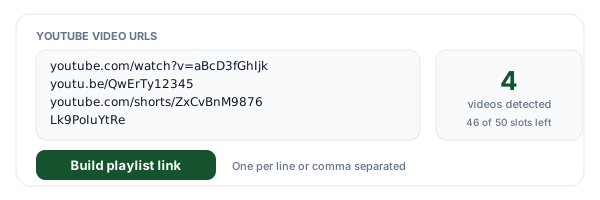
One per line or comma separated. watch, youtu.be, Shorts, Live, embed, or a bare video ID.
0 videos detected, 50 slots left
A playlist URL with 50 IDs in it is very long
Shorten it with Flyn and you get a tidy link people will actually click, plus a click count on every placement you post it in. Country, device, and referrer breakdowns come with Pro.
How to Build a YouTube Playlist Link in 3 Steps
Paste your YouTube URLs
One per line or comma separated, in whatever shape you copied them: watch links, youtu.be links, Shorts, Live, embed URLs, or bare 11-character video IDs. Mixing formats in one paste is fine. The counter under the box tells you how many videos were detected and how many of the 50 slots are still free.
Check the order and trim the list
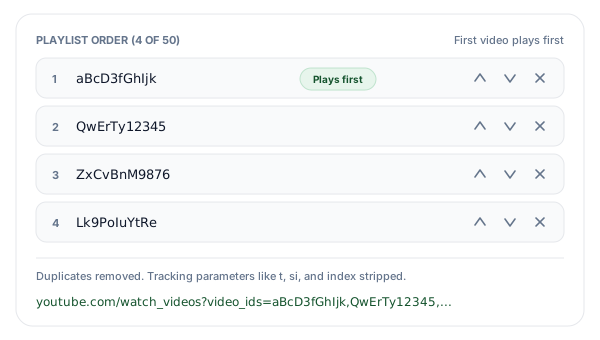
Each URL is reduced to its 11-character video ID and duplicates are removed while your order is preserved. Move any video up or down, remove the ones you changed your mind about, and add a late arrival with the single-line box. The first video in the list is the one that plays when somebody opens the link.
Copy the playlist link and share it
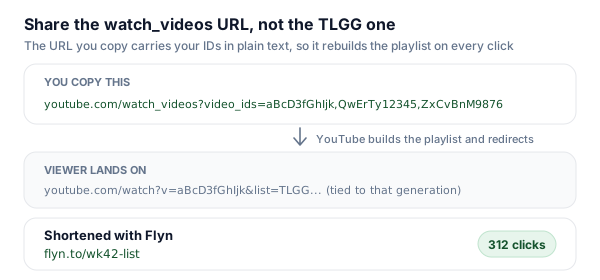
You get a youtube.com/watch_videos URL carrying your IDs in plain text. Open it once to confirm it plays, then shorten it with Flyn so a URL holding 50 video IDs becomes something you can paste into a message, and so every placement reports its own click count back to you.
How the watch_videos Endpoint Builds a Playlist
A YouTube playlist is normally an object inside somebody's account, with a PL id, a title, and an owner. The watch_videos endpoint is the exception. Give youtube.com/watch_videos a video_ids parameter holding a comma separated list of 11-character video IDs and YouTube builds the playlist for you on request, then redirects you to a normal watch page for the first video with a list parameter attached. Nothing was saved to an account, because no account was ever involved. That is the whole trick, and it is why this link works for people who are not signed in to Google at all.
The reason you cannot just type this URL yourself is that you are holding full URLs, not IDs. A copied YouTube link can arrive in at least five different shapes, and the ID sits in a different place in each one: after v= on a watch page, as the first path segment on youtu.be, after /shorts/, after /live/, after /embed/. Extracting 11 characters out of each of those by hand and comma joining them, without a typo, for twenty videos, is exactly the kind of mechanical work that should not be done by a person. That is all this tool does, plus removing duplicates and enforcing the 50 ID limit before YouTube does it for you.
One honest note about what you get back. When the watch_videos URL is opened, YouTube answers with a 303 redirect to an ordinary watch page carrying a list value that begins with TLGG. That TLGG playlist is convenient, it loads on music.youtube.com as well, but it belongs to that generation of the playlist, right down to a date stamp encoded in the id, so you should not treat it as a permanent home for your list. The watch_videos URL is the durable artifact: it spells out your video IDs in plain text, so it can rebuild the playlist every single time somebody clicks it. Share that one, and keep the TLGG link for one-off conversations.
Five Ways to Share a YouTube Playlist, Compared
A no-account link is not always the right answer. Here is what each method costs you and what it gives you back.
| Method | Sign-in needed | Video cap | Edit later? | What it actually is |
|---|---|---|---|---|
| watch_videos link (this tool) | None | 50 videos | Regenerate the link | A plain URL carrying your video IDs. Anyone who opens it gets the playlist built on YouTube's side. Nothing is saved anywhere. |
| Saved playlist in a YouTube account | Google account | 5,000 videos | Yes, anytime | The real thing: a titled, reorderable playlist with a stable PL id that lives in your Library and can be public, unlisted, or private. |
| Adding &list=PL... to a watch URL | None to share | Playlist size | Via the playlist | Only works if a playlist already exists. You are linking to somebody's saved playlist, not creating one. |
| YouTube Data API playlists.insert | OAuth plus quota | Account limits | Yes, via API | The programmatic route. Needs a Google Cloud project, an OAuth consent screen, and daily quota, which is a lot of setup for one link. |
| Add to queue in the player | None | Session only | Yes, locally | Queues live in that one browser or app session. There is no URL to share, so this cannot leave the device it was built on. |
Short version: use this tool when the list is temporary and the audience should not have to sign in. Use a saved playlist when the list is part of your channel and needs a title, a stable address, and edits over time.
Which URL Forms This Tool Reads
Every shape a YouTube link arrives in, and where the 11-character video ID hides in each one. Mix them freely in a single paste.
| URL form | Example you might paste | Where the ID comes from |
|---|---|---|
| youtube.com/watch?v=ID | youtube.com/watch?v=aBcD3fGhIjk&t=90 | v parameter |
| youtu.be/ID | youtu.be/aBcD3fGhIjk?si=x9K2 | First path segment |
| youtube.com/shorts/ID | youtube.com/shorts/aBcD3fGhIjk | Path segment after /shorts/ |
| youtube.com/live/ID | youtube.com/live/aBcD3fGhIjk | Path segment after /live/ |
| youtube.com/embed/ID | youtube-nocookie.com/embed/aBcD3fGhIjk | Path segment after /embed/ |
| Bare video ID | aBcD3fGhIjk | The 11 characters as typed |
The m. and music. subdomains and youtube-nocookie.com are handled the same way. Tracking parameters like t, si, pp, index, and feature are dropped, because watch_videos accepts IDs and nothing else. A playlist URL (youtube.com/playlist?list=PL...) carries no video IDs at all, so we flag it instead of pretending it worked.
Living With the 50 Video Limit
Fifty IDs is the ceiling on the watch_videos endpoint, and it is a hard one. The generator counts as you paste and refuses to put more than 50 into the URL, listing anything past the cut as dropped so nothing disappears silently. If your set is bigger, the usual answer is to split it: a "part one" link and a "part two" link read fine in a newsletter or a course module, and each one still opens without a sign-in.
The other limit worth planning around is that the list is frozen at generation time. There is no playlist object to edit later, so a video that gets deleted or set to private simply will not play for your viewers, and you will not hear about it. If the list is going somewhere permanent, like a help article or a printed QR code, put a Flyn short link in front of it. The short link stays the same while its destination stays editable, so when you regenerate the playlist next quarter you re-point one link instead of chasing every place you posted it.
A practical workflow for creators: build the playlist link here, wrap it in a short link, and pair it with the rest of your YouTube link set. A subscribe link for the call to action, a timestamp link for the moment people ask about, and an embed code for your own site. Our guide to YouTube description links covers how to arrange them so the description does not turn into a wall of URLs.
Where a No-Account Playlist Link Wins
Any time the set of videos is temporary, or the audience should not have to sign in to watch it in order.
Onboarding and training sets
Send a new hire or a new customer one link that plays your five setup videos in order, instead of five separate links they work through by hand.
Newsletter and community round-ups
Collect the week's best videos from other creators into one link. Nothing has to be saved to your channel, so your public playlists stay curated.
Class prep and reading lists
Hand a cohort the exact watch order for a session. Nobody needs a Google account to open it, which matters for students on shared or school devices.
Client review reels
Queue up reference videos for a client call in the order you plan to discuss them, share the link, and drop it when the call is over.
Playlist Links + Flyn: Short Enough to Send, Countable Enough to Learn From
The generator is free forever. Add Flyn when a URL holding fifty video IDs needs to become something a person will actually click.
Editable destinations
Regenerate the playlist next quarter and re-point the same short link. Everywhere you posted it keeps working.
Per-placement analytics
Total clicks free on every link; country, device, and referrer breakdowns on Pro.
QR codes included
A watch_videos URL is far too long for a QR code. A short link is not, so slides and handouts work.
A free plan that lasts
25 links a month with total click counts and QR codes. No trial countdown. Custom domains come with Pro.
Frequently Asked Questions
How do I make a YouTube playlist without signing in?
What is the watch_videos URL and where does it come from?
How many videos can one playlist link hold?
What is the TLGG id in the URL YouTube sends me to, and is it permanent?
Does the order of the videos matter?
Can I paste a playlist URL and pull out its videos?
Will the playlist appear in my YouTube library, and can I edit it later?
Does this work on YouTube Music and in the mobile app?
Which YouTube URL formats can I paste?
Why did one of my videos not play?
Can I track how many times people open my playlist link?
Is this free, and do you store my URLs?
More Free Tools
The rest of the Flyn YouTube link set, instant and free, no sign-up required.
YouTube Subscribe Link Generator
One-click subscribe links with the confirmation prompt built in.
YouTube Timestamp Link Generator
Send viewers to the exact second with the t parameter.
YouTube Embed Code Generator
Iframe code with start time, autoplay, and privacy mode options.
YouTube Link Shortener
Short, trackable links for videos, channels, and playlists.
Ready to hand someone a whole playlist in one link?
Build playlist links for free, then shorten them with Flyn so the URL fits in a message and every placement reports its own clicks. Analytics, QR codes, and editable links included.