Free YouTube Embed Code Generator
Paste any YouTube URL and get a responsive iframe you can paste anywhere. Start and end times, autoplay with the mute it needs, a loop that actually loops, and the no-cookie host.
This tool writes HTML you paste into a page. Want a shareable link that starts at a moment instead? That is the YouTube Timestamp Link Generator, which uses t= rather than start=. Just shortening a video URL? Use the YouTube Link Shortener.
Any form works: watch, youtu.be, Shorts, Live, embed, or playlist. A t= or start= already on the URL prefills the start time below.
Whole seconds only. The player seeks to the nearest keyframe, so it can land up to about two seconds early.
Counted from 0:00 of the video, not from your start time. Leave blank to play to the end.
Embeds cannot travel in an email
Newsletters, PDFs, and chat apps strip iframes, so the video has to go out as a link there. Shorten it with Flyn and see total clicks free on every placement. Country, device, and referrer breakdowns come with Pro.
How to Generate YouTube Embed Code in 3 Steps
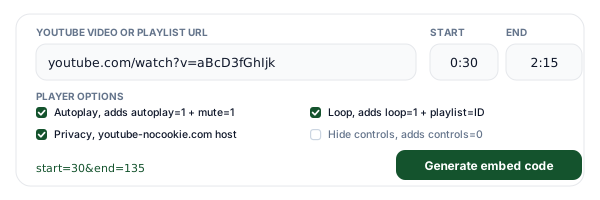
Paste a YouTube URL and pick your options
Every real URL form works: watch, youtu.be, Shorts, Live, embed, playlist pages, the nocookie host, and a bare 11-character video ID. Set a start and end time in any format (2:15, 135, 1h2m3s), then tick what the player should do. If the URL already carried a t= or start=, we prefill the start time for you.
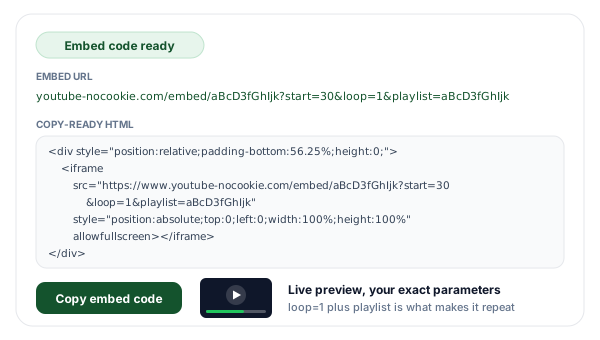
Copy the generated iframe
You get the bare embed URL and a full HTML block with the responsive wrapper, the allow list YouTube itself ships, a referrer policy, and a title attribute for screen readers. When Loop forever is on we write loop=1 and playlist set to the same video ID, because loop=1 alone does nothing on a single video. The live preview runs your exact parameters.
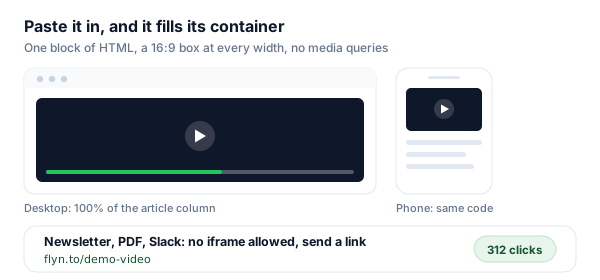
Paste it into your page and track the link version
Drop the block into any HTML page, template, or custom HTML widget and it fills its container at a 16:9 ratio on every screen size. Then, for every place the video goes out as a link instead of an embed, mint a Flyn short link per placement so the click counts tell you which one actually sends people to the video.
What a YouTube Embed URL Is Actually Made Of
Every YouTube embed is the same three pieces: a host, the path /embed/ plus the 11-character video ID, and a query string of player parameters. The host is normally www.youtube.com, and swapping it for www.youtube-nocookie.com is all that privacy mode does. The video ID is the same 11 characters that appear after v= on a watch page, after the slash on a youtu.be link, and after /shorts/ or /live/ on those pages, which is why this tool accepts every one of those forms and pulls the same ID out of all of them.
The query string is where the behaviour lives, and it is also where almost every embed goes wrong. Parameters are plain key and value pairs joined with an ampersand, they take whole numbers rather than 1m30s style notation, and unknown or deprecated parameters fail silently: the player just ignores them and plays anyway. That silence is the whole problem. A missing mute, a lonely loop=1, or a t= where start= belongs produces a player that works fine except for the one thing you wanted, and no error message anywhere tells you why.
One more piece sits outside the URL: the iframe attributes. The allow list (accelerometer, autoplay, clipboard-write, encrypted-media, gyroscope, picture-in-picture, web-share) is what YouTube ships in its own share dialog, and dropping the autoplay entry from it will block autoplay no matter what the URL says. The allowfullscreen attribute is what lets the fullscreen button work at all, and the title attribute gives screen readers something to announce instead of the word iframe. This generator writes all of them, with title set to a placeholder you should replace with the real video title.
The loop Trap: Why loop=1 On Its Own Does Nothing
This is the most valuable thing on this page, so it gets its own section. If you add loop=1 to a single-video embed and nothing else, the video plays once and stops. Not sometimes, not on certain browsers: always. YouTube documents the fix directly in its player parameter reference: to loop a single video you must set loop=1 and also set the playlist parameter to the same video ID that is already in the URL path.
The reason is that the loop parameter was designed for playlists. It tells the player to restart the queue once the queue is exhausted, and a bare single-video embed has no queue to restart. Repeating the video ID in the playlist parameter turns that embed into a one-item queue, and now there is something for loop=1 to send the player back to the start of.
<!-- Plays once, then stops. loop=1 is silently ignored. -->
<iframe src="https://www.youtube.com/embed/aBcD3fGhIjk?loop=1"></iframe>

<!-- Loops forever. playlist repeats the SAME id that is in the path. -->
<iframe src="https://www.youtube.com/embed/aBcD3fGhIjk?loop=1&playlist=aBcD3fGhIjk"></iframe>
Two follow-on details worth knowing. First, a looping hero video usually wants autoplay=1, mute=1, and controls=0 as well, and the autoplay half will not fire without the mute. Second, if the video you pasted already belonged to a playlist, loop and list fight over the same queue, so this generator turns the Keep playlist option off while Loop forever is on rather than emitting two parameters that contradict each other.
t= or start=? It Depends Where the Link Lives
Same job, different parameter name, no error when you get it wrong. This is the second most common way an embed silently misbehaves.
| What you want | On a watch link or youtu.be | Inside an iframe embed |
|---|---|---|
| Start at a time | t=90 (also accepts 1m30s) | start=90 (whole seconds only) |
| Stop at a time | No documented parameter | end=135, counted from 0:00 |
| Loop the video | No documented parameter | loop=1 AND playlist=VIDEO_ID |
| Autoplay | No documented parameter | autoplay=1 AND mute=1 |
| Hide controls | Not possible | controls=0 |
| Keep a playlist | list=PLxxxxxxxx | list=PLxxxxxxxx, or /embed/videoseries?list= |
| Reduce tracking | Not available | Swap the host to youtube-nocookie.com |
The practical rule: if a human is going to click it, you want a watch link with t=, and the YouTube Timestamp Link Generator builds those. If a browser is going to render it inside your page, you want an iframe with start=, and that is this tool. Pasting a t= link into an iframe drops the time, and pasting an /embed/ URL into a chat message gives people a bare player with no title, description, or channel, so it is worth keeping the two jobs straight.
Every Parameter, and the Catch That Comes With It
What this generator writes, what it deliberately leaves out, and why. Values come from YouTube's published player parameter reference.
| Parameter | What it does | We write it? | The catch |
|---|---|---|---|
| start=90 | Begins playback 90 seconds in. | Yes | Whole seconds only. The player seeks to the nearest keyframe, so it can land up to about two seconds early. |
| end=135 | Stops playback at 2:15. | Yes | Counted from 0:00 of the video, never from your start value. A 1:30 to 2:15 clip is start=90 and end=135. |
| autoplay=1 | Starts the video on page load. | Yes | Useless on its own in modern browsers. Must be paired with mute=1, and YouTube warns that data collection begins on load. |
| mute=1 | Starts the player muted. | Yes, with autoplay | Not on YouTube's documented parameter list, but the player honors it, and it is the only way autoplay actually fires. |
| loop=1 | Replays when the video ends. | Yes | Does nothing on a single video by itself. YouTube requires playlist set to the same video ID alongside it. |
| playlist=VIDEO_ID | Queues videos after the first one. | Yes, with loop | Repeating the current video ID here is what makes loop=1 work. With other IDs it becomes a real queue. |
| playsinline=1 | Plays inside the page on iOS. | Yes | Without it, iPhones may take over the whole screen when playback starts. Default behaviour is subject to change. |
| rel=0 | Limits the end-of-video suggestions. | Yes | Since September 25, 2018 it no longer removes related videos, it restricts them to the same channel. |
| controls=0 | Hides the player controls. | Yes | Fine for silent background video, hostile for anything a viewer might want to pause or seek. |
| modestbranding=1 | Used to reduce YouTube branding. | No, deprecated | Deprecated on August 15, 2023 and has no effect. The player now picks its own branding treatment. |
| origin=yourdomain | Extra security check for the player. | No, API only | Only supported for IFrame API embeds (enablejsapi=1). On a plain copy-paste iframe it adds nothing. |
Making the Embed Responsive
YouTube's own share dialog hands you a fixed 560 by 315 iframe. On a phone that is wider than the screen, so the page scrolls sideways and the player gets clipped. The classic fix is the padding-bottom trick: a wrapper with position relative and padding-bottom 56.25% (that is 9 divided by 16, expressed as a percentage), then the iframe positioned absolutely to fill it. Percentage padding is always resolved against the parent element's width, so the wrapper keeps a perfect 16:9 box at any container size, in every browser, with no media queries.
Modern CSS does the same thing in one declaration with the aspect-ratio property, and no wrapper element at all. It is supported across current browsers, so if you do not need to support anything ancient, it is cleaner. This generator emits the wrapper version by default because it is safe absolutely everywhere and survives being pasted into a CMS that scrubs stylesheets, but both are shown below and either is fine.
<!-- 1. Padding-bottom wrapper: works in every browser -->
<div style="position:relative;padding-bottom:56.25%;height:0;overflow:hidden;">
  <iframe
    src="https://www.youtube-nocookie.com/embed/aBcD3fGhIjk?start=90"
    style="position:absolute;top:0;left:0;width:100%;height:100%;border:0;"
    allowfullscreen></iframe>
</div>

/* 2. Modern CSS: one line, no wrapper */
.video-embed { width: 100%; aspect-ratio: 16 / 9; border: 0; }
Two smaller notes. Vertical Shorts are 9:16, not 16:9, so if you are embedding one, flip the padding to 177.78% or set aspect-ratio: 9 / 16, otherwise you get a letterboxed video in a wide black box. And if your embed sits well below the fold, adding loading="lazy" to the iframe defers the whole YouTube payload until the viewer scrolls near it, which is one of the cheapest page-speed wins available on a video-heavy page.
What Privacy Mode Actually Changes
Turning privacy mode on swaps one word in the host: www.youtube.com becomes www.youtube-nocookie.com. Everything else about the embed is identical, the same video ID, the same parameters, the same player. What changes is that YouTube holds off on storing personalized tracking information about the visitor until they actually start playing the video. If someone loads your page and never presses play, the privacy-enhanced host is substantially quieter than the standard one.
Be precise about what it is not. It is not cookie free: the moment playback starts, normal playback tracking applies. The browser still contacts Google servers to load the player itself, so an embed on any host is still a third-party request. And it is not a legal conclusion, so if you operate under a consent regime, treat the no-cookie host as one mitigation among several rather than as a reason to skip your consent flow. The genuinely airtight option is not to load the iframe at all until the visitor clicks a poster image, which is a pattern worth building on privacy-sensitive pages.
One related gotcha: turning autoplay on works against this. YouTube's own documentation notes that when autoplay is enabled, playback happens with no user interaction, so playback data collection and sharing begin on page load. Autoplay plus the no-cookie host largely cancels out the benefit you turned the no-cookie host on for.
Which Options to Use Where
The right parameter set depends entirely on what the page is for.
Landing pages and product tours
A muted, looping, controls-free hero video reads as motion design rather than a video player. That combination is exactly loop=1, playlist=ID, autoplay=1, mute=1, controls=0, and it fails silently if you miss the playlist half.
Documentation and help articles
Embed only the 40 seconds that answer the question, using start and end together, so readers are not hunting through a 20-minute walkthrough for the one step they need.
Course platforms and lesson pages
Use the no-cookie host and rel=0 so a lesson page does not end by recommending someone else's course, and so page load stays quiet until a student presses play.
Newsletters and PDFs
Neither one can run an iframe. Those need a link, not embed code, which is where a short link to the video (or to a timestamped moment inside it) does the job instead.
Embeds Plus Flyn: The Half an iframe Cannot Reach
The generator is free forever. Add Flyn for every place the video travels as a link instead of an iframe.
Editable destinations
Re-point a short link anytime. If you re-upload a video, fix every posted link with one edit.
Per-placement analytics
Total clicks free on every link; full country, device, and referrer breakdowns on Pro.
QR codes included
Turn a video link into a QR code for slides and printed materials, free on every link.
A free plan that lasts
25 links a month with total click counts and QR codes. No trial countdown. Custom domains come with Pro.
Frequently Asked Questions
How do I get the embed code for a YouTube video?
Why does loop=1 not loop my YouTube embed?
Why is my start time ignored in an embed?
How do I make a YouTube embed responsive?
Why does autoplay not work on my embed?
What does rel=0 actually do now?
Is youtube-nocookie.com really cookie free?
How do I stop the embed at a specific time?
Why does my embed say Video unavailable?
Can I hide the YouTube logo with modestbranding?
Do I need the origin parameter in my embed code?
Is this tool free, and can I track how many people watch?
More Free Tools
More free YouTube and link tools from Flyn, instant, no sign-up required.
YouTube Timestamp Link Generator
The t= side of the story: shareable links that open at an exact moment.
YouTube Playlist Link Generator
Build clean playlist links that start on the video you choose.
YouTube Subscribe Link Generator
One-click subscribe links with the confirmation prompt built in.
YouTube Link Shortener
Short, trackable links for videos, channels, and playlists.
Ready to embed it and measure it?
Generate embed code for free, then shorten the link version with Flyn to see which newsletter, post, or page actually drives plays. Analytics, QR codes, and editable links included.