Free Google Review Link Generator
Turn your Google Place ID into a direct one-click "Leave a review" link, plus copy-paste HTML and Markdown. No coding, 100% in your browser.
Paste your Place ID (or a writereview URL). Find my Place ID
Want to see which channel drives reviews?
Shorten your review link with Flyn to get a clean branded URL (go.yourshop.com/review), a QR code for in-store, and click analytics by source, receipts vs SMS vs email signature.
How to Make a Google Review Link in 3 Steps
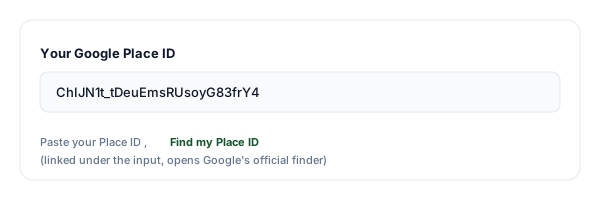
Get your Google Place ID
Open Google's Place ID Finder (linked under the input), search for your business, and copy the Place ID (it looks like ChIJN1t_tDeuEmsRUsoyG83frY4).
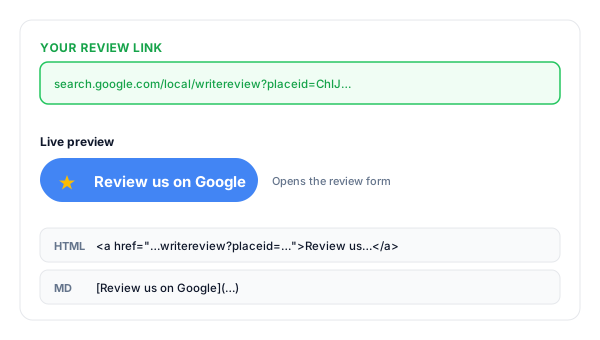
Paste it into the tool
Paste the Place ID into the field above. The tool instantly builds your direct writereview link, plus an HTML "Review us on Google" button and Markdown.
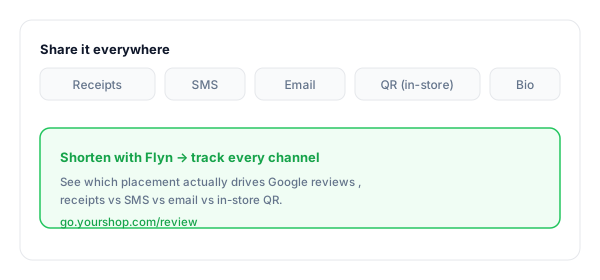
Share it everywhere
Add it to receipts, SMS follow-ups, your email signature, your website, and a QR code for in-store. Shorten it with Flyn to brand it and track which channel converts.
What Is a Google Review Link?
A Google review link is a direct URL that opens the "write a review" form for your business the moment someone clicks it. No searching, no scrolling, one tap, straight to the review.
The canonical format is search.google.com/local/writereview?placeid=<PLACE_ID>. The Place ID is the unique identifier Google assigns to your business listing, paste yours into the tool above and you get the finished link.
A complete Google review link:
https://search.google.com/local/writereview?placeid=ChIJN1t_tDeuEmsRUsoyG83frY4Where to Put Your Google Review Link
The link only works if customers see it. These are the highest-converting placements, and the ones to track if you want to know what actually earns reviews.
| Placement | Why it converts |
|---|---|
| Receipts & invoices | Customers are happiest right after the purchase. A short branded review URL on the receipt converts better than any later email. |
| Thank-you email | Add the link to the post-purchase email, the open rates are the highest you will ever see, so this is prime real-estate. |
| SMS follow-up | Send a short, polite SMS 24-48 hours after the visit with the review link. The single highest-converting channel for local businesses. |
| Email signature | Every business email you already send becomes a passive review request. Zero extra effort, compounding return. |
| In-store QR code | Print the link as a QR on table tents, packaging, or stickers. Use a Flyn dynamic QR so you can edit the destination without reprinting. |
| Social bios & website | A permanent place customers can find your review link long after a purchase. Pair with a clear "Loved it? Review us" CTA. |
Pro tip
Use a separate Flyn short link for each placement (one for receipts, one for SMS, one for email). Same destination, separate click counts, so you can see which channel actually drives Google reviews instead of guessing.
Google Review Link Best Practices
Do
Don't
Shorten and brand the URL (go.yourshop.com/review)
Send a 100-character writereview URL
Ask within 24 hours of the visit or purchase
Wait weeks until the experience is forgotten
Send the same request to every customer
Filter out unhappy customers (review gating)
Use a QR code for in-store and packaging
Make staff or customers type a long URL
Track clicks to find your best channel
Guess where your reviews actually come from
Pair the link with a clear, polite ask
Drop the link with no context or call-to-action
Turn Review Clicks Into a System
See what drives reviews
Track clicks by channel, receipt vs SMS vs email, so you know exactly which placement converts.
Branded & memorable
Turn the long writereview URL into go.yourshop.com/review, clean enough for a receipt or business card.
Dynamic QR for in-store
Print once. If your Place ID ever changes, edit the destination, no reprint and no broken signage. Free on every plan.
A/B test your wording
Split-test "Leave us a review" vs "Tell us how we did", see which call-to-action actually earns more reviews (Pro).
Frequently Asked Questions
What is a Google review link?
How do I find my Google Place ID?
How does the writereview link actually work?
Where should I share my Google review link?
Why is a direct review link better than telling customers to search?
Can I track clicks on my Google review link?
Is it against Google's policy to ask customers for reviews?
Can I put the review link in an email signature, receipt, or SMS?
How do I turn the review link into a QR code for in-store?
What is the difference between a Place ID, CID, and g.page/r link?
Why is the review form opening for the wrong business?
Does Google allow review gating or filtering customers?
More Free Link Tools for Local Businesses
Build, share, and track the rest of your customer-facing links with these free Flyn tools.
QR Destination Audit
Check that the QR code on your menu, receipt, or sticker still points where it should.
Mailto Link Generator
Build review-request emails with pre-filled subject and body. One click for your customer.
SMS Link Generator
Build click-to-text follow-ups with the review link pre-pasted into the message body.
Google Maps Link Generator
Build a share-ready location or directions link customers can open in one tap.
Turn happy customers into reviews
A direct review link gets you to one tap. A Flyn link tells you which channel, receipt, SMS, email, or QR, actually drove the review, so you can double down on what works.