One Link, Different Destinations by Device: How It Works
Your bio gives you one link slot and your audience is holding three different devices. Here is how one short link can send iPhone, Android, and desktop visitors to three different destinations.

Why One URL Cannot Serve Three Audiences
If you have shipped an app on both stores and still run a website that converts, you know the bind: your Instagram bio, your email signature, and your podcast outro each give you exactly one link slot, and your audience is holding three different devices. Send everyone to the website and you bury the app behind an extra tap. Send everyone to the App Store and every Android visitor dies on an Apple page. This guide shows you how to fix it with one short link that reads the device and routes accordingly: iPhone to the App Store, Android to Google Play, desktop to your site.
The three destination problem
Pick any single destination and you sacrifice the other two audiences:
- Link to the App Store and Android users land on a page their phone cannot install from; few will go hunting for the Play listing themselves.
- Link to Google Play and you get the mirror image: every iPhone tap is wasted.
- Link to the website and mobile users get a landing page with a "Download on the App Store" badge: one more tap, one more page load, one more chance to bounce before the install.
What device based routing actually is
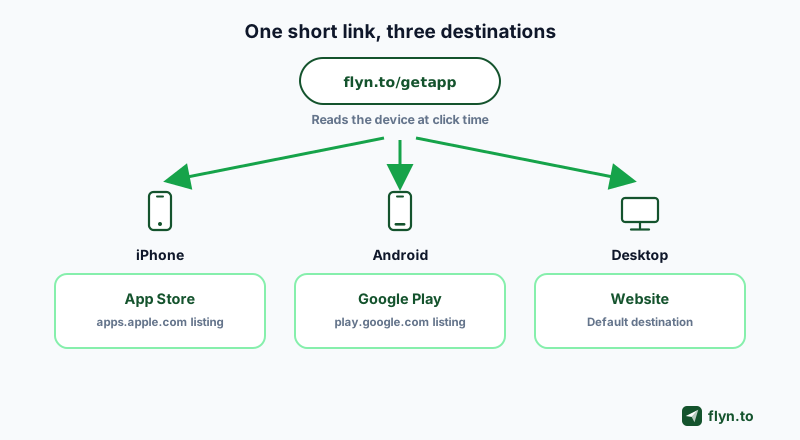
Device routing (also called device targeting or a device redirect) is a rule attached to the link itself. When someone opens the link, the server checks what kind of device made the request and forwards it to the URL you assigned for that device, falling back to a default destination for everyone else. It is the classic example of a smart link: one stable address, conditional behavior behind it. This article is a deep dive on that single feature; if you want the broad market tour instead, our roundup of the best URL shorteners covers the whole field.
 Tap to enlarge
How Device Detection Works Under the Hood
No magic here, and nothing to install on the visitor side. Every HTTP request a browser makes carries a user agent string that announces the operating system: an iPhone identifies itself as iOS, a Pixel as Android, a laptop as Windows or macOS. Device routing is simply a server side redirect that reads that string before answering.
The user agent handshake
Here is the full journey of a single tap, start to finish:
- A visitor taps your short link, for example
flyn.to/getapp. - The request hits the short domain with the visitor's user agent attached.
- The server checks your rules in order: is this iOS? Android? Windows? Mac?
- On a match, it answers with a 302 redirect to the URL you set for that system.
- No match means the visitor falls through to your country rules, then an A/B split if the link has one, then your default destination, which is where desktop traffic lands when you leave Windows and Mac blank.
Because the decision happens on the server, it adds only milliseconds, needs no JavaScript, and works inside in-app browsers. The one exception is Safari on a Mac or iPad when the link has its own Mac URL: the two send the same user agent, so Flyn first shows them a blank device check page. The click is recorded either way: click counts are free on every Flyn plan, and the per device breakdown of those clicks is part of Pro click analytics.
Rule order and the fallback
Treat the fallback as a first class citizen, not an afterthought. A visitor no device rule matches, such as a desktop browser on a link without a Windows or Mac URL, a Linux or ChromeOS machine, or an unknown user agent, falls through to your country rules, then an A/B split if the link has one, and lands on the default destination when neither picks a URL. The cleanest mental model: your default destination is your desktop URL, and the iOS, Android, Windows and Mac fields are exceptions layered on top. The same fields exist in the API (the deep links documentation covers the request shape), and Flyn files the whole capability under smart routing.
Device and country rules do not run on three kinds of link: a password-protected link, a link past its click limit (visitors get its fallback URL instead, if it has one), and a mailto, tel or sms link. Keep routing on a plain web link.
Set Up Device Routing in Flyn, Step by Step
The whole setup takes about two minutes once you have your URLs. Device routing is part of Flyn Pro ($9 per month billed annually, $12 monthly), and you can build the link on the free plan first, then flip routing on when you upgrade.
Collect your three URLs first
- App Store URL: the canonical
https://apps.apple.com/...address of your listing. The free App Store link generator checks it before you use it. - Google Play URL: the
https://play.google.com/store/apps/details?id=...address with your package name. - Website URL: the page desktop visitors should see, which doubles as the fallback for everything else.
If all you need is a tidy standalone store link with click tracking, the App Store link shortener and Google Play link shortener pages handle that simpler job.
The walkthrough
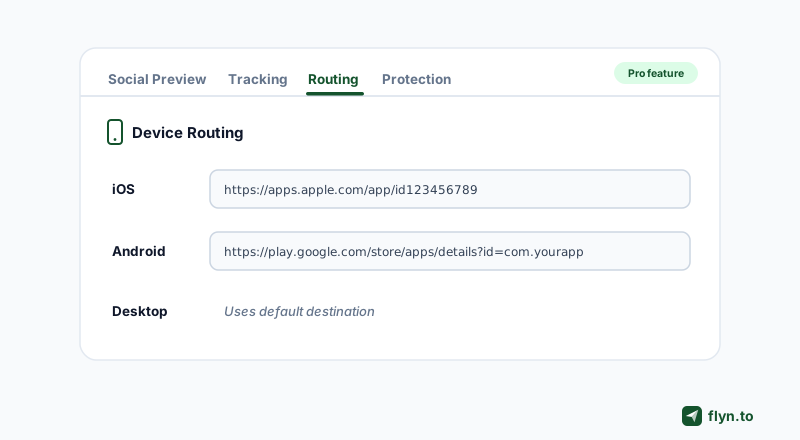
- Create or edit a link. Paste your website URL as the main destination; desktop visitors and unmatched devices will get it. (Sign up free if you have not.)
- Open the Routing tab in the link editor.
- Paste the App Store URL into the iOS field. The placeholder shows the expected
apps.apple.comshape. - Paste the Play URL into the Android field.
- Fill in Windows and Mac only if desktop needs its own page. Both fields are optional. Anything you leave blank falls through to your country rules, then rotation, then the main destination, so your main URL already serves desktop.
- Save and test on a real iPhone, a real Android phone, and a laptop before you post anywhere.
 Tap to enlarge
Desktop apps: Microsoft Store and Mac App Store in the same link
If your product also ships for Windows or macOS, the same link can hand each computer its own store page. Put your Microsoft Store listing (an https://apps.microsoft.com/... address) or your Windows download page in the Windows field, and your Mac App Store listing (an https://apps.apple.com/... address) or your Mac download page in the Mac field. Keep your website as the main destination. One link in a launch email then covers four audiences: iPhones to the App Store, Android phones to Google Play, Windows laptops to the Microsoft Store, and Macs to the Mac App Store.
Two details decide how it behaves. Linux and ChromeOS have no field of their own, so those visitors fall through to your country rules, then an A/B split if the link has one, then the main destination, which is why that page should offer every download. And on a link with a Mac URL, Safari on a Mac or an iPad first gets a blank device check page that tells the two apart, then continues; Chrome, Edge and Firefox on a Mac go straight to the Mac URL. Links without a Mac URL never show that check.
Edit destinations later without touching the link
Destination editing works on every Flyn plan, and it applies to the routing fields too. Ship a new Android package, rebrand the app, or move the desktop landing page, then update the field: the short URL you already posted, and every QR built on it, keeps working unchanged.
Name the slug after the campaign, not the platform. A link called flyn.to/launch stays honest when it serves three destinations; flyn.to/ios becomes a lie the moment Android users tap it. On Pro you can also put the link on one of up to three custom domains so the slot in your bio carries your own name.
The QR Angle: One Code That Routes Every Scan
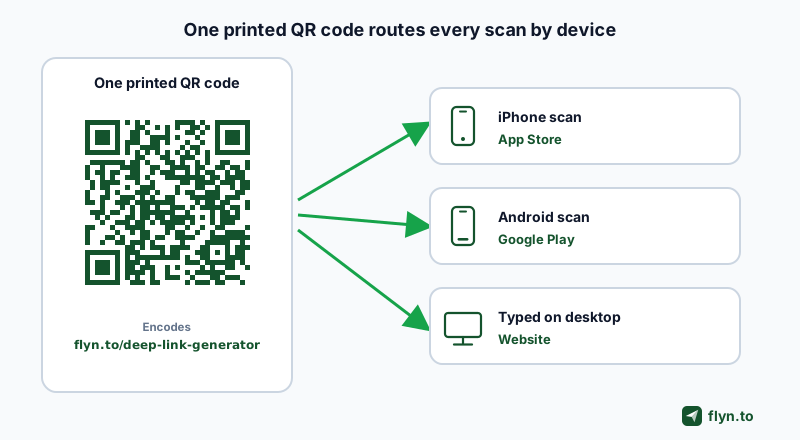
Here is the part most people miss: a QR code is just a link rendered as pixels. If the link underneath routes by device, the printed code inherits that behavior forever. Scan the same poster with an iPhone and you land in the App Store; scan it with a Galaxy and you land in Google Play.
 Tap to enlarge
Why routing lives in the link, not the image
Generic generators that encode your App Store URL directly into the pixels freeze that decision permanently: an Android scan hits an Apple page and the poster is misprinted forever. The fix is to encode the short link instead and let the redirect decide at scan time. Flyn gives every link a standard green QR free, with custom colors on Pro; the free QR code generator and the QR codes feature page cover the basics.
Dynamic QR for anything printed
For print runs, pair device routing with a dynamic QR code, meaning a code whose destination you can change after printing. The combination shines on:
- Product packaging: one code sends each buyer to the right store listing for a companion app.
- Posters and flyers: an event app promo that never strands the wrong platform.
- Conference booths: visitors scan one code; you edit the destination the night before launch.
- Menus and receipts: loyalty app installs from either phone, same sticker.
Deep Links: Route Past the Store and Into Apps
Device routing answers "which storefront." Deep links answer a different one: "which screen inside an app." The same Routing tab carries an Open in native app toggle that, on mobile, opens supported destinations directly in the installed app instead of the browser: YouTube, Instagram, Twitter/X, LinkedIn, TikTok, Spotify and more, 16 platforms in all. Like the device fields, deep links are part of the Pro plan.
Store page or in app content
Use the two tools for what they are:
- Device routing to store URLs is for installs: send people who do not have your app to the correct store.
- Deep links are for content: send people who already have an app (yours or a platform's) straight to a video, a profile, or a product screen without a browser detour.
Build and test the URI before you ship
App URI schemes are fussy, and a wrong one fails silently to the browser. Build yours with the free deep link generator, then open it on a physical phone with the deep link tester before it goes in a campaign. Developers automating link creation should start at the deep links API docs.
One honesty note so you pick the right category of tool: Flyn routes the click perfectly up to the store handoff, but it does not do deferred deep linking (carrying content context through an app install) or install attribution. If you need those, you need an app centric platform like Branch or AppsFlyer OneLink, with the SDK work and pricing that category implies.
What Other Tools Charge to Unlock Device Routing
Shopping for this feature is confusing because two very different products share the name, and their prices differ by an order of magnitude.
Rule based redirects vs app platforms
- Rule based device redirects on a shortener (Flyn, Linkly, Geniuslink, Short.io) let you set any URL per device with no app and no SDK, priced for marketers.
- App deep linking platforms (Branch, AppsFlyer OneLink, Bitly Mobile Deep Links) route users into your own registered app or its store listing. They require app registration or an SDK, and they are priced for app companies: Branch publishes no dollar pricing at all and gates real usage behind a demo, while Bitly's comparison table puts Mobile Deep Links on its Premium plan at $199 per month, annual only, with deep link reporting reserved for Enterprise.
You do not need an attribution SDK to send an Android tap to the Play Store. You need one rule on one link.
The price to unlock
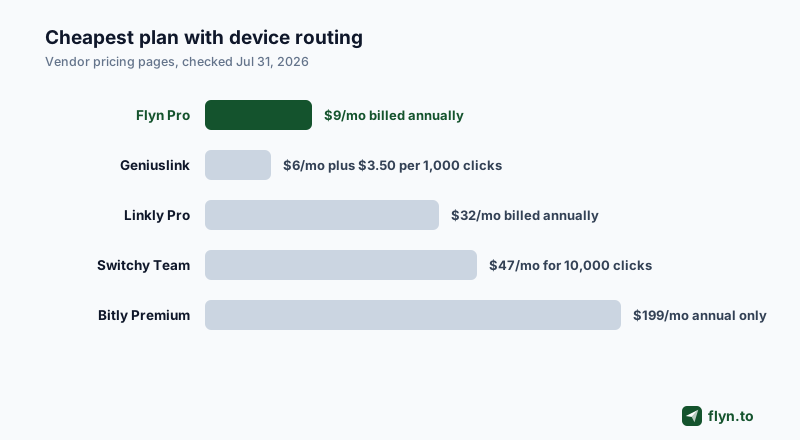
All figures below come from each vendor's public pricing page as checked on Jul 31, 2026:
| Tool | Cheapest plan with device routing | Model |
|---|---|---|
| Flyn | Pro, $9/mo billed annually | Any URL per device: iOS, Android, Windows, Mac, plus a fallback |
| Geniuslink | $6/mo for 1,000 clicks, then $3.50 per 1,000 | Any URL rules; custom domain is a $50/mo add-on |
| Linkly | Pro, $32/mo billed annually | Any URL rules: iOS, Android, Mac, Windows, Linux |
| Switchy | Team, $47/mo for 10,000 clicks | Deep link toggle only, supported apps list |
| Bitly | Premium, $199/mo, annual only | Own app deep links; reporting is Enterprise only |
| AppsFlyer OneLink | Zero plan free (owned media); Growth $0.07 per conversion | Own app routing plus a desktop URL |
| Branch | Undisclosed, demo gated | Own app deep links, full attribution stack |
Switchy deserves a special caution: its deep link toggle only works when the destination app is on its supported list, so it is not a general purpose device router. We scored all of these head to head in our best link shorteners for device routing comparison.
 Tap to enlarge
Five Places One Device Routed Link Beats Three
Once the link exists, it upgrades every channel that only gives you one slot:
- The bio link. Your Instagram or TikTok bio is the canonical one slot surface; a device routed link makes the "download my app" line work for every follower.
- Email signatures and newsletters. One button, correct store per reader, website for the colleagues opening on a desktop client.
- Print and packaging. As covered above: one QR, every scan routed, destination editable after the print run.
- Podcast and video reads. You can only say one URL out loud. Make it a short, memorable slug that does the platform sorting silently.
- Paid social. One ad, one link, no duplicated campaigns per platform just to change the destination URL.
Measure the split you actually get
Every one of those channels now reports into a single link, which makes the analytics interesting. Click counts are free on every plan; the Pro analytics breakdown shows what share of your clicks came from iOS, Android, or desktop, which tells you where to spend next. If you want to go further and split traffic within a device bucket, Pro also includes A/B testing that rotates a link between two destinations.
Common Mistakes and a Five Minute Test Matrix
Device routing fails quietly, so read these before the link goes anywhere public.
The iPad wrinkle
Safari on iPadOS requests desktop websites by default, which means many iPads present a Mac like user agent. On a link without a Mac URL, a request with that user agent skips your iOS rule and falls through to your country rules, then an A/B split if the link has one, then your default destination. Do not fight it, plan for it: keep a clear App Store badge on the desktop page so a misrouted iPad is one tap from the store. If you set a Mac URL, Flyn first shows Safari visitors a blank device check page that tells a Mac from an iPad, then continues. Both user agent strings, the detection methods and a test matrix are in why iPad Safari says it is a Mac.
Store schemes in the Windows and Mac fields
The Windows and Mac fields accept only http or https addresses, so a store scheme such as ms-windows-store: or macappstore: is refused when you save. Paste the store web listing instead: https://apps.microsoft.com/... for the Microsoft Store and https://apps.apple.com/... for the Mac App Store. Where to find each store ID, and when a store scheme is the right link, is in how to link to the Microsoft Store and the Mac App Store.
Never leave the fallback pointing at a placeholder or a dead page. A desktop browser on a link without a Windows or Mac URL, a Linux or ChromeOS machine, an unknown user agent, and, on a link without a Mac URL, a request with a Mac like user agent (which many iPads send) match no device rule, so they reach the default destination whenever no country rule or A/B split picks a URL first. And remember that in-app browsers (Instagram, TikTok, WhatsApp) report as mobile: your iOS and Android rules fire inside them, which is usually what you want, but the store handoff can vary per app, so test in the one you actually post in.
The test matrix
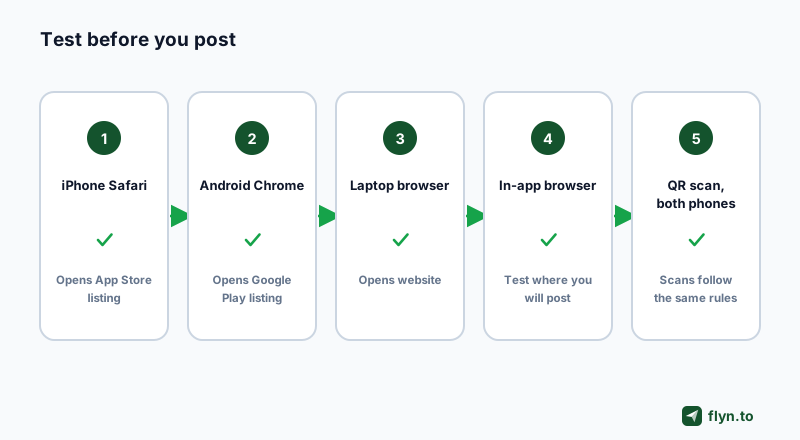
Five checks, five minutes, before the link ships:
- Tap the link in Safari on a real iPhone: it should open your App Store listing.
- Tap it in Chrome on a real Android phone: Play listing.
- Open it in Edge on a Windows laptop and in a browser on a Mac: your Windows or Mac URL if you set one, otherwise the website. With a Mac URL, try Safari on a Mac and on an iPad too.
- Tap it inside the in-app browser of the platform where you will post it.
- Scan the QR with both phone cameras, since scans follow the same rules.
If you enabled the native app toggle, run the destination through the deep link tester as a sixth check.
 Tap to enlarge
One Slot, Every Audience
The one link slot in your bio, signature, or poster does not have to pick a favorite platform. A device routed short link sends iPhone users to the App Store, Android users to Google Play, and desktop visitors to your website, and because the routing lives in the redirect, the same link works spoken, pasted, or printed as a QR code. Setup is two fields and a fallback in Flyn's Routing tab (four fields when Windows and Mac need their own pages), and every destination stays editable after the link is in the wild.
If you landed here because Google shut down Firebase Dynamic Links in August 2025, the migration path is in our Firebase Dynamic Links alternative guide. Otherwise the path is short: create a free account (25 new links a month), build the link, and unlock the Routing tab with Pro at $9 per month billed annually. Your next launch deserves one link that gets everyone to the right place.
Frequently Asked Questions
How do I send mobile users to an app download page and desktop users to my website?
What is the best way to create one link that opens different destinations by device?
How can a single QR code open different destinations on mobile devices?
Do I need to own a mobile app to use device based link routing?
What happens when a visitor does not match the iOS or Android rule?
Can one link send Windows users to the Microsoft Store and Mac users to the Mac App Store?
What happens to Linux, ChromeOS, or a Mac when I leave the Mac field blank?
Can I change the iOS or Android destination after the link is shared?
Why does my iPad open the desktop destination instead of the App Store?
Free tools for this
Three Flyn tools that pair well with the strategy in this article, all free, no signup needed.
UTM Builder
Build campaign-tracked URLs in seconds.
Broken Link Checker
Scan any page for dead links and 404s.
Open Graph Checker
Preview how URLs unfurl on social.
Keep reading
Three related deep-dives from the Flyn blog.

How to Track Which Posts Drive Sales, Not Just Clicks
19 min read

Email Newsletter Click Tracking: Measure Your Real CTR
12 min read

How to Choose a Branded Short Domain for Your Links
13 min read
Ready to try Flyn?
Free plan includes 25 links/month, full analytics, and access to all 30+ free tools above. No credit card required.
Already a member? Log in
Karan Bhakuni is the founder of Flyn. He writes about branded links, click analytics, and the link-management tooling growth teams and creators actually need, drawn from building Flyn and reading a lot of user feedback.
Find these guides useful? Add Flyn as a preferred source so more of them show up in your Google results.