Firebase Dynamic Links Alternative: Migration Guide
Google killed Firebase Dynamic Links on August 25, 2025, and every FDL link now returns a 404. Here is an honest look at your replacement options and a step-by-step plan to rebuild short links, deep links, and QR codes.


What Firebase Dynamic Links did (and why it is hard to replace)
On August 25, 2025, Google switched off Firebase Dynamic Links for good. Every FDL link your team ever shipped, whether it lived on a page.link subdomain or your own custom domain, now returns an error instead of opening your app. If you built onboarding flows, referral programs, or marketing campaigns on FDL, you do not have a deprecation problem anymore. You have an outage. This guide covers exactly what broke, what your realistic replacement options are, and how to rebuild the whole stack, honestly flagging the one piece no link shortener can replace.
To replace FDL well, be precise about what it did. It quietly bundled four different jobs into a single URL:
- Short links: compact, shareable URLs you could brand and track.
- Deep links: taps that opened a specific screen inside your installed app.
- Deferred deep linking: routing brand-new users to the right in-app content after an app store install.
- UTM passthrough: campaign parameters that survived the redirect into your analytics.
Short links with UTM passthrough
Most FDL usage was mundane: a team needed a short, trackable URL that behaved sensibly on every device. FDL carried utmParameters through the redirect chain, so campaign tags arrived intact in analytics. This is the easiest piece to replace, since it is exactly what modern dynamic link platforms are built for.
Deep links into your app
The second job was opening app content directly. A single FDL could open the app if installed, fall back to the right store if not, and land desktop users on your website. If you want a refresher on how that routing works under the hood, read our guide on how deep links open native apps.
Deferred deep linking, the genuinely hard part
The third job is the one that made FDL special: remembering where a user was headed through an app store install, then delivering them there on first launch. Only a handful of services do this well, and it is the one FDL feature you should not assume any alternative covers. We will be explicit below about which tools do.
The shutdown: what broke on August 25, 2025
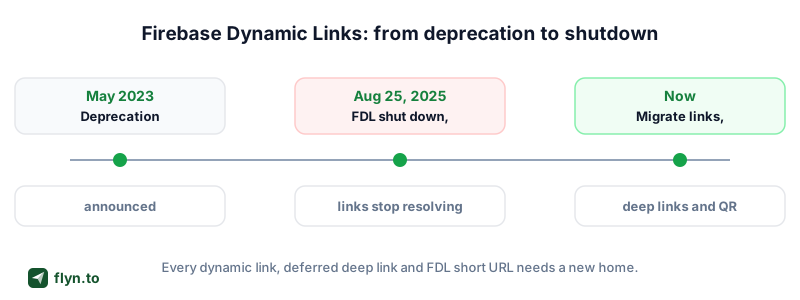
Google announced the deprecation in 2023 and published a countdown that many teams filed under later. Later arrived. On the sunset date, link creation stopped and existing links began returning errors, and the failure mode was uglier than most people expected.
 Tap to enlarge
The timeline that got us here
The deprecation was not a surprise, but the ending was harsh:
- 2023: Google announces the FDL deprecation and stops investing in the product.
- 2023 to mid-2025: links keep working; teams are told to migrate and to export their link metadata while the console still allows it.
- August 25, 2025: shutdown. Error responses roll out across existing links until they reach all FDL traffic.
What a clicked FDL link does today
A dead FDL link does not redirect anywhere. It returns an HTTP 404. That means no app open, no app store fallback, no web fallback, and no analytics event. The only FDL-adjacent feature that survived is email link authentication, and only for teams that upgraded to current Firebase Auth SDKs. Everything else is a hard failure. Paste any old link into our free URL Expander or Redirect Checker and you can watch it fail in real time.
FDL links fail with a 404, not a graceful redirect to your homepage. Printed QR codes on packaging, posters, and product manuals that encoded a page.link URL are now dead in the field, and users scanning them see a Google error page with your brand nowhere on it.
Step zero: inventory every FDL link you still depend on
Before you pick a replacement, figure out what you are actually replacing. Most teams underestimate their link inventory by half, because FDL links accumulated for years across systems owned by different people.
Where FDL links hide
If you exported your link metadata from the Firebase console before the shutdown, start from that CSV. If you did not, that window has closed, and you will need to reconstruct the list from the places links were published:
- App code: FDL SDK calls, share sheets, referral flows, and hardcoded page.link URLs.
- Marketing emails and push notification templates.
- Social bios and posts, app store listings, and paid ad campaigns.
- Printed materials: QR codes on packaging, flyers, signage, and manuals.
- Help docs and blog posts that link to in-app content.
- Partner and affiliate integrations that were handed an FDL URL once and never updated.
Run our Broken Link Checker across your own site to catch every dead page.link reference in one pass.
Prioritize by blast radius
Rank the list by clicks, not by count. Historical analytics exports usually show that a handful of links carried most of your traffic, and those get migrated first. If you never had click-level data, this is a good moment to fix that; here is how click tracking on links works.
Sort your inventory into three buckets: links you can edit at the source (emails, bios, docs), links frozen in the wild (printed QR codes, old posts), and links generated by code. Each bucket gets a different fix, and the frozen bucket is exactly why your replacement links should always have editable destinations.
The honest alternatives landscape
Every vendor writing about the FDL shutdown claims to be the perfect replacement. Most are overselling. Your realistic options fall into three paths, and the right one depends entirely on whether you used FDL as a link tool or as an attribution tool.
| Path | Best for | Deferred deep linking | Effort |
|---|---|---|---|
| Flyn (link management) | Short links, deep links, device routing, QR codes, analytics | No | Low: minutes per link, no SDK |
| Branch and other MMPs | Install attribution, deferred deep linking, campaign measurement | Yes | High: SDK integration, pricing tied to active users |
| DIY App Links + Universal Links | Full control, zero vendor dependency | No | High: native config on both platforms, no analytics |
Branch and the MMP route
If deferred deep linking or install attribution drove your FDL usage, you need a mobile measurement partner. Branch is the best-known option: it captures the click, survives the app store install, and hands your app the original context on first launch. The tradeoffs are real: SDK integration work, contracts, and pricing that scales with usage.
The DIY native path
Google's own migration guidance points to App Links on Android and Universal Links on iOS, and notes that Firebase Hosting can serve the required verification files. This path is free and dependency-free, but you get no short links, no analytics, no QR codes, and no deferred deep linking. It is the right foundation either way (more on that below), just not a complete replacement.
Where Flyn fits
Flyn sits in the middle: a link management platform that rebuilds the FDL features most teams actually used, without an SDK. Compare the broader field on our alternatives hub or in our roundup of the best link management tools.
Most teams never used Firebase Dynamic Links as an attribution suite. They used it as a short link that could open an app. If that describes you, the migration is an afternoon of work, not a quarter-long project.
How FDL features map to Flyn
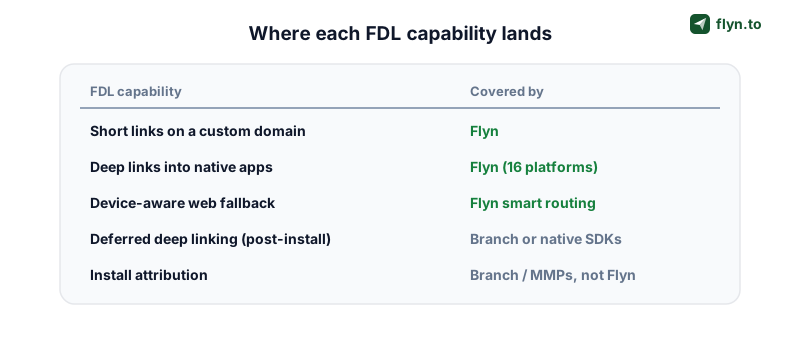
Here is the honest, feature-by-feature mapping. Everything in the left column is something FDL did; the right column is what covers it now.
 Tap to enlarge
| FDL capability | Flyn equivalent |
|---|---|
| Short links on page.link or a custom domain | Branded short links on your own domain |
The link deep link parameter | Deep links into 16 native apps |
Platform fallbacks (ifl, afl, ofl) | Smart routing by device and OS |
| UTM passthrough | UTM parameters preserved through the redirect |
| QR codes (via third-party generators) | Built-in QR codes with editable destinations |
| Click tracking via Google Analytics wiring | Click analytics built in: device, geo, referrer |
| REST API link creation | Deep links API |
| Deferred deep linking and install attribution | Not covered: use Branch or another MMP |
Two of the differences work in your favor. FDL locked analytics behind Google Analytics wiring; Flyn's click analytics are built into every link. And FDL QR codes came from third-party generators that froze the URL forever; Flyn links keep editable destinations, so a printed code can be repointed years later without reprinting.
What Flyn deliberately does not do
Two FDL features have no Flyn equivalent, and pretending otherwise would waste your time: deferred deep linking through an app store install, and install attribution that credits campaigns for downloads. Flyn routes the click perfectly up to the store handoff; what happens after installation is invisible to any link-layer tool. If those features matter to you, jump to the pairing section below, and see the full Firebase Dynamic Links comparison for the fine print.
Deep link parity: getting app opens working again
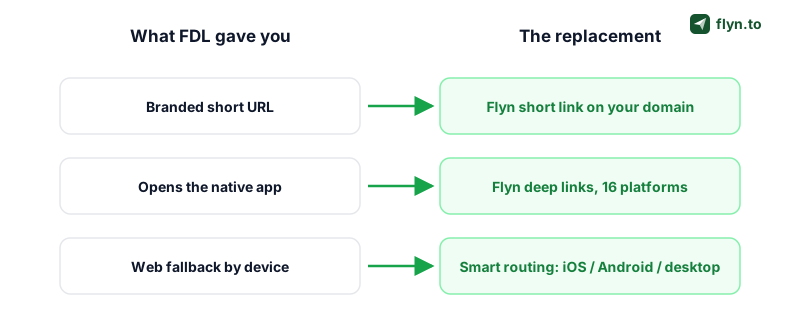
Whichever vendor you pick, deep link parity rests on native platform plumbing that you own, not the vendor. FDL abstracted this away; its replacement should not, because the native setup is what Google itself recommends and it works underneath any link layer you put on top.
 Tap to enlarge
Universal Links and your AASA file
On iOS, an app claims a domain through Universal Links. You host an apple-app-site-association (AASA) file at /.well-known/ on the domain, declare the paths your app handles, and add the Associated Domains entitlement in Xcode. Misformatted AASA files are the number one cause of the dreaded deep link opening Safari instead of the app, so validate yours with our free AASA Validator before you point traffic at it.
Android App Links and assetlinks.json
Android's mirror image is App Links: an assetlinks.json file at /.well-known/ containing your app's package name and SHA-256 certificate fingerprint, plus intent filters with autoVerify in your manifest. Check the whole chain, file syntax, fingerprint match, and verification state, with the Android App Links Validator.
Build and test before you point traffic
With verification files live, compose the actual links with the Deep Link Generator (it handles app URI schemes and store fallbacks for 16 popular apps) and confirm real behavior on real devices with the Deep Link Tester. Test all three cases every time: app installed, app not installed, and desktop.
The step-by-step migration plan
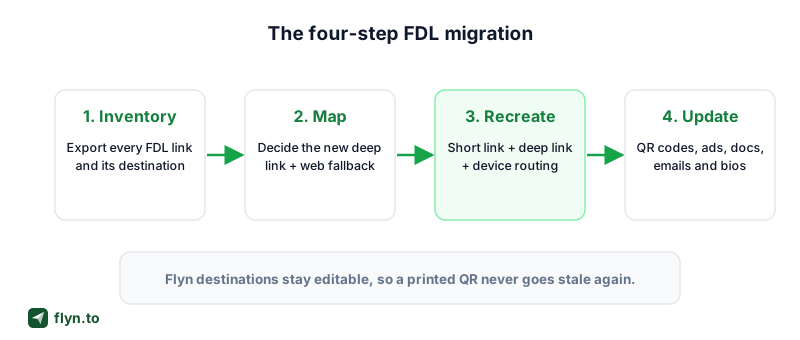
Here is the end-to-end playbook. Budget an afternoon for a typical app with a few dozen active links, plus one release cycle if you also need the native deep link setup from the previous section.
 Tap to enlarge
- Export or reconstruct your inventory. Start from your pre-shutdown CSV export if you have one; otherwise use the inventory hunt from step zero. One spreadsheet, one row per link: destination, deep link target, and every place it was published.
- Map your URL patterns. Most FDL fleets collapse into a handful of patterns: product pages, referral invites, campaign landings, support articles. Migrate patterns, not individual links.
- Recreate the links in Flyn. Each pattern becomes a short link with a deep link target and device routing rules: app if installed, correct store otherwise, web on desktop. Use custom slugs to keep paths human-readable, and the Bulk URL Shortener to create hundreds at once.
- Update your QR codes. Regenerate every code with the QR Code Generator pointing at the new Flyn links. Because Flyn destinations are editable, this is the last reprint you will ever do for a routing change.
- 301 the old domains you own. If your FDL links lived on a custom domain you control, put a wildcard 301 redirect in front of it, mapping old paths to new Flyn links. Our htaccess and Nginx redirect generators write the rules, and our 301 vs 302 guide explains why permanent is the right signal here.
- Verify everything. Re-test each pattern on iOS, Android, and desktop, re-scan every reprinted QR code, and watch the first week of click analytics for surprises.
If you cannot redirect the old domain
Links on page.link subdomains are unrecoverable: that infrastructure belongs to Google, and there is nothing for you to 301. For those, the fix is upstream. Edit every source you control to point at the new link, and accept that abandoned third-party posts are lost. Painful, but it is also the argument for owning your link domain from now on.
What Flyn does not replace (and what to do instead)
Honesty check: after the migration above, two FDL capabilities are still missing, because no link shortener can provide them.
- Deferred deep linking: carrying context through an app store install to first launch.
- Install attribution: crediting a campaign or referrer for a download.
If you truly need deferred deep linking
Run the numbers first. Deferred deep linking only matters for the slice of clicks that land on users without the app installed who then complete the install. For many products, a good default onboarding flow covers that slice acceptably. If it is core to your growth loop (referral rewards are the classic case), integrate Branch or another MMP alongside Flyn: Flyn handles your branded, editable, trackable link layer, and the MMP handles the install boundary. The two layers do not conflict.
For campaign measurement short of full attribution, disciplined UTM tagging on every link (build tags with the UTM Builder) plus Flyn's click analytics tells you which channels drive taps, even when the install itself is not attributed.
Ship the fix before your next campaign
The FDL shutdown is the loudest reminder in years that link infrastructure is real infrastructure. When it dies, onboarding flows, printed packaging, and years of shared URLs die with it. The teams that came out fine were the ones whose links had editable destinations and an exit path they controlled.
Rebuild on that principle. Create a free Flyn account, recreate your top ten links as short links in a single sitting (add deep links and device routing on Pro), and reprint your QR codes once, pointing at links you can repoint forever. If you are consolidating from other shorteners at the same time, the migration hub covers every path. Your users have been hitting 404s since August 25, 2025. Every day of delay is measurable, so start with the ten links that matter and work down the list.
Frequently Asked Questions
When did Firebase Dynamic Links shut down?
Do old Firebase Dynamic Links still work?
What does Google recommend as a replacement for Firebase Dynamic Links?
Does Flyn support deferred deep linking or install attribution?
Can I redirect my old Firebase Dynamic Links domain?
How do I fix QR codes that pointed to Firebase Dynamic Links?
Should I replace Firebase Dynamic Links with Flyn or Branch?
How long does migrating off Firebase Dynamic Links take?
Free tools for this
Three Flyn tools that pair well with the strategy in this article, all free, no signup needed.
Redirect Checker
Trace 301/302 redirect chains.
Broken Link Checker
Scan any page for dead links and 404s.
URL Cleaner
Strip tracking params from any URL.
Keep reading
Three related deep-dives from the Flyn blog.

Website Migration Redirects: 301 Checklist
12 min read

How to Track Which Posts Drive Sales, Not Just Clicks
19 min read
Postback URL Tracking: How S2S Conversion Tracking Works
17 min read
Ready to try Flyn?
Free plan includes 25 links/month, full analytics, and access to all 30+ free tools above. No credit card required.
Already a member? Log in
Karan Bhakuni is the founder of Flyn. He writes about branded links, click analytics, and the link-management tooling growth teams and creators actually need, drawn from building Flyn and reading a lot of user feedback.
Find these guides useful? Add Flyn as a preferred source so more of them show up in your Google results.