Free AASA Validator
Fetch and validate your apple-app-site-association file for iOS Universal Links. Catch redirects, JSON errors, and malformed app IDs before they break your deep links.
Fetches https://<domain>/.well-known/apple-app-site-association and validates it for iOS Universal Links.
Shorten the links that open your app
Create Flyn short links that route to your Universal Links and count every click free. Pro adds device, country, and referrer breakdowns. Every install link becomes a data point you control.
How to Validate Your AASA File in 3 Steps
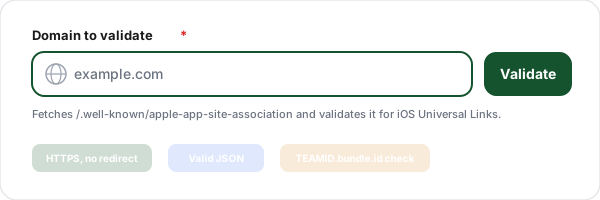
Enter your domain
Paste the domain that hosts your app. The validator fetches the apple-app-site-association file from the .well-known URL Apple documents, over HTTPS and without following redirects.
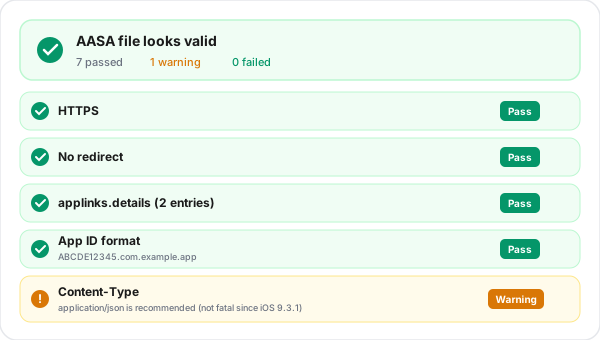
Review every check
Get pass, warning, and fail results for reachability, no-redirect, valid JSON, the applinks object, the details array, app ID format, and file size, with a clear message for each.
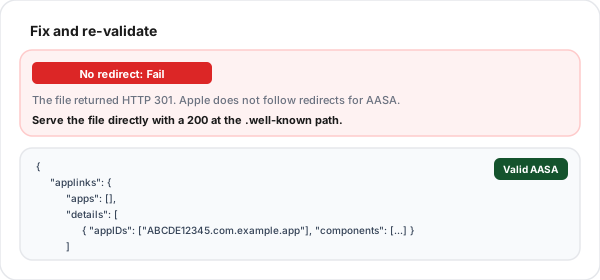
Fix and re-validate
Each failed check ships with a concrete fix: serve the file with a 200, drop the .json extension, add the Team ID prefix. Apply it and re-run to confirm the file is valid.
What Is the apple-app-site-association File?
The apple-app-site-association file, almost always called the AASA file, is a small JSON document you host on your own domain. It is the contract between your website and your iOS app: it tells iOS which URL paths on your domain should open your app instead of Safari. This mechanism is what Apple calls Universal Links, and it is the recommended way to deep link into an app from the web, email, messages, or another app.
When a user taps a link to your domain, iOS fetches your AASA file, matches the path against the components (or legacy paths) you declared, and if there is a match it opens the associated app at exactly the right screen. If the file is missing, served through a redirect, malformed, or the app IDs are wrong, iOS silently gives up and the link opens in the browser instead. Because the failure is silent, a broken AASA file can go unnoticed for a long time, which is why validating it directly is so valuable.
What This Validator Checks
Every check Apple cares about, with a clear pass, warning, or fail and a fix for each.
Reachable over HTTPS, no redirect
The file must respond with HTTP 200 over HTTPS at the .well-known path. Apple requires the file to be hosted with no redirects, so the validator fails any 301 or 302 instead of following it.
Valid JSON, no .json extension
The body must parse as valid JSON, and the file name must be apple-app-site-association with no extension. A JSON content type is recommended but not strictly required since iOS 9.3.1.
applinks object present
Universal Links require a top-level applinks object. The validator confirms it exists and that the legacy applinks.apps field, if present, is an empty array as Apple recommends.
Non-empty details array
applinks.details must be a non-empty array. Each entry describes one or more apps and the URL paths that should open them.
Modern or legacy detail format
Each detail entry must use either the modern appIDs + components format or the legacy appID + paths format. Partial or mixed entries are flagged so you can fix them.
App ID shape (TEAMID.bundle.id)
Every app ID must be a 10-character Team ID, a dot, then a reverse-DNS bundle identifier. Missing the Team ID prefix is the single most common AASA mistake.
webcredentials and appclips
If present, the validator reports webcredentials (Password AutoFill, Sign in with Apple) and appclips sections so you can confirm the rest of your associated-domains setup.
File size under 128 KB
Apple processes AASA files up to 128 KB. The validator reports your file size and fails anything larger, since an oversized file silently breaks association.
Where the AASA File Must Live
Apple's documentation places the file in your site's .well-known directory, at https://yourdomain.com/.well-known/apple-app-site-association, and does not list the domain root as an alternative. That URL is what this validator checks. The file must be served over HTTPS, return HTTP 200 with no redirect, have no file extension, and contain valid JSON.
The most common deployment trap is a redirect: many hosts and CDNs automatically send the request to another host or force a trailing slash. Apple requires the file to be hosted with no redirects, so any of these fails Apple's hosting requirement. If your stack adds a redirect, configure an explicit pass-through rule for the .well-known path so the file is served directly.
Common AASA Errors and How to Fix Them
The mistakes that silently break Universal Links most often.
Serving the file through a redirect
Sending the AASA request to a trailing-slash variant, another host, or a CDN via a 301 or 302 breaks Apple's rule that the file is hosted with no redirects. Serve the file directly with a 200.
Adding a .json extension
The file must be named apple-app-site-association with no extension. Naming it apple-app-site-association.json means iOS never finds it at the expected path.
Using the bundle ID without the Team ID
An app ID of com.example.app is wrong. It must be prefixed with your 10-character Team ID, like ABCDE12345.com.example.app. Without the prefix, iOS cannot match the app.
Putting app IDs in applinks.apps
The apps array is legacy and must be empty. Your real configuration goes in applinks.details. App IDs placed in apps are ignored.
Wrong Content-Type or invalid JSON
A trailing comma, a comment, or an HTML error page returned instead of JSON all break parsing. Serve clean JSON, ideally with Content-Type: application/json.
Forgetting the Associated Domains entitlement
Even a perfect AASA file does nothing without applinks:yourdomain.com in the app Associated Domains entitlement. Validate the file here, then confirm the entitlement in Xcode.
Valid Deep Links + Trackable Short Links
Validate your AASA file here, then use Flyn to wrap your Universal Links in short links that count every tap, with device, country, and referrer breakdowns on Pro.
Deep link routing
Send users straight into your app with short links that respect your Universal Links setup.
Click analytics
Every tap counted from day one; Pro breaks taps down by device, OS, country, and referrer. Know which channels drive installs.
Branded domains
Pro adds custom domains with automatic HTTPS. Branded short links build trust before the tap.
No ad pages
Flyn puts no ad page before the redirect, on any plan, Free included.
Frequently Asked Questions
What is an apple-app-site-association file?
Where exactly does the AASA file need to live?
Can the AASA file be served through a redirect?
Does the AASA file need a .json extension or a specific Content-Type?
What is the difference between the modern and legacy AASA format?
What does the app ID format TEAMID.bundle.id mean?
Why should applinks.apps be an empty array?
How big can the AASA file be?
My AASA file looks correct but Universal Links still do not open my app. Why?
Does iOS cache the AASA file?
Can one AASA file serve multiple apps?
Is this AASA validator free and does it store my data?
More Free Deep Link Tools
Everything you need to ship reliable deep links on both platforms, free and with no sign-up.
Android App Links Validator
Validate assetlinks.json and Digital Asset Links for Android App Links.
Deep Link Tester
Check both iOS and Android deep link configuration for any domain at once.
Deep Link Generator
Build app-open deep links for WhatsApp, Instagram, Spotify, and more.
Apple App Site Association Generator
Generate the apple-app-site-association file with app IDs and path rules, then validate it here.
Ready to ship reliable deep links?
Validate your AASA file for free, then use Flyn to share short links that route into your app with free click tracking and QR codes; Pro adds analytics breakdowns and custom domains, all in one platform.