Free Apple App Site Association Generator
Build the apple-app-site-association file iOS needs for Universal Links. Compose app IDs from your Team ID and bundle ID, add path, query, and fragment rules, and copy or download valid AASA JSON with the legacy paths array included.
This tool writes the file. Already hosting one and wondering why links fail? Run it through the AASA Validator. Building the Android half? Use the Android App Links Validator.
Not written into the file. We use it to show you the exact URL the file has to answer on.
The App ID prefix is usually your Team ID. Older identifiers can have a different prefix, so copy it from the Identifiers page in your Apple Developer account.
In patterns, * matches any run of characters and ? matches exactly one, so ?* means "at least one character".
Universal Links still need a link to click
Wrap the campaign URLs that lead into your app in Flyn short links and see total clicks free on every one. Full country, device, and referrer breakdowns come with Pro.
How to Create an AASA File in 3 Steps
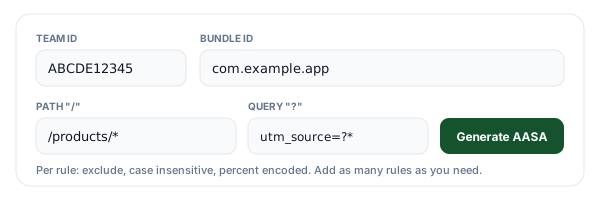
Enter your app IDs and path rules
Your Team ID and bundle identifier compose the app ID that iOS matches, for example ABCDE12345.com.example.app. Add one rule per URL pattern: a path such as /products/*, an optional query match such as utm_source=?*, and an optional fragment. Turn on Exclude for the patterns that should stay in Safari, and reorder rules so exclusions sit above the broader pattern they carve out.
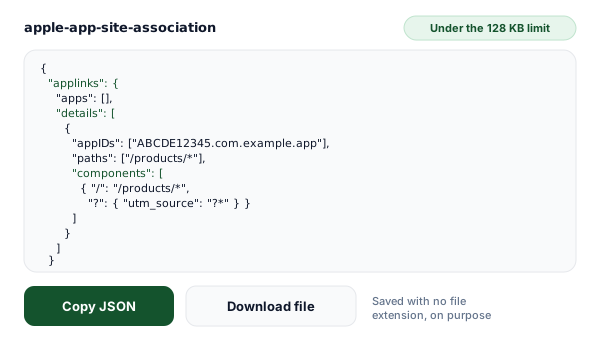
Generate and download the file
You get formatted JSON with the components array iOS 13 and later reads, the legacy appID and paths keys older versions read, and optional webcredentials and appclips service blocks. The byte counter shows how much of the 128 KB budget you have used. Download saves an extensionless apple-app-site-association file, which is exactly what the server has to serve.
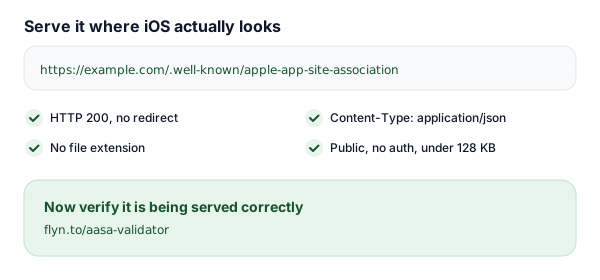
Host it at /.well-known and verify
Upload it so https://yourdomain.com/.well-known/apple-app-site-association answers with HTTP 200, Content-Type application/json, no redirect, and no auth in front of it. Then hand the live URL to our AASA validator, which requests the file at that URL without following redirects and tells you which of those conditions your server is actually meeting.
What the apple-app-site-association File Actually Does
A Universal Link is an ordinary https URL. There is nothing special about the link itself, so the association has to be proved from both sides. Your app claims the domain by listing applinks:example.com in its Associated Domains capability, and your domain confirms the claim by serving a file that names the app. iOS only opens your app for a tapped link when both halves agree.
The confirmation is this file. When your app is installed, the system fetches https://example.com/.well-known/apple-app-site-association through a content delivery network Apple runs, parses it, and keeps the result on the device. Later, when someone taps a link to that host, iOS walks the components array in order and acts on the first entry that matches the URL. A match with no exclude key opens the app; a match with "exclude": true sends the URL to Safari; no match at all also means Safari.
Two consequences follow from that ordering rule and catch people out. First, exclusions must come before the broader pattern they carve out, because matching stops at the first hit. Second, the file is fetched, not pushed: because it is cached on the device and behind Apple's CDN, an edit to the file does not reach installed apps immediately. During development, appending ?mode=developer to the associated domain makes the device fetch straight from your server and skip the cache.
The Hosting Checklist Everyone Gets Wrong
Most broken Universal Links are not caused by bad JSON. They are caused by a correct file that iOS cannot reach. Every row below is a condition the fetch has to satisfy.
| Requirement | What it has to be | What breaks it |
|---|---|---|
| URL path | /.well-known/apple-app-site-association | Apple documents only the .well-known directory. Do not rely on any other path, the domain root included. |
| File extension | None at all | apple-app-site-association.json is a different URL. The extensionless path returns 404 and every link falls back to Safari. |
| Content-Type | application/json | text/plain, text/html, and application/octet-stream are common defaults when the server guesses from a missing extension. |
| HTTP status | 200, served directly | Apple requires the file to be hosted with no redirects. A 301 or 302 to www, to a trailing slash, or to a CDN path breaks that rule. |
| Transport | HTTPS with a valid certificate | Plain HTTP, an expired certificate, or a hostname mismatch stops the fetch before the file is read. |
| File size | Under 128 KB (131,072 bytes) | Larger files are rejected. Wildcard patterns replace long literal path lists. |
| Access | Public, unauthenticated | Basic auth, IP allowlists, geo blocks, staging passwords, and bot challenges all answer Apple instead of your file. |
| Edge and CDN | Passed through untouched | A proxy that minifies, injects HTML, rewrites the content type, or serves an error page turns a valid file into an invalid one. |
| Host match | Exactly the host in the entitlement | example.com and www.example.com are separate hosts. Each one you list as applinks: needs its own copy of the file. |
This page writes the file, it does not fetch yours
Once the file is uploaded, check the live URL against every row in this table with our validator. It requests your file at the .well-known URL without following redirects and reports the status code, redirects, content type, size, and parsed app IDs.
components vs the Legacy paths Array
iOS 13 replaced the string-based paths array with the components array. The two formats can live side by side in the same details entry, which is what the legacy toggle in the generator does, so one file keeps working across iOS versions.
| Capability | components (iOS 13+) | paths (legacy) |
|---|---|---|
| iOS versions that read it | iOS 13 and later | iOS 12 and earlier (still parsed by newer versions when components is absent) |
| App ID key | "appIDs", an array, so one entry can serve several apps | "appID", a single string, one app per entry |
| Shape of a rule | A dictionary, for example {"/": "/products/*"} | A plain string, for example "/products/*" |
| Match the query string | Yes, via "?" with per-parameter patterns | No, the query is ignored entirely |
| Match the fragment | Yes, via "#" | No |
| Exclude a pattern | "exclude": true on the rule | A "NOT " prefix on the string |
| Case sensitivity | Per rule, "caseSensitive": false opts out | Always case sensitive, no control |
| Percent encoding | Per rule, "percentEncoded": false opts out | No control |
| Inline documentation | A "comment" key that iOS ignores | None, the array holds strings only |
One honest limit of shipping both: the legacy block names a single app and matches on the path only, so a rule that exists purely to match a query parameter or a fragment cannot be expressed there. The generator tells you exactly which rules were left out of the legacy array instead of quietly dropping them.
Every components Key, Explained
A component is a dictionary of matchers plus a few flags. Keys you leave out are simply not constrained, and the two boolean flags below default to true, which is why the generator only writes them when you opt out.
| Key | What it matches | Example | Default |
|---|---|---|---|
| "/" | The URL path. * matches any run of characters, ? matches exactly one. | "/": "/products/*" | No path constraint |
| "?" | The query. A dictionary matches named parameters; a plain string matches the whole query string. | "?": { "utm_source": "?*" } | No query constraint |
| "#" | The fragment, written without the leading hash. | "#": "reviews" | No fragment constraint |
| "exclude" | When true, a match stops the URL from opening the app and hands it to Safari. | "exclude": true | false |
| "caseSensitive" | Whether the pattern is matched case sensitively. | "caseSensitive": false | true |
| "percentEncoded" | Whether the pattern itself is written percent encoded. | "percentEncoded": false | true |
| "comment" | Ignored by iOS. A note for whoever opens the file next. | "comment": "Product detail pages" | None |
Wildcards work the same way in every pattern: * matches any run of characters including none, and ? matches exactly one, so ?* means "at least one character" and ???? means "exactly four".
webcredentials and appclips in the Same File
applinks is only one of the services this file can declare, and they all live in the same JSON document at the same URL. Adding webcredentials lets Password AutoFill treat your website and your app as one login: a password saved in Safari is offered inside the app, and a password created in the app shows up on the site. It takes only the app IDs, no rules, and pairs with the Associated Domains entry webcredentials:example.com.
appclips names the App Clip that can launch from links on this domain. The App Clip has its own bundle identifier, conventionally the parent app's identifier with .Clip appended, so the generator prefills that and lets you change it. Turning these on adds a few lines, keeps everything at one URL, and means one deployment instead of three.
Everything the generator writes is computed in your browser. No app ID, bundle identifier, or path pattern is sent to a server, and your recent files are kept in your own browser storage so you can pull an earlier version back into the form. Clear that history whenever you like.
Where Universal Links Meet Campaign Links
One detail worth knowing before you launch a campaign: iOS evaluates the host of the URL that was actually tapped. If a link on one host redirects to your domain, the redirect target is not what gets matched against an association file, so a cross-domain hop is not a substitute for the entitlement. Any host you want to open your app has to appear in Associated Domains and serve its own copy of this file, a branded short domain included. Our deep link generator and deep link tester cover the scheme-based side of the same problem.
What short links are genuinely good at here is attribution. A Universal Link tells you nothing about where the tap came from, so put a distinct short link in each placement, the ad, the email, the QR code on the packaging, and the click counts tell you which one is feeding your app. The destination stays editable too, so when a path pattern changes you re-point the link instead of reprinting the material.
AASA Files + Flyn: Links You Can Measure
The generator is free forever. Add Flyn when you want the links that lead into your app to report back.
Editable destinations
Re-point a short link anytime. When a path pattern changes, fix every posted link with one edit.
Per-placement analytics
Total clicks free on every link; full country, device, and referrer breakdowns on Pro.
QR codes included
Turn any campaign link into a QR code for packaging, posters, and slides, free on every link.
A free plan that lasts
25 links a month with total click counts and QR codes. No trial countdown. Custom domains come with Pro.
Frequently Asked Questions
What is an apple-app-site-association file?
Where exactly do I host the apple-app-site-association file?
Does the AASA file need a .json extension?
What Content-Type should the AASA file be served with?
Why do redirects break Universal Links?
What is the difference between components and the legacy paths array?
How do I find my Team ID and build the app ID?
Can one AASA file cover more than one app?
How do I stop a specific path from opening the app?
How do I match query parameters or fragments?
Does the file still need to be signed, and how large can it be?
My file looks right but Universal Links still do not work. What now?
More Free Tools
The rest of the deep-linking toolkit, instant and free, no sign-up required.
AASA Validator
Fetch your live apple-app-site-association file and check how it is served.
Android App Links Validator
Check the assetlinks.json half of the same job on Android.
Deep Link Generator
Build app scheme and intent links with a web fallback built in.
Deep Link Tester
Check an iOS or Android deep link before you ship it in a campaign.
Ready to make your links open the app?
Generate the file for free, host it at /.well-known, then shorten the campaign links that lead into your app so you can see which placement actually drives opens. Analytics, QR codes, and editable destinations included.