Free Android App Links Validator
Fetch and validate your assetlinks.json file for Android App Links. Catch missing relations, bad package names, and malformed SHA-256 fingerprints before they break auto-verification.
Fetches https://<domain>/.well-known/assetlinks.json and validates Digital Asset Links for Android App Links.
Shorten the links that open your app
Create Flyn short links that route to your App Links, counting every click free with device, country, and referrer breakdowns on Pro. Every install link becomes a data point you control.
How to Validate Your assetlinks.json in 3 Steps
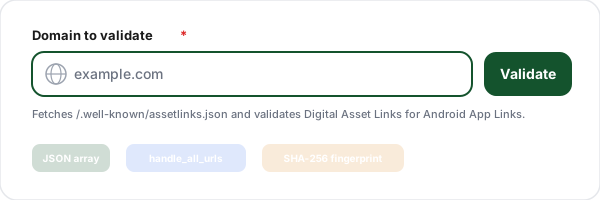
Enter your domain
Paste the domain that hosts your app. The validator fetches the assetlinks.json file from the same .well-known URL Android queries, over HTTPS and without following redirects.
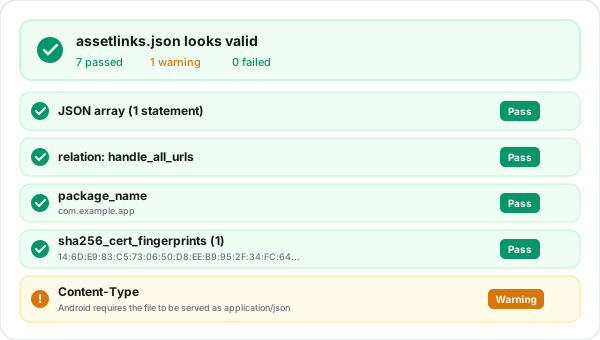
Review every check
Get pass, warning, and fail results for reachability, the JSON array, the handle_all_urls relation, the android_app namespace, package name, and fingerprint format.
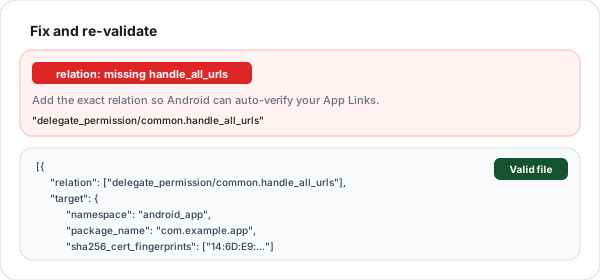
Fix and re-validate
Each failed check ships with a concrete fix: add the missing relation, correct the package name, or include the Play App Signing fingerprint. Apply it and re-run.
What Is the assetlinks.json File?
assetlinks.json is a Digital Asset Links file you host on your own domain. It is the contract between your website and your Android app: it declares which app, signed with which certificate, is allowed to handle links to your domain. This is the foundation of Android App Links, the mechanism that lets a tap on one of your URLs open your app directly instead of the browser or a disambiguation dialog.
When your app declares an intent filter with android:autoVerify set to true, Android fetches your assetlinks.json at install time, confirms that a statement grants the handle_all_urls permission to your package with a matching signing fingerprint, and marks your App Links as verified. If the file is missing, not an array, lacks the required relation, or lists the wrong fingerprint, verification fails silently and your links stop opening the app. Validating the public file directly is the fastest way to catch this.
What This Validator Checks
Every requirement Android cares about, with a clear pass, warning, or fail and a fix for each.
Reachable over HTTPS, no redirect
The file must respond with HTTP 200 over HTTPS at the .well-known path. Android requires it to be accessible without any redirects, so the validator fails a 301 or 302 instead of following it.
Content-Type application/json
Android expects the file to be served as application/json. The validator warns if the Content-Type is missing or wrong so you can fix the server configuration.
Top level is a JSON array
assetlinks.json must be a JSON array of statement objects, even for a single app. A bare object instead of an array is the most common structural mistake.
handle_all_urls relation
At least one android_app statement must include the exact relation delegate_permission/common.handle_all_urls. Without it, Android will not auto-verify your App Links.
android_app namespace
Each App Links statement must target an android_app. Statements with a web or other namespace are flagged because they do not enable App Links.
Valid package_name
The package_name must be present and a valid reverse-DNS application ID, like com.example.app, matching your app build configuration exactly.
SHA-256 fingerprint format
sha256_cert_fingerprints must be a non-empty array of 32-byte uppercase hex fingerprints separated by colons. Each malformed fingerprint is called out individually.
Overall App Links readiness
The validator confirms that, across all statements, at least one android_app grants handle_all_urls, so you know the file as a whole meets the auto-verification requirement.
Where the assetlinks.json File Must Live
Android fetches the file from https://yourdomain.com/.well-known/assetlinks.json. The path is fixed: it must be under /.well-known/ and named assetlinks.json exactly. The file must be served over HTTPS, return HTTP 200, be delivered as application/json, and contain a valid JSON array. It must also be accessible without any redirects: a 301 or 302 is a response other than HTTP 200, which Digital Asset Links treats as an error, so the validator fails it instead of following it.
If you serve App Links from multiple domains or subdomains, each one needs its own assetlinks.json with a statement for your app. Remember that auto-verification also depends on your manifest: the intent filter must set android:autoVerify to true and declare a BROWSABLE, DEFAULT, https filter for the host. Validate the public file here, then confirm the manifest and signing fingerprints in your build.
Common assetlinks.json Errors and How to Fix Them
The mistakes that silently break App Links most often.
Wrapping a single statement as an object
The file must be an array even for one app. Starting with { instead of [ makes Android reject it. Wrap your statement in square brackets.
Missing the handle_all_urls relation
Auto-verification needs the exact relation delegate_permission/common.handle_all_urls in an android_app statement. A typo or omission means links never auto-open your app.
Forgetting the Play App Signing fingerprint
With Play App Signing, the production cert is Google managed. List the SHA-256 from the Play Console App integrity page, not just your local upload or debug key.
Wrong package_name
The package_name must match your applicationId exactly. A mismatch grants permission to a nonexistent app and verification quietly fails.
Malformed fingerprints
Lowercase hex, missing colons, or a truncated value all break verification. Each fingerprint must be 32 uppercase hex bytes separated by colons (95 characters).
Manifest missing autoVerify
Even a perfect file does nothing without android:autoVerify="true" and a BROWSABLE, https intent filter in your manifest. Validate the file here, then check the manifest.
Verified App Links + Trackable Short Links
Validate your assetlinks.json here, then use Flyn to wrap your App Links in short links that count every tap, with device, country, and referrer breakdowns on Pro.
Deep link routing
Send users straight into your app with short links that respect your App Links setup.
Click analytics
Every tap is counted as it happens, and Pro logs device, OS, country, and referrer detail. Know which channels drive installs.
Branded domains
Custom domains with automatic HTTPS on Pro. Branded short links build trust before the tap.
No ad pages
Flyn puts no ad page before the redirect, on any plan, Free included.
Frequently Asked Questions
What is the assetlinks.json file?
Where exactly does assetlinks.json need to live?
What is the handle_all_urls relation and why does it matter?
What format does the file need to be in?
What is the package_name and how is it validated?
What are sha256_cert_fingerprints and where do I get them?
Why do I need to include the Play App Signing fingerprint?
My assetlinks.json looks correct but App Links still do not verify. Why?
Can one assetlinks.json grant access to multiple apps?
How is this different from the iOS AASA file?
Does Android cache the verification result?
Is this validator free and does it store my data?
More Free Deep Link Tools
Everything you need to ship reliable deep links on both platforms, free and with no sign-up.
AASA Validator
Validate apple-app-site-association for iOS Universal Links.
Deep Link Tester
Check both iOS and Android deep link configuration for any domain at once.
Deep Link Generator
Build app-open deep links for WhatsApp, Instagram, Spotify, and more.
AASA Generator
Build the apple-app-site-association JSON that iOS Universal Links need.
Ready to ship reliable deep links?
Validate your assetlinks.json for free, then use Flyn to share short links that route into your app with click tracking and QR codes free, plus analytics breakdowns and custom domains on Pro, all in one platform.