Instagram In-App Browser: Why Links Break and the Fix
Your link works in Safari, Chrome, and every test you run, then dies inside Instagram. Here is what the in-app browser actually breaks, and the two-stage fix that gets people out.

Your Link Works Everywhere Except Instagram
You tested the link. It opens in Chrome, in Safari, on every device you own. Then you put it in your Instagram bio, a Story sticker, or a DM broadcast, and the complaints start: the app never opens, the download does nothing, the login spins forever. Nothing is wrong with your link. Everything is wrong with the browser Instagram forced it into.
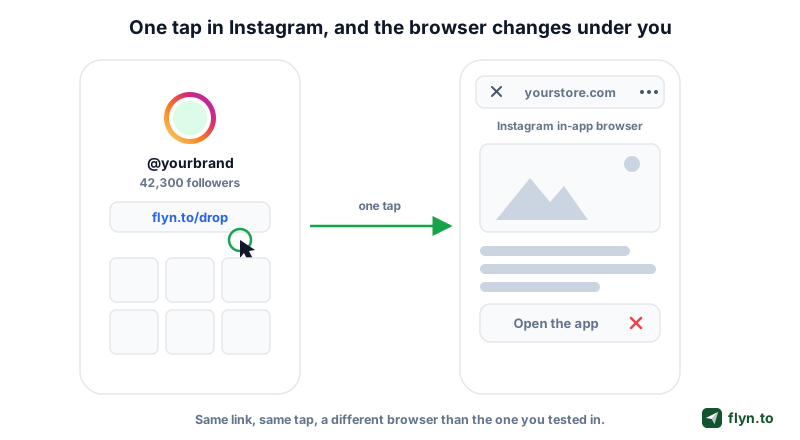
Every link tapped inside Instagram opens in the in-app browser, a stripped-down web view inside the Instagram app itself. It is not Safari, it shares none of Safari's logins or settings, and it has few of its capabilities. That one detail quietly breaks app handoffs, App Store downloads, OAuth logins, and traffic attribution, the four failures this guide dissects.
What this guide covers
- What the in-app browser actually is, and why Meta keeps you inside it.
- The four concrete breakages, with a Safari vs Instagram behavior table.
- The bypass folklore: what x-safari-https and instagram://extbrowser once did, and why they died.
- A per-app escape guide, plus a live in-app browser detector embedded mid-article.
- The builder-side fix: detection, tap-first design, and deep links (a Flyn Pro feature) that finish the handoff.
Need the link itself first? The free Instagram link shortener takes a minute; the rest of this post covers what happens after the tap.
 Tap to enlarge
What an In-App Browser Actually Is
When you tap a link in Instagram on iOS, the page renders inside a WKWebView, Apple's embeddable browser component. Think of it as a browser engine with the browser removed: the same WebKit engine as Safari, but the app around it decides everything else: the toolbar, the menu, which URL schemes may launch, and when you are allowed to leave. Android is the same story: Instagram embeds an Android WebView instead of handing the click to Chrome.
A rendering engine with the browser removed
- Cold sessions: the WebView shares no cookies with Safari or Chrome, so every site treats the visitor as a stranger.
- No browser conveniences: no extensions, no reliable password autofill, no default-browser preference, no address bar you can edit.
- Clipped capabilities: downloads, permission prompts, and app launches are restricted or silently dropped.
Why Meta keeps you inside
Attention and measurement. Every in-app second is one swipe from returning to the feed, and the host app can watch the pages you visit. In 2022, security researcher Felix Krause showed that Meta's iOS in-app browsers were injecting JavaScript into third-party pages opened from ads and links. Meta calls the script aggregated event measurement, but the point stands: this is a browser Meta controls, tuned for Meta's goals, not your conversion rate. It matters most when you pay for the click, the territory of Instagram ad link tracking.
The Four Ways It Breaks Your Links
Here is the damage, loudest complaints first.
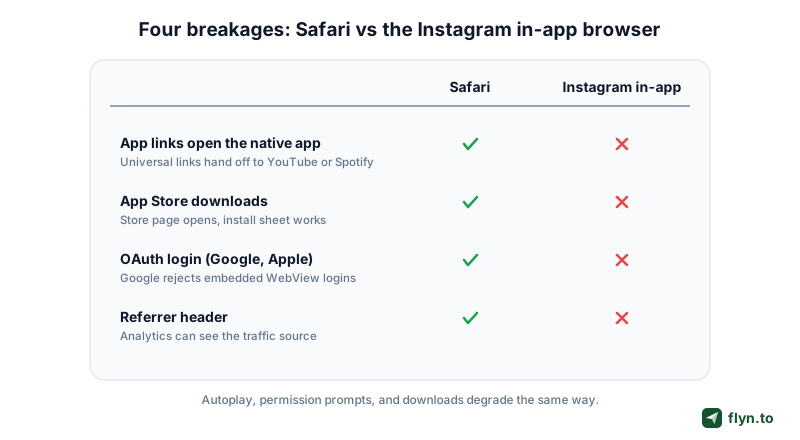
1. App handoffs never happen
On the open web, a link to a YouTube video, a Spotify playlist, or your own product triggers a universal link handoff and the native app opens. Inside Meta's iOS in-app browser, that automatic launch is blocked: the page stays in the WebView and the visitor gets the logged-out mobile web version, minus subscriptions, follows, and in-app checkout. The mechanics are covered in how deep links open native apps, and you can probe any URI with the free deep link tester.
2. App Store downloads stall
Store links are a special case of the same handoff, so install campaigns suffer the same fate: the store page half-loads or the tap does nothing. If installs are the goal, send each device to its own store with a link from the App Store link generator and assume an extra step on Instagram traffic.
3. OAuth logins get blocked
Google has refused OAuth requests from embedded WebViews since 2016, returning a disallowed_useragent error, with enforcement tightened since. Sign in with Google inside the Instagram browser is not flaky, it is blocked by policy, and any funnel that opens with a social login quietly bleeds here.
4. The referrer disappears
The quietest breakage: the in-app browser routinely strips the Referer header, so your analytics cannot tell the visit came from Instagram at all. More on that next.
| Behavior | Safari on iOS | Instagram in-app browser |
|---|---|---|
| App links open the native app | Yes, universal links hand off | No, the page stays in the WebView |
| App Store downloads | Store page and install sheet work | Unreliable, often a dead tap |
| OAuth login (Google) | Works normally | Google blocks WebView OAuth by policy |
| Referrer header | Sent normally | Usually stripped, traffic reads as Direct |
| Autoplay and permissions | Standard prompts | Restricted, camera and mic prompts often fail |
 Tap to enlarge
The Referrer Hole: Instagram Traffic That Reads as Direct
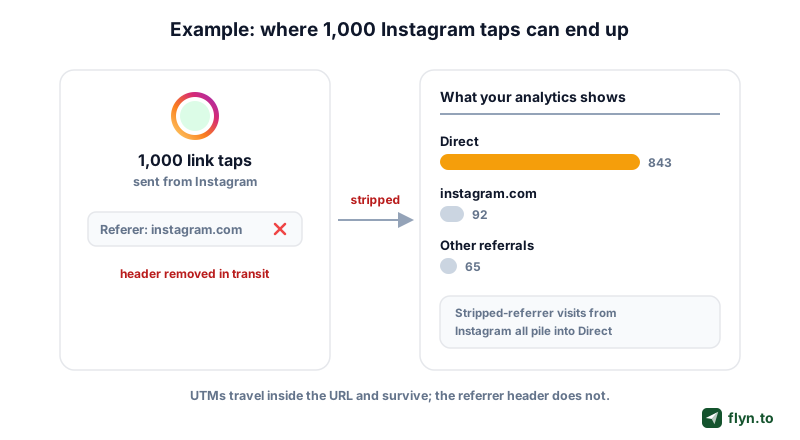
Marketers usually discover the in-app browser through their analytics, not their links. The pattern: a Story goes out, taps spike in your click analytics, and Google Analytics shows a surge of Direct mobile traffic. The visits are real. The label is wrong.
What it looks like in your reports
When the Referer header is stripped, GA4 has nothing to attribute, so the session lands in Direct or Unassigned. Multiply by every Story, bio tap, and DM: Instagram looks like it sends almost nothing while quietly being your biggest social source.
 Tap to enlarge
Patch it with UTMs and a short link
UTM parameters survive because they travel inside the URL itself, out of reach of header stripping. Tag the destination with the UTM builder (utm_source=instagram at minimum), then wrap it in a short link, and you get two independent readings: the short link counts every tap server-side before the WebView can lose anything, and the UTMs relabel whatever reaches your site. The full paid-traffic version of this setup lives in Instagram ad link tracking, and the generic method in how to track clicks on a link.
Bypass Folklore: x-safari-https and instagram://extbrowser
Now the section most people searched for: the schemes that supposedly force links out of the in-app browser, sold as a feature by a whole cottage industry. Here is the honest history.
A short history of the cat and mouse
- x-safari-https:// An undocumented iOS scheme that opened a URL directly in Safari. For a glorious stretch, redirecting to
x-safari-https://yourstore.compopped your page open in Safari. It no longer reliably does. - instagram://extbrowser An internal Instagram scheme, sometimes passed a
?url=target, that asked the app itself to reopen a page in the device browser. Undocumented, never guaranteed, and widely reported as a no-op on current builds. - intent:// URLs Android intent syntax can still launch apps from some WebViews, but behavior varies by app version, and Meta narrows it constantly.
Each trick spread, and each stopped working. Neither the x-safari-https scheme nor the extbrowser jump reliably opens the system browser today, and every replacement hack lives on borrowed time: a bypass depends on undocumented behavior inside an app whose owner profits from the WebView and ships updates weekly. That is exactly why Flyn's escape page ships no bypass button, only the menu path that always works.
The honest state of play
Meta's iOS in-app browser blocks automatic app launches, and no service reliably bypasses it. Not Flyn, not anyone. A vendor can demo a redirect that works today and dies silently next month, and you will not find out until your conversion rate does. What works durably is the unglamorous pair this post keeps returning to: detect the environment, then guide the escape.
A guaranteed silent bypass of the Instagram in-app browser is a patched exploit with a subscription fee. Detection plus a guided escape is the fix that survives app updates.
Bypass redirects are not just fragile, they are dangerous. Rapid hops through odd URL schemes look like cloaking to Meta and to Google Safe Browsing, and a flagged domain loses every click, the failure mode we dissect in Instagram link blocked as unsafe. No recovered app handoff is worth a red warning interstitial.
Test Your Browser Right Now
Reading about detection is one thing. Watching it run is better. The widget below is our free in-app browser detector running live on this page: it reads your user agent string and tells you whether you are in a real browser or inside an app WebView, and which app is wrapping you. To see the raw string your browser sends, and why Safari on an iPad usually sends the same one as a Mac, try the What Is My User Agent tool and our guide to iPad Safari user agents.
Two ways to use it
- Right now: if you opened this article from Instagram, Facebook, or TikTok, the verdict below should name the app that has you.
- As a support tool: send the detector link to a confused customer and ask what it says.
The detector is free, no account needed. Notice what it does not promise: an automatic breakout, because nothing reliably delivers one. It gives you certainty about the environment, stage one of the real fix.
Scan to run this test on your phone
Useful for support teams: when a user reports a broken link, ask for the string on whatismybrowser.com or from your logs, paste it here, and see exactly which in-app browser they were stuck in.
The Escape Guide for Every Major App
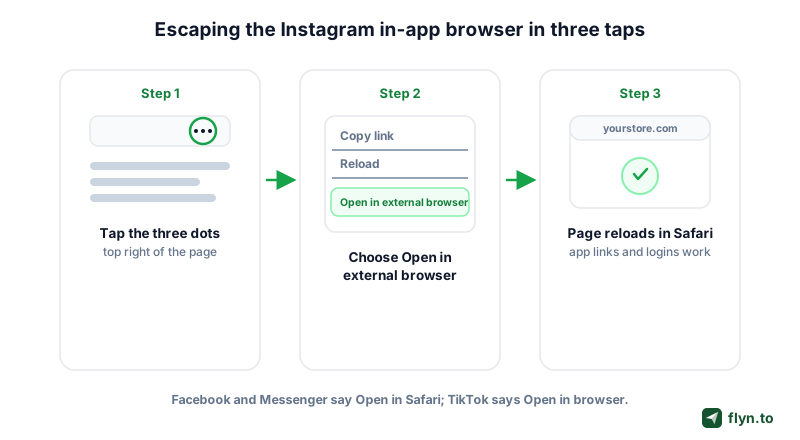
Every major in-app browser ships a hidden exit. The pattern, find the menu, then the open-in-browser row, has survived every redesign. Current as of August 2026:
- Tap the three dots in the top-right corner of the in-app browser.
- Choose Open in external browser.
- The page reloads in Safari on iOS or your default browser on Android, with app links, downloads, and logins working again.
Facebook and Messenger
- Tap the three dots in the corner of the browser view.
- Choose Open in Safari on iOS, or Open in external browser on Android.
Facebook link posts have reach quirks stacked on top of the browser problem; the Facebook link shortener guide covers those.
TikTok
- Tap the three dots (bottom-right on some versions).
- Choose Open in browser.
TikTok bio traffic behaves much like Instagram traffic; see the TikTok link shortener for the platform specifics.
When the menu is missing
Some ad placements and Story surfaces hide the menu. The fallback that always works: copy the link and paste it into a real browser. Slow, but unblockable.
 Tap to enlarge
Put the escape instruction on the page itself, one line, above the fold: In Instagram? Tap the three dots, then Open in external browser. Visitors who see the instruction at the moment the problem is happening actually follow it. A help article they find later converts nobody.
Builder Fixes: Detect, Design Tap-First, Deep Link
You cannot patch Instagram, but you control your page and your link. The durable fix has three layers, and the first two are free.
Detect the in-app browser from the user agent
Every major in-app browser announces itself in the user agent string. Instagram appends an Instagram token with the app version. Facebook and Messenger add FBAN or FBAV on iOS and FB_IAB on Android. TikTok carries musical_ly or BytedanceWebview, LINE adds Line/, and Snapchat writes Snapchat. A first-pass check is one regex: /(Instagram|FBAN|FBAV|FB_IAB|musical_ly|Snapchat)/i. That is the core of our in-app browser detector, plus two shape checks for the quieter cases: an Android ; wv) marker, and an iPhone user agent missing its Safari/ token.
Design tap-first pages
- Show a detection banner naming the app and its exact exit steps, only when an in-app browser is detected.
- Make the primary action an explicit tap on a big button; explicit taps get further than automatic launches.
- Defer OAuth: never make a social login the landing action for social traffic.
- Skip autoplay and permission prompts, which fail silently in the WebView.
Let the link do the heavy lifting
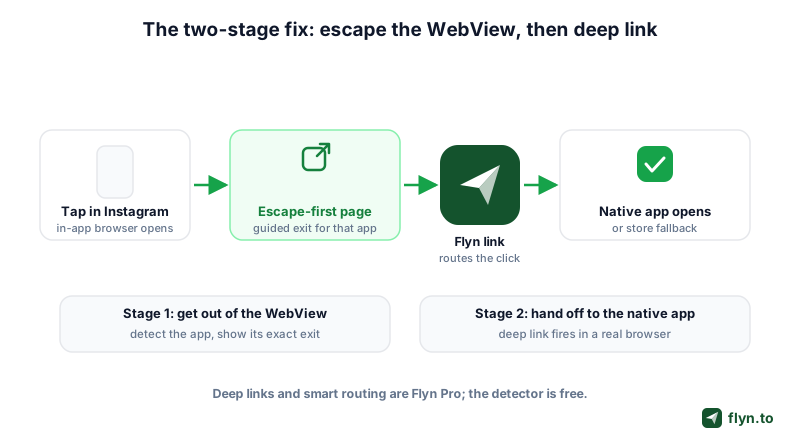
This exact flow is productized in Flyn deep links, a Pro feature: one short link that routes into the native app across 18 platforms, with a device-aware web fallback. When the click comes from an iOS in-app browser (Instagram, Facebook, Messenger, TikTok, Snapchat, LINE, or LinkedIn), where an automatic launch is impossible, the link serves an escape-first page instead: it names the app, shows that exact exit path, and completes the app handoff the moment the visitor lands in a real browser. On Android the intent handoff still runs as normal. Add smart routing (also Pro) to split iOS, Android, Windows and Mac destinations, the pattern explored in one link, different destinations by device. Prototype free with the deep link generator, verify with the deep link tester, and read the API surface in the deep links docs. Pro is $9 a month billed annually, or $12 monthly, on the pricing page; the detector stays free either way. Create a free account and you will at least measure the problem honestly.
 Tap to enlarge
Frequently Asked Questions
Why do links not work properly in Instagram?
How do I open an Instagram link in Safari or Chrome instead?
Can a link automatically bypass the Instagram in-app browser?
How can I tell if I am inside an in-app browser?
Why does my Instagram traffic show up as Direct in Google Analytics?
Do deep links work inside the Instagram in-app browser?
Do Facebook, Messenger, and TikTok have the same problem as Instagram?
Free tools for this
Three Flyn tools that pair well with the strategy in this article, all free, no signup needed.
UTM Builder
Build campaign-tracked URLs in seconds.
Broken Link Checker
Scan any page for dead links and 404s.
Open Graph Checker
Preview how URLs unfurl on social.
Keep reading
Three related deep-dives from the Flyn blog.
Postback URL Tracking: How S2S Conversion Tracking Works
17 min read
The Anatomy of a URL: Every Part Explained in Detail
15 min read

301 vs 302 Redirect: When to Use Each
14 min read
Ready to try Flyn?
Free plan includes 25 links/month, full analytics, and access to all 30+ free tools above. No credit card required.
Already a member? Log in
Karan Bhakuni is the founder of Flyn. He writes about branded links, click analytics, and the link-management tooling growth teams and creators actually need, drawn from building Flyn and reading a lot of user feedback.
Find these guides useful? Add Flyn as a preferred source so more of them show up in your Google results.