Free In-App Browser Detector
Am I in an in-app browser? Find out instantly whether this page opened in Instagram, Facebook, TikTok, or another in-app browser, or paste a user agent to check it for in-app browser markers. Get the verdict plus honest escape steps.
Want to see what your browser and device report, and which smart link field they match? Use What Is My User Agent.
Scan to run this test on your phone
Useful for support teams: when a user reports a broken link, ask for the string on whatismybrowser.com or from your logs, paste it here, and see exactly which in-app browser they were stuck in.
Sharing links into Instagram and TikTok?
Create Flyn short links that count every click for free, with device, country, and referrer breakdowns on Pro. Deep links on Pro detect in-app browsers and show the visitor that app's exact way out.
How to Detect an In-App Browser in 3 Steps
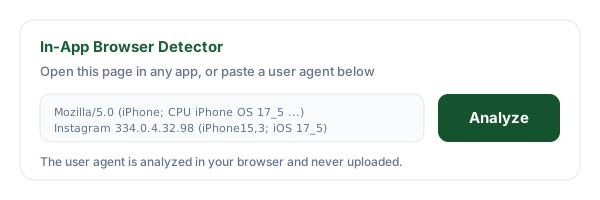
Open the page or paste a user agent
Visit this page from the app you want to test (paste the link into a DM to yourself, then tap it), or paste a user-reported user agent string into the analyzer for a support workflow.
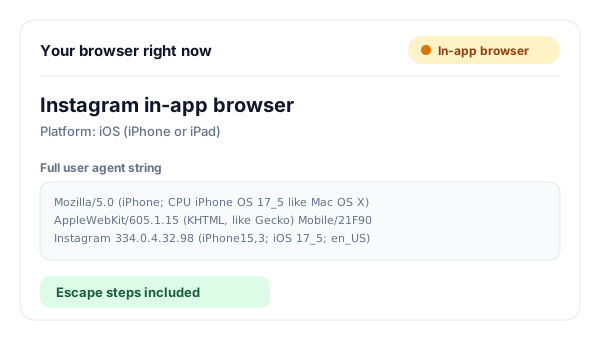
Read the verdict
The detector names the exact in-app browser (Instagram, Facebook, Messenger, TikTok, Snapchat, Pinterest, LINE, LinkedIn), catches generic Android WebViews and iOS embedded views, or confirms a regular browser like Safari or Chrome.
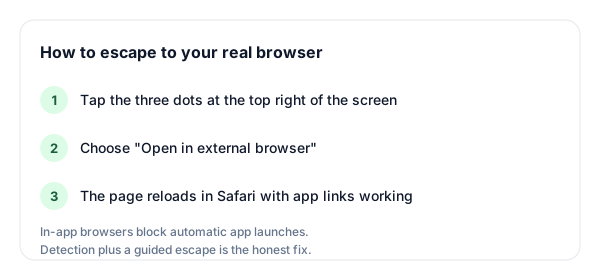
Follow the escape steps
When an in-app browser is detected, the tool shows that app's exact menu path to reopen the page in Safari or Chrome, where app links, OAuth logins, and downloads work again.
What Is an In-App Browser?
An in-app browser is a web view embedded inside a mobile app. When you tap a link in Instagram, Facebook, TikTok, or Snapchat, the page does not open in Safari or Chrome: it opens inside the app, in a rendering component the app fully controls (WKWebView on iOS, WebView or a Custom Tab on Android). It looks close enough to a real browser that most people never notice, right up until something they need, an app link, a login, a download, silently fails.
The differences are structural, not cosmetic. An in-app browser has its own cookie jar, so you are logged out of everything. It has no extensions, no password manager integration on many platforms, and the host app decides which web APIs the page may use. Meta's iOS in-app browser goes furthest: it blocks JavaScript from launching other apps at all, which is why so many links shared on Instagram appear broken when the destination expects to open a native app.
Why Platforms Keep You Inside Their Browser
The first reason is engagement. Every second you spend in Safari is a second you are not scrolling the feed, and a user who leaves the app may not come back this session. The in-app browser keeps the feed one swipe away, which measurably protects session length, the metric social platforms optimize hardest.
The second reason is data and ad attribution. Inside its own browser, the platform can observe how you interact with the pages its ads and links send you to, keeping its conversion loop intact without depending on another browser's privacy rules. None of this is accidental: the in-app browser is a product decision that trades your convenience for the platform's metrics, which is exactly why the escape hatch is always a small menu and never a big button.
What Breaks Inside an In-App Browser
The five failures behind most "your link is broken" reports, and what the user actually experiences.
| What breaks | Why it breaks | What the user sees |
|---|---|---|
| App links (deep links) | The WebView blocks JavaScript from launching other apps; on iOS, Meta blocks even tap-triggered scheme handoffs in many cases. | Tapping "Open in Spotify" or a YouTube link does nothing, or the page just sits on a spinner. |
| OAuth logins | Google returns a disallowed_useragent error for embedded web views because the host app could read the login form. | "Sign in with Google" shows error 403: disallowed_useragent; other providers fail silently. |
| File downloads | In-app browsers have no download manager and no access to the system one, especially on iOS. | PDFs, images, and APK files fail without any error message. |
| Referrer headers | Many WebViews strip or rewrite the Referer header, and traffic exits the app without normal navigation context. | Analytics report the visit as "direct" traffic, so the real source app gets no credit. |
| Cookies and sessions | Each app's WebView has its own cookie jar, fully separate from Safari or Chrome. | Users are mysteriously logged out of sites they use every day, and carts or preferences are empty. |
How to Escape Each App's In-App Browser
Every major app hides an exit. Here is where each one keeps it.
Tap the three dots at the top right, then choose "Open in external browser".
Tap the three dots menu, then choose "Open in Safari" (iOS) or "Open in browser" (Android).
Messenger
Tap the three dots menu, then choose "Open in Safari" (iOS) or "Open in browser" (Android).
TikTok
Tap the three dots menu, then choose "Open in browser".
Snapchat
Tap the three dots menu, then choose "Open in Safari" (iOS) or your default browser on Android.
Tap the three dots menu, then choose "Open in Safari" (iOS) or "Open in browser" (Android).
Look for the menu or export icon in the corner of the browser view, then choose the open-in-browser option, or copy the link and paste it into your browser.
LINE
Tap the menu in the corner of the browser view, then choose "Open in Safari" (iOS) or "Open in other app" (Android).
Any other app
Find the menu (usually three dots), pick "Open in browser" or "Open in Safari". No menu? Copy the link address and paste it into your real browser.
Why "Bypass the In-App Browser" Claims Fail
Search for this problem and you will find services promising to break your links out of Instagram automatically. Here is the honest version: Meta's iOS in-app browser blocks automatic app launches, and no service reliably bypasses it. Every trick so far has followed the same life cycle. The x-safari-https scheme forced a handoff to Safari until Instagram blocked it. Redirect chains through ftp or blob URLs, intent workarounds, and dialer-scheme hacks each worked for weeks or months, spread across marketing forums, and were patched. The platform controls the WebView; whoever controls the WebView wins the cat and mouse game.
What actually works is detection plus a guided escape. Detect the in-app browser server-side (the way this tool does client-side), then show the visitor a purpose-built page: one clear tap to attempt the app on platforms where that still works (Android intent URLs usually launch it), and honest instructions for the three dots menu where it does not. That converts a silent failure into a two-second detour. It is exactly what Flyn's deep links do on Pro, and it outperforms any "bypass" because it never breaks when the platforms patch the next trick. The long version, including what breaks inside the in-app browser and how to read the user agent yourself, is in Instagram in-app browser: why links break and the fix.
Detect Here, Fix It on Your Links with Flyn
The detector diagnoses one visit. Flyn short links apply the fix to every click you ever share into a social app.
Deep links with escape pages
On Pro, deep-link-enabled links check the user agent on each mobile click: Android usually gets the app launch, iOS inside a social browser gets a guided escape page instead of a blank screen.
Click analytics
Count every click free. On Pro, see device, country, and referrer breakdowns to spot how much of your traffic arrives through in-app browsers.
Smart routing
Route clicks by device or country on Pro, so iOS, Android, and desktop visitors each land where the link actually works for them.
Sub-50ms redirects
Detection happens during the redirect itself, so an in-app visitor gets the escape page instead of a dead end, and every other click redirects as usual.
Deep links and smart routing are Pro features. See how Flyn deep links work
Frequently Asked Questions
What is an in-app browser?
Why do links open blank or broken in Instagram?
How do I open a link in Safari from Instagram?
How do I escape the Facebook or Messenger in-app browser?
How do I open links in my real browser from TikTok?
Why do apps force links through their own browsers?
Does the x-safari-https:// trick still work to escape Instagram?
What breaks inside in-app browsers?
Can I detect an in-app browser from the user agent alone?
Is this a WebView detector or a user agent checker?
Why does Google block logins inside in-app browsers?
How do Flyn deep links handle in-app browsers?
Is this in-app browser detector free?
More Free Link Tools
Explore more free tools from Flyn for diagnosing and building better links.
Deep Link Tester
Validate a domain's iOS Universal Links and Android App Links files.
Link Inspector
See where any short link really goes before you click it.
What Is My User Agent
See what your browser and device report, and which smart link field they match.
Deep Link Generator
Build app scheme and web fallback links for six apps, or any custom scheme.
Stop losing clicks to in-app browsers
Diagnose the problem here, then share Flyn short links that handle it for you: free click counts and QR codes, with deep links, smart routing, and analytics breakdowns on Pro.