Free URL to Domain Extractor
Paste a URL list or any text and get the root domain or hostname of every link, counted and sorted. Built on the Public Suffix List, so bbc.co.uk and jane.github.io come out right.
Runs in your browser, nothing is uploaded. Press Ctrl + Enter (Cmd + Enter on Mac) to extract.
Output
Sort
Know the domains. Now measure the links you share.
Flyn short links count every click on the free plan, and Pro breaks each click down by country, device, and referrer. Every link you share becomes a data point you own.
How to Extract Domains from URLs in 3 Steps
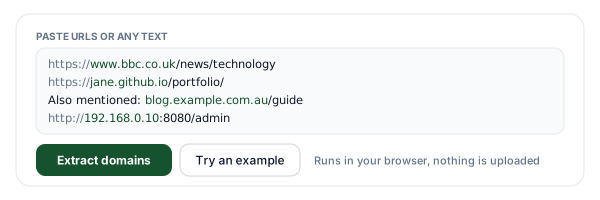
Paste URLs or text
Paste a URL list, a backlink export, an email, or HTML. Every http and https link is found, plus bare domains like example.com/page, and all of it runs in your browser.
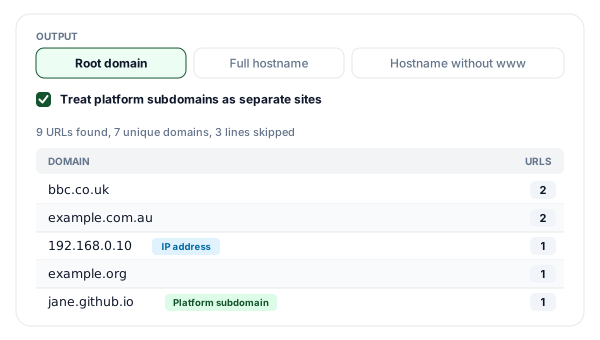
Pick the output and review
Choose root domain, full hostname, or hostname without www. Each result shows how many URLs it covers, with IP addresses, local hosts, and platform subdomains labeled.
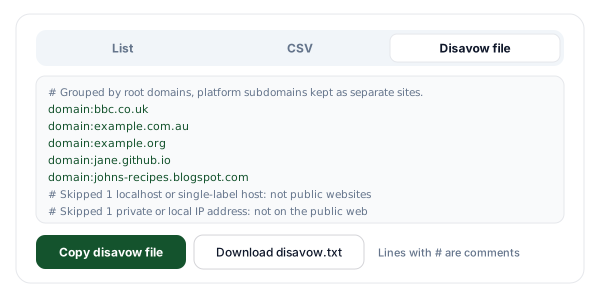
Copy or download
Copy the plain list, download a CSV with domain, count, and an example URL, or build a disavow file with one domain: line per public site.
URL vs Hostname vs Root Domain
"The domain" of a link can mean three different things, and most mix-ups come from switching between them without noticing. Here is how the same pieces break down for a few real-world shapes.
| URL | Hostname | Root domain | Public suffix |
|---|---|---|---|
| https://www.bbc.co.uk/news?page=2 | www.bbc.co.uk | bbc.co.uk | co.uk |
| https://shop.example.com.au/cart | shop.example.com.au | example.com.au | com.au |
| https://jane.github.io/blog | jane.github.io | jane.github.io (github.io with the platform option off) | github.io (io with it off) |
| https://www.example.com:8080/a#top | www.example.com | example.com | com |
| http://192.168.0.10/admin | 192.168.0.10 | none (IP address) | none |
The URL is the whole address: the scheme (https), the host, an optional port (:8080), the path, the query string (?page=2), and the fragment (#top). The hostname is only the host. It never includes the port, and because DNS names are case-insensitive, the tool lowercases it.
The root domain, also called the registrable domain or eTLD+1, is the public suffix plus one more label. It is the level at which a name is registered, which makes it the natural unit for counting how many different sites link to you, or for grouping a messy link list by owner. An IP address has no suffix, so it has no root domain at all.
What Is the Public Suffix List, and Why "Last Two Labels" Breaks
The Public Suffix List is a list of the endings under which anyone can register a name of their own. It is an initiative of Mozilla, maintained as a community resource. It covers plain top-level domains like com and de, second-level registrations like co.uk, com.au, and co.jp, and a separate private section for platforms that give users their own subdomains, such as github.io, blogspot.com, and myshopify.com.
Browsers rely on it to decide which parts of a name belong to one site: it stops a page from setting a "supercookie" for a whole suffix like co.uk, it decides which part of a domain name to highlight in the interface, and it sorts history entries by site. A domain extractor needs the same answer.
| Hostname | Last two labels | With the Public Suffix List |
|---|---|---|
| www.bbc.co.uk | co.uk (wrong) | bbc.co.uk |
| shop.example.com.au | com.au (wrong) | example.com.au |
| city.example.co.jp | co.jp (wrong) | example.co.jp |
| jane.github.io | github.io (wrong) | jane.github.io |
| blog.example.com | example.com | example.com |
The shortcut is only right when the suffix is a single label, like com. The list also changes as new entries are added, so this tool uses the copy bundled with the open source tldts library; a suffix added very recently may not be recognized until that copy is updated. Hosts whose ending is not on the list at all (an internal name like example.local, for instance) are still extracted when written as a full http(s) URL, and labeled so you can spot them.
How to Extract a Domain from a URL in Google Sheets and Excel
If your URLs already live in a spreadsheet, a formula will get you the hostname. Put the URLs in column A starting at A2, enter each formula in the cell named before it, and fill it down.
Google Sheets
B2  Hostname:         =LOWER(REGEXEXTRACT(A2,"^(?:[A-Za-z][A-Za-z0-9+.-]*://)?([^/?#:]+)"))
C2  Without www:      =REGEXREPLACE(B2,"^www\.","")
D2  Last two labels:  =IFERROR(REGEXEXTRACT(B2,"[^.]+\.[^.]+$"),B2)
Excel (2007 and later)
B2  Strip the scheme: =MID(A2,IFERROR(FIND("://",A2)+3,1),2048)
C2  Hostname:         =LOWER(LEFT(B2,MIN(FIND({"/","?","#",":"},B2&"/?#:"))-1))
D2  Last two labels:  =IF(LEN(C2)-LEN(SUBSTITUTE(C2,".",""))<2,C2,MID(C2,FIND("|",SUBSTITUTE(C2,".","|",LEN(C2)-LEN(SUBSTITUTE(C2,".",""))-1))+1,255))
Where formulas stop
The hostname formulas are dependable for ordinary http and https URLs (they do not handle a user:password@ prefix). The "last two labels" formulas are as far as a formula can go: they return co.uk for www.bbc.co.uk and com.au for shop.example.com.au, because knowing that co.uk is a suffix takes the Public Suffix List. For a root domain column you can trust, paste the URLs into the tool above, turn off Remove duplicates, and copy the line-by-line output back next to your URLs. If your spreadsheet separates arguments with semicolons (common in European locales), swap the commas between arguments for semicolons.
Extract a Domain from a URL in JavaScript and Python
Both languages parse the hostname out of the box. The root domain needs a library that ships the Public Suffix List, which is where most hand-rolled code goes wrong.
JavaScript (browser or Node.js)
// Hostname: the URL parser built into browsers and Node.js
new URL('https://www.bbc.co.uk/news').hostname;  // 'www.bbc.co.uk'

// Root domain: needs the Public Suffix List (npm install tldts)
import { getDomain } from 'tldts';
getDomain('https://www.bbc.co.uk/news');                                  // 'bbc.co.uk'
getDomain('https://jane.github.io/blog');                                 // 'github.io'
getDomain('https://jane.github.io/blog', { allowPrivateDomains: true });  // 'jane.github.io'
new URL() throws on a bare domain like example.com/page, so add https:// first. tldts leaves platform suffixes out unless you pass allowPrivateDomains, which is what this tool's platform option switches.
Python
from urllib.parse import urlsplit
urlsplit('https://www.bbc.co.uk/news').hostname   # 'www.bbc.co.uk'
urlsplit('www.bbc.co.uk/news').hostname           # None: add the scheme first

import tldextract  # pip install tldextract
ext = tldextract.extract('https://www.bbc.co.uk/news')
f'{ext.domain}.{ext.suffix}'                      # 'bbc.co.uk'

private = tldextract.TLDExtract(include_psl_private_domains=True)
p = private('https://jane.github.io/blog')
f'{p.domain}.{p.suffix}'                          # 'jane.github.io'
By default tldextract fetches the latest Public Suffix List on first use and caches it. For an IP address the suffix comes back empty, so check ext.suffix before joining the parts.
Turning a Backlink List into a Disavow File
Read this first
Google says that in most cases it can work out which links to trust on its own, so most sites will never need the disavow tool. It is meant for sites with a considerable number of spammy, artificial, or low-quality links that have caused a manual action, or are likely to. Even then, Google's first recommendation is to remove as many of those links at the source as you can. Details are in Google's disavow documentation.
If you are in that situation, the slow part is turning thousands of linking URLs into one line per site. That is the part this tool automates:
- 1Export the linking pages from the Links report in Search Console or from your backlink tool.
- 2Paste them above, keep the output on Root domain, and leave platform subdomains separate, so one bad blogspot.com blog does not take every Blogger site linking to you with it.
- 3Open the Disavow file tab and delete every line for a site you still want links from. Links on public IP addresses are listed as individual URLs, while localhost and private or loopback IPs are left out.
- 4Download disavow.txt and upload it with the disavow links tool in Search Console, for each URL-prefix property you need it on. The tool does not support Domain properties.
Google's disavow file format
- One entry per line: a full URL to disavow a single page, or domain: followed by a domain or subdomain.
- Lines that start with # are comments, and Google ignores them.
- A plain .txt file encoded in UTF-8 or 7-bit ASCII.
- At most 100,000 lines (blank and comment lines count) and 2 MB, with each URL up to 2,048 characters.
- Uploading a new file replaces the existing list for that property, and it applies to that property and its child properties only.
- It works on URL-prefix properties only: the disavow links tool does not support Domain properties.
Clean Domain Lists, Then Links You Can Measure
The extractor tells you which sites a list of links points to. Flyn short links tell you what happens when people click the links you share.
Every click counted
Each Flyn short link counts its clicks on the free plan. Pro breaks them down by country, device, browser, and referrer.
Bots filtered, free
See how many of your clicks came from real people and how many from bots, on every plan.
Your own domain
Pro connects up to 3 custom domains, so your short links carry your brand instead of ours.
QR codes included
Create a QR code for any short link on the free plan, so print and screen point at the same tracked link.
Frequently Asked Questions
What is the difference between a URL, a hostname, and a root domain?
How does the tool work out the root domain?
Why not just keep the last two parts of the hostname?
What does "treat platform subdomains as separate sites" change?
What happens with IP addresses and localhost?
Can I paste messy text instead of a clean list?
How do I build a disavow file with this tool?
Do I actually need a disavow file?
Can I get one result per row to paste back into a spreadsheet?
Are internationalized domain names supported?
Is my list uploaded anywhere?
How do I extract a domain from a URL in Excel or Google Sheets?
More Free Link Tools
Get the links first, then group them by domain here, or dig into a single domain further.
URL Extractor
Pull every full URL out of any text as a clean, deduped list.
Link Extractor
Extract every link from a live web page, then paste them here to count the domains.
Subdomain Finder
Discover the subdomains of a root domain from Certificate Transparency logs.
Bulk URL Opener
Open a list of links in new tabs, in batches that resume where you stopped.
Know where your links go, and how often they get clicked
Extract domains for free, then share Flyn short links: free click counts and QR codes, with analytics breakdowns and custom domains on Pro, all in one platform.