Free Tool
4.9/5

URL Extractor

Paste any text, email, or CSV and pull every URL out of it in one click. Dedupe, sort, filter by domain, then copy or export the clean list.

Got your link list? Shorten them all.

Turn the extracted URLs into branded short links with click analytics, QR codes, and editable destinations. Bulk import is built in.

Shorten for free

How to Extract URLs from Text in 3 Steps
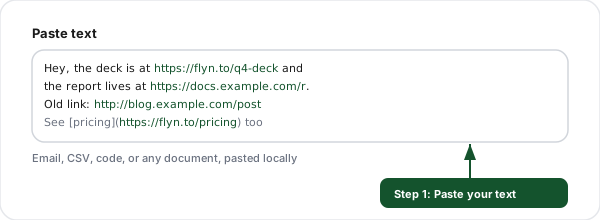
Step 1: Paste your text (URL Extractor)
1

Paste your text

Drop in any email, chat export, CSV, code, or document. It is read locally in your browser.
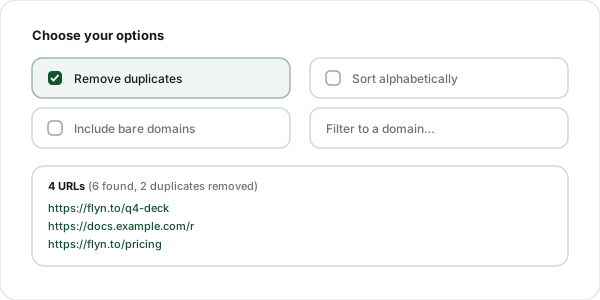
Step 2: Choose your options (URL Extractor)
2

Choose your options

Dedupe, sort alphabetically, include bare domains, or filter to a single domain.

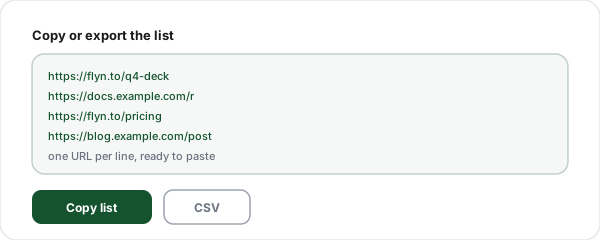
Step 3: Copy or export (URL Extractor)
3

Copy or export

Copy the clean list one URL per line, or download it as a CSV for a spreadsheet.

Why Use Our URL Extractor?

100% client-side

Extraction runs in your browser. Nothing you paste is ever uploaded.

Dedupe + count

Duplicate links collapse to one, with a total and unique counter.

Sort + filter

Keep original order or sort alphabetically, and filter to one domain.

Bare domains too

Optionally catch example.com style links, not just http addresses.

CSV + copy export

Copy one URL per line or download the whole set as a CSV.

Markdown + HTML

Pulls real URLs out of Markdown links and HTML anchor tags too.

When You Need to Extract URLs from Text

Cleaning up an exported list

A CSV export, CRM dump, or analytics report has links buried in messy columns. Paste it in and get a clean, deduped URL list ready to use.

Pulling links out of an email or newsletter

Copy the body of an email and extract every link inside it, then audit, shorten, or archive them without clicking through one by one.

Harvesting links from a document or PDF

Select all and copy from a PDF, Word doc, or slide deck, then extract the destinations in one pass instead of hunting for each hyperlink.

Cleaning Markdown or source code

Paste a Markdown file, a chat log, or a chunk of code and get back just the URLs, with the surrounding syntax stripped away.

Building a bulk-shorten or audit batch

Turn any text into a one-URL-per-line list, the exact format bulk shorteners and link checkers expect for an import.

Frequently Asked Questions

How does this tool extract URLs from text?
Paste any block of text into the input box and the tool scans it character by character for anything that looks like a web address. It recognizes full links that start with http:// or https://, protocol-relative links that start with //, and bare domains like example.com/page when you enable that option. Every match is pulled into a clean, copyable list. All of this happens in your browser, so even a huge paste is processed instantly.
How is this different from the Link Extractor?
They solve two different problems. The Link Extractor fetches a live web page and pulls the links out of its HTML, so you give it a URL. This URL Extractor works on text you already have: an email, a chat export, a CSV, a code file, a PDF you copied from, or a document. You paste the raw text and it finds every URL inside it. Use the Link Extractor for a page that is online, and use this tool for text in your clipboard.
Does it remove duplicate URLs?
Yes, deduplication is on by default. If the same URL appears five times in your text, the list shows it once. You can turn dedupe off if you need every occurrence, for example when you are counting how many times a link was mentioned. The result counter always shows both the total matches found and the unique count so you know exactly what was removed.
Can it pull URLs out of a CSV or spreadsheet column?
Yes. Copy the column or the whole sheet and paste it in. Commas, tabs, quotes, and line breaks are all treated as separators, so the URLs are extracted cleanly regardless of the surrounding spreadsheet formatting. This is a fast way to turn a messy export into a clean link list you can shorten, audit, or import elsewhere.
Will it catch bare domains without http?
Only if you enable the "include bare domains" option. By default the tool extracts links that have a real protocol (http:// or https://) because those are unambiguous. Bare domains like example.com are riskier to detect because ordinary sentences contain things that look like domains (filenames, version numbers, abbreviations). Turning the option on adds a stricter domain pattern that requires a valid top-level domain, which catches real bare domains while avoiding most false positives.
Can I sort the extracted URLs?
Yes. You can keep the original order they appeared in the text, or sort them alphabetically. Alphabetical sorting groups links from the same domain together, which makes it easy to scan, spot duplicates across paths, and review a large list. The sort is applied after deduplication so you always see a clean, ordered set.
Can I filter to just one domain?
Yes. Type a domain into the filter box (for example youtube.com) and the list narrows to only URLs on that domain. This is useful when a long email or document mixes links from many sites and you only care about one of them, such as pulling every YouTube link out of a script or every Amazon link out of an affiliate roundup.
Is my text private? Do you upload it anywhere?
Your text never leaves your browser. The extraction runs entirely in client-side JavaScript with no network request, so nothing you paste is sent to or stored on our servers. The optional history feature keeps your last few extractions in your browser localStorage only, and you can clear it at any time. You can safely paste private emails, internal documents, or client data.
How many URLs can it handle at once?
There is no fixed limit because the work happens locally on your device. You can paste a few links or tens of thousands of lines from a log file or export, and the tool extracts them in one pass. Very large pastes are capped at a sensible number of displayed results for performance, but the copy and CSV export always include the full set.
Can I export the results as a CSV?
Yes. Alongside the copy button there is a CSV export that downloads every extracted URL as a one-column file, ready to open in Excel or Google Sheets or to import into another tool. You can also copy the list as plain text, one URL per line, which is the format most bulk tools and shorteners expect.
What can I do with the extracted links next?
A clean URL list is the starting point for a lot of link work. You can bulk-shorten them into branded short links with Flyn, check whether they are still alive with the Broken Link Checker, strip tracking parameters with the URL Cleaner, or audit their rel attributes. Extracting the URLs from your text is step one; the related tools below handle what comes after.
Does it find URLs inside Markdown and HTML?
Yes. Markdown link syntax like [text](https://example.com) and HTML like <a href="https://example.com"> both contain real URLs, and the extractor pulls the address out of them just like it does from plain text. If you paste a chunk of source code or a Markdown document, you get back the clean list of destinations without the surrounding syntax.

A link list is better when every link is tracked

Extract your URLs here, then shorten them with Flyn for branded short links, real-time click analytics, QR codes, and bulk import, all in one platform.