Free WordPress Redirect Generator
Build 301/302 WordPress redirects as Redirection plugin JSON imports or PHP snippets for functions.php / mu-plugins. Pick the workflow that fits your stack.
JSON file ready to import into the free Redirection plugin (Tools → Redirection → Import). Recommended for non-coders, no PHP edits needed.
How to install
1. Install the free Redirection plugin by John Godley from the WordPress plugin directory.
2. Go to Tools → Redirection. Complete the 2-minute setup wizard if it's your first time.
3. Click the Import/Export tab. Choose Import from JSON, drop in the downloaded file, click Import.
4. Verify rules under Redirects, then test one in an incognito window to confirm.
Need redirects you can edit later without WP-admin?
Point your high-value old URLs at Flyn short links, edit the destination anytime from anywhere, no PHP, no plugin update, no deploy. Track every click by location, device, and referrer. Moving a whole site? Bulk-import your entire redirect map with Flyn's CSV import instead of adding rules one at a time.
How to Create WordPress Redirects in 3 Steps
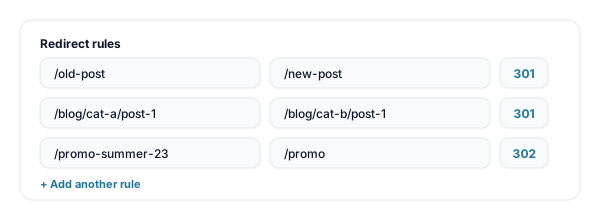
Enter your old and new URLs
Add rows of source path (old URL) and destination (new URL or external link). Pick 301, 302, or 307 per rule. Add as many rules as you need.
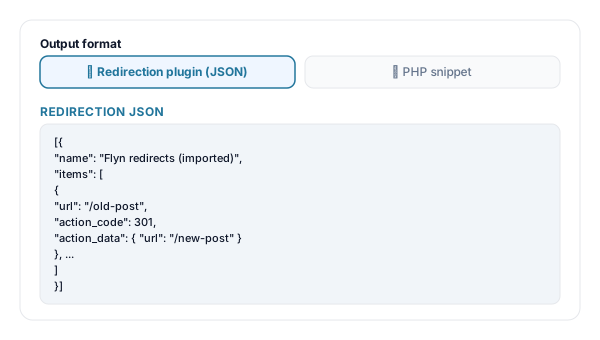
Pick your output format
Toggle between Redirection plugin JSON (easy import, no-code) and PHP snippet for functions.php / mu-plugins (version control, no plugin needed).
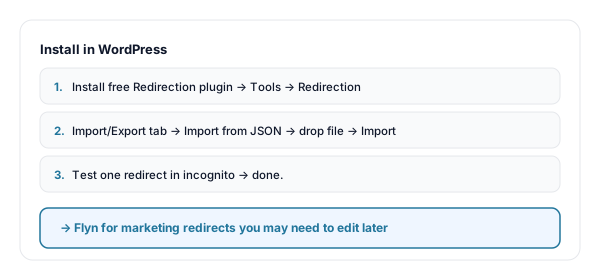
Install and test
For the plugin: download .json, import via Tools → Redirection → Import/Export. For PHP: paste into wp-content/mu-plugins/flyn-redirects.php. Test in incognito.
WordPress Redirects: Plugin vs PHP vs .htaccess
WordPress has three common ways to set up redirects, each with trade-offs:
- Redirection plugin (recommended for most): a free, well-maintained WP plugin (10M+ active installs). Manage rules from wp-admin, see hit logs, monitor 404s. The JSON output above imports directly. Best for non-developers and most teams.
- PHP snippet (template_redirect): add a wp_safe_redirect call to functions.php or wp-content/mu-plugins. Lives in your repo, version-controlled, no plugin to keep updated. Best for agencies and developer-managed sites.
- .htaccess (Apache only): server-level redirects fire before WordPress loads, fastest. But only works on Apache; managed WP hosts often use NGINX. Use our HTAccess Redirect Generator for those.
When to Add a Redirect
The single most common WordPress SEO mistake is leaving 404s on URLs that had backlinks or rankings. Use redirects whenever:
| Situation | Why it matters |
|---|---|
| Renamed a post or page slug | WordPress changes the URL, old backlinks now 404 unless you redirect. Add /old-slug → /new-slug. |
| Restructured your category hierarchy | Moving /blog/category-a/post to /blog/category-b/post means every old child URL needs a redirect. |
| Deleted a post or merged duplicate content | Send the deleted URL to the closest replacement, not the homepage, Google treats homepage-redirects as soft 404s. |
| HTTPS migration | Force every http:// URL to its https:// equivalent, usually a server-level rule, but PHP fallback works for legacy hosts. |
| WWW / non-WWW canonicalization | Decide on one (recommended: non-www) and 301 the other to it, site-wide via plugin or a regex rule. |
| Migrating from another platform to WordPress | Map every old Squarespace / Webflow / Shopify URL to its WordPress equivalent BEFORE you launch. |
Pro tip
Before any migration, pull the list of pages with backlinks from Search Console → Performance → Pages (or Ahrefs / Semrush). Every URL that has clicks or impressions needs a redirect, losing those is losing real traffic. And when you build those rules, default to 301s; the 301 vs 302 guide explains the rare cases where a 302 is right.
WordPress Redirect Best Practices
Do
Don't
Use 301 (Permanent) for renamed/moved content
Use 302. It does not transfer SEO equity reliably
Redirect old URL → closest replacement
Redirect everything to the homepage (soft 404 risk)
Keep redirects in mu-plugins for version control
Paste into parent theme functions.php (lost on update)
Audit existing 404s in Search Console first
Migrate blindly and lose ranking on backlinked URLs
Test every important redirect in incognito
Trust the WP cache to show fresh behavior
Use Flyn for redirects you may need to edit later
Hardcode marketing-campaign destinations
Edit Redirects Without Touching wp-admin
Edit destinations on the fly
Point a Flyn link at any new destination from anywhere, no PHP edit, no plugin update, no WP login required.
Real per-link analytics
See clicks by country, device, referrer, hour. The Redirection plugin only logs hits, Flyn shows you where from and on what device.
Branded short URLs
go.yourbrand.com/launch instead of /lp-2026-spring. Cleaner in emails, printable on flyers, memorable in ads.
Stop hardcoding marketing URLs
Use Flyn for campaign destinations, keep WP redirects for the structural site moves, where they belong.
Frequently Asked Questions
What does this WordPress redirect generator output?
Why not just edit my .htaccess file?
Which method is better, Redirection plugin or PHP snippet?
Should I use 301 or 302 for moved WordPress posts?
How do I avoid redirect chains when restructuring permalinks?
Will redirects work for posts that no longer exist?
Can I redirect an entire old category or tag to a new one?
Will these redirects survive a theme update?
How do I handle WordPress trailing-slash differences?
Do these redirects affect SEO ranking?
How many redirects can WordPress handle?
Can I track which old URLs are still getting hit?
More Free Redirect & SEO Tools
Cover every redirect format and audit every step of the migration. New to this? Read the website migration redirect checklist.
HTAccess Redirect Generator
Server-level Apache .htaccess redirect rules, fastest path for traditional LAMP hosting.
NGINX Redirect Generator
nginx server-block redirect config, return 301, HTTPS, www/non-www, pretty URLs.
Redirect Checker
Trace full redirect chains, detect loops, verify 301 vs 302, confirm every redirect actually works.
Broken Link Checker
After your migration, scan for any 404s your redirect map missed.
Stop losing traffic on old URLs
WordPress redirects keep your backlinks and rankings intact during migrations. Flyn keeps your marketing URLs editable forever, with per-click analytics on every campaign.