Mailchimp Link Tracking with Branded, Editable Short Links
Mailchimp tells you who clicked inside one campaign. Flyn short links add the other half: branded links you can edit after sending, a 30-day click history (unlimited on Pro), and one view of the same link across email, social, and print.
- Free plan, no card required
- Set up in minutes
- GDPR-ready analytics
- No ad interstitials
- Cancel anytime
Mailchimp link tracking tells you who clicked inside a single campaign, so why add a link shortener on top? Because campaign reports are a snapshot: the data lives inside one campaign, the tracking wrapper uses a generic list-manage domain, and once an email is sent, a wrong URL stays wrong forever. Putting a Flyn short link in your campaign fixes all three. You get a branded link that carries your name instead of a tracking domain, a destination you can change even after the send button is pressed, and a click record that keeps accumulating for as long as the link lives, from this campaign, the next one, and everywhere else you paste it. Setup takes about two minutes and works on every Mailchimp plan, including the free tier.
Setup
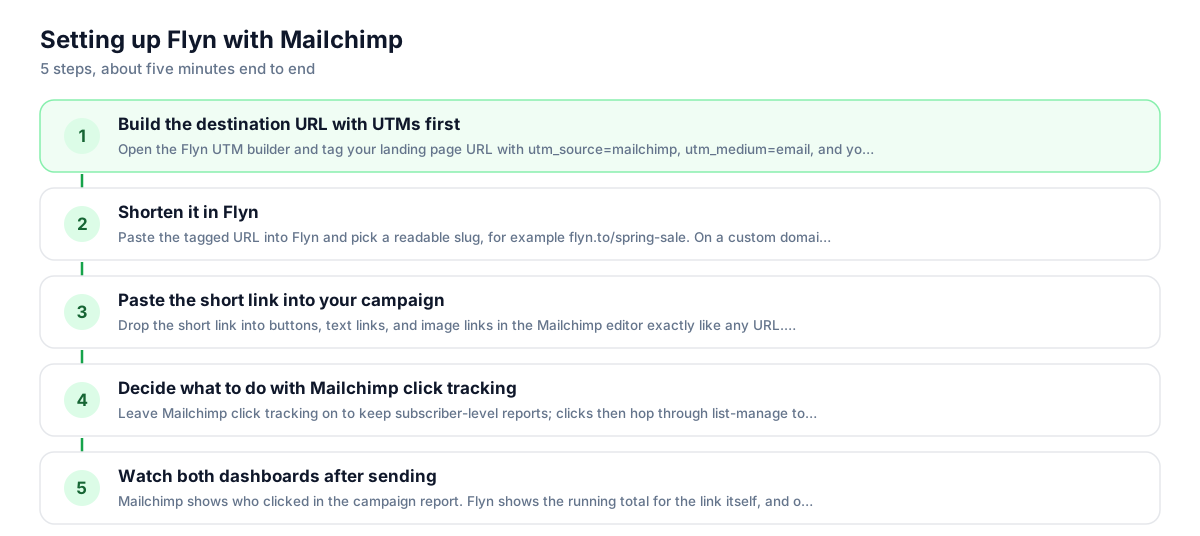
Use Flyn with Mailchimp in 5 steps
- 1
Build the destination URL with UTMs first
Open the Flyn UTM builder and tag your landing page URL with utm_source=mailchimp, utm_medium=email, and your campaign name. Bake the tags into the destination before shortening; that is the most reliable setup, and the destination value wins if the same parameter is also appended to the short link.
- 2
Shorten it in Flyn
Paste the tagged URL into Flyn and pick a readable slug, for example flyn.to/spring-sale. On a custom domain it becomes links.yourbrand.com/spring-sale. Your first links work without an account; sign up free to keep them editable.
- 3
Paste the short link into your campaign
Drop the short link into buttons, text links, and image links in the Mailchimp editor exactly like any URL. It behaves like a normal link in previews and test sends.
- 4
Decide what to do with Mailchimp click tracking
Leave Mailchimp click tracking on to keep subscriber-level reports; clicks then hop through list-manage to Flyn to your page, which adds a few milliseconds. Turn it off in campaign settings if you prefer a single clean hop and only need aggregate numbers.
- 5
Watch both dashboards after sending
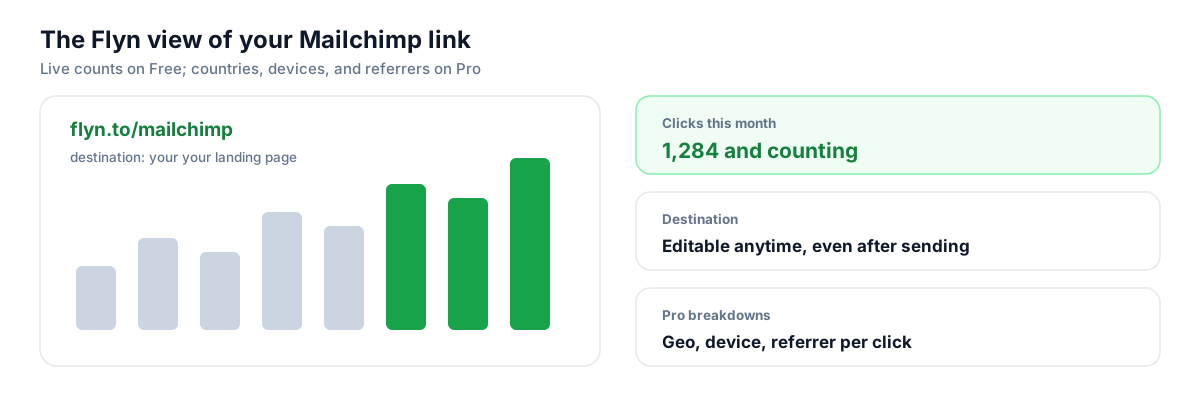
Mailchimp shows who clicked in the campaign report. Flyn shows the running total for the link itself, and on Pro the countries, devices, and referrers behind it, including clicks from people who forwarded the email.
UTM recipe
The UTM convention for Mailchimp
Tag the destination URL before you shorten it, so every click lands in your analytics tool already labeled. A consistent convention beats a clever one; use these values for every Mailchimp send and your reports stay comparable across months.
| Parameter | Value | Why |
|---|---|---|
| utm_source | mailchimp | The platform that carried the click |
| utm_medium | Keep this constant for all email traffic | |
| utm_campaign | spring-sale | One name per campaign, kebab-case, no dates needed |
| utm_content | header-button | Optional: tell the header button from the footer text link |
https://yourstore.com/sale?utm_source=mailchimp&utm_medium=email&utm_campaign=spring-sale&utm_content=header-button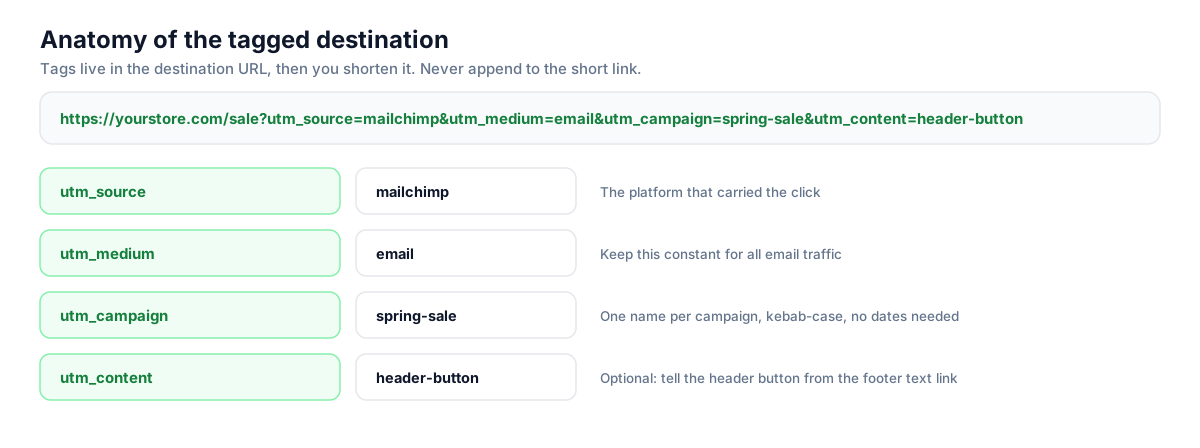
Build this in seconds with the free UTM builder, then shorten the tagged URL. You can also append parameters to the short link itself: Flyn forwards them to the destination, and if the same parameter is baked into the destination, that value takes priority.
Honest comparison
What Mailchimp tracks vs what Flyn adds
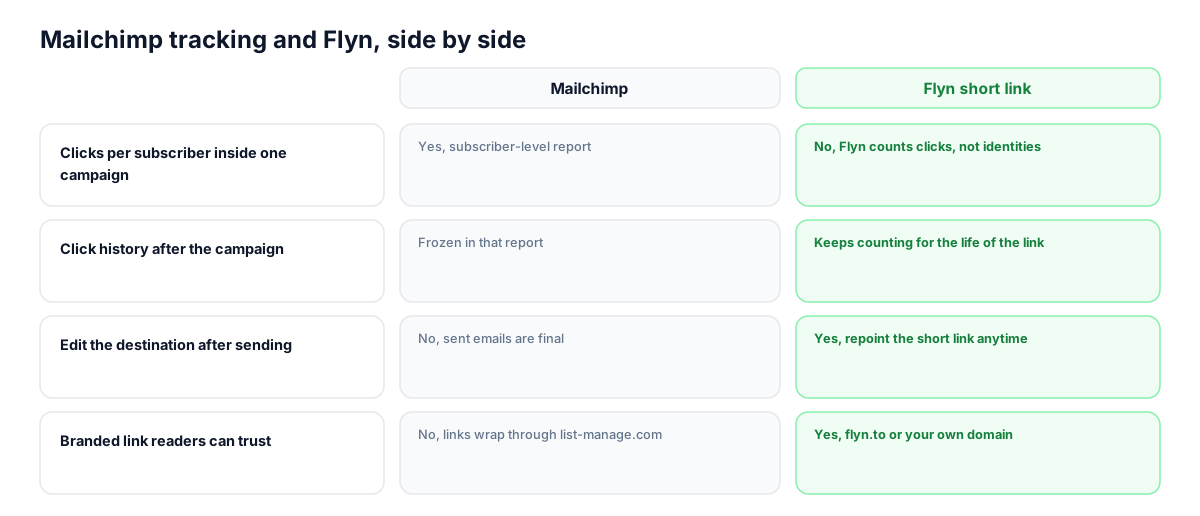
The two trackers answer different questions and work well together. Mailchimp answers "which subscriber clicked in this campaign". Flyn answers "what happened to this link everywhere, forever". Keep both on and you lose nothing.
| Capability | Mailchimp | Flyn short link |
|---|---|---|
| Clicks per subscriber inside one campaign | Yes, subscriber-level report | No, Flyn counts clicks, not identities |
| Click history after the campaign | Frozen in that report | Keeps counting for the life of the link |
| Edit the destination after sending | No, sent emails are final | Yes, repoint the short link anytime |
| Branded link readers can trust | No, links wrap through list-manage.com | Yes, flyn.to or your own domain |
| Same link tracked across email, social, and print | No, email only | Yes, one link, one combined count |
Why it matters
What you get
Fix a wrong link after sending
The email is out and the button points to the wrong page. With a Flyn link you repoint the destination in ten seconds and every past and future click lands right; without one, the mistake is permanent.
Your brand in the status bar
Readers who hover see flyn.to or your own domain instead of a long list-manage tracking URL. Recognizable links pull better click rates, especially in plain-text sends where the URL is visible.
Click history that outlives the campaign
Campaign reports freeze after the send window. The short link keeps counting: forwards, replies that quote your mail, the same link pasted into a newsletter roundup months later.
One link across every channel
Use the same short link in the email, the matching Instagram post, and the printed flyer QR code. Flyn shows the combined picture, and UTMs still split channels apart in GA4.
Worth knowing before you start
- Keep Mailchimp click tracking on if you need subscriber-level click data; Flyn counts clicks but never identifies which subscriber clicked.
- Bake UTM parameters into the destination before shortening for the most robust setup; on a name clash the destination value wins. Parameters you append to the short link now forward to the destination too, so just avoid tagging the same utm name from both places.
- If you use a brand-new custom domain for short links in email, send a few normal campaigns first; brand-new domains in bulk email can look unfamiliar to spam filters until they build history.
Bulk-create links for big sends with the API
Sending a multi-link digest every week? Create the batch programmatically: one POST per link with the destination, slug, and tags, then paste the returned short URLs into your template. Webhooks can push each click event to your own stack as it happens.
Shorten API referenceGo deeper
Features, tools, and guides that pair with this
Features
Free tools
Frequently asked questions
Does Flyn work with the free Mailchimp plan?
Yes. Flyn links are normal URLs, so they work in any Mailchimp plan and any email template. Flyn itself is also free to start: 25 links a month with click counting, custom slugs, and QR codes.
Will Mailchimp still track my clicks if I use Flyn links?
Yes. With click tracking enabled, Mailchimp wraps your short link the same way it wraps any URL, so subscriber-level reports keep working. The click passes through Mailchimp, then Flyn, then lands on your page.
Does the extra redirect slow my links down?
Each hop adds milliseconds, not seconds. Flyn serves redirects from edge infrastructure, and the total delay of Mailchimp plus Flyn is well under what a reader can perceive. If you want a single hop, disable Mailchimp click tracking for that campaign.
Can I change where a link points after the campaign has been sent?
Yes, and this is the biggest single reason to shorten first. Edit the destination in your Flyn dashboard and every copy of that short link, in every inbox, immediately points to the new page. Sent emails cannot be edited, but your links can.
Should I use Mailchimp auto UTM tagging or Flyn UTMs?
Pick one source of truth. If you enable Mailchimp Google Analytics tracking it appends its own parameters to raw links; when you pre-tag destinations yourself with the Flyn UTM builder you control the naming and keep it consistent across channels. Most teams tag manually and leave the Mailchimp toggle off.
Do clicks from forwarded emails get counted?
Flyn counts them, which is exactly why its totals often exceed the campaign report. Mailchimp attributes clicks to known subscribers; a forwarded email clicked by a stranger still hits your short link and shows up in Flyn.
Can I put merge tags like *|FNAME|* inside a Flyn link?
Not inside the slug itself, which is fixed. You can append a merge tag as a query parameter and the redirect now forwards it to the destination, but for split tracking it is cleaner to personalize the surrounding copy, or create per-segment links, for example flyn.to/sale-vip and flyn.to/sale-list.
Will short links hurt my email deliverability?
Established domains like flyn.to carry normal reputation, and Flyn scans every destination against Google Safe Browsing, which protects the domain links share. For the strongest setup use your own custom domain on Flyn so your email domain and link domain tell the same story.
How do I see which country or device my clicks came from?
Click counts are free on every link. Geographic, device, and referrer breakdowns are part of Flyn Pro, which also removes the monthly link cap. The campaign-level subscriber data stays in Mailchimp either way.
Can I create the links automatically for every campaign?
Yes, through the REST API: one authenticated POST returns a short link with your slug, tags, and UTM-tagged destination. Teams sending weekly digests usually script the batch and paste the returned links into the template. Webhooks can stream click events back to your warehouse.
Start tracking your Mailchimp links free
Shorten your first links without an account, no card required. Free covers 25 links a month; Pro unlocks unlimited links and geo, device, and referrer breakdowns.