What Is My User Agent?
A free device and browser detector. See what your browser and device report: your user agent string and client hints, the OS, device and browser as Flyn analytics record them, whether an iPad is presenting itself as a Mac, and which field of a smart link you match. Or paste any user agent to decode it.
Want to know whether you are inside Instagram's or TikTok's built-in browser? Use the In-App Browser Detector.
Reading your browser
For support teams: ask a customer to open this page and copy the string above, or take it from your logs. The pasted string is analyzed in this page and never sent anywhere. Touch support cannot be known from a pasted string, so a Safari string that says Mac could be a Mac or an iPad.
Flyn Pro
One link for iPhone, Android, Windows and Mac
Give one short link its own iOS, Android, Windows and Mac destinations. On links with a Mac destination, the Safari check above tells an iPad from a Mac. Every other device gets your country rules, A/B split or default page. Pro starts at $9 a month billed annually, or $12 monthly.
Sharing one link with iPhone, Android, Windows and Mac users?
Create Flyn short links with click counts for free. On Pro, add device, OS and browser breakdowns, and give each link its own iOS, Android, Windows and Mac destinations.
How to Check Your User Agent in 3 Steps
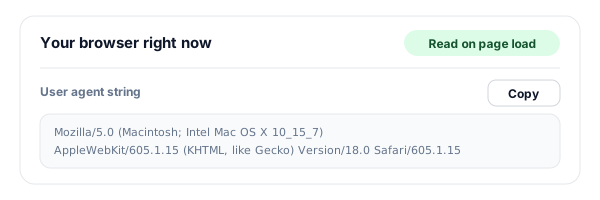
Open the page on the device you want to check
The tool reads your browser the moment the page loads: the user agent string (with a copy button) and, in Chrome, Edge and other Chromium browsers, the client hints. On a computer without a touch screen, scan the QR code with an iPad or phone to run the same check there.
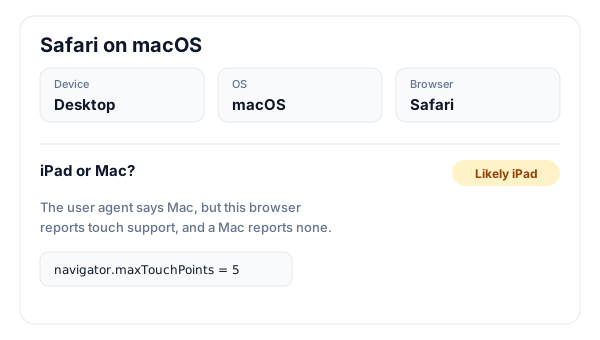
Read the device, OS, browser and the iPad check
See the device type, operating system and browser as Flyn analytics record them, then the iPad or Mac panel: when Safari presents a Mac user agent, touch support decides, the same rule Flyn short links use.
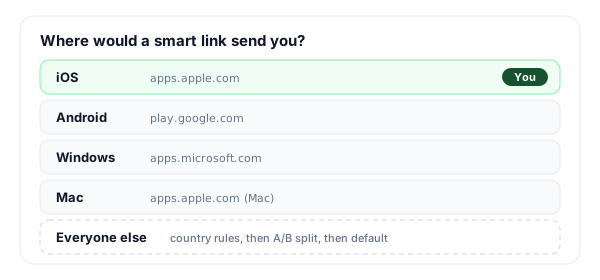
See which smart link field you match
The last panel shows which destination a link with iOS, Android, Windows and Mac fields would serve this device, and what happens to a device with no field. Paste any user agent to run the same analysis for someone else.
What Is a User Agent?
A user agent is the line of text a browser sends in the User-Agent header of every request. It names the browser and its version, the rendering engine, and the operating system, in a format that grew by imitation: nearly every browser still starts with Mozilla/5.0 and many mention Safari and KHTML, like Gecko, so that old sites written for one browser keep working in the others. Reading one means looking for the tokens that matter (iPhone, Android, Windows NT, Macintosh, CrOS, Edg/, Firefox/) and ignoring the rest.
Websites use it to pick a layout, to count which devices their visitors use, and, on a short link, to decide where to send each visitor. Chromium-based browsers now add User-Agent Client Hints, short structured headers for the brand, a mobile flag and the platform, because the string itself has been trimmed to protect privacy. Flyn reads both: the string, and the hints when a browser sends them. The tool above runs the very same code, which is why its labels match what a Flyn click records.
Why Does My iPad Say It Is a Mac?
Since iPadOS 13, Safari on iPad asks for desktop websites by default, and to get them it sends the same user agent as Safari on a Mac. It sends no client hints either. So for any server, Flyn's included, a request from Safari on an iPad and one from Safari on a Mac look the same. That is great for getting the full desktop version of a site, and a problem for anything that routes by device: an iPad sent to a Mac download page is in the wrong place.
The browser itself knows the difference. An iPad has a touch screen and reports it (navigator.maxTouchPoints is 5), and a Mac reports 0. So on a Flyn link that has a Mac destination, Safari visitors whose user agent says Mac see a blank page for a moment that checks touch support, then the link continues: a Mac to the Mac destination, an iPad (or an iPhone using Request Desktop Website) to the iOS destination. With JavaScript off, it continues as a Mac. Chrome, Edge and Firefox on a Mac skip the check and go straight to the Mac destination, and on links without a Mac destination nothing changes: Safari on an iPad still reads as a Mac and gets the link's country rules, A/B split or default. The iPad or Mac panel in the tool above applies the same touch rule to your own browser.
For both strings side by side, why user agent checks get iPads wrong, and how to route iPads correctly, read iPad Safari says it is a Mac: how to detect and route iPads.
What Each Device Tells a Website
Common browsers, what their user agent and client hints say, and what Flyn records and routes for each. Every row is the output of Flyn's own detection code.
| Device and browser | User agent says | Client hints | Flyn records | Smart link field |
|---|---|---|---|---|
| iPhone, Safari | iPhone | None | iOS, mobile, Safari | iOS |
| iPad, Safari (default) | Macintosh | None | macOS, desktop, Safari; iOS, tablet on a link with a Mac destination | iOS on a link with a Mac destination; otherwise country rules, A/B split or default |
| Mac, Safari | Macintosh | None | macOS, desktop, Safari | Mac |
| Mac, Chrome | Macintosh, Chrome | Platform "macOS" | macOS, desktop, Chrome | Mac |
| Windows, Edge | Windows NT 10.0, Edg | Platform "Windows" | Windows, desktop, Edge | Windows |
| Android phone, Chrome | Linux; Android 10; K | Platform "Android", mobile | Android, mobile, Chrome | Android |
| Large Android tablet, Chrome | X11; Linux x86_64 | Platform "Linux" | Linux, desktop, Chrome (Chrome asks for the desktop site by default here) | None: country rules, A/B split or default |
| Chromebook, Chrome | X11; CrOS | Platform "Chrome OS" | Chrome OS, desktop, Chrome | None: country rules, A/B split or default |
| Linux, Firefox | X11; Linux | None | Linux, desktop, Firefox | None: country rules, A/B split or default |
How a Flyn Smart Link Routes Each Device
- 1
Device rules first
A Pro link can hold an iOS, an Android, a Windows and a Mac destination. Windows and Mac take http or https URLs only, so use the store's web page (apps.microsoft.com, apps.apple.com) rather than a store scheme.
- 2
Then country rules
A device with no field of its own (Linux, ChromeOS, anything unrecognized), or a field left blank, moves on to the link's country rules. There is no combined device and country rule, and no city, region or time rule.
- 3
Then the A/B split, then the default
If no country rule matches, the link's A/B split applies when it has one, and otherwise its default destination.
- 4
Where rules do not apply
Routing rules do not apply to crawlers, password-protected links, links past their click limit, or mailto, tel and sms links.
More on the idea behind it in what smart links are, and the full setup on the device targeting page.
Detect It Here, Route It with Flyn
This page reads one browser. Flyn short links use the same detection code for their click analytics and device rules.
Four device destinations
On Pro, one link can send iOS, Android, Windows and Mac visitors to their own pages, with everyone else on your country rules or default.
iPads go to iOS
On links with a Mac destination, a quick touch check sends Safari on an iPad to your iOS destination instead of the Mac one.
The same labels in analytics
This tool runs the detection code Flyn analytics use. Click counts are free; device, OS and browser breakdowns are on Pro.
No visitor identity
Flyn records no visitor identity and no unique visitors, only labels such as device, OS, browser, country, city and referrer.
Frequently Asked Questions
What is my user agent?
Why does my iPad say it is a Mac?
How does Flyn tell an iPad from a Mac on a short link?
What are User-Agent Client Hints?
Why does my Mac user agent say Mac OS X 10_15_7?
Why does my Android user agent say Android 10; K?
Can a user agent be faked?
Which field of a Flyn smart link would my device match?
Does Flyn record who I am when I click a short link?
Is my user agent sent anywhere by this tool?
Is this the same as the In-App Browser Detector?
More Free Link Tools
More free tools from Flyn for testing devices, apps and the links you send them.
In-App Browser Detector
Find out whether a page opened inside Instagram, Facebook or TikTok, and how to get out.
App Store Link Generator
One link that sends iOS to the App Store and Android to Google Play.
Deep Link Tester
Validate a domain's iOS Universal Links and Android App Links files.
Link Inspector
See where any short link really goes, hop by hop, before you click it.
Give iPhone, Android, Windows and Mac visitors their own page
Start with free short links and click counts. Add iOS, Android, Windows and Mac destinations on Pro, with the iPad check built in on links that have a Mac destination.