Free Tool
4.9/5

Punycode Converter

Convert international domain names to and from punycode. Paste a Unicode domain or an xn-- domain and convert instantly, and spot lookalike phishing domains.

Direction is detected automatically. Paste Unicode to encode, or an xn-- domain to decode.

Sharing links from an international domain?

Flyn short links work with any domain, IDN included, and add click analytics, QR codes, and branded short URLs your readers can trust.

Try Flyn free

How to Convert Punycode in 3 Steps

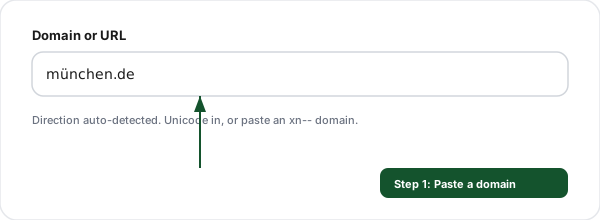
Step 1: Paste a domain or URL (Punycode Converter)
1

Paste a domain or URL

Enter a Unicode domain, an xn-- domain, or a full URL. Direction is auto-detected.
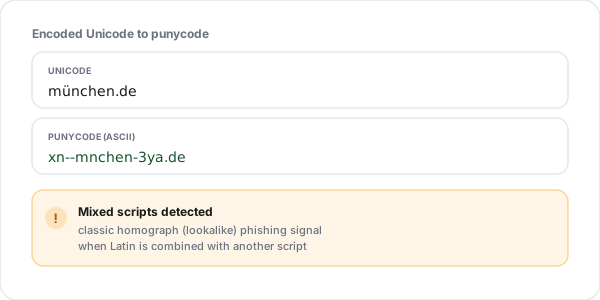
Step 2: See both forms (Punycode Converter)
2

See both forms

Unicode and ASCII punycode side by side, with a warning when non-Latin scripts appear.
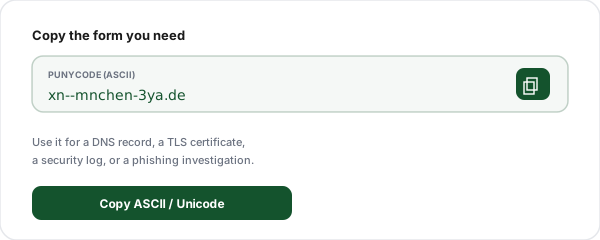
Step 3: Copy the result (Punycode Converter)
3

Copy the result

Copy whichever form you need for DNS, a certificate, a log, or a security check.

Why Use Our Punycode Converter?

Both directions

Unicode to punycode and xn-- back to Unicode, auto-detected.

Homograph warning

Flags mixed or non-Latin scripts, a classic phishing signal.

Full URLs too

Paste a whole URL and only the hostname is converted.

Per-label view

See exactly which part of the domain changed and how.

RFC 3492 accurate

Uses the real punycode algorithm, reversible every time.

100% client-side

Runs in your browser. Nothing you paste is uploaded.

Punycode Examples

Unicode domain

Punycode (ASCII)

münchen.de

xn--mnchen-3ya.de

café.fr

xn--caf-dma.fr

日本.jp

xn--wgv71a.jp

مثال.com

xn--mgbh0fb.com

пример.рф

xn--e1afmkfd.xn--p1ai

Notice that each label is encoded separately, including the top-level domain (.рф becomes xn--p1ai). The basic ASCII letters survive and the non-Latin characters are recorded in the coded suffix after the hyphen.

Frequently Asked Questions

What is punycode?
Punycode is a way to represent Unicode characters using only the limited ASCII set that the Domain Name System allows. Domain names can technically only contain letters a to z, digits, and hyphens, so a domain with accented or non-Latin characters like münchen.de is encoded into an ASCII string that starts with the prefix xn--, in this case xn--mnchen-3ya.de. Browsers display the friendly Unicode version to users but send the punycode version over the network.
What is an internationalized domain name (IDN)?
An IDN is a domain name that contains characters outside the basic Latin alphabet, such as accents (café.fr), non-Latin scripts (例え.jp, мойсайт.рф), or emoji in some registries. IDNs let people register and use domains in their own language and script. Under the hood, every IDN is converted to punycode for DNS, which is exactly what this tool does and undoes.
How do I convert a domain to punycode?
Paste the Unicode domain (for example münchen.de or 日本.jp) into the converter and it instantly produces the ASCII punycode form (xn--mnchen-3ya.de). The tool detects which direction you need automatically: if you paste Unicode it encodes to punycode, and if you paste an xn-- domain it decodes back to readable Unicode. It converts each label of the domain separately, exactly as the DNS standard requires.
How do I decode an xn-- domain back to readable text?
Paste the xn-- domain (for example xn--80ak6aa92e.com) into the box and the tool decodes it to its Unicode form. This is useful when you see a punycode domain in an email header, a security log, a certificate, or a browser address bar and want to know what it actually says. Decoding is the single best way to reveal a disguised lookalike domain.
What is a homograph or homoglyph attack?
A homograph attack uses characters from other scripts that look identical to Latin letters to register a domain that visually impersonates a real one. For example, the Cyrillic letter а looks exactly like the Latin a, so аpple.com (with a Cyrillic first letter) can masquerade as apple.com. Because the two are different at the byte level, they are different domains. Decoding a suspicious domain to its punycode and Unicode forms reveals the trick: a legitimate domain stays plain ASCII, while a spoof shows an xn-- form full of unexpected scripts.
Can this tool help me spot a phishing domain?
Yes. Paste any domain you are unsure about. If it is a normal ASCII domain, the converter shows it unchanged. If it secretly contains non-Latin characters, the tool reveals the xn-- punycode and flags that mixed or non-Latin scripts are present, which is a strong phishing signal. Pair it with our short link safety checker when the suspicious domain sits behind a shortened link.
Does the converter handle a full URL, not just a domain?
Yes. You can paste a whole URL like https://münchen.de/page?x=1 and the tool converts only the hostname, leaving the path and query string untouched, then shows you the fully converted URL. You can also paste just the bare domain. Either way, only the host portion is ever encoded, because punycode applies to domain labels and never to the rest of a URL.
Is the conversion done in my browser?
Yes, entirely. The punycode encode and decode algorithm (RFC 3492) runs in client-side JavaScript, so nothing you paste is sent to or stored on our servers. You can safely check internal hostnames, unreleased domains, or suspicious links from a security investigation without anything leaving your device.
Why does my converted domain look different from what I expected?
Punycode encodes the entire set of non-ASCII characters in a label into a compact suffix after a hyphen, so the result rarely resembles the original letter by letter. For example, münchen becomes mnchen-3ya: the basic ASCII letters are kept, the non-ASCII ü is removed from its position, and a coded sequence (3ya) at the end records where it goes and what it is. This is normal and reversible: decoding restores the exact original.
Do all browsers show punycode or Unicode?
It depends on the registry and the script. Most modern browsers display the Unicode form for domains whose script matches the user's languages or the top-level domain's rules, and fall back to showing the raw xn-- punycode when a domain mixes scripts in a way that looks like a spoofing attempt. That fallback is a built-in anti-phishing defense. This tool always shows you both forms so you are never guessing.
Can I convert emoji domains?
Yes, where the registry allowed them. Some top-level domains historically permitted emoji in domain names, and those are encoded to punycode just like any other non-ASCII character. Paste the emoji domain and the tool returns the xn-- form, or paste the xn-- form to see the emoji it represents. Note that most major registries no longer accept new emoji registrations.
Is punycode the same as URL encoding or percent encoding?
No, they solve different problems in different parts of a URL. Punycode applies only to the domain name (the host) and encodes Unicode into the DNS-safe ASCII a to z, 0 to 9, and hyphen set. Percent encoding (URL encoding) applies to the path, query string, and fragment and encodes unsafe characters as %XX sequences. If you need to encode the path or query portion of a URL, use our URL encoder and decoder instead.

Links your readers can trust, on any domain

Whether your domain is ASCII or an IDN, Flyn turns it into branded short links with real-time click analytics, QR codes, and editable destinations.