Best URL Shorteners With an API and Webhooks for Developers
Almost every shortener has a free API. Almost none gives you webhooks without a serious upgrade, and one of them makes you talk to sales. Here is what each actually gates, including where we come off worst.

The API Is the Cheap Half
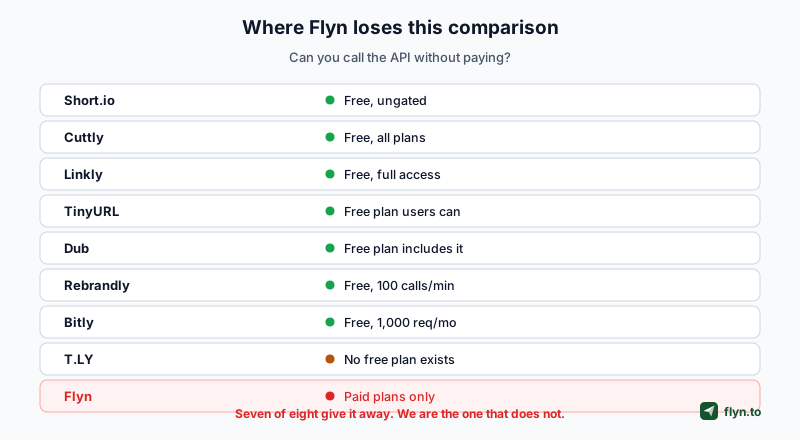
If you are choosing a shortener because you intend to create links from code, the good news is that this is now close to a commodity. We checked eight vendors' own documentation and pricing in August 2026, and seven put the REST API on their free plan.
 Tap to enlarge
Let us get our own answer out of the way
Flyn's API keys require a paid plan. Short.io states flatly that its API works on every price plan, Cuttly says all plans include API access, Linkly lists full API access on its free card, TinyURL's help centre confirms free-plan users can use the API, Dub includes it in the free bullets, Rebrandly gives free accounts 100 calls a minute, and Bitly allows 1,000 requests a month on free. If your first requirement is calling an API without paying, Flyn does not meet it, and all seven of those do, Bitly within a 1,000-request monthly quota. Our alternatives pages compare them in full.
T.LY is a special case
Its API is not gated behind a higher tier, but T.LY has no free plan at all, so there is no free API by definition. The cheapest way in is its entry subscription; see our T.LY comparison.
Free API access is not the same as useful API access. The interesting question is the quota attached to it, which is the next section, and whether you can be notified of events rather than having to ask repeatedly, which is the section after that.
Read the Quota, Not the Checkmark
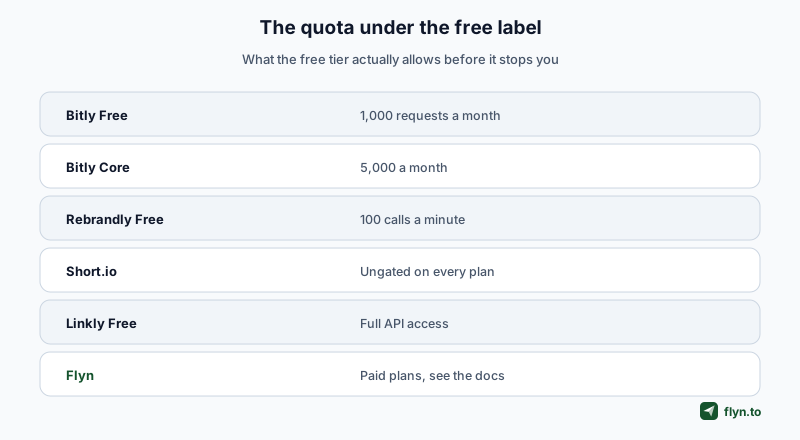
A green tick in a comparison table tells you the API exists. It does not tell you how far it goes, and the free tiers vary by orders of magnitude.
 Tap to enlarge
Bitly's free API is smaller than it sounds
1,000 requests a month is the free allowance, rising to 5,000 on Core at $10/month and 25,000 on Growth. A nightly job that syncs a few hundred links will exhaust the free tier within days. Bitly also gates some analytics endpoints independently, returning an upgrade-required error on plans that lack them, so a working call today can fail after a feature moves tiers.
Per-minute and per-month limits are different animals
Rebrandly's free plan is 100 calls a minute, which is a throughput limit rather than a budget: you can run all month at a steady pace. Bitly's is a monthly budget you can spend in an afternoon. When you compare, convert both to the shape of your actual workload before deciding which is more generous.
Check what a bulk operation costs you
If you are creating links in batches, find out whether the vendor charges one request per link or one per batch. Dub documents bulk create, update and delete at up to 100 links per call, which is the difference between 10 requests and 1,000 for the same job. Our own bulk shortening guide covers the non-API routes for the same task.
Webhooks Are Where the Money Is
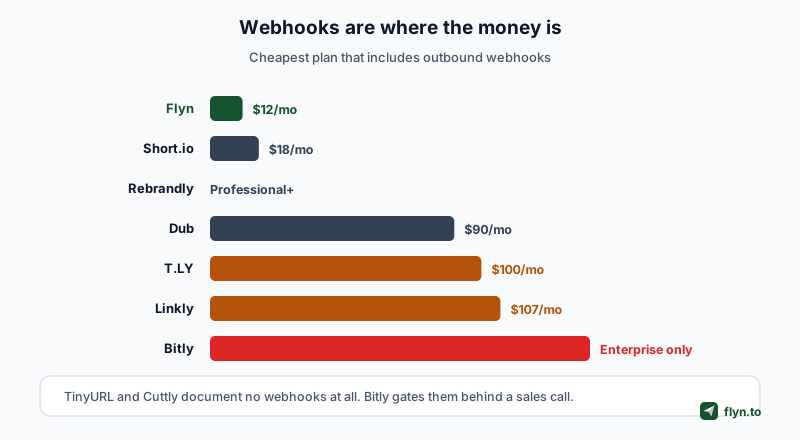
Here is the pattern that runs through this whole comparison. The API is nearly free everywhere. Being told when something happens is not.
 Tap to enlarge
| Tool | API on free plan | Webhooks | Cheapest plan with webhooks |
|---|---|---|---|
| Flyn | No, paid only | Yes | Pro, $12/mo |
| Short.io | Yes, ungated | Yes, fire on click | Pro, $18/mo |
| Rebrandly | Yes, 100 calls/min | Yes, 1 on Professional | Professional and above |
| Dub | Yes | Yes, real-time events | Business, $90/mo |
| T.LY | No free plan exists | Yes | Business, $100/mo |
| Linkly | Yes, full access | Yes | Business, $107/mo |
| Bitly | Yes, 1,000 req/mo | Yes | Enterprise, custom |
| TinyURL | Yes | Not documented | n/a |
| Cuttly | Yes, all plans | Not documented | n/a |
Bitly makes you talk to sales
Bitly's pricing comparison dashes webhooks on every self-service tier and ticks them on Enterprise, which is custom-priced and sales-contacted. For a developer evaluating tools on a Friday afternoon, that is effectively a no.
The two with none at all
TinyURL's OpenAPI spec contains no webhook endpoints, and the word does not appear across Cuttly's API documentation, API hub or integrations pages. On either tool, polling is your only option, which brings us back to the quota question.
Where we come out ahead, and why
Flyn includes webhooks on Pro at $12/month, which is the cheapest here. That is a genuine advantage and it sits directly beside our genuine disadvantage: we charge for the API that others give away. Both facts describe the same pricing decision, which is that we put the developer surface behind one paid tier rather than splitting it across five.
Almost nobody charges for the API any more. Look at what a vendor charges to tell you something happened, because that is where its pricing philosophy actually lives.
Why a Webhook Is Worth Paying For
 Tap to enlarge
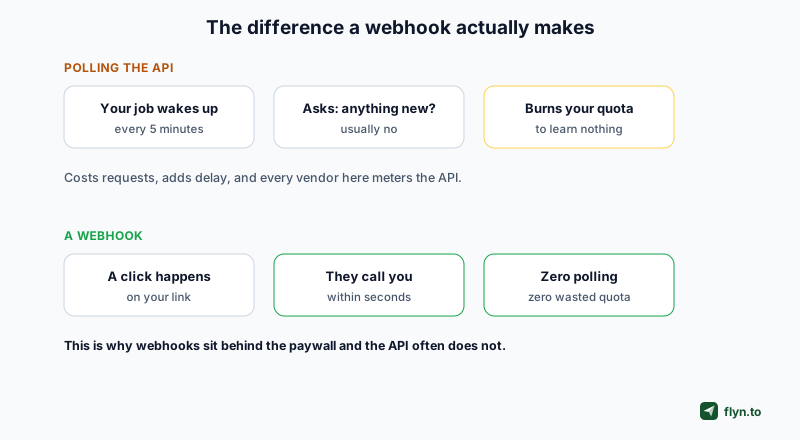
Polling costs you twice
Without webhooks you write a job that asks the API for changes on a schedule. It is slow, because your data is only as fresh as the interval, and it is expensive, because most of those calls return nothing and still count against your quota. On Bitly free, a five-minute poll would exceed the monthly allowance in under four days.
What people actually build with them
Posting click events into Slack when a campaign link fires. Writing conversions to a warehouse as they happen. Triggering a re-check when a link's bot ratio jumps. None of these is exotic, and all of them are painful to build on polling.
Check the delivery guarantees, not just the feature
Before you commit, find out whether the vendor signs its payloads, whether it retries on failure, and what it does after repeated failures. A webhook that silently stops after three timeouts is worse than polling, because you will not notice. Our webhooks documentation covers ours, and the rate limits page covers the polling side.
Point any vendor's webhook at a request-bin service for an hour before you build against it. You will learn the payload shape, the retry behaviour and the real latency faster than the documentation will tell you, and on a trial plan it costs nothing.
The Practical Evaluation
Four checks that take an afternoon and save a rebuild.
Create, read, update, delete, all four
Some APIs are create-heavy and thin elsewhere. Confirm you can edit a destination and delete a link programmatically, not just mint new ones. This is where a tool that looks complete on the pricing page turns out not to be.
Find the auth model before the endpoints
Bearer tokens are the norm across every vendor here. What varies is where the token is scoped: per user, per workspace or per domain. Short.io configures webhooks at the domain level rather than per link, which is a meaningful design difference if you run many domains.
Test the error you will actually hit
Not a 404. Call the endpoint that your plan does not include, and see what comes back. Bitly returns an upgrade-required error on plan-gated analytics endpoints, which is well behaved. Find out how your candidate signals it, because that error will appear in production the first time someone downgrades.
Ask what happens to your links if you stop paying
On a paid API, this is the question that matters most and is asked least. Do the links keep resolving? Does the API stop but redirects continue? This is the same durability question that runs through lifetime deals, and it deserves an answer in writing.
Authentication and the Shape of Each API
Once you have narrowed the field on price, the day-to-day experience comes down to how the API is put together. These differences do not show up on a pricing page.
Token scope decides your architecture
Every vendor here uses bearer tokens. Where they differ is what a token represents, and it changes how you build.
| Concern | What to look for | Why it bites later |
|---|---|---|
| Token scope | Per user, per workspace or per domain | Decides whether one integration can serve many clients |
| Webhook scope | Per link or per domain | Short.io is domain-level, so per-link filtering is your job |
| Bulk endpoints | Calls per batch, not per link | A tenfold difference in quota consumption |
| Plan-gated endpoints | How an unavailable endpoint fails | It will happen the first time someone downgrades |
| Payload signing | A shared secret and a signature header | Without it, anyone can post fake events at you |
Idempotency, or the lack of it
If your job retries after a timeout, will you get one link or two? Few shorteners document an idempotency key, which means the safe pattern is to check before you create, and that doubles your request count. Factor it into the quota arithmetic rather than discovering it in a duplicate-links cleanup.
Pagination shapes your sync
Cursor-based pagination survives new links being created mid-sync; offset-based pagination quietly skips records when the underlying list shifts. If you are building a nightly export, this is the difference between a reliable job and one that loses a link occasionally and never tells you.
SDKs are convenience, not capability
Dub ships TypeScript and other SDKs, and Bitly publishes a full OpenAPI spec you can generate a client from. Both are genuinely useful, and neither adds a capability the raw API lacks. Judge the endpoints first and treat an SDK as a time saver rather than a differentiator. The authentication docs cover ours.
Test what happens when your plan lapses. On most of these tools the redirects keep working while the API stops, but that is worth confirming in writing rather than assuming. An integration that silently stops creating links is a bad way to discover a failed payment.
Choosing
 Tap to enlarge
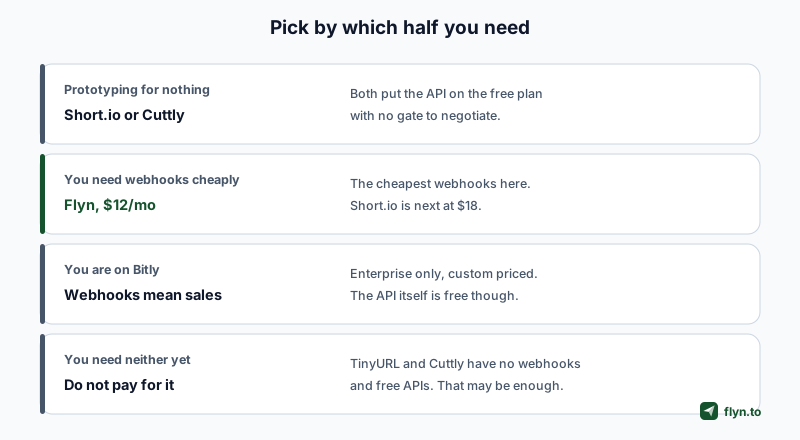
If webhooks are the requirement
Flyn at $12/month is the cheapest, Short.io at $18 is next, and everything else is $90 or more or requires a sales conversation. This is the one section of this article where we would argue for ourselves without qualification.
If you are prototyping and do not want to pay
Flyn's API keys come with the same paid plan as its webhooks, so a free prototype needs a free API tier elsewhere. Short.io and Cuttly both put the API on the free plan with no gate, and Short.io's is explicitly ungated across every tier. Linkly and TinyURL also offer it free.
If you are already on Bitly
The API is fine and free within its quota. Webhooks mean Enterprise, so if event delivery is on your roadmap, price that conversation now rather than after you have built around polling.
If you need neither yet
Do not pay for either yet. When you do, Flyn's Pro plan at $12/month carries both the API and webhooks; until then, a free API on Cuttly or TinyURL covers a surprising amount of automation, and you can move later if your own domain carries the links. Our API guide walks through the calls, and the reference has the endpoint detail.
Frequently Asked Questions
Which URL shorteners have a free API?
Which shortener has the cheapest webhooks?
Is Bitly's free API enough to build on?
Why do shorteners charge for webhooks but not the API?
Can I use webhooks to track clicks in real time?
What should I check before building on a shortener's API?
Do any shorteners offer bulk endpoints?
Which shortener is best for developers overall?
Free tools for this
Three Flyn tools that pair well with the strategy in this article, all free, no signup needed.
UTM Builder
Build campaign-tracked URLs in seconds.
Broken Link Checker
Scan any page for dead links and 404s.
Redirect Checker
Trace 301/302 redirect chains.
Keep reading
Three related deep-dives from the Flyn blog.
Best Link Rotators for A/B Testing and Traffic Splitting
16 min read
Best Link Shorteners for Affiliate Marketers Who Need Cloaking
16 min read
Best URL Shorteners That Filter Bot Clicks From Analytics
15 min read
Ready to try Flyn?
Free plan includes 25 links/month, full analytics, and access to all 30+ free tools above. No credit card required.
Already a member? Log in
Karan Bhakuni is the founder of Flyn. He writes about branded links, click analytics, and the link-management tooling growth teams and creators actually need, drawn from building Flyn and reading a lot of user feedback.
Find these guides useful? Add Flyn as a preferred source so more of them show up in your Google results.