Free UPI Payment Link Generator
Turn your UPI ID into a payment link and a real, scannable QR code for UPI apps like GPay, PhonePe and Paytm. Fix the amount or let the payer choose. Built in your browser: your UPI ID never leaves it.
Flyn does not touch your money. This page builds a payment request, not a payment. The link and the QR are assembled in your browser from what you type, with and your UPI ID is never sent to Flyn. Money moves directly between the payer's UPI app and your bank.
The same ID you see in GPay, PhonePe, Paytm or your bank app under "My UPI ID".
Shown on the payer's confirm screen next to the name your bank has on file.
Written into the link as two decimals, so 499 becomes 499.00.
Appears in both statements, so it is the fastest way to match a payment to an order. Trimmed to 80 characters, our own cap: NPCI's spec sets no length, and 80 is the figure Google Pay's web payment API documents for its transaction note.
Fill in your UPI ID and payee name, then generate. The QR below is a real, scannable code, test it with your own phone before you print it.
Sending the catalogue with the payment request?
A UPI link cannot be tracked, by design, because it does not touch the web. The catalogue, price list or product page you send alongside it can be. Wrap that one in a Flyn short link and see how many people actually opened it before they paid.
How to Create a UPI Payment Link in 3 Steps
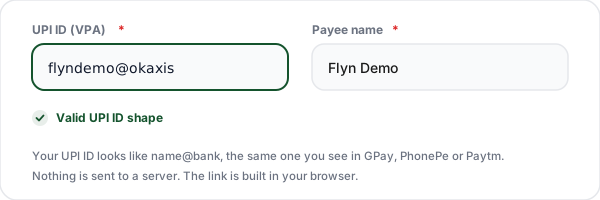
Enter your UPI ID and payee name
Type the UPI ID you want the money to land in, in the name@bank shape, plus the name the payer should see. The shape is checked as you type, so a missing handle or a stray space is caught before you print anything.
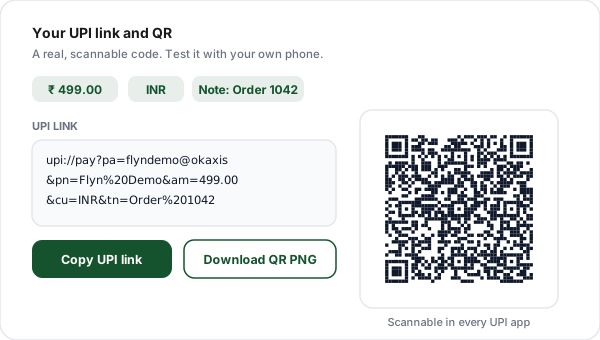
Set the amount and a note
Fix the amount for an invoice, or switch to payer chooses and the amount parameter is dropped from the link entirely. Add an order or table number as the note, then generate the link and a real, scannable QR.
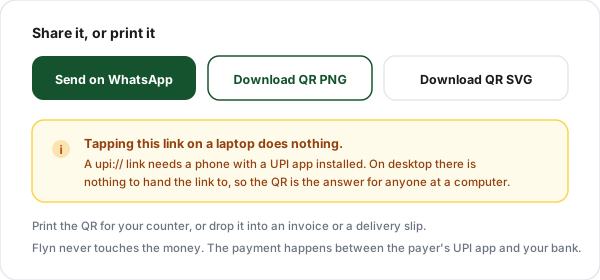
Share the link, or print the QR
Send the link to anyone on a phone, share it on WhatsApp, or download the QR as PNG or SVG and print it for the counter. Anyone at a desktop uses the QR, because a upi:// link has nothing to open there.
What Is a UPI Payment Link?
A UPI payment link is a deep link, not a web address. It looks like upi://pay?pa=you@bank&pn=Your%20Shop&am=499.00&cu=INR&tn=Order%201042 and its whole job is to hand a set of payment details to a UPI app on the payer's phone. The app opens on its confirm screen with your ID, your name and the amount already filled in, and the payer enters their UPI PIN. Nothing has been paid until they do.
That distinction matters more than it sounds. This is a payment intent, not a transaction. There is no gateway, no order id, no webhook and no settlement report, because nothing in the chain belongs to a service provider. The string is just text. Encode that same text as a QR code and you get a square of the kind taped next to tills across India, which is why the two outputs on this page are really the same thing in two shapes.
The upside is that it costs nothing and cannot be switched off. There is no account to keep active, no free trial that expires and takes your printed code with it, and no third party in the money path. The trade-off is the other side of the same coin: because nothing intermediates the payment, nobody can tell you how many people opened the link, and there is no automatic order confirmation. You reconcile from your bank statement, which is exactly what the transaction note field is for.
This generator is deliberately the plain version of the format. It builds the bare intent, with no merchant category code, no signed payload and no PSP dependency, so the code you print today encodes the same payment request for as long as your UPI ID is still active.
The Parameters in a UPI Link
Five parameters do the work here, and four more turn up on registered-merchant links. Here is what each one is for, and why this tool generates some and deliberately leaves the rest alone.
| Parameter | Meaning | Built here | Notes |
|---|---|---|---|
| pa | Payee address | Yes | Your VPA, the name@bank identifier that receives the money. The one parameter a upi://pay link cannot do without. Left unencoded apart from spaces, since @ is a legal character inside a query string, so there is no reason to send it as %40. |
| pn | Payee name | Yes | The label offered to the payer. URL-encoded, so "Sharma Electronics" becomes Sharma%20Electronics. The payer may instead be shown the name their app looks up against that VPA, so use your registered or trading name. |
| am | Amount | Yes | The amount in rupees. NPCI asks only for the "Transaction amount in decimal format", and its own examples use a bare integer; we write two decimals because that is unambiguous. Omitted completely when you pick "payer chooses", because the spec says "If 'am' is not present then field is editable" and does not define an empty am=. |
| cu | Currency | Yes | INR. UPI settles in rupees, so there is nothing to choose here. This tool writes the parameter out rather than leaving it implied. |
| tn | Transaction note | Yes | A short reference that lands in both statements. URL-encoded and capped at 80 characters. NPCI's spec sets no length for it; 80 is our own cap, borrowed from the "(Maximum length is 80 characters)" that Google Pay's web payment API documents for its transaction note. |
| tr | Transaction reference | No | A unique reference id used by merchants to reconcile a specific order through their PSP. Only meaningful if you have a payment provider generating and tracking those ids, so this tool leaves it out. |
| mc | Merchant category code | No | A four digit code identifying the business category on a registered merchant VPA. Issued during merchant onboarding, not something you can invent, so it is omitted. |
| url | Invoice URL | No | A link to an invoice or order page. This tool leaves it out, because a plain short link sent alongside the payment request does the same job without depending on where the payer's app chooses to show it. |
| mode, orgid, sign | Signed intent fields | No | Used for verified merchant intents that carry a digital signature issued by a PSP. They cannot be self-generated, and an invalid signature is worse than none, so this tool builds the plain, unsigned intent. |
Every value except the VPA is percent-encoded, so a payee name with a space or an ampersand in it cannot break the query string. The VPA keeps its @ because that character is legal inside a query string, so there is nothing to gain from encoding it.
Why the Link Does Nothing on a Laptop
This is a common question about UPI links, and the answer is not a bug. Here is what happens on each device, and which of the two outputs to send.
A upi:// link is handed to an app, not fetched from a server. Your operating system looks for something registered to handle the upi scheme. On a phone with GPay or PhonePe installed, it finds one. On a desktop it finds nothing, so the browser stays exactly where it is. Nothing is broken, and no amount of retrying will change it. Send the QR to desktop payers instead.
| Where the payer is | Tapping the link | Scanning the QR |
|---|---|---|
| Android phone with a UPI app | Opens the UPI app on its pay screen, or an app chooser if more than one is installed | Scans from a UPI app's own scanner or the camera |
| iPhone with a UPI app | If an installed app claims the scheme it opens on its pay screen, though we have not tested this on iOS. With more than one installed, Apple documents that which app the system targets is undefined | Scans from the Camera app or in-app scanner |
| Phone with no UPI app installed | Nothing happens, or an "unsupported address" alert | Nothing to scan with until an app is installed |
| Windows or Mac desktop | Nothing happens. There is no app to hand it to | The answer here. Show it on screen, scan with a phone |
| In-app browser (Instagram, WhatsApp) | May not open at all. If nothing happens, open the page in Chrome or Safari first | Works, because the scan happens outside the browser |
The practical rule is simple. If you are messaging a customer who is holding a phone, send the link. If you are on a call, on a video, on a poster, or emailing someone at a desk, send the QR image. When you are not sure, send both: they encode the same payment request, so there is no risk of them disagreeing.
Fixed Amount or Payer Chooses: Which to Use
The amount is the field that changes how the payer's app opens, so it is worth getting right before you print anything.
| Mode | In the link | Best for | Watch out for |
|---|---|---|---|
| Fixed amount | am=499.00 present | Invoices, order totals, fixed-price products, deposits | A typo in the amount means a wrong payment and a manual refund. Regenerate rather than editing the string by hand. |
| Payer chooses | am left out entirely | Tips, donations, running tabs, variable-weight goods | Payers occasionally type the wrong figure, so put the amount in the note or say it out loud at the counter. |
The empty amount trap
Leaving the amount box blank and letting am= stay in the link with nothing after it is not the same as an open amount. NPCI's UPI Linking Specifications say of the amount field, “If 'am' is not present then field is editable”, so an absent parameter is the documented way to hand the payer the keypad. The same spec spells out what an empty value means for the neighbouring mam tag, grouping it with the tag being absent or null, but says nothing about an empty am=. This tool removes the parameter entirely in payer-chooses mode rather than emit a form the spec does not define.
Where Indian Sellers Actually Use This
Six patterns that come up again and again for shopkeepers, resellers, freelancers and creators.
Counter QR for a shop
Print the open-amount code once, tape it near the till, and stop dictating your UPI ID over a noisy counter. The code does not expire, because there is no service behind it.
Per-order links for resellers
Generate a fixed-amount link with the order number as the note, paste it into the WhatsApp chat, and match the payment to the order from your statement later.
Freelance invoices
Add the link at the bottom of a PDF invoice next to your bank details. Clients on a phone tap it, clients at a desk scan the QR from the same page.
Creator tips and donations
An open-amount QR in a video description, a story, or a stream overlay. Supporters decide the number, and you do not share an account number publicly.
Event and workshop fees
One fixed-amount code on the registration poster, with the batch name in the note so late payers are still easy to identify.
Delivery and cash on delivery
Hand the customer a printed code on the delivery slip instead of hunting for change, with the invoice number already in the transaction note.
Printing a UPI QR That Scans First Time
A code that scans perfectly on your screen can fail on a counter. These six things are worth checking before you print a hundred copies.
Keep the quiet zone
The white margin around the code is part of the code. Cropping it tight against a border or a photo is a common reason a printed QR refuses to scan.
Print at 3 cm or larger
A counter code should be at least 3 cm square, and a poster read from two metres away needs roughly a tenth of the reading distance in width. Bigger is safer than clever.
Black on white, nothing else
Coloured or reversed codes lose contrast under shop lighting. If you must brand it, brand the frame around the code, not the modules themselves.
Matte, not glossy
Glossy lamination throws back overhead light straight into the camera. Matte lamination protects the print without the glare that kills scans.
Test before you print a hundred
Scan the on-screen code with two different UPI apps, then scan the first printed copy. Check the amount and the note on the confirm screen, not just that something opened.
Put the amount in words too
Print the payee name and the amount under the code. It reassures the payer before they scan and catches the case where someone photographs an old code.
What Flyn Does, and What It Never Touches
Flyn is a link and QR company, not a payment company. This page takes what you type, joins it into a string, and draws a QR code from that string in your browser. Your UPI ID, your amount and your note are never sent to us. If you accept analytics cookies the page makes requests of its own, so a busy network tab is not a sign that your payment details went somewhere: those requests do not carry them.
Money does not pass through Flyn either. When a customer scans your code, their UPI app talks to their bank, which talks to NPCI, which talks to your bank. Flyn is not a step in that chain and could not be even if it wanted to be. There is no fee, no cut, no settlement delay and no dashboard of your transactions here, because we simply do not have them.
The recent-requests list under the tool lives in this browser's localStorage so you can rebuild a code without retyping. The tool does not upload it, and the clear button removes it. On a shared shop computer, clear it when you finish.
For anything that genuinely needs measuring, the product page, the catalogue, the price list you send alongside the payment request, use a Flyn short link. That is the part of the transaction that happens on the web, and it is the part that can honestly be counted.
Why Use Flyn's UPI Link Generator
Free forever, honest about what it can and cannot do, and built by a team that makes links and QR codes for a living.
No server, no storage
The link is built in your browser and your UPI ID is never sent to us. There is no account and no database row holding it here.
A real, scannable QR
Proper error correction and a full quiet zone, exported as PNG or vector SVG, so the printed version scans as well as the screen one.
Static and permanent
No account, no trial and no service behind the code. Nothing can be switched off later and take your printed QR with it.
Honest about desktop
We tell you up front that a upi:// link does nothing on a laptop, instead of letting you find out after you have sent it to a customer.
Frequently Asked Questions
What is a UPI payment link?
Does this work with Google Pay, PhonePe and Paytm?
Why does nothing happen when I click the link on my laptop?
What is a VPA and where do I find mine?
Can I set a fixed amount?
Can I leave the amount blank so the payer decides?
Is it safe to share my UPI ID publicly?
Does Flyn see my money, or take a cut?
Can I print the QR and stick it on my counter?
Can I add a note for each order?
Do I need a business or merchant account to use this?
Is there a limit on how much someone can pay through this link?
Does the link or the QR code ever expire?
Why does the payer see a different name than the one I typed?
Can customers outside India pay through a UPI link?
Related Free Tools
The rest of the counter kit, all free.
WhatsApp Link Generator
A wa.me click-to-chat link with the order message pre-filled, to send next to the payment request.
Dynamic QR Code Generator
A QR you can re-point after printing, with scan counts. For catalogues and offers, not payments.
QR Code Generator
Turn any link, text or contact detail into a clean, downloadable QR code in PNG or SVG.
Pix QR Code Generator
The Brazilian equivalent. Build a Pix BR Code QR and the copia e cola string from a Pix key.
The payment is untrackable. Everything around it does not have to be.
Print the UPI code for free, then put a Flyn short link on the catalogue, the price list and the product page you send with it. Free click counts and a free QR on every link, with analytics breakdowns and custom domains on Pro.