Free Google Drive Direct Link Generator
Paste any Drive share link and get the two URLs Google never shows you: a direct download that skips the preview page, and a hotlinkable image URL you can drop into an img tag, an email, or a CSS background.
This tool rewrites a Drive URL. Just want a short, branded link to a file? Use the Google Drive Link Shortener. Not sure where a link really goes? Try the Link Inspector.
Every shape works: /file/d/ID/view, /open?id=, /uc?id=, a docs.google.com editor URL, or the file ID on its own.
Only affects the image link. Drive scales the height to keep the aspect ratio and will not upscale past the preview it stored.
Want to know how many times it was downloaded?
A raw Drive URL reports nothing back. Wrap it in a Flyn short link and see total clicks free on every link. Full country, device, and referrer breakdowns come with Pro.
How to Make a Drive Direct Link in 3 Steps
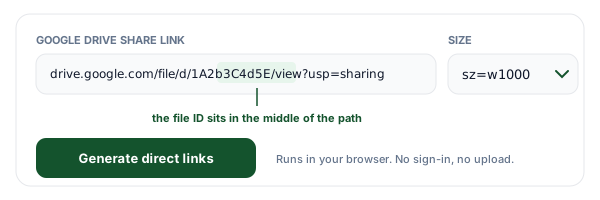
Paste any Google Drive link
Paste the share link exactly as Drive hands it to you. Every real shape is accepted: /file/d/FILE_ID/view?usp=sharing, /open?id=, /uc?id=, the account-scoped /drive/u/0/ variants, a docs.google.com editor URL, and the bare file ID on its own. Pick a width for the image link while you are here, or leave it at 1000 pixels.
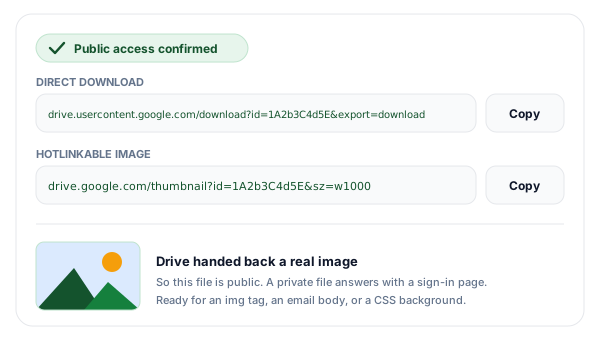
Copy the two links Drive never shows you
You get a direct download URL on drive.usercontent.google.com, which serves the file bytes with no preview page in between, and a thumbnail URL that responds as a real image so it works in an img tag, an email body, or a CSS background. The tool then loads that thumbnail once and tells you whether Drive actually served it, which is the fastest way to find out that a file is still private.
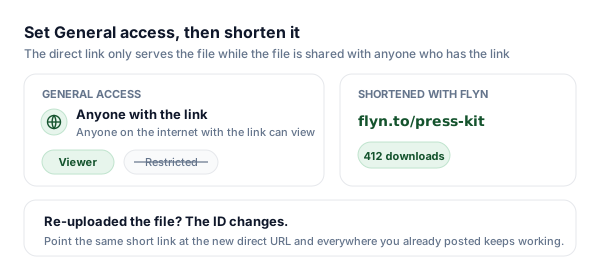
Set General access, then shorten and track it
Open Share in Drive and set General access to Anyone with the link, or the direct URL will keep answering with a sign-in page. Then shorten the direct link with Flyn: you get a clean address you can print, a count of how many times the file was really downloaded, and an editable destination so a re-upload under a new file ID takes one edit instead of a hunt.
What a Google Drive Direct Link Actually Is
The link Drive gives you when you click Share is not a link to your file. It is a link to a web page about your file: drive.google.com/file/d/FILE_ID/view?usp=sharing returns HTML, with a toolbar, a preview pane, and a download button that a human has to press. That is perfectly fine when you are sending a document to a colleague, and completely wrong when you are wiring up a Download button, an installer link, or an image in an email. Those need a URL that responds with the file itself.
That URL exists, and it lives on a different hostname: drive.usercontent.google.com. Google splits the interface (drive.google.com) from the content delivery (drive.usercontent.google.com), and downloads moved onto the second host in late 2023. The name appears nowhere in the Drive interface, in the Share dialog, or in the right-click menu, so there is no way to copy it and no way to guess it. Add "/download?id=FILE_ID&export=download" and you have the address that serves the bytes.
The second obstacle is where the ID sits. In most URLs the identifier is the last segment, so you can eyeball it at the end of the address. Drive puts it in the middle: /file/d/1A2b3C4d5E6f7G8h9I0jKlMnOpQrStUv/view, with a /view (or /edit, or /preview) trailing after it, and sometimes a /drive/u/0/ prefix from a multi-account session in front. That is why hand-editing a Drive URL so reliably produces something broken, and why this generator parses the ID out rather than asking you to find it.
The third URL is the one most people are actually looking for when they want to "hotlink" a Drive image: drive.google.com/thumbnail?id=FILE_ID&sz=w1000. Unlike the download URL, it responds with an image content type, so browsers and mail clients paint it instead of saving it. It is a preview Google generated, not your original file, which is both its strength (small, fast, always a JPEG) and its limit (re-encoded, no transparency, useless for anything that is not visual).
Every Google Drive URL Shape, and What It Really Returns
Eight addresses that all look like they point at the same file. Only three of them ever hand you one.
| URL shape | You get | What Google returns | Use it for |
|---|---|---|---|
| drive.google.com/file/d/ID/view | Preview | An HTML preview page with the Drive toolbar. The file itself is never at this address. | Sending someone into Drive so they click Download themselves. |
| drive.google.com/open?id=ID | Preview | The legacy share form. It redirects to the /file/d/ID/view preview page. | Nothing new. Treat it as an older way of writing the preview link. |
| drive.google.com/uc?export=download&id=ID | Redirect | The classic direct-download trick. It now answers with a redirect to drive.usercontent.google.com. | Still works in a browser, but you are depending on a hop Google controls. |
| drive.usercontent.google.com/download?id=ID&export=download | File | The endpoint that serves the actual bytes today. This is what the generator outputs. | Download buttons, curl and wget, installers, sample data, press kits. |
| drive.google.com/thumbnail?id=ID&sz=w1000 | Image | A re-encoded JPEG preview at the width you ask for, sent with an image content type. | img tags, email bodies, forum posts, CSS background-image. |
| drive.google.com/uc?export=view&id=ID | Unreliable | The old hotlink-an-image trick. Now unreliable: it often answers with HTML or a redirect rather than an image. | Nothing. Use the thumbnail endpoint instead. |
| docs.google.com/document/d/ID/export?format=pdf | File | A copy of a native Google Doc, built on request in the format you name. | Downloading a Doc, Sheet, or Slides deck as pdf, docx, xlsx, or pptx. |
| drive.google.com/drive/folders/ID | Preview | A folder listing rendered as a web page. Drive has no single-URL download for a folder. | Nothing. Zip the files, upload the zip, and link that. |
Set Sharing to Anyone With the Link First
No URL shape can make a private file public. A direct link is only an address; the permission on the file decides whether that address returns anything. This is the single most common reason a generated Drive link "does not work", and it is worth two minutes before you publish anything.
- 1Open the file in Google Drive, right-click it, and choose Share.
- 2Look at the General access row at the bottom of the dialog. If it says Restricted, only the people listed above it can open the file, and your direct link will fail for everyone else.
- 3Change Restricted to "Anyone with the link".
- 4Leave the role on Viewer. Commenter and Editor also allow downloads, but Viewer is the only one that does not hand write access to strangers.
- 5Open the gear icon in the same dialog and check that "Viewers and commenters can see the option to download, print, and copy" is on. When that box is unticked, Drive blocks the direct download even though the file is public.
- 6Click Done, copy the link, and paste it into the generator above.
What makes this hard to debug is that Drive does not fail loudly. A restricted file does not return 403 or a machine-readable error. It returns Google's ordinary sign-in page, with a 200 status and an HTML content type. So the browser shows a login screen, an img tag shows a broken image icon, and curl reports a successful download of a few kilobytes that turn out to be a web page. That is exactly why the generator loads the thumbnail once after you click Generate: if Drive hands back a real image, the file is genuinely reachable without a login, and if it does not, you know before you publish rather than after.
Two things this checklist cannot fix. If the file lives in a Google Workspace account, an administrator can disable external sharing entirely, in which case "Anyone with the link" is not offered at all and no URL will make the file public. And "Anyone with the link" means exactly that: consumer Drive has no per-link password and no expiry date, so treat a public file as published. If you need the link itself to be revocable or password-gated, put a password-protected short link in front of it.
The sz Parameter: Sizing the Hotlinked Image
The thumbnail endpoint takes one meaningful parameter, sz, and it decides how big a preview Google builds for you. The w in sz=w1000 stands for width in pixels, so that value asks for an image roughly 1000 across with the height scaled to match. Ask for less when the image is going into an email or a table row, because you are paying for those pixels in load time on someone else's connection.
| Value | What you get |
|---|---|
| sz=w1000 | About 1000 pixels wide, height scaled to keep the aspect ratio. The default here. |
| sz=w320 | A small thumbnail for list rows, avatars, and email, where weight matters more than detail. |
| sz=h600 | Constrains the height instead: about 600 pixels tall, with the width scaled to match. |
| sz=w800-h600 | A bounding box. The image is fitted inside 800 by 600 rather than cropped to it. |
Two behaviours worth knowing. Google serves the closest preview it has already stored and does not upscale, so asking for sz=w4000 on a 900-pixel image gives you a 900-pixel image, not a blurry giant one. And the response is a JPEG regardless of what you uploaded: a PNG with a transparent background comes back flattened onto white. When transparency or exact pixels matter, the thumbnail endpoint is the wrong tool and the download URL is the right one.
Where Drive Direct Links Break
Large files hit the virus-scan interstitial. Google scans what it serves, and it cannot scan very large files, so past roughly 100 MB the download endpoint answers with a page saying it could not scan the file, plus a confirm button. A person clicks through without thinking about it. A script does not: curl and wget save that HTML page under your intended filename, which is why an automated Drive download so often produces an archive that will not open. If machines need to fetch the file, host it somewhere that just serves bytes.
The thumbnail endpoint is for images, not files. It hands back a preview Google generated. For a photo or a PDF that is a genuine picture of your content. For a zip, an installer, a font, or most video, there is nothing visual to generate, so you get a generic icon or nothing at all. Never point a download button at the thumbnail URL, and never assume it will serve your original bytes.
Drive counts downloads and will cut you off. Every file has a per-file download quota. A link that gets picked up by a large newsletter or a busy subreddit can trip it, after which Google answers every request with a message saying the file cannot be viewed or downloaded right now, usually until the counter resets the next day. Nothing in the URL causes this and nothing in the URL fixes it. Drive is storage with sharing bolted on, not a content delivery network.
The ID is the file, and files move. Trash the file, flip sharing back to Restricted, or replace it with a fresh upload and the ID changes or stops resolving. Everything you already published points at the old one. This is the single best argument for putting a short link in front of a Drive URL rather than pasting the Drive URL itself: a short link whose destination you can edit survives a re-upload, and the printed flyer, the old newsletter, and the forum post from last year all keep working.
Where a Direct Link Earns Its Keep
Anywhere a person or a program expects a URL to answer with a file rather than a web page.
Download buttons that actually download
Press kits, brand assets, menus, and PDFs on a landing page. A button pointed at the preview page sends people to Drive; a button pointed at the direct URL starts the download.
Images where you cannot upload
Forum signatures, marketplace listings, HTML email, and internal wikis that accept an image URL but give you nowhere to host one. The thumbnail URL fills that gap.
Sample data and course files
A dataset, a starter project, or a worksheet that students and readers need to fetch with one click, or with curl inside a lesson, without a Drive account.
Docs and knowledge bases
Embed a diagram or screenshot that already lives in the team Drive without moving it into a CMS first, and keep one copy as the source of truth.
Drive Links + Flyn: An Address You Control
The generator is free forever. Add Flyn when a 90-character Google URL is not something you want to print, say out loud, or be stuck with.
Editable destinations
Re-upload the file and the ID changes. Re-point the short link once and every place you posted it keeps working.
Download counts
A raw Drive URL tells you nothing. Total clicks are free on every link; country, device, and referrer come with Pro.
QR codes included
Put the file behind a QR code on a flyer, a poster, or a slide. Free on every link, and it survives a re-upload.
A free plan that lasts
25 links a month with total click counts and QR codes. No trial countdown. Custom domains come with Pro.
Frequently Asked Questions
How do I turn a Google Drive share link into a direct download link?
What is drive.usercontent.google.com, and why is it not anywhere in Drive?
Why does my direct link show a Google sign-in page instead of the file?
How do I embed a Google Drive image in HTML or in an email?
What does the sz parameter do, and what values can I use?
Does the old drive.google.com/uc?export=download link still work?
Why do I see a page saying Google Drive cannot scan this file for viruses?
Can I create a direct download link for a Google Drive folder?
Do these links work for Google Docs, Sheets, and Slides?
Can I host my website images on Google Drive?
Why did my Drive image or download stop working after a traffic spike?
Is this tool free, and do you store the links I paste?
More Free Tools
More free link tools from Flyn, instant, no sign-up required.
Google Drive Link Shortener
Turn a long Drive URL into a short, trackable link you can print.
Google Forms Link Shortener
Short links for forms, with click counts on every distribution channel.
Link Inspector
See the headers, redirects, and final destination behind any URL.
URL Expander
Unshorten any link and see where it lands before you click it.
Ready to hand people the file, not the preview page?
Generate direct links for free, then shorten them with Flyn so you can count real downloads and re-point the link the day you re-upload the file. Analytics, QR codes, and editable destinations included.