Google Tag Manager Link Tracking That Works Beyond Your Own Pages
Google Tag Manager fires tags when visitors click links on pages you control, and GA4 or any other tag stores the event. Flyn counts the redirect itself, so the same short link keeps reporting from email, QR codes, and social posts where no container ever loads.
- Free plan, no card required
- Set up in minutes
- GDPR-ready analytics
- No ad interstitials
- Cancel anytime
Google Tag Manager is a tag delivery system, not an analytics tool: it has no reports of its own, and every click it detects only exists if a container loaded, consent was granted, and no ad blocker stripped the script. That leaves two blind spots for link tracking. First, clicks on your short links that happen off your site (in a newsletter, a printed QR code, a WhatsApp message) never touch your container. Second, on-site clicks from blocked or unconsented sessions vanish. Pairing GTM with Flyn short links closes both gaps: a Just Links trigger filtered on your short domain captures rich on-page events, while Flyn counts every redirect server-side, everywhere, with UTM parameters carrying attribution into GA4 on the destination.

Setup
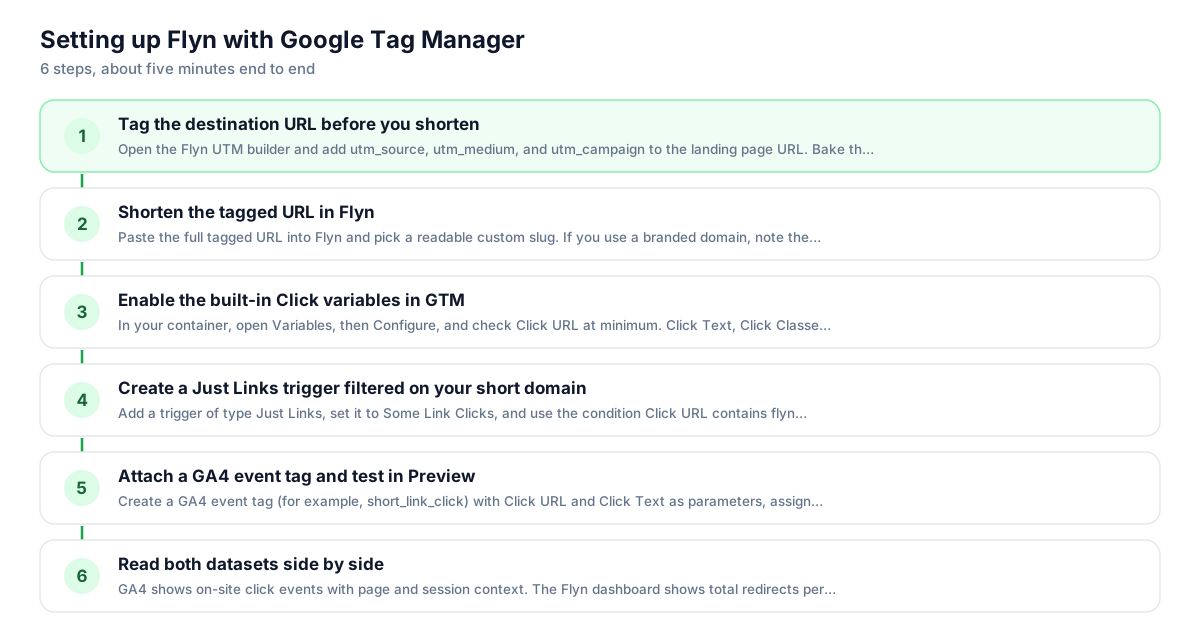
Use Flyn with Google Tag Manager in 6 steps
- 1
Tag the destination URL before you shorten
Open the Flyn UTM builder and add utm_source, utm_medium, and utm_campaign to the landing page URL. Bake the parameters into the destination before shortening; that is the most reliable setup, and the destination value wins if the same parameter is also appended to the short link.
- 2
Shorten the tagged URL in Flyn
Paste the full tagged URL into Flyn and pick a readable custom slug. If you use a branded domain, note the exact hostname now: it becomes the match value in your GTM trigger filter, so every short link you create is captured by one trigger.
- 3
Enable the built-in Click variables in GTM
In your container, open Variables, then Configure, and check Click URL at minimum. Click Text, Click Classes, and Click ID are worth enabling too: they tell you which specific element carried the short link when several placements share one URL.
- 4
Create a Just Links trigger filtered on your short domain
Add a trigger of type Just Links, set it to Some Link Clicks, and use the condition Click URL contains flyn.to (or your branded domain). Enable Wait for Tags with the default 2000 ms timeout and Check Validation so tags fire before the browser navigates away.
- 5
Attach a GA4 event tag and test in Preview
Create a GA4 event tag (for example, short_link_click) with Click URL and Click Text as parameters, assign the trigger, then open Preview mode. Click a short link on your staging page and confirm the tag fires in Tag Assistant before publishing the container.
- 6
Read both datasets side by side
GA4 shows on-site click events with page and session context. The Flyn dashboard shows total redirects per link, including clicks from email, QR, and social where GTM never ran. When Flyn's count exceeds GA4's, the gap is your off-site and blocked traffic.
UTM recipe
The UTM convention for Google Tag Manager
Tag the destination first, then shorten. GA4 on the destination page reads these parameters from the landing URL, so attribution survives the Flyn redirect without any extra GTM configuration.
| Parameter | Value | Why |
|---|---|---|
| utm_source | googletagmanager | Or the real channel if the short link travels beyond your site: newsletter, qr, partner-site. Pick one convention and keep it. |
| utm_medium | referral | Describes the mechanism, not the tool. Use email, qr, or social when the link ships through those channels instead. |
| utm_campaign | summer-partner-promo | Lowercase, hyphenated, no dates. GA4 groups sessions by this value, so typos create duplicate campaign rows. |
https://example.com/partner-offer?utm_source=googletagmanager&utm_medium=referral&utm_campaign=summer-partner-promo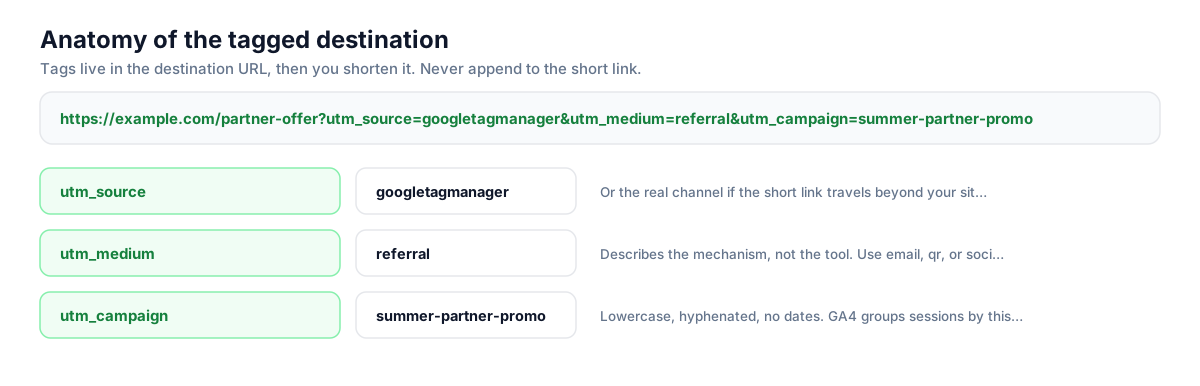
Build this in seconds with the free UTM builder, then shorten the tagged URL. You can also append parameters to the short link itself: Flyn forwards them to the destination, and if the same parameter is baked into the destination, that value takes priority.
Honest comparison
What Google Tag Manager tracks vs what Flyn adds
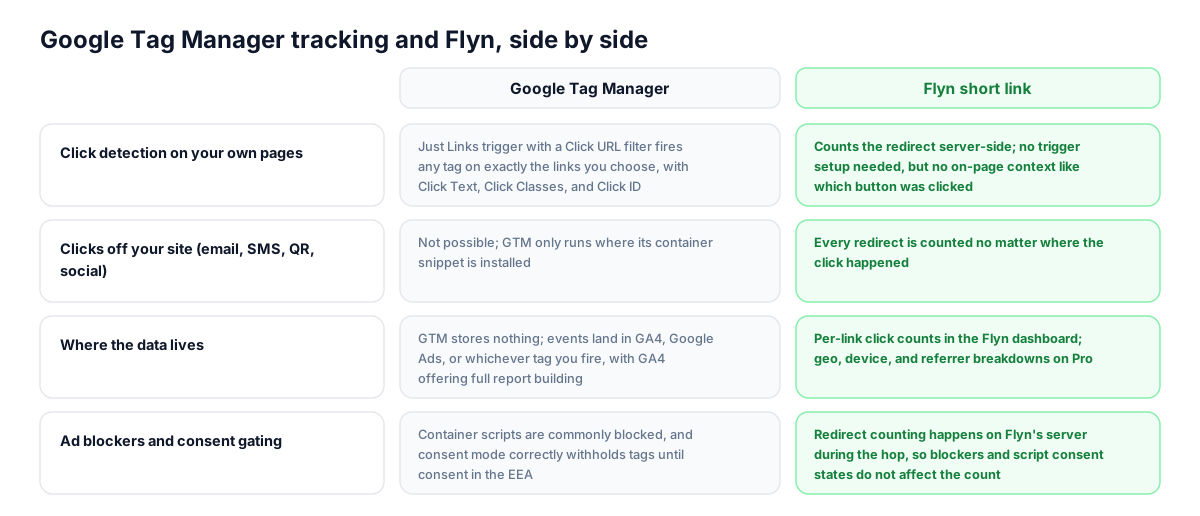
GTM is excellent at detecting clicks on pages where its container runs and routing them to GA4, Google Ads, or any tag you configure. Flyn measures the redirect itself, so it works wherever the link travels. Use both: GTM for on-site behavioral context, Flyn for the total click count.
| Capability | Google Tag Manager | Flyn short link |
|---|---|---|
| Click detection on your own pages | Just Links trigger with a Click URL filter fires any tag on exactly the links you choose, with Click Text, Click Classes, and Click ID available as context | Counts the redirect server-side; no trigger setup needed, but no on-page context like which button was clicked |
| Clicks off your site (email, SMS, QR, social) | Not possible; GTM only runs where its container snippet is installed | Every redirect is counted no matter where the click happened |
| Where the data lives | GTM stores nothing; events land in GA4, Google Ads, or whichever tag you fire, with GA4 offering full report building | Per-link click counts in the Flyn dashboard; geo, device, and referrer breakdowns on Pro |
| Ad blockers and consent gating | Container scripts are commonly blocked, and consent mode correctly withholds tags until consent in the EEA | Redirect counting happens on Flyn's server during the hop, so blockers and script consent states do not affect the count |
| Who clicked | GA4 ties clicks to sessions and its own user identifiers, enabling funnels and audiences | Anonymous counts only; Flyn never identifies which visitor clicked and does not replace GA4 user-level analysis |
| Link rewriting | GTM never rewrites or wraps your links; it listens for clicks with event listeners | You choose the link: flyn.to slugs or your own branded domain, edited any time without touching the container |
Why it matters
What you get
One trigger covers every short link
Because all your Flyn links share one domain, a single Just Links trigger with Click URL contains your short domain matches every current and future link. No per-link trigger maintenance, no container republish when marketing adds a new campaign link.
Counts survive blockers and consent gates
GTM containers are stripped by many ad blockers, and consent mode rightly holds tags until consent. Flyn counts the click during the server-side redirect hop, so your baseline click number stays complete even when the container never fires.
The same link reports from anywhere
A short link you track on-site with GTM also gets pasted into newsletters, QR codes, and DMs. GTM goes silent there; Flyn keeps counting, so one link gives you a total across every surface instead of only your own pages.
Click counts without report spelunking
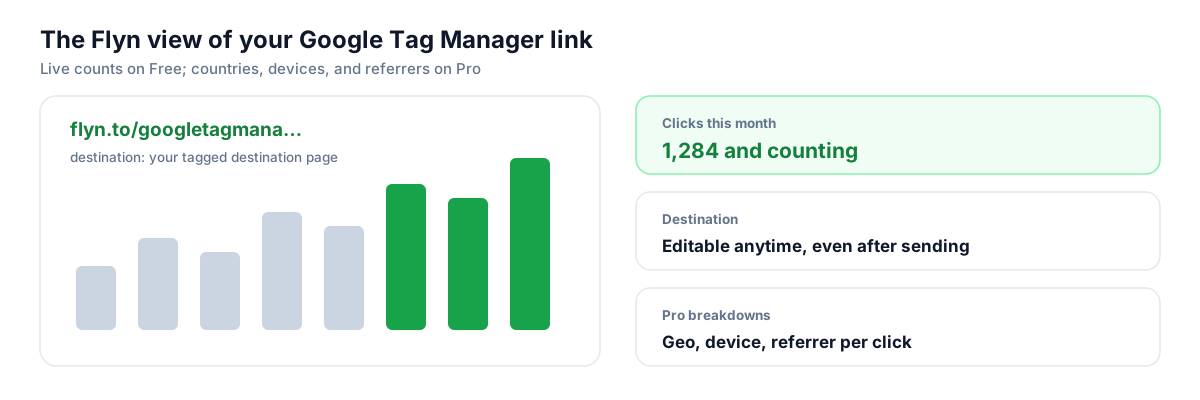
GTM has no reports, so answering how many clicks did that link get means building a GA4 exploration. Flyn's dashboard shows the per-link count directly, and Pro adds geo, device, and referrer breakdowns when you need the detail.
Worth knowing before you start
- Watch for double counting: if GA4 enhanced measurement outbound click tracking is on, clicks to flyn.to already fire a click event with outbound set to true, alongside your custom GTM tag. Either filter your GA4 reports by event name or disable the outbound toggle in the data stream settings.
- Just Links triggers only fire on real anchor elements. Buttons that navigate via JavaScript need an All Elements click trigger instead, and Wait for Tags and Check Validation are not available there.
- The destination page sees the click as a fresh landing; the HTTP referrer will show your site or nothing, not the campaign. That is why the UTMs belong in the destination URL, baked in before shortening; the redirect now forwards an appended parameter too, but the destination value wins on a name clash.
- Wait for Tags briefly delays navigation (default timeout 2000 ms) so your tag can fire before the browser leaves the page. Keep the default; raising it makes short-link clicks feel slow.
Mint short links from the same workflow that ships your container
If you template links per campaign or generate them in a build step, call Flyn's REST API instead of shortening by hand: POST the UTM-tagged destination to /api/shorten with your API key and get back a short URL ready to drop into your site or dataLayer-driven content. Webhooks can push click events to your own endpoint if you want them in a warehouse next to your GA4 export.
Shorten API referenceGo deeper
Features, tools, and guides that pair with this
Features
Free tools
Frequently asked questions
Does Google Tag Manager rewrite or wrap my links the way email platforms do?
No. GTM never modifies your HTML or your URLs. It attaches event listeners to the page and reacts when a click happens, which is why the Click URL variable shows your short link exactly as written. Your Flyn link goes out clean, and the visible URL, the copied URL, and the tracked URL are all the same string.
How do I fire a tag only when someone clicks a Flyn short link?
Create a trigger of type Just Links, choose Some Link Clicks, and add the condition Click URL contains flyn.to, or your branded domain if you use one. Enable the built-in Click URL variable first under Variables, then Configure. That one trigger matches every short link on the site, so new campaign links need no container changes.
Why does Flyn show more clicks than my GA4 event count?
Expect a gap, and treat it as signal. GA4 only records clicks where the container loaded, consent allowed tags, and no blocker interfered, and only on pages you control. Flyn counts every redirect, including clicks from emails, QR codes, social DMs, and blocked sessions. The difference is your off-site and untagged traffic, which GTM alone cannot see.
Will GA4 enhanced measurement double count my short link clicks?
Possibly. Enhanced measurement automatically logs a click event with the outbound parameter set to true whenever a user clicks a link leaving your domain, and flyn.to qualifies. If you also fire a custom GTM tag on the same click, you get two events. Either rely on the automatic event alone, name your custom event distinctly and filter reports, or turn off outbound click tracking in the data stream settings.
Can GTM track clicks on my short links in newsletters or social posts?
No. GTM code only executes on pages where the container snippet is installed, so a click inside Gmail, Instagram, or a WhatsApp thread never reaches your container. This is the core reason to pair GTM with Flyn: the short link's redirect is counted server-side on every click, regardless of where the link was pasted.
Do UTM parameters survive the Flyn redirect into GA4?
Yes, as long as they are part of the destination URL you shortened. Flyn redirects to that exact URL, so GA4 on the landing page reads utm_source, utm_medium, and utm_campaign normally. Flyn now forwards query strings appended to the short link too, but the destination value wins on a name clash, so tag first, shorten second to keep one canonical set.
Does Wait for Tags slow down navigation when visitors click a short link?
Slightly, and by design. Wait for Tags holds the browser on the page until your tags fire or the timeout elapses, defaulting to 2000 milliseconds. In practice tags usually fire in well under that, so the delay is rarely noticeable. Keep the default timeout, and remember the option exists only on Just Links triggers, not All Elements.
Do I need consent for Flyn's click counts under GDPR?
Flyn's counting happens during the redirect on Flyn's server and is anonymous: no profile is built and no individual is identified. That is a different situation from GTM tags, which consent mode correctly withholds until the visitor agrees. You should still describe short-link redirects in your privacy policy, and your consent banner requirements for GA4 and Google Ads tags are unchanged.
Can Flyn tell me which logged-in user or GA4 client clicked a link?
No. Flyn counts clicks anonymously and never identifies which visitor clicked, so it does not replace GA4 sessions, user IDs, or audience building. Use GTM plus GA4 for user-level analysis on pages you control, and use Flyn for the trustworthy total across every channel. The two numbers answer different questions, and you want both.
Can I deploy Flyn's conversion tracking tag through my container?
Yes. Conversion tracking is a Pro feature you switch on per link: the redirect adds an unguessable click id to the destination, and a small Flyn tag on your own site reports back when the visitor reaches the goal page. In GTM that is two Custom HTML tags. Load https://www.flyn.to/flyn.js on All Pages, then on your purchase or signup trigger call window.flyn('conversion', { value: 49.00, currency: 'USD' }) with the value from your dataLayer, using tag sequencing so the script tag fires first. Each tracked link then reports conversions, conversion rate, and total value beside its clicks. One trade-off to weigh: a tag delivered by the container inherits the container's blind spots, so blockers and consent gating that stop GTM stop these pings too. Putting the script directly in your page template is the more complete install.
Start tracking your Google Tag Manager links free
Shorten your first links without an account, no card required. Free covers 25 links a month; Pro unlocks unlimited links and geo, device, and referrer breakdowns.