Adobe Analytics Link Tracking with Short Links That Keep Your cid
Adobe Analytics attributes visits to campaigns through tracking codes like cid, captured by your s.campaign implementation and Marketing Channels processing rules. Flyn wraps those long tagged URLs in short, editable links and counts every click at the redirect, including the ones that never fire your page beacon.
- Free plan, no card required
- Set up in minutes
- GDPR-ready analytics
- No ad interstitials
- Cancel anytime
Adobe Analytics never sees a click until your landing page loads and the AppMeasurement or Web SDK beacon fires with the tracking code attached. That leaves gaps: QR scans on a slow connection, users who bounce before the tag loads, consent rejections, and ad blockers all vanish from the Tracking Code report. And a raw URL carrying cid=em:jul-newsletter:cta2 is too ugly for print, SMS, or a conference slide. The fix is to bake the tracking code into the destination URL first, then shorten it. The short link keeps the cid intact through the redirect, gives you a clean branded URL for offline placements, counts every redirect in real time, and lets you swap the destination after 10,000 flyers are already printed.

Setup
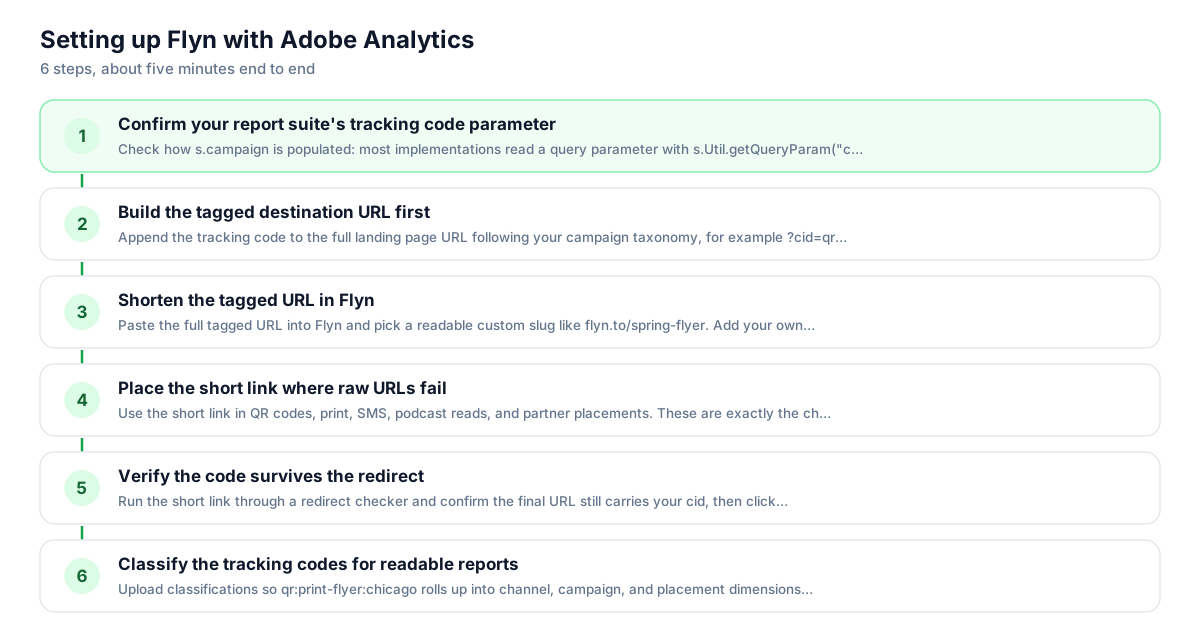
Use Flyn with Adobe Analytics in 6 steps
- 1
Confirm your report suite's tracking code parameter
Check how s.campaign is populated: most implementations read a query parameter with s.Util.getQueryParam("cid") or a processing rule that copies cid into the Campaign variable. Use that exact parameter name. If your org uses em_cid, s_cid, or channel-specific params, follow the convention, not this guide's default.
- 2
Build the tagged destination URL first
Append the tracking code to the full landing page URL following your campaign taxonomy, for example ?cid=qr:print-flyer:chicago. Keep the code in the destination before you shorten; that is the most reliable setup, and the destination value wins if the same parameter is also appended to the short link.
- 3
Shorten the tagged URL in Flyn
Paste the full tagged URL into Flyn and pick a readable custom slug like flyn.to/spring-flyer. Add your own branded domain for print and email trust. The redirect preserves the entire destination, query string included, so s.campaign receives exactly the cid you baked in.
- 4
Place the short link where raw URLs fail
Use the short link in QR codes, print, SMS, podcast reads, and partner placements. These are exactly the channels where Adobe has zero pre-arrival visibility and where a 200-character tagged URL is unusable. Flyn generates the QR code from the same link, so scan traffic lands with the cid intact.
- 5
Verify the code survives the redirect
Run the short link through a redirect checker and confirm the final URL still carries your cid, then click it and check that the value appears in the Tracking Code dimension after processing. Do this once per campaign template before anything gets printed or sent.
- 6
Classify the tracking codes for readable reports
Upload classifications so qr:print-flyer:chicago rolls up into channel, campaign, and placement dimensions in Analysis Workspace. Flyn's per-link counts then act as your fast pre-click check while classified Adobe reports remain the source of truth for attribution.
UTM recipe
The UTM convention for Adobe Analytics
Adobe Analytics does not use utm_ parameters natively. It reads whatever query parameter your implementation maps into s.campaign, conventionally cid. Build the code from your taxonomy with a consistent delimiter so classifications can split it later, and keep it inside the destination URL before shortening.
| Parameter | Value | Why |
|---|---|---|
| cid | qr:print-flyer:chicago | The tracking code your implementation reads into s.campaign, typically via getQueryParam("cid") or a processing rule. Use one delimiter (colon or pipe) consistently across every campaign so classification rules can parse channel, campaign, and placement. |
| channel prefix | qr, em, sms, soc, aff | Lead the code with a channel token that your Marketing Channels processing rules match on the query string parameter. Offline and QR traffic arrives with no referrer, so the cid prefix is the only reliable channel signal. |
| length budget | under 255 bytes | s.campaign truncates anything past 255 bytes. Delimited codes rarely get close, but automated taxonomies that concatenate long names can, and a truncated code breaks classification matching silently. |
https://www.example.com/summer-sale?cid=qr:print-flyer:chicago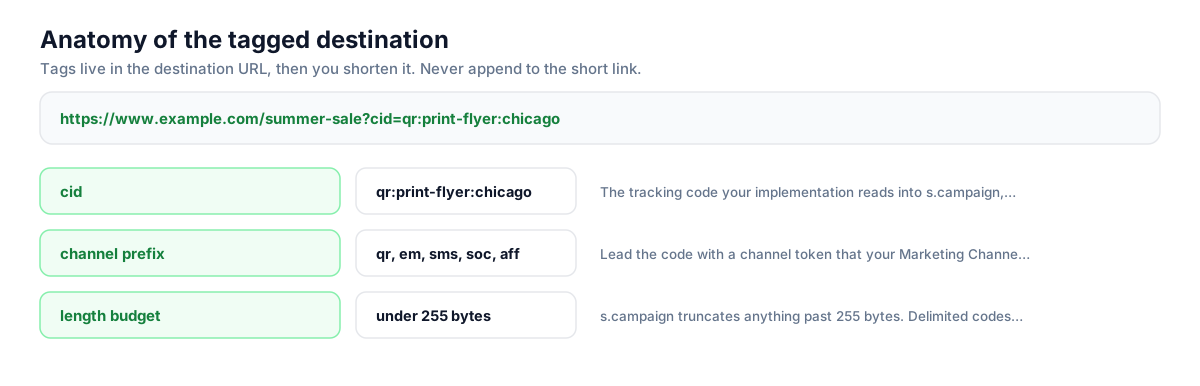
Build this in seconds with the free UTM builder, then shorten the tagged URL. You can also append parameters to the short link itself: Flyn forwards them to the destination, and if the same parameter is baked into the destination, that value takes priority.
Honest comparison
What Adobe Analytics tracks vs what Flyn adds
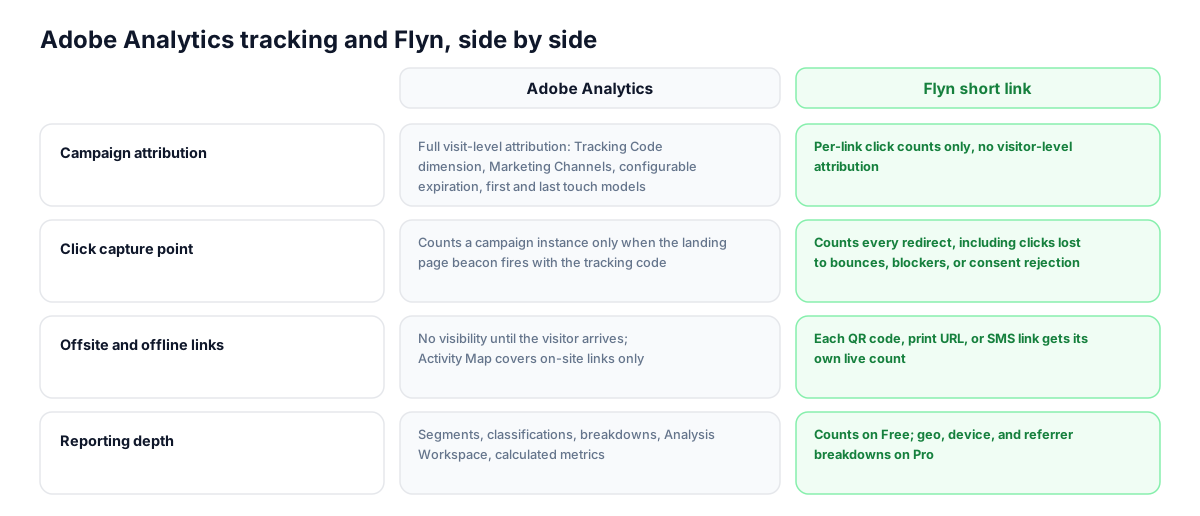
These are complementary layers, not competitors. Adobe Analytics owns attribution, segmentation, and everything that happens after the landing page beacon fires. Flyn sits in front of it, counting raw redirects and keeping the tagged URL presentable. Neither replaces the other, and no data moves between them.
| Capability | Adobe Analytics | Flyn short link |
|---|---|---|
| Campaign attribution | Full visit-level attribution: Tracking Code dimension, Marketing Channels, configurable expiration, first and last touch models | Per-link click counts only, no visitor-level attribution |
| Click capture point | Counts a campaign instance only when the landing page beacon fires with the tracking code | Counts every redirect, including clicks lost to bounces, blockers, or consent rejection |
| Offsite and offline links | No visibility until the visitor arrives; Activity Map covers on-site links only | Each QR code, print URL, or SMS link gets its own live count |
| Reporting depth | Segments, classifications, breakdowns, Analysis Workspace, calculated metrics | Counts on Free; geo, device, and referrer breakdowns on Pro |
| Changing a live link | A tracking code in a printed URL is fixed forever | Destination behind the short link is editable anytime, the printed link never changes |
| Data latency and access | Processing latency applies and viewers need report suite access | Real-time counts on a dashboard anyone on the team can open |
Why it matters
What you get
QR and print traffic lands with the right cid
Offline placements are where Adobe Analytics is blind before arrival and where raw tagged URLs are impossible to type. A Flyn short link carries the full cid through the redirect, and the QR code generated from it means scan traffic populates the Tracking Code dimension correctly.
See clicks your beacon never records
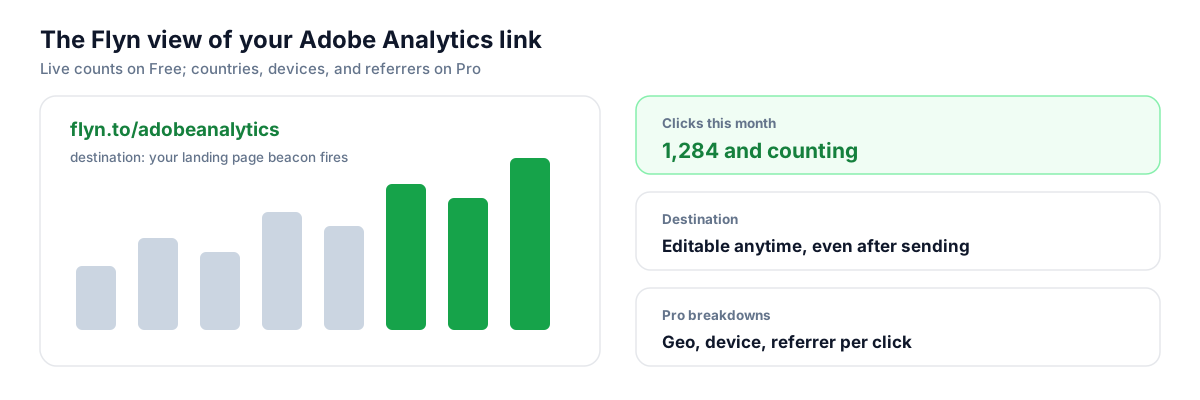
Adobe only counts a campaign instance when the landing page tag fires. Flyn counts at the redirect, so the gap between Flyn clicks and Tracking Code instances quantifies your loss to bounces, ad blockers, and consent rejection, a number Adobe alone cannot show you.
Fix destinations after the code is printed
A tracking code baked into 10,000 flyers or a trade show banner cannot be reprinted. With a Flyn link in the artwork, you can repoint the destination, tagged with a corrected cid if needed, without touching the printed URL.
Branded links that hide the taxonomy
A governed Adobe taxonomy produces long, cryptic URLs that depress click-through in email and SMS and look untrustworthy in print. A branded short link on your own domain keeps the code invisible to users and intact for s.campaign.
Worth knowing before you start
- Keep cid in the destination, not tacked onto the Flyn short link. The redirect now forwards a parameter added to the short URL, but the destination value wins on a name clash, so tag the destination first, then shorten, to keep one clean cid.
- Flyn click counts will run higher than Tracking Code instances in Adobe. Flyn counts every redirect; Adobe needs the landing page beacon to fire and, in many regions, consent to be granted. Treat the delta as measurement loss, not double counting.
- If you send email through Adobe Journey Optimizer or Adobe Campaign, those products wrap links on their own tracking domain. Your short link then sits behind their redirect, adding a second hop. That is normal and both layers keep working, but test the chain once per template.
- Marketing Channels rules that rely on referrer will misclassify QR and offline traffic, which arrives with no referrer. Match on the cid query string parameter in your channel rules instead, and lead every code with a channel token.
Generate tagged short links from your campaign taxonomy
Enterprise Adobe shops usually manage tracking codes in a taxonomy spreadsheet or a campaign management tool. Flyn's REST API turns each row into a short link in one POST: build the destination with the cid from your generator, send it to the shorten endpoint with a deterministic slug, and write the short URL back to the sheet. Webhooks can push click events to your own systems for monitoring, though nothing flows into Adobe Analytics itself.
Shorten API docsGo deeper
Features, tools, and guides that pair with this
Features
Free tools
Frequently asked questions
Does Adobe Analytics wrap or redirect my links?
No. Adobe Analytics is a JavaScript measurement layer, not a link wrapper. Activity Map tracks on-site link clicks by attaching context data to the next Analytics call, and campaign attribution reads the tracking code from the landing page URL. It never rewrites your URLs or adds a redirect domain. If you shorten a link with Flyn, that redirect is the only hop in the chain, unless an email tool like Adobe Journey Optimizer adds its own.
Will a short link break my cid tracking code?
Not if the code is inside the destination URL before you shorten. Flyn's redirect passes the full destination through untouched, query string included, so s.campaign receives exactly the cid you built. Flyn now also forwards a cid appended to the short link, but the destination value wins on a name clash, so tag first, shorten second to keep one clean cid.
Should I use utm_source or cid for Adobe Analytics?
Use whatever your implementation actually reads. Adobe has no native utm_ support; the Campaign variable is populated by your code or a processing rule from a parameter your team chose, conventionally cid. Some orgs map utm_ parameters into s.campaign via processing rules so links work in both Adobe and GA4. Check the implementation before tagging anything, because a parameter Adobe is not configured to read is invisible.
How do short links interact with Marketing Channels processing rules?
The tracking code passes through the redirect, so any channel rule that matches on the cid query string parameter fires normally. Referrer-based rules are the risk: QR scans and clicks from many native apps arrive with no referrer, so without a query string rule they fall into Direct. Lead every cid with a channel token like qr or sms and add a rule matching that prefix.
Why does Flyn show more clicks than my Tracking Code instances?
They measure different points. Flyn counts at the redirect, before your page loads. Adobe counts only when the landing page beacon fires with the code attached, which requires the page to load, the tag to run, and in many regions consent to be granted. Bounces, ad blockers, slow connections, and bot filtering all widen the gap. The difference is a useful measurement-loss metric rather than an error.
Does this workflow change with Customer Journey Analytics?
The tagging side is identical: bake the tracking code into the destination, shorten, place the short link. What changes is classification and channel logic. CJA defines marketing channels with derived fields instead of processing rules, applied retroactively at report time, and Adobe is steering classification work toward Data Prep rather than the legacy Rule Builder. Your cid convention and short links carry over unchanged.
Is there a length limit on Adobe tracking codes?
Yes. The campaign variable is truncated at 255 bytes. Hand-built codes rarely approach that, but automated taxonomies that concatenate campaign, ad group, creative, and placement names can, and truncation breaks classification matching without any warning. Keep codes delimited and compact. The short link helps on the user-facing side too, since nobody has to see or type the long tagged URL.
Can Flyn send click data into Adobe Analytics?
No, and this guide does not claim otherwise. Flyn's counts live in the Flyn dashboard and, if you want, flow to your own systems via webhooks. Nothing is written into your report suite. Think of Flyn as the pre-click layer: fast redirect-level counts per placement, with Adobe Analytics remaining the system of record for attribution, visits, and conversion analysis.
I send email with Adobe Journey Optimizer. Do I still need short links?
AJO and Adobe Campaign wrap email links on their own tracking domain for click reporting, so inside those emails a Flyn link adds a second hop behind their wrapper. Both layers keep working, but the bigger win is everywhere those tools do not reach: QR codes, print, SMS through other providers, podcast reads, and partner placements, where the short link is the only thing carrying your cid.
Can Flyn tell me which visitor or segment clicked?
No. Flyn counts clicks anonymously and never identifies who clicked. Visitor-level analysis, segmentation, and attribution stay in Adobe Analytics, which ties the tracking code to visits and conversions once the beacon fires. Flyn Free gives you total clicks per link; Pro adds geo, device, and referrer breakdowns, still aggregate and anonymous.
Start tracking your Adobe Analytics links free
Shorten your first links without an account, no card required. Free covers 25 links a month; Pro unlocks unlimited links and geo, device, and referrer breakdowns.