HubSpot Link Tracking That Works Beyond the Email
HubSpot already tells you which contact clicked which marketing email or sequence step. Flyn adds branded short links that keep counting after the send: in chat, LinkedIn messages, proposals, and anywhere else a link travels, with destinations you can still edit.
- Free plan, no card required
- Set up in minutes
- GDPR-ready analytics
- No ad interstitials
- Cancel anytime
HubSpot's click tracking is genuinely good inside HubSpot. Marketing emails log which contact clicked which link, sequences report clicks per step, and the traffic analytics tool buckets UTM-tagged visits by source. The gaps show up at the edges. HubSpot wraps every tracked link through hubspotlinks.com (or a custom tracking domain on Professional and Enterprise), which reads as obviously automated in one-to-one sales outreach. Once an email is sent or a sequence is running, the destination behind each link is frozen. And the moment your link leaves a HubSpot send (pasted into LinkedIn, a chat widget, a PDF proposal), per-link click data gets thin. A Flyn short link fixes those three problems without touching your HubSpot reporting.

Setup
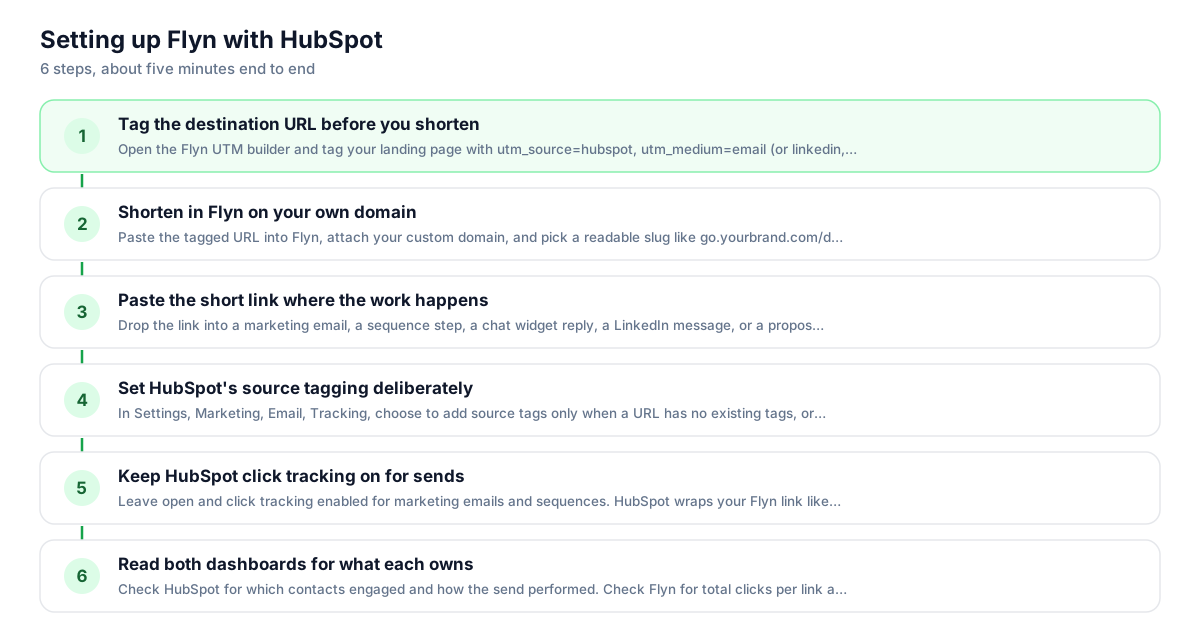
Use Flyn with HubSpot in 6 steps
- 1
Tag the destination URL before you shorten
Open the Flyn UTM builder and tag your landing page with utm_source=hubspot, utm_medium=email (or linkedin, chat, proposal), and a campaign name. Bake the tags into the destination before shortening; that is the most reliable setup, and the destination value wins if the same parameter is also appended to the short link.
- 2
Shorten in Flyn on your own domain
Paste the tagged URL into Flyn, attach your custom domain, and pick a readable slug like go.yourbrand.com/demo (a custom domain is a Pro feature). The Free plan includes 25 links a month and custom slugs, which is enough to cover a full nurture sequence.
- 3
Paste the short link where the work happens
Drop the link into a marketing email, a sequence step, a chat widget reply, a LinkedIn message, or a proposal PDF. The same link counts clicks from all of them, so you finally see which surface actually drives traffic, not just email.
- 4
Set HubSpot's source tagging deliberately
In Settings, Marketing, Email, Tracking, choose to add source tags only when a URL has no existing tags, or leave auto-tagging on. Flyn forwards parameters appended to the short link onto the destination, so HubSpot's tags reach your landing page analytics. If you also baked UTMs into the destination URL, those take priority on a name clash, so avoid tagging the same names from both sides.
- 5
Keep HubSpot click tracking on for sends
Leave open and click tracking enabled for marketing emails and sequences. HubSpot wraps your Flyn link like any other URL, so contact-level reports keep working. The click passes through HubSpot, then Flyn, then lands on your tagged page.
- 6
Read both dashboards for what each owns
Check HubSpot for which contacts engaged and how the send performed. Check Flyn for total clicks per link across every channel, and on Pro, where clicks came from by country, device, and referrer. When a sequence link goes stale, edit the destination in Flyn instead of rebuilding the sequence.
UTM recipe
The UTM convention for HubSpot
HubSpot auto-tags email links with utm_source=hs_email, and those values are not editable. For links you shorten yourself, set your own explicit values in the destination URL before shortening so every channel is labeled the way your reports expect.
| Parameter | Value | Why |
|---|---|---|
| utm_source | hubspot | Your own label for HubSpot-driven traffic; HubSpot's automatic value is hs_email, so pick one convention and keep it |
| utm_medium | Switch to linkedin, chat, or proposal when the same short link goes out on another surface | |
| utm_campaign | q3-nurture | Match the HubSpot campaign name so traffic analytics and your other tools bucket visits the same way |
| utm_content | cta-book-demo | Optional: distinguish two links in the same email, for example the button versus the plain text link |
https://example.com/demo?utm_source=hubspot&utm_medium=email&utm_campaign=q3-nurture&utm_content=cta-book-demo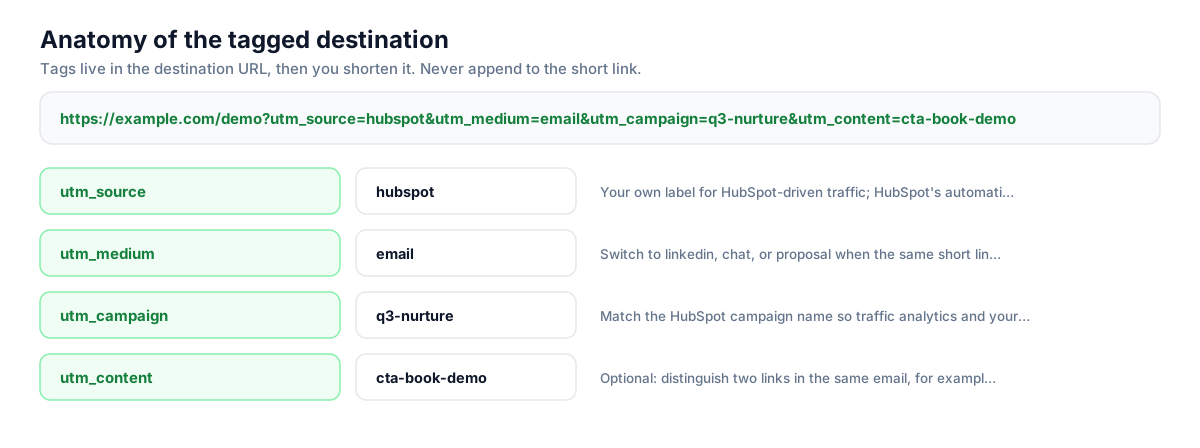
Build this in seconds with the free UTM builder, then shorten the tagged URL. You can also append parameters to the short link itself: Flyn forwards them to the destination, and if the same parameter is baked into the destination, that value takes priority.
Honest comparison
What HubSpot tracks vs what Flyn adds
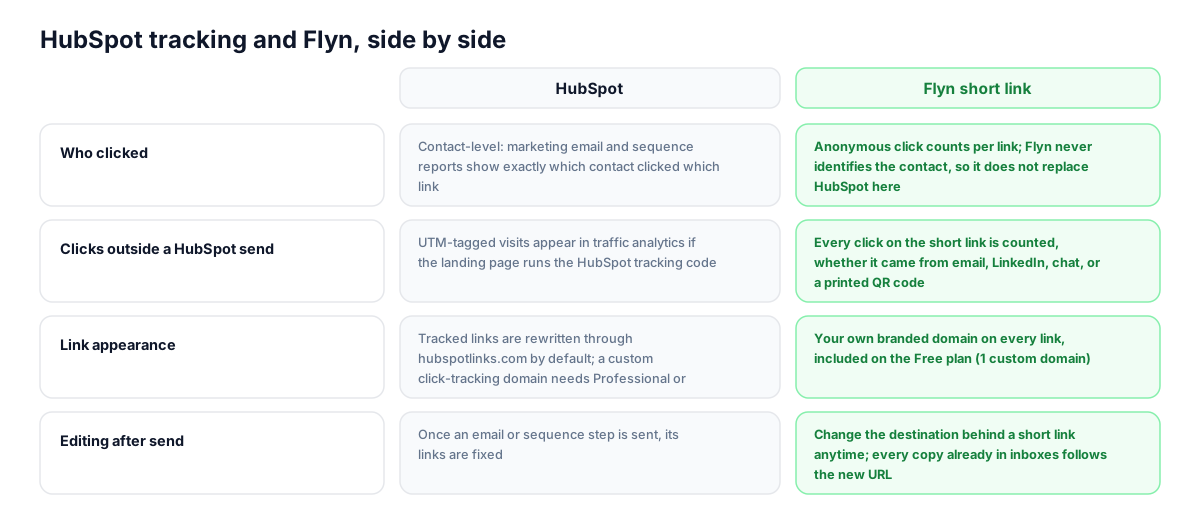
These are complementary layers, not substitutes. HubSpot owns contact-level engagement inside its sends; Flyn owns the link itself, wherever it goes. Use both and read each report for what it is good at.
| Capability | HubSpot | Flyn short link |
|---|---|---|
| Who clicked | Contact-level: marketing email and sequence reports show exactly which contact clicked which link | Anonymous click counts per link; Flyn never identifies the contact, so it does not replace HubSpot here |
| Clicks outside a HubSpot send | UTM-tagged visits appear in traffic analytics if the landing page runs the HubSpot tracking code | Every click on the short link is counted, whether it came from email, LinkedIn, chat, or a printed QR code |
| Link appearance | Tracked links are rewritten through hubspotlinks.com by default; a custom click-tracking domain needs Professional or Enterprise | Your own branded domain on every link |
| Editing after send | Once an email or sequence step is sent, its links are fixed | Change the destination behind a short link anytime; every copy already in inboxes follows the new URL |
| Audience breakdowns | Email reports show top clicked links, click maps, and device or client data for the send | Geo, device, and referrer breakdowns per link on Pro; Free shows click counts |
| UTM handling | Auto-tags email links (utm_source=hs_email, utm_medium=email) with account-level settings to skip already-tagged URLs | UTMs you bake into the destination pass through the redirect untouched and land in analytics intact |
Why it matters
What you get
Sales outreach that does not look automated
HubSpot rewrites tracked links through hubspotlinks.com unless you set up a custom click-tracking domain, which requires Professional or Enterprise. A Flyn link on your own domain reads as a link a human typed, which matters in one-to-one prospecting where a tracking URL signals mass outreach.
Fix a link mid-sequence without rebuilding it
Sequences run for weeks, and sent emails cannot be edited. When a pricing page moves or a case study gets replaced, change the destination behind the Flyn link once. Every email already sitting in a prospect's inbox now points to the right page.
One click count across every channel
HubSpot's per-link reporting is strongest inside its own sends. The same Flyn link pasted into a marketing email, a chat reply, a LinkedIn message, and a proposal keeps a single running total, so you can compare surfaces instead of guessing.
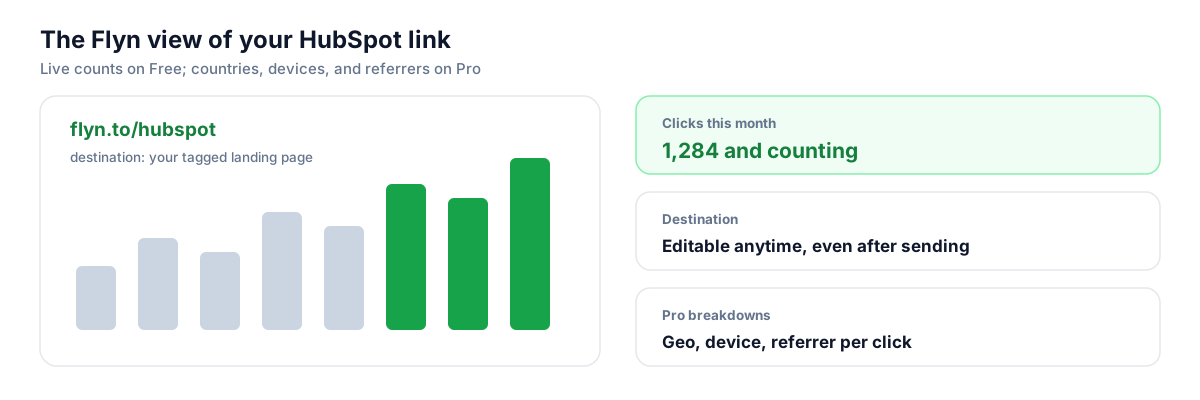
See where clicks come from on Pro
HubSpot's email reports cover devices and clients for a send. Flyn Pro adds geo, device, and referrer breakdowns per link across all channels, which is useful when your sequences target specific regions or when you suspect a link is being forwarded outside your list.
Worth knowing before you start
- Expect a double hop in tracked sends: the click goes through HubSpot's tracking redirect first, then Flyn's, then lands on your page. Both redirects are fast, but test the full chain with a redirect checker before a big send.
- HubSpot's automatic UTM tagging appends parameters to the URLs in your email, including your short link. Flyn now forwards those appended parameters onto the destination, so the auto-tags reach analytics. If you also bake UTMs into the destination URL, those win on a name clash, so pick one source to avoid double-tagging.
- Flyn counts clicks anonymously. It will never tell you which contact clicked, so keep HubSpot's click tracking on and treat its email and sequence reports as the source of truth for contact-level engagement.
- Generic shortener domains have a poor reputation with spam filters. Always put your Flyn links on your own custom domain before using them in email, especially sales outreach to cold inboxes.
Generate links per sequence or per rep with the Flyn API
RevOps teams often need one short link per campaign, per rep, or per sequence variant, each with its own UTM set. A short script does it: POST the tagged destination and a slug to Flyn's shorten endpoint, then paste the returned links into your HubSpot templates or personalization tokens. It is a plain REST call with no special setup, so it works the same from any language or a scheduled job.
Shorten API docsGo deeper
Features, tools, and guides that pair with this
Features
Free tools
Frequently asked questions
Does HubSpot still track clicks if I use a Flyn short link in a marketing email?
Yes. With click tracking enabled, HubSpot wraps your short link the same way it wraps any URL, so contact-level click reports keep working. The click passes through HubSpot's tracking redirect, then Flyn's redirect, then lands on your destination. You lose nothing on the HubSpot side and gain a link that keeps counting when it gets forwarded or pasted elsewhere.
Will HubSpot's automatic UTM tagging break my short link?
It will not break the link, and the auto-tags now survive. HubSpot appends parameters like utm_source=hs_email to URLs in the email, and Flyn now forwards those appended parameters onto the destination. If you also bake your own UTMs into the destination URL before shortening, those pass through untouched and win on a name clash, so pick one source to avoid double-tagging.
Can I stop HubSpot from rewriting links through hubspotlinks.com?
You can disable click tracking at the account level in email settings, but then you lose contact-level click data in your email reports, which is usually not worth it. The better options are a custom click-tracking domain (available on Sales Hub or Marketing Hub Professional and Enterprise, set up via a CNAME record) or accepting the wrap in marketing sends while using branded Flyn links for surfaces HubSpot does not wrap, like LinkedIn and proposals.
Do short links hurt deliverability in HubSpot sequences?
Links on generic shortener domains can, because spam filters see those domains constantly in abuse. Links on your own custom domain do not carry that baggage. In sequences, where you are often emailing cold or cool inboxes from your own mailbox, a branded link also looks more human than a raw tracking URL when the recipient hovers over it.
Can I use Flyn links in HubSpot sequences and one-to-one sales emails?
Yes, and this is where they help most. Sequence emails cannot be edited once enrollment starts, but a Flyn link's destination can be changed anytime, so a moved pricing page or updated case study does not strand weeks of scheduled emails. Sales open and click tracking through your connected inbox treats the short link like any other URL.
Does Flyn tell me which HubSpot contact clicked my link?
No. Flyn counts clicks anonymously and shows totals per link, plus geo, device, and referrer breakdowns on Pro. It never identifies the person. HubSpot's marketing email and sequence reports remain your source for contact-level engagement, which is exactly why the two work well together: HubSpot answers who, Flyn answers how many and from where, across every channel.
Will clicks on a Flyn link show up in HubSpot's traffic analytics?
Yes, as long as two things are true: the UTM parameters are baked into the destination URL, and the landing page runs your HubSpot tracking code. The visit arrives with your tags intact and gets bucketed under the matching source in the traffic analytics UTM parameters tab. Set utm_campaign to match your HubSpot campaign name so campaign reporting lines up.
Which setting should I pick in HubSpot's email source tracking options?
HubSpot offers three: tag all URLs (overwrites existing tags), tag only URLs without existing tags, or no tagging. For short links it matters less than it seems, because Flyn now forwards tags appended to the short link, and any UTMs you baked into the destination win on a name clash either way. Choose the middle option as a safe default so any full-length URLs in the same email keep the tags you wrote, then rely on baked-in UTMs for shortened links.
Can I put a Flyn link in HubSpot chat, bots, or social posts?
Yes, and it is one of the strongest reasons to use one. HubSpot's per-link click reporting is built around email sends; a link pasted into a chatflow reply, a bot message, or a social post does not get the same per-link treatment. The Flyn link counts every one of those clicks in the same dashboard, and the UTMs in its destination still label the visit correctly for traffic analytics.
Is the Flyn Free plan enough for a HubSpot nurture program?
For most single-campaign use, yes. Free includes 25 new links a month, custom slugs, QR codes, link expiration, and unlimited click counting on existing links. You outgrow it when you want geo, device, and referrer breakdowns, A/B testing between two destinations, or team workspaces for shared sequence links; those are on Pro at $9 a month or a one-time lifetime purchase.
Start tracking your HubSpot links free
Shorten your first links without an account, no card required. Free covers 25 links a month; Pro unlocks unlimited links and geo, device, and referrer breakdowns.