Google Analytics 4 Link Tracking That Starts Before the Pageview
Google Analytics 4 reads the UTM parameters on every arriving session and sorts them into Traffic acquisition automatically. Flyn short links carry those tags into places GA4 cannot reach, and count every click server-side, including the ones that never load your page.
- Free plan, no card required
- Set up in minutes
- GDPR-ready analytics
- No ad interstitials
- Cancel anytime
GA4 already does the hard part: any session that arrives with UTM parameters gets sorted into Traffic acquisition under Session source/medium with zero configuration. The problem is everything before the arrival. GA4 only records a visit if its tag loads in the browser, so a scan of an untagged QR code shows up as Direct (none), an ad-blocked visitor shows up as nothing at all, and a click that bounces before gtag.js fires never existed. Flyn closes that gap. You bake UTMs into the destination, shorten it, and put the short link on flyers, packaging, podcast notes, and social bios. GA4 gets clean source data on every arrival, and Flyn's server-side redirect counts every click, including the ones GA4 physically cannot see.

Setup
Use Flyn with Google Analytics 4 in 6 steps
- 1
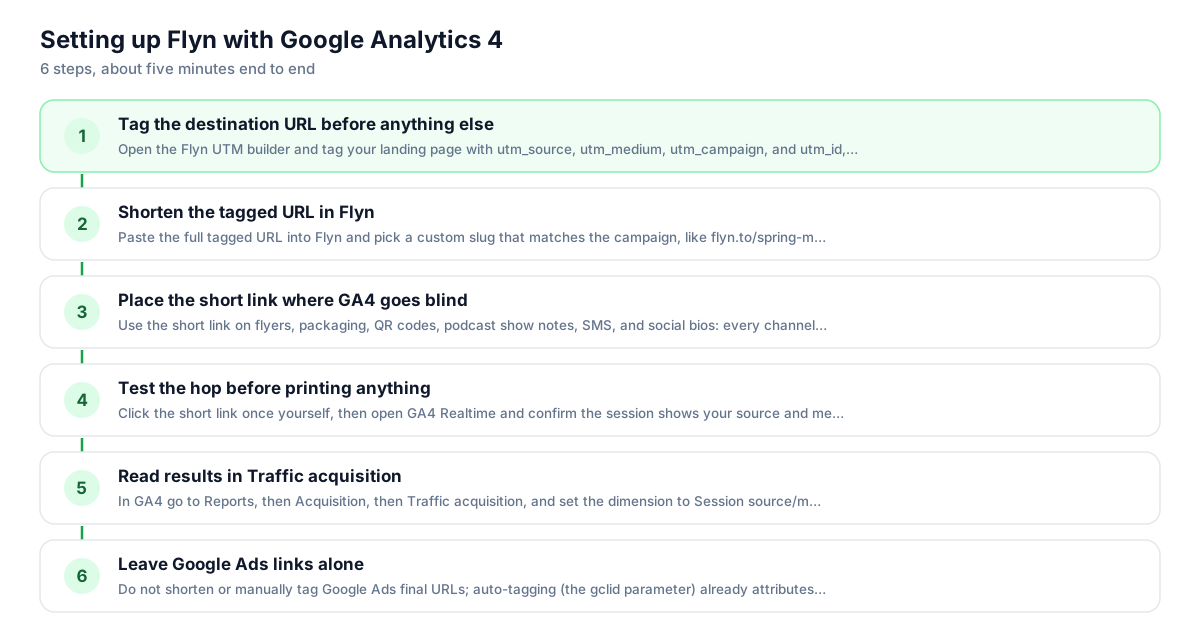
Tag the destination URL before anything else
Open the Flyn UTM builder and tag your landing page with utm_source, utm_medium, utm_campaign, and utm_id, the four parameters Google recommends setting together to avoid (not set) rows. Bake them into the destination before shortening; that is the most reliable setup, and the destination value wins if the same parameter is also appended to the short link.
- 2
Shorten the tagged URL in Flyn
Paste the full tagged URL into Flyn and pick a custom slug that matches the campaign, like flyn.to/spring-menu. Add your own domain if you have one; a branded short link earns more scans and clicks on printed material than a random-character URL.
- 3
Place the short link where GA4 goes blind
Use the short link on flyers, packaging, QR codes, podcast show notes, SMS, and social bios: every channel where GA4 would otherwise report Direct (none). The redirect preserves your UTM parameters, so each surface arrives in GA4 as a distinct named source.
- 4
Test the hop before printing anything
Click the short link once yourself, then open GA4 Realtime and confirm the session shows your source and medium. Run the link through the Campaign URL QA checker too. Thirty seconds of QA beats discovering a typo after five thousand flyers ship.
- 5
Read results in Traffic acquisition
In GA4 go to Reports, then Acquisition, then Traffic acquisition, and set the dimension to Session source/medium. Your tagged values appear there automatically. Compare each row against the matching Flyn click count; the gap between them is your ad-blocked and pre-load loss.
- 6
Leave Google Ads links alone
Do not shorten or manually tag Google Ads final URLs; auto-tagging (the gclid parameter) already attributes those sessions with more detail than UTMs can. Reserve Flyn short links for the channels GA4 cannot auto-tag: offline, email from other tools, social, and partners.
UTM recipe
The UTM convention for Google Analytics 4
GA4 reads these parameters off the destination URL at arrival, no property setup required. Tag the destination, then shorten; that is the most reliable setup, and the destination value wins if the same parameter is also appended to the short link.
| Parameter | Value | Why |
|---|---|---|
| utm_source | spring-flyer | Where the click physically happens: the flyer, the newsletter, the podcast. Keep it lowercase; GA4 treats Flyer and flyer as separate rows. |
| utm_medium | qr | The channel type. Nonstandard values like qr still report fine under Session source/medium but may fall into the Unassigned channel group. |
| utm_campaign | spring-launch | One consistent name across every surface in the campaign, so Session campaign rolls them up in one row. |
| utm_id | spring-launch-01 | Google recommends setting it alongside source and medium; it is also required if you ever import cost data into GA4. |
https://example.com/spring-menu?utm_source=spring-flyer&utm_medium=qr&utm_campaign=spring-launch&utm_id=spring-launch-01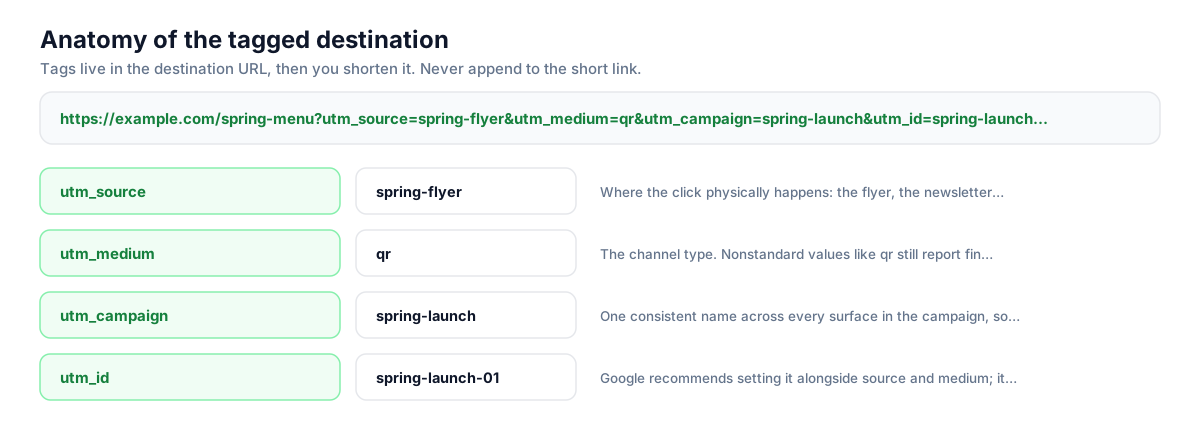
Build this in seconds with the free UTM builder, then shorten the tagged URL. You can also append parameters to the short link itself: Flyn forwards them to the destination, and if the same parameter is baked into the destination, that value takes priority.
Honest comparison
What GA4 measures vs what Flyn measures
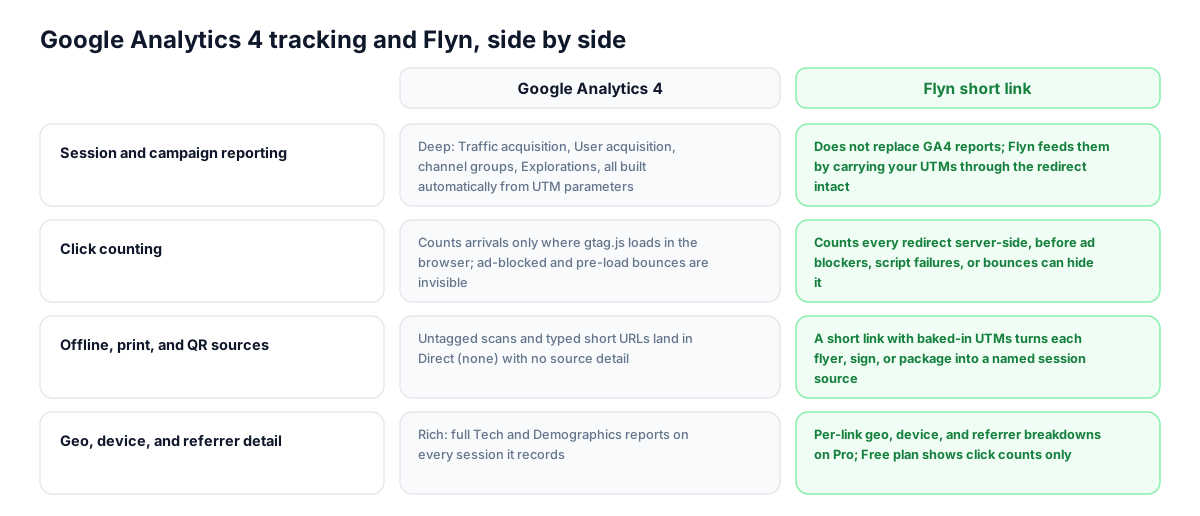
GA4 is a measurement script on your site, not a link wrapper: it never touches the link itself, it only sees sessions that arrive with its tag loaded. Flyn sits on the click side of that line, so the two datasets complement rather than compete.
| Capability | Google Analytics 4 | Flyn short link |
|---|---|---|
| Session and campaign reporting | Deep: Traffic acquisition, User acquisition, channel groups, Explorations, all built automatically from UTM parameters | Does not replace GA4 reports; Flyn feeds them by carrying your UTMs through the redirect intact |
| Click counting | Counts arrivals only where gtag.js loads in the browser; ad-blocked and pre-load bounces are invisible | Counts every redirect server-side, before ad blockers, script failures, or bounces can hide it |
| Offline, print, and QR sources | Untagged scans and typed short URLs land in Direct (none) with no source detail | A short link with baked-in UTMs turns each flyer, sign, or package into a named session source |
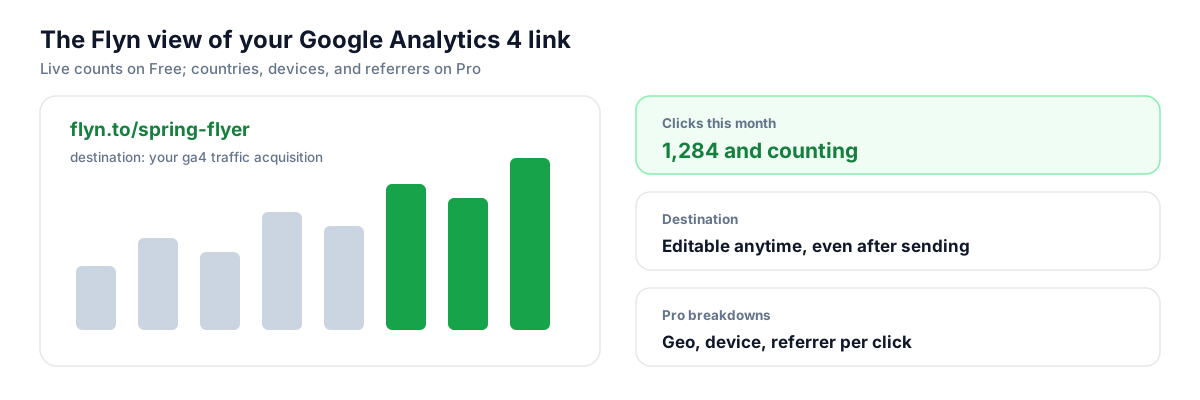
| Geo, device, and referrer detail | Rich: full Tech and Demographics reports on every session it records | Per-link geo, device, and referrer breakdowns on Pro; Free plan shows click counts only |
| Real-time visibility | Realtime report shows sessions from the last 30 minutes, standard reports can lag hours | Live per-link click counts the moment the redirect fires, useful for QA before a campaign goes wide |
| Outbound click tracking | Enhanced measurement fires a click event for links leaving your own domain | Measures clicks on links placed anywhere: other people's newsletters, PDFs, print, bios, DMs |
Why it matters
What you get
Count the clicks GA4 never records
GA4 only logs a session if its tag executes in the browser, so ad-blocked visitors and people who bounce before gtag.js loads vanish. Flyn counts at the redirect, server-side, so you finally know your true click volume and can size the measurement gap.
Turn Direct (none) into named sources
Untagged QR scans, typed URLs from print, and dark-social pastes all pile into GA4's Direct bucket. A Flyn short link with baked-in UTMs gives each flyer, sign, and bio its own Session source/medium row instead.
Keep acquisition data clean
One misspelled or miscased UTM value splits a campaign across multiple GA4 rows forever, and missing parameters produce (not set). Building tags once in the UTM builder and reusing the short link everywhere enforces one canonical spelling per campaign.
Ship links people will actually click
A fully tagged URL runs 150-plus characters and looks like spam on a slide, in an SMS, or under a QR code. The short link hides the tagging without losing it: GA4 still receives every parameter after the redirect.
Worth knowing before you start
- UTM values are case sensitive in GA4: utm_source=Flyer and utm_source=flyer become two separate rows. Standardize on lowercase before you shorten, because a printed short link locks the tags in.
- Custom mediums like qr or print report correctly under Session source/medium but usually land in the Unassigned channel group, since GA4's default channel definitions do not recognize them. Query by source/medium, or build a custom channel group.
- You can append parameters to the Flyn short link and the redirect now forwards them to the destination, but baking all tagging into the destination URL before shortening stays the most reliable path, and the destination value wins if the same parameter appears in both places.
- Expect Flyn's click count to run higher than GA4 sessions for the same link: bots, ad blockers, pre-load bounces, and repeat clicks within one session all widen the gap. That difference is signal about measurement loss, not an error.
Generate tagged short links in bulk with the API
Teams running many campaigns can script the whole recipe: build the destination URL with UTMs in code, POST it to Flyn's shorten endpoint, and write the returned short link back to your campaign sheet or CMS. One API call per link guarantees every QR code and print run ships with consistent, GA4-ready tagging, no copy-paste drift.
Shorten API docsGo deeper
Features, tools, and guides that pair with this
Features
Free tools
Frequently asked questions
Does Google Analytics 4 track short link clicks automatically?
No. GA4 is a script on your website, not a link service: it never sees the click on the short link itself, only the arrival on a page where its tag loads. To attribute that arrival, the destination URL behind the short link must carry UTM parameters. Flyn's redirect preserves them, so the session lands in Traffic acquisition under the source and medium you chose.
Where do UTM-tagged short links show up in GA4 reports?
In Reports, then Acquisition, then Traffic acquisition, using the Session source/medium, Session campaign, or Session source dimensions. First-time visitors also appear in User acquisition under the first-user dimensions. For deeper cuts, Explorations lets you combine those campaign dimensions with landing page, device, or geography. No configuration is needed; GA4 parses UTMs on every arriving URL by default.
Why does my QR code traffic show as Direct in GA4?
A QR scan opens the URL with no referrer, so an untagged link is indistinguishable from someone typing the address, and GA4 files it under Direct (none). The fix is to tag the destination with utm_source, utm_medium, and utm_campaign, shorten it with Flyn, and generate the QR code from the short link. Every scan then arrives with a named source.
Do I add UTM parameters to the short link or to the destination URL?
Prefer the destination URL, before you shorten it. Flyn now forwards query parameters appended to the short link too, so something like flyn.to/promo?utm_source=flyer does arrive tagged; and if you also baked a utm_source into the destination, that one wins on the clash. Tag first in the UTM builder, shorten second, and keep one canonical set so the session lands under exactly the source you intend.
Does a Flyn redirect break GA4 attribution?
No. The redirect resolves to your full destination URL, UTM parameters included, and GA4 attributes the session from those parameters. UTMs take precedence over the referrer in GA4's source detection, so even when the referrer is stripped (common in apps, email clients, and QR scans), the session still lands under your tagged source and medium rather than Direct.
Why does Flyn show more clicks than GA4 shows sessions?
Because they measure different points. Flyn counts every redirect at the server. GA4 needs its JavaScript to load in the visitor's browser, so it misses ad-blocked users, people who close the tab before the tag fires, and some in-app browsers. Bots can also inflate the click side, and several clicks within 30 minutes collapse into one GA4 session. A 10 to 30 percent gap is normal.
Can Flyn tell me which link produced a sale, or is that only GA4's job?
GA4 answers it at the campaign level, from the UTM parameters on the arriving session. Flyn Pro's conversion tracking answers it at the link level: switch it on per link, add the small Flyn tag to your site, and each link reports conversions, conversion rate against verified human clicks, and total value beside its click count. The window is 30 days, and on Safari and iOS browser privacy rules can shorten stored attribution to about 7 days. Expect the two numbers to differ for the same reasons clicks and sessions differ. Use GA4 for on-site behavior and funnels, and per-link conversions when the question is which placement earned the money.
Should I set utm_id and utm_source_platform too?
Google's own guidance says yes: set utm_source, utm_medium, utm_campaign, utm_id, and utm_source_platform together, because missing parameters surface as (not set) in reports. utm_id also becomes mandatory if you later import cost data into GA4. Skip utm_creative_format and utm_marketing_tactic for now; Google's documentation notes those two are accepted in URLs but not currently reported in GA4 properties.
Should I use short links in Google Ads campaigns?
No. Google Ads auto-tagging appends a gclid that gives GA4 richer attribution than manual UTMs, and ad policies expect the final URL to match your landing domain. Keep ads on auto-tagging and use Flyn short links for everything GA4 cannot auto-tag: print, QR codes, SMS, social bios, partner mentions, and email sent from other platforms.
Are UTM values case sensitive in GA4?
Yes. GA4 treats utm_medium=Email and utm_medium=email as different values, so one campaign can fragment into several report rows from casing alone. Agree on all-lowercase values, build tags in the UTM builder rather than by hand, and run new URLs through the Campaign URL QA checker. Since a printed short link freezes its tags forever, catch casing before you shorten.
Does GA4's outbound click tracking do what a short link does?
No, it covers a different direction. Enhanced measurement's outbound click event fires when a visitor already on your site clicks a link to another domain. It cannot measure clicks that happen off your site: on a flyer, in someone else's newsletter, in a social post, or in a PDF. Flyn measures exactly those, then hands the visitor to GA4 with UTMs intact.
Start tracking your Google Analytics 4 links free
Shorten your first links without an account, no card required. Free covers 25 links a month; Pro unlocks unlimited links and geo, device, and referrer breakdowns.