beehiiv link tracking that follows one link across every issue
beehiiv already gives you verified, bot-filtered click stats for every post, down to which subscriber clicked. Flyn adds what a per-post report cannot: one short link with a lifetime click history across 20 issues, a destination you can edit after send, and counts from web and social shares.
- Free plan, no card required
- Set up in minutes
- GDPR-ready analytics
- No ad interstitials
- Cancel anytime
beehiiv's analytics are genuinely good: verified clicks that filter out inbox-scanner bots, per-link tables inside each post, and a Clicks Report that aggregates URLs across posts on paid plans. So why add a shortener? Because beehiiv's view is organized around posts, and your most important links are not. A recommendation link you drop into 20 issues, a sponsor URL you negotiated for a quarter, an affiliate link that also lives in your X bio: each of those needs one continuous history, not 20 separate report rows. And once a post is sent, the email version is frozen; if a sponsor changes their landing page, you cannot fix the link in delivered inboxes. A Flyn short link solves both: one stable URL you reuse everywhere, with a destination you control forever.
Setup
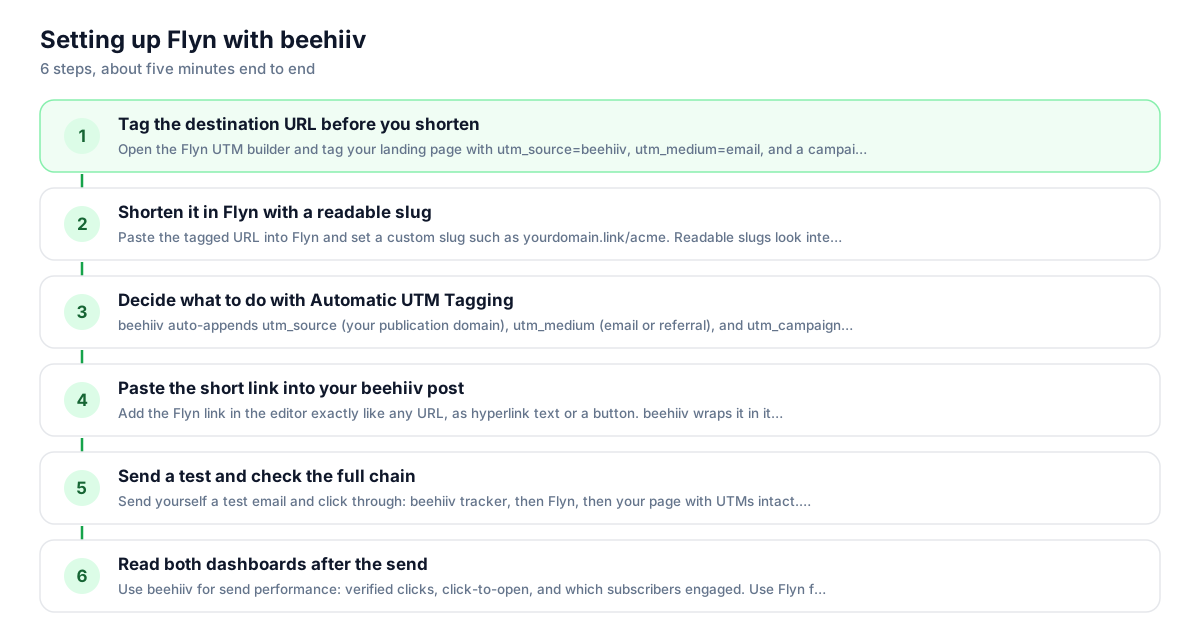
Use Flyn with beehiiv in 6 steps
- 1
Tag the destination URL before you shorten
Open the Flyn UTM builder and tag your landing page with utm_source=beehiiv, utm_medium=email, and a campaign name like utm_campaign=sponsor-acme. Bake the tags into the destination before shortening; that is the most reliable setup, and if the same parameter is also appended to the short link the destination value wins.
- 2
Shorten it in Flyn with a readable slug
Paste the tagged URL into Flyn and set a custom slug such as yourdomain.link/acme. Readable slugs look intentional in a newsletter and survive being read aloud or screenshotted. If this link will run across many issues, name it for the offer, not the issue number.
- 3
Decide what to do with Automatic UTM Tagging
beehiiv auto-appends utm_source (your publication domain), utm_medium (email or referral), and utm_campaign (the post slug) to post links. Flyn now forwards those appended parameters onto the destination, so they reach your analytics. If you also bake tags into the destination, those win on a name clash, so pick one source to avoid double-tagging. Manage the toggle under Settings, General Info, UTM Analytics.
- 4
Paste the short link into your beehiiv post
Add the Flyn link in the editor exactly like any URL, as hyperlink text or a button. beehiiv wraps it in its own tracking redirect on send, so your verified clicks, click map, and per-subscriber click table all keep working. Nothing about beehiiv's reporting changes.
- 5
Send a test and check the full chain
Send yourself a test email and click through: beehiiv tracker, then Flyn, then your page with UTMs intact. Run the destination through the Flyn campaign URL QA checker first, and confirm the click registered in your Flyn dashboard before the real send goes out.
- 6
Read both dashboards after the send
Use beehiiv for send performance: verified clicks, click-to-open, and which subscribers engaged. Use Flyn for the link's life beyond the send: total clicks across every issue that carried it, plus traffic from the web version and social shares. The two views answer different questions.
UTM recipe
The UTM convention for beehiiv
beehiiv respects manually added UTM parameters and will not overwrite them, so tag your destination yourself and keep control of how sessions show up in your analytics. Build the tags into the destination URL, then shorten; if the same parameter is also appended to the short link, the destination value wins.
| Parameter | Value | Why |
|---|---|---|
| utm_source | beehiiv | Identifies the platform. beehiiv's auto-tagging would use your publication domain instead; setting it yourself keeps naming consistent across tools. |
| utm_medium | Matches beehiiv's own convention for the email version of a post. Use a separate Flyn link with utm_medium=social when you share the web post. | |
| utm_campaign | sponsor-acme | Name the offer or placement, not the issue. A stable campaign value is what lets one link aggregate cleanly across 20 issues. |
https://yourproduct.com/deal?utm_source=beehiiv&utm_medium=email&utm_campaign=sponsor-acme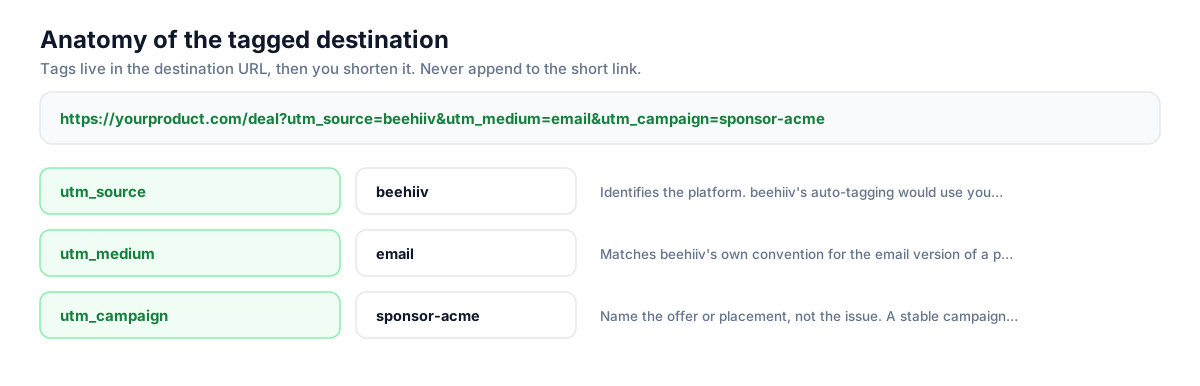
Build this in seconds with the free UTM builder, then shorten the tagged URL. You can also append parameters to the short link itself: Flyn forwards them to the destination, and if the same parameter is baked into the destination, that value takes priority.
Honest comparison
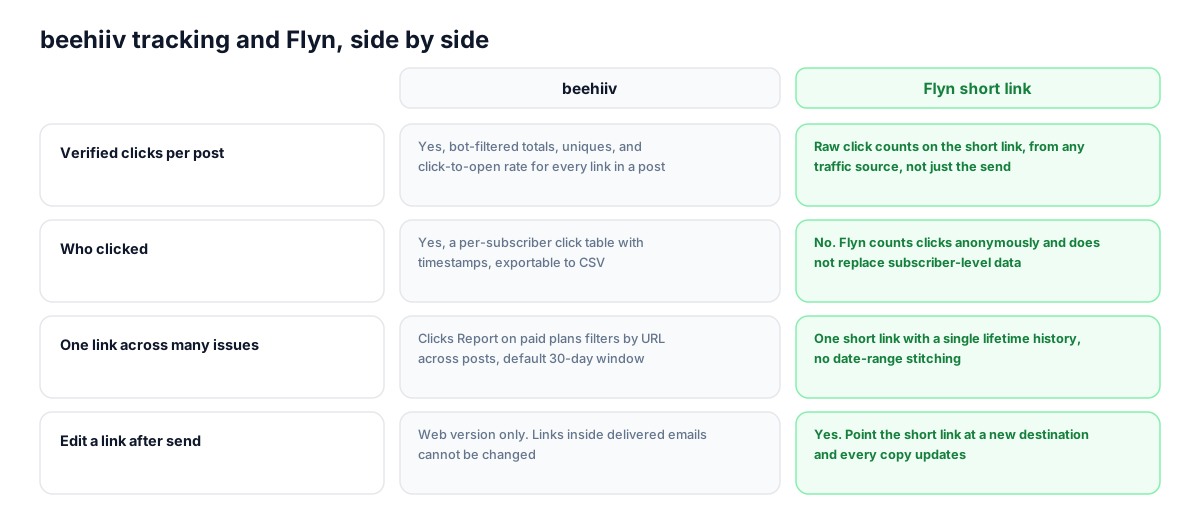
What beehiiv tracks vs what Flyn adds
beehiiv wraps every link in a sent email through its tracking redirect and reports verified clicks, so give it full credit: it knows which subscriber clicked, which Flyn never will. Flyn sits one layer closer to the destination and watches the link itself, wherever it travels.
| Capability | beehiiv | Flyn short link |
|---|---|---|
| Verified clicks per post | Yes, bot-filtered totals, uniques, and click-to-open rate for every link in a post | Raw click counts on the short link, from any traffic source, not just the send |
| Who clicked | Yes, a per-subscriber click table with timestamps, exportable to CSV | No. Flyn counts clicks anonymously and does not replace subscriber-level data |
| One link across many issues | Clicks Report on paid plans filters by URL across posts, default 30-day window | One short link with a single lifetime history, no date-range stitching |
| Edit a link after send | Web version only. Links inside delivered emails cannot be changed | Yes. Point the short link at a new destination and every copy updates |
| Clicks from shares and forwards | Web clicks are reported for the online post; forwarded-email clicks blur into the original send | Every click on the short link counts, whether from email, the web post, or a social share |
| Geo, device, and referrer per link | Post analytics focus on email and web engagement, not per-link geo or device splits | On Flyn Pro: country, device, and referrer breakdowns for each short link |
Why it matters
What you get
One history for a link you send 20 times
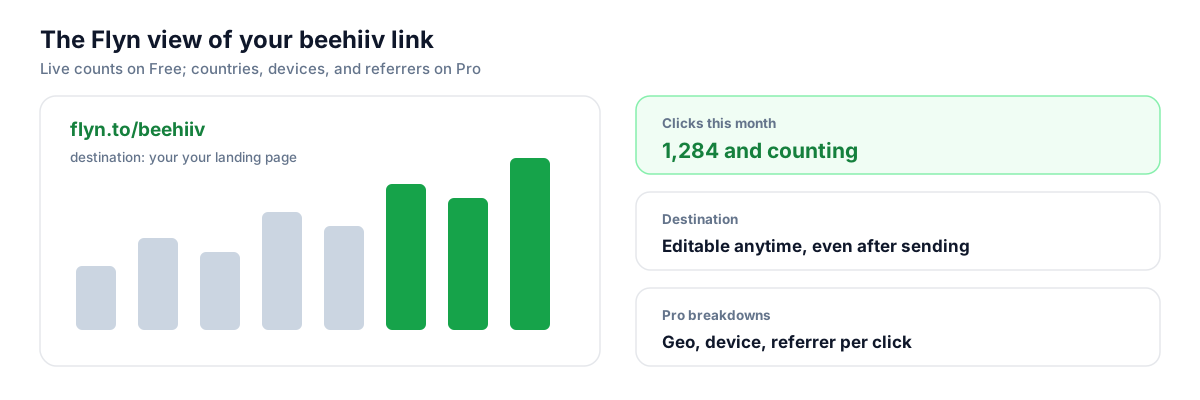
beehiiv reports each post separately, and its cross-post Clicks Report defaults to a 30-day window on paid plans. A Flyn short link keeps a single lifetime count for your recommendation or affiliate link, no matter how many issues, welcome emails, or automations it appears in.
Fix a sponsor link after the send
Delivered beehiiv emails are frozen; if a sponsor's landing page moves or a promo code changes, every sent copy points at the old URL. Edit the Flyn link's destination once and every email, archive page, and share updates instantly, with the click history intact.
Count clicks the send never sees
Every beehiiv post has a web version that gets shared, linked, and forwarded. Clicks on a Flyn short link count identically whether they come from the inbox, the web post, a Reddit thread, or a screenshot, so you finally see a link's full reach.
Branded links instead of raw affiliate URLs
Long affiliate and tracking URLs look like spam in a newsletter and get mangled when copied. Flyn's free plan includes custom slugs, so readers see yourdomain.link/tool instead of a 200-character query string.
Worth knowing before you start
- Email clicks take a double hop: beehiiv's tracking redirect first, then Flyn, then your page. It adds milliseconds, and beehiiv's subscriber-level reporting keeps working, but expect small count differences: beehiiv's verified-click filter discards bot and inbox-scanner clicks that Flyn may count as raw clicks.
- beehiiv's Automatic UTM Tagging (on by default) appends parameters to links in your posts, including Flyn short links. Flyn now forwards those appended parameters onto the destination, so they reach analytics. Baking your own UTMs into the destination is still the most reliable set, and it wins on any name clash, so avoid double-tagging the same name.
- beehiiv's cross-post Clicks Report is a paid-plan feature. On the free Launch plan you get per-post link stats only, which makes an external cross-issue view like Flyn's more useful, not less.
- Flyn does not know which subscriber clicked. beehiiv's per-subscriber click table and Most Engaged Subscribers view remain your only source for identity-level engagement; use Flyn alongside them, not instead of them.
Mint per-issue sponsor links with the Flyn API
If you sell sponsorships, create a fresh short link per issue with one POST request: same tagged destination, a slug like issue-42-acme. Each placement gets its own clean count you can screenshot into the sponsor report, while the destination stays editable if the advertiser changes landing pages mid-flight.
Shorten API referenceGo deeper
Features, tools, and guides that pair with this
Features
Free tools
Frequently asked questions
Does beehiiv's click tracking still work if I use a Flyn short link?
Yes. On send, beehiiv wraps your Flyn link in its tracking redirect exactly the way it wraps any URL, so verified clicks, the click map, and the per-subscriber click table all keep working. The click passes through beehiiv's tracker, then Flyn, then lands on your tagged destination. You lose nothing on the beehiiv side and gain a second, link-centric count on the Flyn side.
Will beehiiv's Automatic UTM Tagging break my short link?
No. beehiiv appends utm_source (your publication domain), utm_medium (email or referral), and utm_campaign (the post slug) to links in posts. Appended to a Flyn short link, those parameters now forward through the redirect: the click still counts, the reader still lands correctly, and the auto-tags reach your analytics. If you also bake your own UTMs into the destination, those win on a name clash (beehiiv will not overwrite manually set parameters), so avoid double-tagging.
Can beehiiv track the same link across multiple posts?
Partly. On paid beehiiv plans, the Clicks Report (under Analyze) can filter by URL and aggregate verified clicks across posts, defaulting to a 30-day window. It is genuinely useful, but it is a report you assemble per query. A Flyn short link is the aggregation: one lifetime count that also includes clicks from the web version, social shares, and anywhere else the link travels outside beehiiv's sends.
Can I change a link after a beehiiv post is sent?
Not in the emails already delivered; those are frozen the moment they send. You can edit the web version of a post, but every inbox copy still carries the original URL. This is exactly what an editable short link fixes: if the destination behind your Flyn link changes, update it once in the Flyn dashboard and every sent email, archive page, and share immediately points at the new page.
Why don't my beehiiv click numbers match my Flyn numbers?
Three reasons. First, beehiiv's verified-click system filters out bot and inbox-scanner clicks that Flyn may record as raw clicks, so Flyn often reads slightly higher. Second, Flyn counts clicks beehiiv never sees: the web version of your post, social shares, forwards where tracking degrades. Third, a reader can hit beehiiv's tracker and abandon before the redirect completes, though that gap is rare. Treat beehiiv as send performance and Flyn as total link performance.
Does Flyn show me which subscriber clicked, like beehiiv does?
No. beehiiv ties email clicks to subscriber profiles, showing exactly who clicked and when, and Flyn does not replace that. Flyn counts clicks anonymously: totals on the free plan, plus country, device, and referrer breakdowns on Pro. Keep beehiiv for identity-level engagement and segmentation; use Flyn for the link-level view across issues and channels.
Should I use a custom domain on Flyn if beehiiv already has my domain?
Yes, they do different jobs. Your beehiiv custom domain hosts the publication and its web posts. A Flyn custom domain brands the short links readers actually see and click, like go.yourdomain.com/tool. Generic shortener domains have mixed reputations with mailbox providers because anyone can use them; links on a domain only you control avoid that guilt by association.
Will short links hurt my beehiiv deliverability?
Not if you use your own domain. Deliverability risk from shorteners comes from shared public domains that spammers also use. A Flyn short link on your own custom domain carries your reputation, not a stranger's. beehiiv's own tracking wrap is the first hop anyway, so mailbox providers primarily evaluate your sending domain and the visible link domain, both of which stay yours.
How do I track a beehiiv recommendation separately from the same link on X or Instagram?
Create one Flyn short link per channel, each pointing at the same page with different tags baked in: utm_source=beehiiv and utm_medium=email for the newsletter, utm_source=x and utm_medium=social for the post. Each short link keeps its own count, so you can compare channels at a glance in Flyn while your analytics tool separates the sessions cleanly.
Is the Flyn free plan enough for a weekly newsletter?
Usually. Free includes 25 new links per month with custom slugs, QR codes, link expiration, and click counts. A weekly issue with two or three fresh tracked links uses about 12 links a month, and reused links (your evergreen recommendations) cost nothing new. Upgrade to Pro at $9/month for unlimited links plus geo, device, and referrer breakdowns per link.
Start tracking your beehiiv links free
Shorten your first links without an account, no card required. Free covers 25 links a month; Pro unlocks unlimited links and geo, device, and referrer breakdowns.