ActiveCampaign Link Tracking That Outlives the Campaign
ActiveCampaign already wraps every email link, logs which contact clicked, and can trigger an automation off that click. Flyn adds a branded short link with an editable destination and a click history that keeps counting outside any single campaign.
- Free plan, no card required
- Set up in minutes
- GDPR-ready analytics
- No ad interstitials
- Cancel anytime
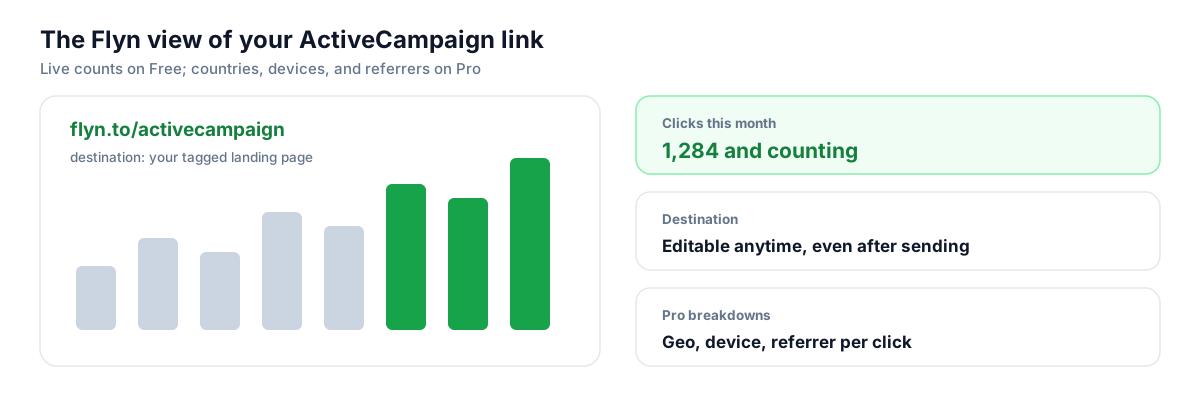
ActiveCampaign's link tracking is genuinely good: every link is wrapped with a per-contact tracking URL, clicks land on the contact record, and a single click can fire automations, link actions, segments, and lead score changes. So why add a shortener? Because that data is locked inside one campaign in one account. Reuse the same CTA in an SMS, a PDF, or a partner newsletter and ActiveCampaign sees nothing. And once an automation email is live, its links are frozen: a welcome series running for two years will keep sending subscribers to a page you retired last quarter. A Flyn short link gives each CTA one permanent branded URL with a lifetime click count and a destination you can change anytime, while ActiveCampaign keeps telling you exactly who clicked.
Setup
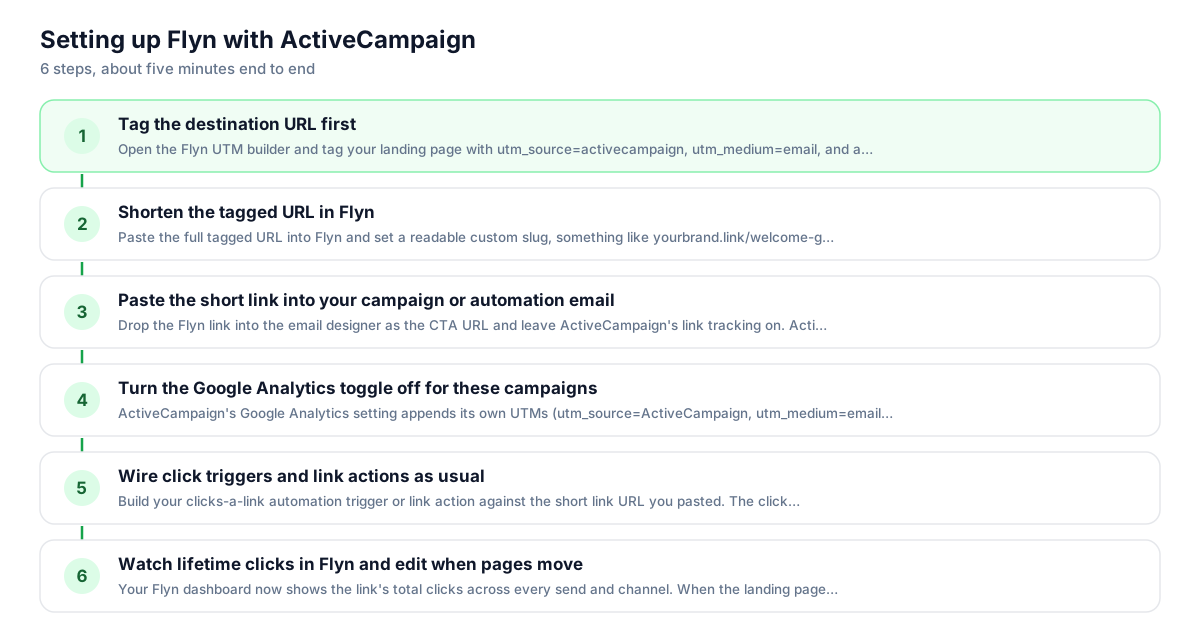
Use Flyn with ActiveCampaign in 6 steps
- 1
Tag the destination URL first
Open the Flyn UTM builder and tag your landing page with utm_source=activecampaign, utm_medium=email, and a campaign name. Bake the tags into the destination before shortening; that is the most reliable setup, and if the same parameter is also appended to the short link the destination value wins.
- 2
Shorten the tagged URL in Flyn
Paste the full tagged URL into Flyn and set a readable custom slug, something like yourbrand.link/welcome-guide. Connect your own domain (1 included on Free) so the visible link carries your name instead of a generic shortener domain subscribers cannot vouch for.
- 3
Paste the short link into your campaign or automation email
Drop the Flyn link into the email designer as the CTA URL and leave ActiveCampaign's link tracking on. ActiveCampaign wraps the short link per contact exactly as it wraps any URL, so the Clicks report, link actions, and click triggers all keep working.
- 4
Decide how the Google Analytics toggle should behave
ActiveCampaign's Google Analytics setting appends its own UTMs (utm_source=ActiveCampaign, utm_medium=email) to the URL in the email, and Flyn now forwards those onto the destination. Since you already baked correct UTMs into the destination, those win on a name clash, so switch the toggle off on the Campaign Summary page to avoid double-tagging.
- 5
Wire click triggers and link actions as usual
Build your clicks-a-link automation trigger or link action against the short link URL you pasted. The click registers on ActiveCampaign's redirect before the visitor ever reaches Flyn, so tagging, lead scoring, and automation entry behave exactly as they do with a full-length URL.
- 6
Watch lifetime clicks in Flyn and edit when pages move
Your Flyn dashboard now shows the link's total clicks across every send and channel. When the landing page changes, update the destination in Flyn once; every automation email already in flight, plus every PDF and SMS reusing that link, points at the new page instantly.
UTM recipe
The UTM convention for ActiveCampaign
Skip ActiveCampaign's auto-generated UTMs for short-link campaigns and set your own. Tag the destination URL before you shorten it, then keep the values consistent so Google Analytics groups every ActiveCampaign send under one source.
| Parameter | Value | Why |
|---|---|---|
| utm_source | activecampaign | Lowercase and consistent; ActiveCampaign's own toggle would send ActiveCampaign or Newsletter depending on branding, which splits your GA reports |
| utm_medium | Matches the convention ActiveCampaign itself uses, so this traffic rolls up with your other email sends | |
| utm_campaign | welcome-series | Use the automation or campaign name so GA sessions reconcile against the ActiveCampaign Clicks report |
| utm_content | cta-button | Optional: distinguish the button from a text link in the same email, since each unique URL is also tracked separately in ActiveCampaign |
https://yourstore.com/onboarding-guide?utm_source=activecampaign&utm_medium=email&utm_campaign=welcome-series&utm_content=cta-button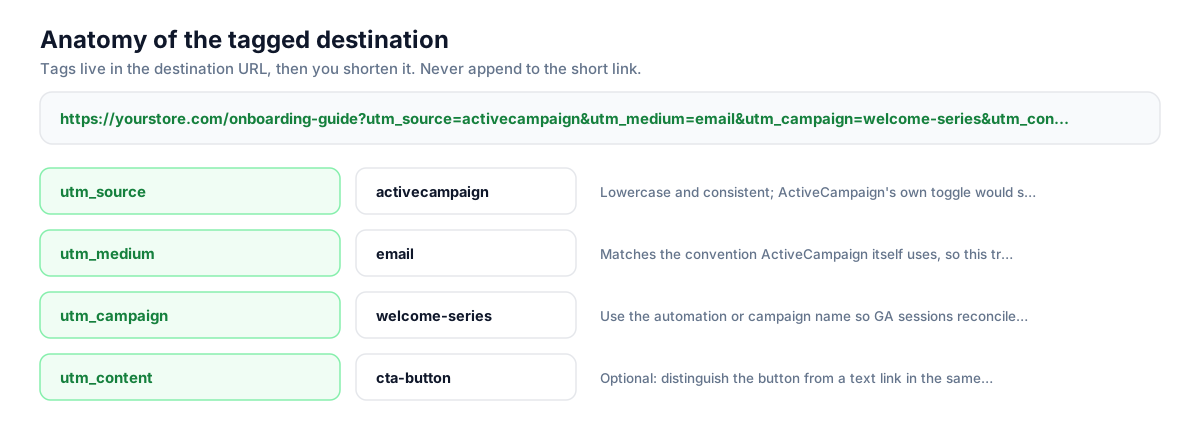
Build this in seconds with the free UTM builder, then shorten the tagged URL. You can also append parameters to the short link itself: Flyn forwards them to the destination, and if the same parameter is baked into the destination, that value takes priority.
Honest comparison
ActiveCampaign click tracking vs Flyn: what each layer sees
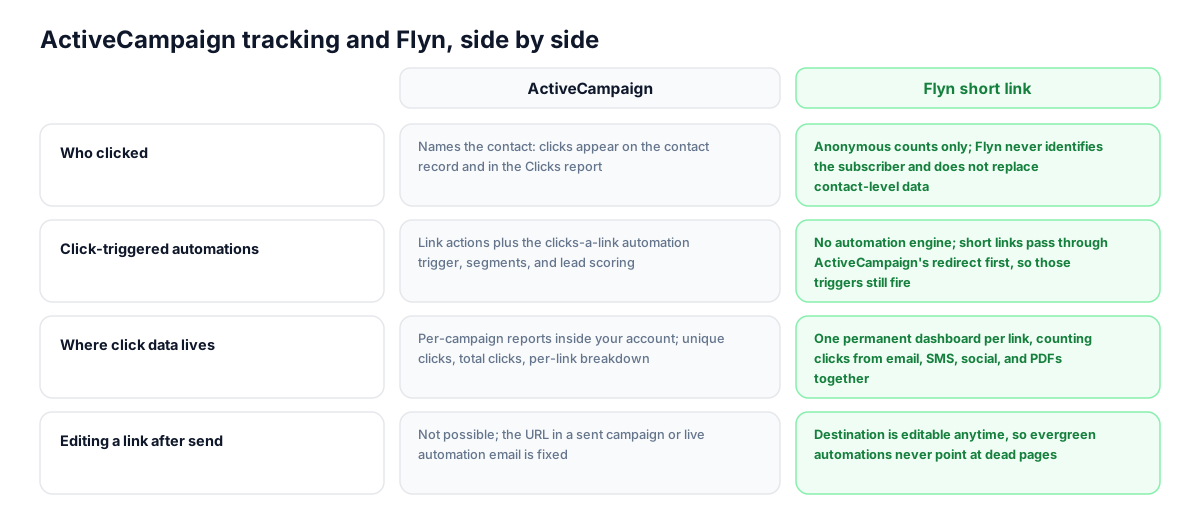
These are complementary layers, not competitors. ActiveCampaign wraps your short link the same way it wraps any URL, so its per-contact reporting and click triggers keep working. Flyn sits behind that redirect and counts every click on the link itself, from any channel, forever.
| Capability | ActiveCampaign | Flyn short link |
|---|---|---|
| Who clicked | Names the contact: clicks appear on the contact record and in the Clicks report | Anonymous counts only; Flyn never identifies the subscriber and does not replace contact-level data |
| Click-triggered automations | Link actions plus the clicks-a-link automation trigger, segments, and lead scoring | No automation engine; short links pass through ActiveCampaign's redirect first, so those triggers still fire |
| Where click data lives | Per-campaign reports inside your account; unique clicks, total clicks, per-link breakdown | One permanent dashboard per link, counting clicks from email, SMS, social, and PDFs together |
| Editing a link after send | Not possible; the URL in a sent campaign or live automation email is fixed | Destination is editable anytime, so evergreen automations never point at dead pages |
| Branded link domain | CNAME masks its tracking domains; a true custom link-tracking domain requires Marketing Enterprise | Custom slugs included on the Free plan |
| Geo, device, and referrer detail | Reporting centers on contact engagement rather than per-click device or referrer breakdowns | Geo, device, and referrer breakdowns per link on Pro; Free shows click counts |
Why it matters
What you get
Evergreen automations that never link to dead pages
A welcome series or nurture flow can run for years, but ActiveCampaign cannot edit a URL in a live automation email. Point every CTA at a Flyn link once, and when the page moves you change the destination in Flyn instead of rebuilding and re-testing the email.
One click history across campaigns and channels
ActiveCampaign scatters clicks across per-campaign reports, and reuse of the same URL in SMS or a PDF is invisible to it. A Flyn link keeps one running total for that CTA everywhere it appears, so you can compare the same offer across sends without exporting anything.
A branded domain without Marketing Enterprise
ActiveCampaign reserves true custom link-tracking domains for Marketing Enterprise; other plans get a masked CNAME over its tracking domains. Flyn includes custom slugs on the Free plan, so the link subscribers see and share carries your brand.
Short links that survive outside email
ActiveCampaign link tracking only exists inside its own sends. When the same campaign runs through SMS, where a tagged URL eats most of a 160-character segment, or lands in a printed QR code, the Flyn link stays short, trackable, and consistent across every surface.
Worth knowing before you start
- Expect a double hop: the click goes through ActiveCampaign's tracking redirect, then Flyn's, then reaches your page. Both systems log the click and the delay is milliseconds, but a redirect checker is worth running once before a big send.
- Be deliberate with ActiveCampaign's Google Analytics toggle on short-link campaigns. It appends UTMs to the URL in the email, and Flyn now forwards those onto the destination. Bake your UTMs into the destination too and those win on a name clash, so turn the toggle off to keep one clean source.
- Site Tracking identifies contacts by attaching a parameter to email links pointing at your whitelisted domain. That identification does not carry through a short link, so keep full URLs on any link where you rely on the web-page-is-visited trigger, and use Flyn links where portability matters.
- Do not turn off ActiveCampaign link tracking to expose your branded domain. Doing so kills the Clicks report, link actions, and click triggers for that campaign entirely, and the tracking domain is masked by your CNAME anyway.
Auto-shorten every campaign URL before it hits the email designer
Agencies and teams sending dozens of ActiveCampaign campaigns a month can script the boring part. Call Flyn's REST API with the fully tagged destination URL and get back a branded short link with your slug convention, one HTTP request per campaign. Store the returned link ID and you can pull lifetime click counts into your own reporting later, alongside the numbers from ActiveCampaign's Clicks report.
Shorten API referenceGo deeper
Features, tools, and guides that pair with this
Features
Free tools
Frequently asked questions
Do ActiveCampaign click triggers still work on a short link?
Yes. With link tracking enabled, ActiveCampaign wraps your short link with a per-contact tracking URL the same way it wraps any link. The click registers on ActiveCampaign's redirect before the visitor reaches Flyn, so the clicks-a-link automation trigger, link actions, segments, and lead scoring all keep working. The click then passes through Flyn and lands on your tagged page.
Does ActiveCampaign rewrite my short link in the email?
It does, and that is by design. ActiveCampaign replaces every URL in a campaign with a unique tracking link specific to that campaign and contact, then redirects clicks through its link-tracking domains before passing them to the URL you specified. Your Flyn link is the URL it passes to, so both systems record the click and the subscriber still ends up on your landing page.
Should I use ActiveCampaign's Google Analytics toggle with short links?
You can. That toggle appends UTMs to the URL in the email, using utm_source=ActiveCampaign (or Newsletter with branding off), utm_medium=email, your campaign name, and the subject line as utm_content. Flyn now forwards parameters appended to the short link, so those reach Google Analytics. If you also bake your own UTMs into the destination, those win on a name clash, so pick one source and leave the toggle off for those campaigns to avoid double-tagging.
Will Site Tracking still recognize contacts who click a short link?
Often not. Site Tracking works by attaching a contact-identifying parameter to email links that point at your whitelisted domain, and that identification does not survive the pass through a short link. Keep full URLs on links where you depend on the web-page-is-visited trigger or contact site history. Use Flyn links for CTAs where cross-channel tracking and editability matter more than on-site identification.
Can I turn off link tracking so subscribers see my branded domain?
You can, per campaign, under Options on the Campaign Summary page, but you should not. Disabling it removes the Clicks report, link actions, and click triggers for that entire campaign. ActiveCampaign already masks its tracking domains with your sending CNAME, and the visible link in the email body is whatever you pasted, so your Flyn branded link is what subscribers see when they hover.
Does Flyn tell me which contact clicked, like ActiveCampaign does?
No. Flyn counts clicks anonymously and never identifies the subscriber, so it does not replace ActiveCampaign's contact-level reporting. Keep ActiveCampaign link tracking on for who-clicked data, triggers, and scoring. Flyn answers the questions ActiveCampaign cannot: how many total clicks this CTA earned across every campaign, SMS, and PDF over its lifetime, and on Pro, where those clicks came from by country, device, and referrer.
Can I change a link inside a live ActiveCampaign automation?
Not the URL itself: once an automation email is active, editing links means pausing, editing, and re-testing the email. If the CTA is a Flyn short link, you skip all of that. Change the destination in your Flyn dashboard and every copy of that email already scheduled or in flight resolves to the new page immediately, along with any other channel reusing the same link.
Why do my ActiveCampaign click counts and Flyn click counts differ?
They measure different points in the chain. ActiveCampaign separates unique clicks from total clicks and only counts sends it delivered, while Flyn counts every arrival at the short link, including people who copied it from the email into a chat or clicked it from a forward. Security scanners that prefetch links can also register in one system and not the other. Directional agreement matters; exact parity does not.
Do short links hurt deliverability in ActiveCampaign emails?
Generic shortener domains with poor reputations can, because filters see a domain used by thousands of unrelated senders. Using your own custom domain on Flyn links avoids that shared-reputation problem, which is the same reason ActiveCampaign masks its tracking domains with your CNAME. Keep the visible link text honest and matching your brand, and short links behave no worse than full URLs.
Is the free Flyn plan enough for a typical ActiveCampaign sender?
For most senders, yes. Free includes 25 new links per month, custom slugs, QR codes, link expiration, and a 30-day click history (unlimited retention on Pro). Since one evergreen link serves an entire automation indefinitely, 25 per month goes far. Upgrade to Pro ($9/month or a one-time lifetime option) when you want geo, device, and referrer breakdowns, A/B testing between 2 destinations, or team workspaces.
Start tracking your ActiveCampaign links free
Shorten your first links without an account, no card required. Free covers 25 links a month; Pro unlocks unlimited links and geo, device, and referrer breakdowns.