Free Zoom Link Generator
Turn a meeting ID and passcode into a one-click Zoom join link. Get a web link, a zoommtg:// app deep link, or a Personal Meeting Room URL, 100% in your browser.
Paste the plain passcode. We URL-encode it into the pwd= parameter so the link carries it for you.
Make it short and trackable
Zoom links are long and forgettable. Wrap yours in a Flyn short link like flyn.to/standup to get a clean URL plus click analytics, without changing the destination.
How to Create a Zoom Link in 3 Steps
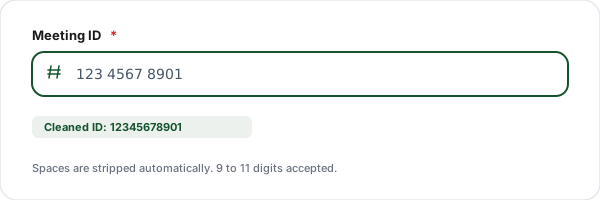
Enter the meeting ID
Paste your numeric Zoom meeting ID. We strip the spaces Zoom adds for readability so the link is valid. Prefer a permanent URL? Switch to Personal Room mode and enter your vanity link name.
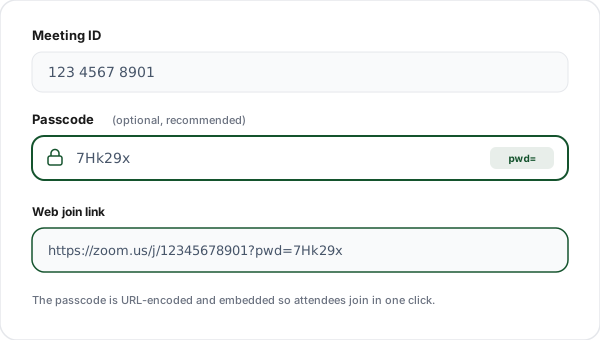
Add an optional passcode
Type the meeting passcode. We URL-encode it and embed it as the pwd= parameter so attendees are admitted in one click instead of being prompted to type it.
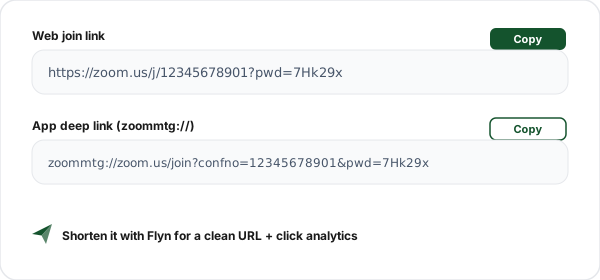
Copy the join link
Copy the web join link to share in calendars, email, and chat, or copy the zoommtg:// app deep link to launch the installed Zoom client directly from a shortcut.
What is a Zoom Join Link?
A Zoom join link is a URL that opens a specific meeting directly, so nobody has to type a meeting ID by hand. The standard web format is https://zoom.us/j/MEETING_ID, and a passcode is carried in the link as ?pwd= so attendees join in a single click.
Zoom shows meeting IDs in a spaced, human-friendly form like "123 4567 8901", but the link itself needs the digits only. This generator strips the spaces for you and URL-encodes the passcode, so the link you copy actually works. It also offers the zoommtg:// app deep link for launching the desktop or mobile client directly.
For meetings you run again and again, your Personal Meeting Room link (https://zoom.us/my/your-name) is the best choice: it is a permanent vanity URL tied to your account that never changes between sessions, perfect for recurring standups, office hours, and booking pages.
One honest caveat: when Zoom generates an invite from inside the app, the pwd= value is an encrypted token, not your plain passcode. This tool builds a valid, shareable link from the passcode you enter, but for the exact "never prompted for the passcode" experience, copy the invite link straight from your Zoom client, which already contains that encrypted token.
Three Types of Zoom Link
Different situations call for different link formats. Here is what each one is for and when to reach for it.
| Type | Format | What it does | Best for |
|---|---|---|---|
| Web join link | https://zoom.us/j/MEETING_ID?pwd=PASSCODE | The universal default. Works in any browser, on any device, and hands off to the Zoom app if installed. | Sharing anywhere |
| App deep link | zoommtg://zoom.us/join?confno=MEETING_ID&pwd=PASSCODE | Skips the browser and opens the installed Zoom client directly. Does nothing if Zoom is not installed. | Desktop shortcuts, kiosks |
| Personal Meeting Room | https://zoom.us/my/YOUR-NAME | A permanent vanity URL tied to your account that never changes between meetings. | Recurring 1:1s, booking pages |
Common Zoom Link Use Cases
Calendar invites
Drop the web join link into a Google Calendar, Outlook, or Apple Calendar event so attendees click straight from their reminder.
Recurring standups
Use a Personal Meeting Room link for daily standups and weekly syncs so the URL never changes between sessions.
Booking and "meet with me" pages
Add your zoom.us/my/ link to a scheduling page or email signature so people always know where to find you.
Webinar and class reminders
Send a clean join link in reminder emails and SMS so students and attendees enter in one tap.
Support and sales handoffs
Generate a passcode-protected link on the fly during a chat so a customer can jump into a call instantly.
Desktop launch shortcuts
Use the zoommtg:// deep link in a desktop or Stream Deck shortcut to open your room with one keypress.
Zoom Link Best Practices
Always include the passcode in the link for low-friction joins, but treat the resulting URL as sensitive: anyone who has it can enter the room. Share it only with intended attendees and avoid posting passcode-laden links in public channels.
Use a Personal Meeting Room sparingly. It is perfect for trusted recurring meetings, but because the URL never changes, an old attendee could rejoin a future call. Enable the waiting room so you control who gets in.
Shorten before you share. Raw Zoom links are long and easy to mangle when copied into SMS or printed materials. A short link is cleaner, harder to break, and lets you see how many people actually clicked.
Test the link before the meeting. Paste it into a fresh browser tab to confirm it resolves to the right room and that the passcode is accepted, especially the first time you use a newly generated link.
Why Use Flyn's Zoom Link Generator?
100% Client-side
All link building happens in your browser. Your meeting ID and passcode never touch our servers.
Three formats
Get the web join link, the zoommtg:// app deep link, and the Personal Meeting Room URL.
Auto-cleaned IDs
We strip the spaces Zoom adds and URL-encode the passcode so the link actually works.
No sign-up
No account, no limits, no ads. Generate as many Zoom links as you need, instantly.
Frequently Asked Questions
What is a Zoom join link?
A Zoom join link is a URL that opens a specific meeting directly, without anyone having to type a meeting ID by hand. The standard web format is https://zoom.us/j/MEETING_ID, and a passcode can be embedded as ?pwd=ENCRYPTED_VALUE so attendees join in one click. When clicked, the link opens in the browser and then hands off to the installed Zoom app, or runs in the browser if Zoom is not installed.
How do I create a Zoom link from a meeting ID?
Paste your numeric meeting ID into the generator and click Generate. We strip any spaces (Zoom shows IDs like "123 4567 8901" but the link needs the digits only) and build https://zoom.us/j/12345678901. If you add a passcode, we append the URL-encoded ?pwd= value so the link is one-click. Everything happens in your browser, nothing is sent to a server.
What is the difference between the web link and the zoommtg:// app link?
The web link (https://zoom.us/j/...) works everywhere: it opens in any browser and then offers to launch the Zoom app. The app deep link (zoommtg://zoom.us/join?confno=...) skips the browser entirely and tries to open the installed Zoom client directly. The web link is the safe default for sharing; the deep link is handy for desktop shortcuts and kiosk machines where Zoom is always installed.
Why does the pwd= value in a real Zoom link look scrambled?
When Zoom itself generates an invite, the pwd= parameter is an encrypted token, not your plain passcode, which lets attendees join without re-typing it. This tool URL-encodes whatever passcode you enter and places it in pwd=. That produces a valid, shareable link, but for the true one-click "no passcode prompt" experience you should copy the invite link straight from your Zoom client, which contains Zoom's own encrypted token.
What is a Personal Meeting Room (PMI) link?
Your Personal Meeting Room is a permanent meeting that is always reserved for you, reachable at https://zoom.us/my/YOUR-NAME once you set a Personal Link in Zoom. It is great for recurring 1:1s and "grab time with me" links because it never changes. Switch this generator to Personal Room mode, enter your personal link name, and we build the vanity URL for you.
How long is a Zoom meeting ID?
Scheduled and instant meeting IDs are usually 10 or 11 digits, while Personal Meeting IDs are 10 digits and older IDs can be 9. This tool accepts 9 to 11 digits and rejects anything outside that range so you do not ship a broken link. Always copy the ID from Zoom rather than typing it from memory.
Do I still need a passcode if I have a join link?
Zoom requires a passcode on most meetings by default for security. If your link includes the correct ?pwd= token, attendees are admitted in one click. If it does not, they will be prompted for the passcode after clicking. Including the passcode in the link is convenient but means anyone with the link can join, so only share it with intended attendees.
Will the link open the Zoom app or the browser?
The web link tries to launch the installed desktop or mobile Zoom app first. If Zoom is not installed, the browser prompts the attendee to download it or to "Join from your browser" via Zoom's web client. The zoommtg:// deep link only works when the Zoom app is installed and will do nothing on a machine without it, which is why the web link is the better choice for public sharing.
Can I use this link in a calendar invite?
Yes. Paste the generated web join link into the location or description field of a Google Calendar, Outlook, or Apple Calendar event. Attendees can click it straight from the calendar reminder. For recurring events, the Personal Meeting Room link is ideal because it stays the same for every occurrence.
Is my meeting ID or passcode sent to Flyn?
No. This generator runs entirely in your browser using JavaScript. Your meeting ID, passcode, and personal link name are never transmitted to or stored on any server. The recent-links history is saved only in your own browser via localStorage and you can clear it anytime.
How do I make a short, branded Zoom link?
Raw Zoom links are long and hard to remember. Generate your join link here, then wrap it in a Flyn short link to get something like flyn.to/standup. You also get click analytics, so you can see how many people opened the invite and from which device, without changing where the link points.
Can attendees join a Zoom meeting without an account?
Yes, in most cases. Unless the host has enabled "only authenticated users can join", anyone with the join link and passcode can enter as a guest, no Zoom account required. They may still need to install the app or use the web client. This is why a clean, working join link matters: it removes the last bit of friction before someone is in the room.
Related Tools
Calendly Link Generator
Build a prefilled Calendly booking link so people can grab time with you in one click.
Teams Meeting Link Generator
Generate a Microsoft Teams meeting join link to share in invites and chat.
Bulk URL Shortener
Turn long Zoom links into short, branded URLs with click analytics built in.
QR Code Generator
Turn your Zoom join link into a scannable QR code for slides, posters, and signage.
Ready to level up your links?
Use our free tools to build meeting and contact links, then wrap them in Flyn short links to get click analytics, see how many people actually opened your Zoom invite and from where.