Free Calendly Link Generator
Prefill the invitee name, email, and notes on your Calendly booking page, then add utm_source, utm_medium, and utm_campaign tracking. Built 100% in your browser.
Calendly prefills your event's first single-line question with the a1 value.
Track clicks on your Calendly link
Calendly shows you bookings. Wrap your link in a Flyn short link to also see total clicks, devices, and locations, so you know your click-to-booking rate.
How to Create a Calendly Link in 3 Steps
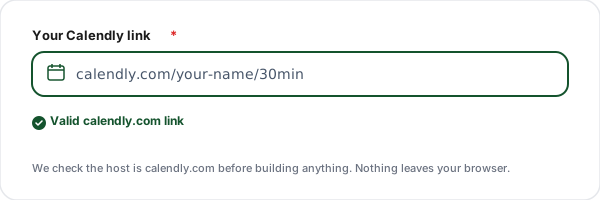
Paste your Calendly link
Paste your scheduling URL, for example calendly.com/your-name/30min. The tool checks that it is a real calendly.com link before building anything.
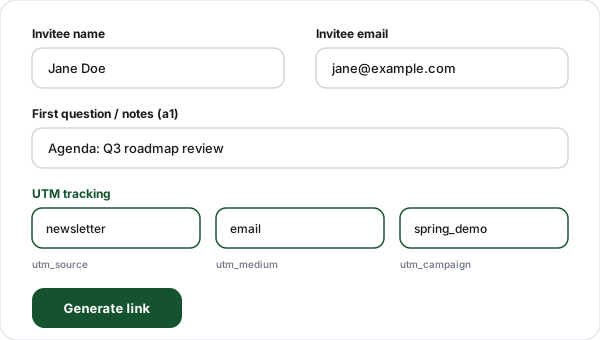
Add prefill and UTM details
Optionally prefill the invitee name, email, and first question (a1). Expand UTM tracking to add utm_source, utm_medium, and utm_campaign for attribution.
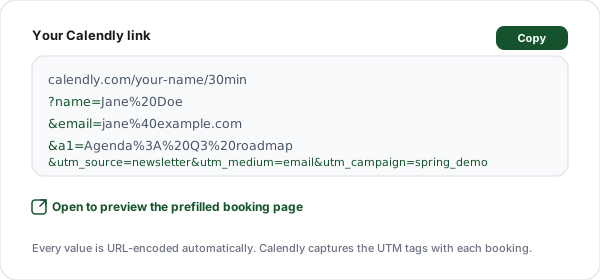
Copy your tracked link
Click Generate, then copy the fully URL-encoded link or click Open to preview the prefilled booking page in a new tab.
What is a Calendly Prefill Link?
A Calendly prefill link is your normal scheduling URL with extra query parameters that fill in the booking page on the invitee's behalf. Calendly officially supports prefilling the name and email fields, plus your event's custom questions using positional keys like a1 for the first single-line question.
The base link looks like calendly.com/your-name/30min. Once you append parameters it becomes calendly.com/your-name/30min?name=Jane%20Doe&email=jane%40example.com&a1=Agenda. When the invitee opens it, their details are already typed in, so they review and confirm rather than fill out a form from scratch. Less friction means more completed bookings.
On top of prefilling, Calendly captures the standard utm_source, utm_medium, and utm_campaign parameters and stores them with the booking. That lets you attribute a confirmed meeting back to the channel that produced it, your newsletter, a LinkedIn post, or a paid ad, instead of guessing.
This generator handles the fiddly part: URL-encoding every value correctly and joining the parameters in the right order. You type plain text, it produces a valid link. Because everything runs in your browser, your Calendly URL and any invitee details never touch a server.
Calendly Link Parameters Reference
These are the prefill and tracking parameters this tool appends. The first parameter starts with ?; the rest are joined with &.
| Parameter | Purpose | Example |
|---|---|---|
| name | Prefills the invitee name field on the booking page. | ?name=Jane%20Doe |
| Prefills the invitee email field. Must be a valid email address. | &email=jane%40example.com | |
| a1 | Prefills your event's first single-line custom question (notes, agenda, or guests). | &a1=Agenda%3A%20Q3%20roadmap |
| utm_source | The channel that drove the booking, captured by Calendly for attribution. | &utm_source=newsletter |
| utm_medium | The marketing medium, such as email, social, or cpc. | &utm_medium=email |
| utm_campaign | The specific campaign name so you can compare bookings across campaigns. | &utm_campaign=spring_demo |
Common Calendly Link Use Cases
One-to-one sales emails
Prefill the prospect's name and email so the booking page is one click away from confirmed, and tag the link with utm_campaign to attribute the meeting.
Newsletter "book a call" CTAs
Add utm_source=newsletter and utm_medium=email so you can see exactly how many meetings each newsletter issue produced.
Paid ad landing pages
Pass utm_source, utm_medium=cpc, and the ad campaign name so booked demos roll up against ad spend in your reporting.
Partner and affiliate links
Give each partner a Calendly link with a unique utm_source so you can credit which partner sent which booking.
Support escalation flows
Prefill the a1 notes field with a ticket number or account ID so the call starts with context already attached.
Event follow-ups
After a webinar, send attendees a Calendly link with utm_campaign set to the event name to measure post-event demand.
Manual URL vs This Generator
You can hand-write a prefilled Calendly URL, but a single stray space or missing ampersand breaks it silently. The generator removes the guesswork.
| Task | By hand | With this tool |
|---|---|---|
| Prefill name + email | Type %20 and %40 by hand | Plain fields, auto-encoded |
| Prefill first question (a1) | Remember the a1 key + position | Labeled a1 field |
| UTM source / medium / campaign | Concatenate three params manually | Three boxes, joined for you |
| URL encoding | Easy to break with a stray space or & | encodeURIComponent on every value |
| Calendly URL validation | None, typos ship silently | Rejects non-calendly.com links |
| Click analytics (beyond bookings) | Not possible | Wrap in a Flyn short link |
Why Use Flyn's Calendly Generator?
100% Client-side
All encoding happens in your browser. Your Calendly URL and invitee data never touch our servers.
Live preview
See the generated link update as you type. Open it in one click to preview the prefilled booking page.
UTM attribution
Add source, medium, and campaign so Calendly can credit each booking to the channel that drove it.
Unicode safe
Names, notes, and campaign names with spaces, emoji, or accents encode correctly, no broken links.
Frequently Asked Questions
What is a Calendly link generator?
A Calendly link generator is a tool that takes your existing Calendly scheduling URL (like calendly.com/your-name/30min) and appends the prefill and tracking parameters that Calendly officially supports. Instead of manually typing out ?name=Jane%20Doe&[email protected]&utm_source=newsletter, you fill in plain fields and the tool builds a correctly URL-encoded link for you. Everything runs in your browser, so no account or sign-up is needed.
Does Calendly actually support prefilling the name and email?
Yes. Calendly supports passing name and email as query parameters on a scheduling link, which prefills those fields on the booking page so the invitee does not have to type them again. The exact keys are name and email. This is documented in Calendly's own help center under embed and prefill options, and it works on standard scheduling links as well as embeds.
What is the a1 parameter for?
Calendly prefills custom questions on your event using positional parameters: a1 maps to your event's first single-line question, a2 to the second, and so on. The most common use is the a1 field, which often holds a "Please share anything that will help prepare for our meeting" note, an agenda, or guest emails. Our tool exposes a1 directly so you can prefill that first question. If your event uses different questions, the a1 value lands in whichever single-line question comes first.
How do I add UTM tracking to a Calendly link?
Append utm_source, utm_medium, and utm_campaign as query parameters to your scheduling URL. Calendly captures these UTM values and stores them with the booking, so you can attribute meetings back to the channel that drove them (newsletter, paid ad, LinkedIn post). Our generator adds all three with correct URL encoding. Calendly also supports utm_term and utm_content, but source, medium, and campaign are the three that matter most for reporting.
Where do the UTM values show up in Calendly?
Calendly attaches captured UTM parameters to the scheduled event and passes them through to integrations like your CRM, Google Analytics, Salesforce, and Calendly's own analytics, depending on your plan. You can also pass them to webhooks. This lets you answer "which campaign booked the most demos" rather than just counting total meetings. Note that some UTM forwarding features depend on your Calendly subscription tier.
Will the prefilled fields lock the invitee out of editing?
No. Prefilled values are conveniences, not locks. The invitee can still change the name, email, or notes on the booking page before confirming. Prefilling simply reduces friction by filling the obvious fields for them, which is especially useful when you already know who you are sending the link to (for example, in a one-to-one sales email).
Does this tool store my Calendly link or invitee data?
No. The entire link is built in your browser with JavaScript. Nothing is sent to our servers, and your Calendly URL, invitee names, and emails never leave your device. Your recent links are saved only in your browser's localStorage so you can reuse them, and you can clear that history at any time with one click.
Why must the link be a calendly.com URL?
The prefill and UTM parameters this tool appends are specific to Calendly's booking pages. We validate that the host is calendly.com (or a calendly.com subdomain) so you do not accidentally generate a link with Calendly-only parameters pointed at a different scheduler that would ignore them. If you use a different tool, the name, email, a1, and utm_ keys may not be recognized.
How are special characters and spaces handled?
Every value is passed through encodeURIComponent before it is added to the URL. That converts spaces to %20, ampersands to %26, and any accented or non-ASCII characters to their UTF-8 percent-encoded form. You can type names, notes, and campaign names naturally, and the generated link will be valid and safe to paste anywhere.
Can I track how many people clicked the link, not just who booked?
Calendly's UTM capture tells you about bookings that completed, but it cannot tell you how many people clicked the link and did not book. To see total clicks, devices, and locations for everyone who opened the link, wrap your generated Calendly link in a Flyn short link. You then get click analytics on top of Calendly's booking analytics, which is useful for measuring drop-off between click and booking.
Does prefilling work inside a Calendly embed too?
Yes. The same name, email, a1, and utm_ parameters work whether the invitee opens a standalone scheduling link or an inline/popup embed on your website. For embeds, you would typically pass the same query string to the embed configuration. The link this tool produces is the standalone scheduling URL, which you can also paste into emails, buttons, QR codes, and chat messages.
Is there a length limit on the generated link?
There is no hard Calendly limit, but practical URL limits apply. Most browsers and email clients handle URLs up to roughly 2000 characters comfortably. Since the only long field is usually the a1 note, keep that concise. If you need to pass a long agenda, consider putting it in the meeting description inside Calendly instead of the URL, and keep the a1 value short.
Related Tools
Zoom Link Shortener
Turn long Zoom meeting URLs into short, branded, trackable links for invites and calendar events.
ICS Calendar Link Generator
Generate downloadable .ics files and add-to-calendar links for meetings and events.
UTM Builder
Build UTM-tagged campaign URLs for any link, so every channel rolls up in your analytics.
Bulk URL Shortener
Shorten many links at once and get click analytics, devices, and locations, on top of Calendly bookings.
Ready to track your bookings end to end?
Generate a prefilled, UTM-tagged Calendly link for free, then wrap it in a Flyn short link to measure clicks, devices, and locations, not just completed bookings.