Free ICS Calendar Link Generator
Generate a downloadable .ics event file (RFC 5545) that works in Apple Calendar, Outlook, Yahoo, Thunderbird, and every iCal-compatible client. No coding, 100% in your browser.
Detected: UTC
Add an event title.
Want to know which channel drove the download?
Host the .ics behind a Flyn short link, every click is logged with location, device, and referrer. You finally see whether the email or the landing page is doing the work.
How to Make an .ics File in 3 Steps
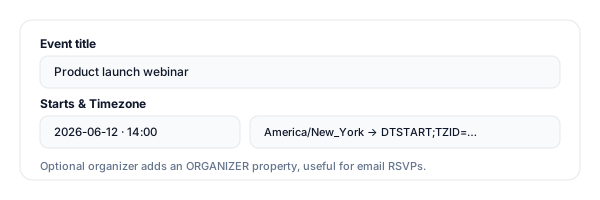
Fill in your event details
Title, date/time, timezone, location, description, optional organizer. The tool understands all-day and multi-day events.
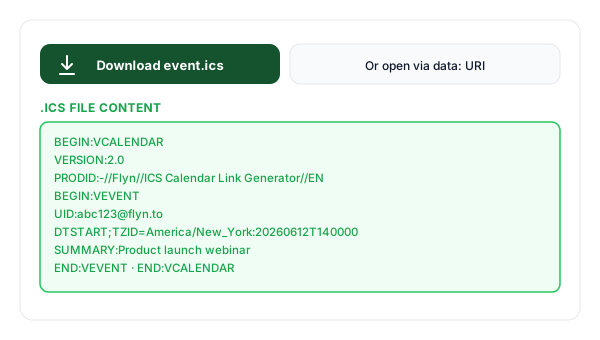
Download the .ics file
The tool builds a valid RFC 5545 .ics file and gives you a one-click download, plus a data: URI alternative and the raw text to copy.
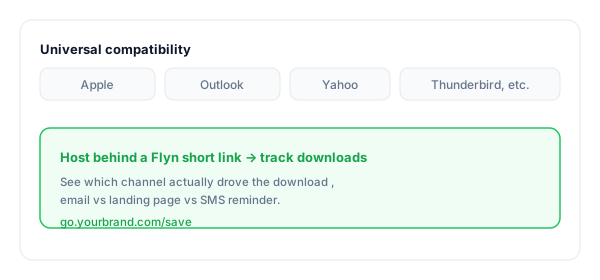
Share or attach it
Attach to your confirmation email, host it on your event page, or send via SMS. Shorten the download URL with Flyn to track clicks per channel.
What Is a .ics / iCalendar File?
A .ics file is a plain-text event file in the iCalendar format defined by RFC 5545. It carries one or more VEVENT records with the title, date/time, timezone, location, description, and organizer.
Every modern calendar app understands it. That makes .ics the universal fallback for Apple Calendar (iPhone/Mac), Outlook desktop, Yahoo, Thunderbird, and any iCal-compatible client, including the productivity tools that have started supporting calendar attachments (Notion, Linear, even Slack reminders).
A minimal .ics event:
BEGIN:VCALENDAR
VERSION:2.0
PRODID:-//Flyn//ICS Calendar Link Generator//EN
BEGIN:VEVENT
UID:[email protected]
DTSTAMP:20260527T140000Z
DTSTART;TZID=America/New_York:20260612T140000
DTEND;TZID=America/New_York:20260612T150000
SUMMARY:Product launch
LOCATION:https://meet.google.com/...
END:VEVENT
END:VCALENDAR
Which Calendar Clients Support .ics?
Effectively all of them. .ics is the universal interop format, that's why it is the safest default for "Save the date" emails to mixed audiences.
| Client | Behavior |
|---|---|
| Apple Calendar (iOS / macOS) | Tapping the .ics opens a one-tap "Add to Calendar" prompt, the cleanest iPhone path. |
| Outlook (desktop / mobile) | Double-click on desktop opens the event in compose-mode; mobile imports into the default calendar. |
| Google Calendar (web) | File → Import lets users add the .ics events. (For one-click, our Google Calendar Link Generator is smoother.) |
| Yahoo Calendar | Import the .ics from settings, yes, Yahoo Calendar still exists and accepts iCal files. |
| Thunderbird / Lightning | Opens via Events and Tasks → Import, the historical iCal reference implementation. |
| Notion / Linear / Slack | Most modern productivity tools that "support calendars" accept .ics, handy for embedding event reminders in product workflows. |
Pro tip
Offer three buttons side-by-side: Google Calendar, Outlook, and .ics download. The three cover ~99% of invitees and the click rate on the third button is higher than people expect, iPhone users overwhelmingly tap it.
.ics Best Practices
Do
Don't
Use TZID for timed events
Floating times (no TZ), invitees in other zones see wrong time
Offer .ics alongside Google + Outlook links
Force Apple users into a Google sign-in flow
Attach the .ics directly to your invite email
Hide it behind three clicks on a landing page
Set a stable UID per event
Generate a new UID on every re-send (creates duplicates)
Shorten the download URL + track per channel
Guess which channel actually drove the download
Test the file in Apple Calendar before mass send
Discover an escaping bug after 5,000 emails go out
Turn Calendar Downloads Into Attribution
Trackable downloads
Host the .ics behind a Flyn short URL, every click is logged with location, device, and referrer.
See what drives RSVPs
Per-channel short links, email vs landing page vs SMS, give you clean attribution on who saved the date.
Branded & memorable
Turn the bare .ics URL into go.yourbrand.com/save, clean enough for an SMS or printed flyer.
Edit without re-sending
If the event time changes, swap the destination .ics file behind the same Flyn link, old emails still work (Pro).
Frequently Asked Questions
What is an .ics file?
Why use a .ics file instead of an "Add to Google/Outlook" link?
How does Apple Calendar handle a .ics file?
How do I attach the .ics file to an email?
How do I add an .ics download to my website?
How do I handle timezones in a .ics file?
Can a single .ics file contain multiple events?
Why is my event saving to the wrong calendar?
Will it work for all-day or multi-day events?
Can I include the organizer in the .ics?
Can I track who downloaded the .ics file?
Does the .ics file work on Android?
More Free Calendar & Event Tools
Build the complete add-to-calendar set with these companion tools. New here? Read our guide to add-to-calendar links for events.
Google Calendar Link
One-click "Add to Google Calendar" link with timezone, location, and description.
Outlook Calendar Link
For personal (outlook.com) or work (Office 365) accounts, pair with .ics for full coverage.
Eventbrite Link Shortener
Turn long Eventbrite registration URLs into branded short links with click tracking.
Mailto Link Generator
Build the invite email with pre-filled subject, body, CC, BCC, and attachments.
Reach every calendar your invitees use
.ics is the universal save-the-date format, Apple, Outlook, Yahoo, Thunderbird, Google all import it. Pair this with the Google + Outlook buttons, host each behind a Flyn short link, and finally know which channel saved the event.