Free Add to Outlook Calendar Link Generator
Turn any event into a one-click "Add to Outlook Calendar" link, for personal (outlook.com) or work (Office 365) accounts. No coding, 100% in your browser.
Outlook interprets times in the signed-in user's profile timezone. Mention the event timezone clearly in the description so attendees in other zones convert correctly.
Add an event title.
Want to see which channel actually drives RSVPs?
Shorten your Outlook calendar link with Flyn for a clean branded URL plus per-channel click analytics, see whether the email, SMS, or landing page is doing the work.
How to Make an Outlook Calendar Link in 3 Steps
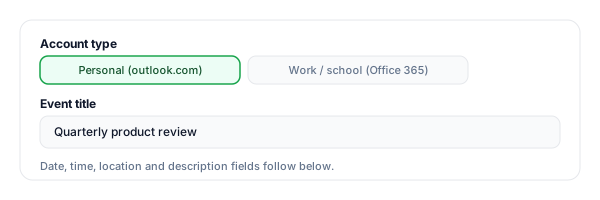
Pick personal or work, fill in the event
Choose Personal (outlook.com) or Work/school (Office 365), then enter the title, date/time, location, and description. Tick all-day for events without a specific time slot.
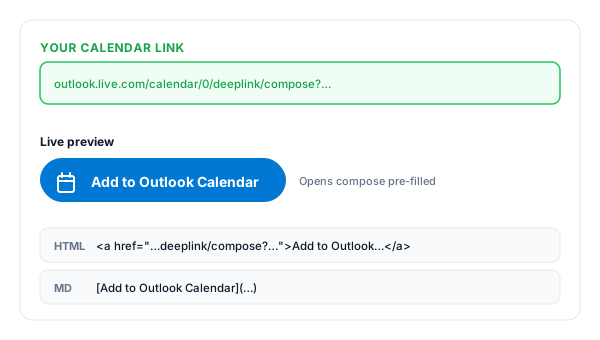
Copy your calendar link
The tool instantly builds the Outlook deeplink/compose URL, plus an HTML "Add to Outlook Calendar" button and a Markdown version.
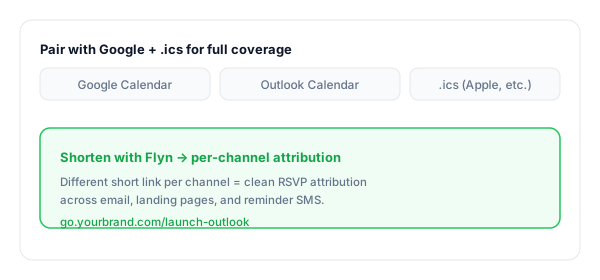
Share it everywhere
Drop it on the landing page, into the confirmation email, and the reminder SMS. Shorten with Flyn to brand the URL and track which channel converts.
What Is an Add to Outlook Calendar Link?
An Add to Outlook Calendar link opens Outlook on the web with all your event details, title, date/time, location, description, pre-filled. The invitee just clicks Save.
It uses Microsoft's official deeplink/compose endpoint at outlook.live.com/calendar/0/deeplink/compose (or outlook.office.com for Office 365 work accounts). Same parameters; different domain for the auth tenant.
A complete Add to Outlook Calendar link:
https://outlook.live.com/calendar/0/deeplink/compose?path=%2Fcalendar%2Faction%2Fcompose&rru=addevent&subject=Product+launch&startdt=2026-06-12T14:00:00&enddt=2026-06-12T15:00:00&location=…&body=Agenda+…Where to Put Your Add to Outlook Calendar Link
The link only earns RSVPs where attendees actually see it. These are the placements with the strongest ROI for Outlook-leaning audiences (B2B / enterprise).
| Placement | Why it converts |
|---|---|
| Event landing page | Pair the Outlook button next to Google Calendar and .ics so every visitor finds a one-click path that matches their setup. |
| Confirmation email | Office 365 accounts dominate B2B inboxes, the Outlook button often outperforms Google Calendar in enterprise audiences. |
| Reminder email (24h before) | Send the link again in the day-before reminder for invitees who skipped adding to calendar the first time. |
| Internal kickoff / company invites | For internal events, your team is almost certainly on Office 365, the work-account Outlook link is the most reliable. |
| Speaker/host signatures | Every event email automatically becomes another passive RSVP funnel. Zero extra effort, compounding return. |
| Webinar registration flow | Show the Outlook button right after submit, peak intent moment for adding the event before life intervenes. |
Pro tip
Pair the Outlook button with a Google Calendar button and an .ics download in the same row, the three together cover ~99% of every invitee's calendar setup.
Outlook Calendar Link Best Practices
Do
Don't
Pick the right account type (personal vs Office 365)
Send the wrong URL and trigger a sign-in mismatch
Put the join URL in the location field
Bury Teams/Zoom links inside the description
Spell out the timezone in title or description
Rely on Outlook auto-converting times invisibly
Offer Google Calendar and .ics alongside
Force every invitee onto a single calendar app
Shorten + track separately per channel
Guess which placement actually drives the RSVPs
Test the link in incognito before sending
Discover a typo after the mass send goes out
Turn Outlook Clicks Into Attribution
See what drives RSVPs
Track clicks by channel, landing page vs email vs SMS, so you know which placement actually turns interest into a saved event.
Branded & memorable
Turn the long Outlook URL into go.yourbrand.com/launch, clean enough for an SMS and a printed flyer.
Edit the destination
If the time, link, or agenda changes, edit the Flyn short link once, every email and post now points to the new calendar URL (Pro).
A/B test the button copy
Split-test "Add to Outlook" vs "Save the date" across audiences, see which copy earns more enterprise RSVPs (Pro).
Frequently Asked Questions
What is an Add to Outlook Calendar link?
What is the difference between outlook.com and Office 365 (outlook.office.com)?
How does the deeplink/compose URL actually work?
Do invitees need an Outlook account?
How do I handle timezones?
Can I add a Teams or Zoom video URL automatically?
Can I include HTML or links in the description?
Will it work for all-day or multi-day events?
Can I track clicks on the Add to Outlook Calendar link?
Does this link work on mobile?
Why are the Office 365 and outlook.com versions slightly different?
Should I also offer Google Calendar and Apple Calendar?
More Free Calendar & Event Tools
Build the full add-to-calendar set with these companion tools. New here? Read our guide to add-to-calendar links for events.
Google Calendar Link
Build the matching Google Calendar button for the same event, pair them side by side.
.ics File Generator
For Apple Calendar and any iCal-compatible client, download a universal event file.
Eventbrite Link Shortener
Turn long Eventbrite registration URLs into clean branded short links with click tracking.
Mailto Link Generator
Pre-fill the invite email with subject, body, CC, BCC. One click to open and send.
Reach every calendar your invitees use
Outlook covers the enterprise inbox. Pair it with Google Calendar and .ics, then track each button with a separate Flyn short link to see which calendar actually wins your RSVPs.