Free MS Teams Meeting Link Generator
Build a Microsoft Teams link in seconds. Generate official chat and call deep links from an email, or clean and brand a pasted meeting join URL, all in your browser.
Opens a chat in Microsoft Teams with these people. They must be in your Teams org or guests.
Track clicks on your Teams meeting link
Wrap your Teams join link in a Flyn short link to see who clicked to join, from where, on what device, without changing the destination.
How to Build a Microsoft Teams Link in 3 Steps
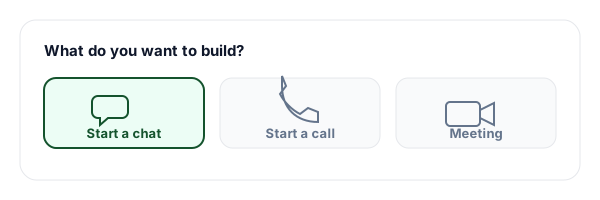
Pick chat, call, or meeting
Choose whether you want to start a chat, start a call, or brand an existing meeting join link. Each mode builds the right Microsoft-documented format.
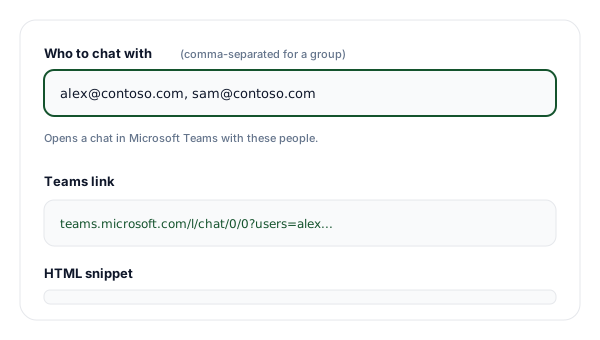
Enter an email or paste a join link
For chat and call, type one or more emails (comma-separated for a group). For a meeting, paste the Teams join URL that Teams or Outlook generated when you scheduled it.
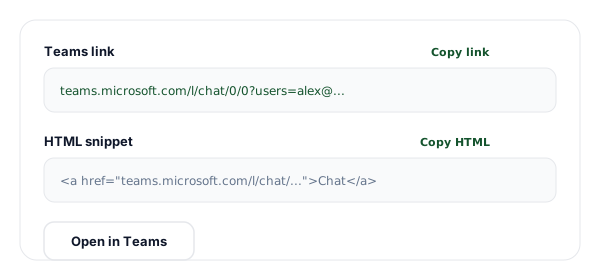
Copy the link or HTML
Copy the generated Teams link, copy the HTML anchor snippet for a webpage or email, or open it directly in Microsoft Teams to test it.
What is a Microsoft Teams Link?
A Microsoft Teams link is a URL that opens Teams and takes the clicker straight to an action: joining a meeting, opening a chat, or starting a call. The best-known one is the meeting join link that appears as "Join Microsoft Teams Meeting" in calendar invites. Teams also exposes a small set of documented deep links that anyone can construct by hand.
The two deep links this tool builds are the chat link, https://teams.microsoft.com/l/chat/0/0?users=EMAIL, and the call link, https://teams.microsoft.com/l/call/0/0?users=EMAIL. Both take one or more email addresses and, when clicked, open the matching chat or call in Teams. They are perfect for email signatures, runbooks, and internal docs where you want a one-click way to reach a person or a group.
The third kind, the scheduled-meeting join link, is different. It can only be created by Teams or Outlook when you actually schedule a meeting, because it is bound to a specific meeting object, organizer, and tenant. No tool can fabricate a valid one out of thin air, and you should be wary of any that claim to. What this tool does instead is take the real join link you paste, validate that it is a genuine Teams URL, clean it, and wrap it in a tidy HTML button.
Once you have a clean join link, the natural next step is to make it short and trackable. A raw Teams join URL is enormous and tells you nothing about engagement. Wrapping it in a Flyn short link gives you a branded, memorable URL and a live count of how many people clicked to join, which is invaluable for webinars, all-hands, and external meetings.
Three Kinds of Teams Link
Teams supports several link formats. Two are deep links you can build from an email; the third is the meeting join link that Teams or Outlook mints for you.
| Type | Format | This tool | What it does |
|---|---|---|---|
| Start a chat | teams.microsoft.com/l/chat/0/0?users=EMAIL | Yes, from an email | Opens a one-to-one or group chat in Teams. Add multiple emails, comma-separated, for a group. |
| Start a call | teams.microsoft.com/l/call/0/0?users=EMAIL | Yes, from an email | Starts an audio or video call to one or more people in Teams. Recipients must be in your org or guests. |
| Join a meeting | teams.microsoft.com/l/meetup-join/... | Clean and brand a pasted link | Minted by Teams or Outlook when the meeting is scheduled. Paste it here to clean it and wrap it in a button. |
Common Teams Link Use Cases
Email signature "Chat with me"
Add a chat deep link to your signature so colleagues open a Teams chat with you in one click, no searching for your name.
Support escalation buttons
Put a call deep link to your on-call engineer in your incident runbook so responders start a Teams call instantly.
Event landing pages
Wrap your scheduled meeting join link in a branded "Join the webinar" button on your registration page.
Calendar invite descriptions
Drop a clean, short join link into Google or Apple Calendar events that point to a Teams meeting.
Internal docs and wikis
Link "Start a call with the team" directly from your knowledge base using a group call deep link.
Sales outreach
Share a trackable short link to your standing demo meeting so you can see who clicked to join.
Chat vs Call vs Meeting Links
Each Teams link type behaves differently. Use this to decide which one fits your use case before you build it.
| Aspect | Chat link | Call link | Meeting link |
|---|---|---|---|
| Created by this tool | Yes (from email) | Yes (from email) | No (you paste it) |
| Needs a scheduled meeting | No | No | Yes |
| Works for external guests | Org or guests only | Org or guests only | Yes, if organizer allows |
| Opens | A Teams chat | A Teams call | The Teams meeting |
| Official Microsoft format | Yes, documented | Yes, documented | Yes, Teams or Outlook minted |
| Brandable with Flyn | Yes | Yes | Yes |
Why Use Flyn's Teams Link Generator?
100% Client-side
Every link is built in your browser. Your emails and meeting links never touch our servers.
Honest by design
We build the real Microsoft-documented formats and never fabricate fake meeting endpoints.
Link + HTML output
Copy the raw Teams URL, or a ready-to-paste HTML anchor for your site or email signature.
Trackable with Flyn
Shorten your join link to get a branded URL and see exactly how many people clicked to join.
Frequently Asked Questions
What is a Microsoft Teams meeting link?
A Microsoft Teams meeting link is a URL that, when clicked, opens Microsoft Teams (in the app or in a browser) and either joins a scheduled meeting, starts a chat, or starts a call. The most common one is the "meeting join" link that Teams or Outlook generates when you schedule a meeting (it looks like https://teams.microsoft.com/l/meetup-join/...). Teams also supports documented deep links such as https://teams.microsoft.com/l/chat/0/0?users=EMAIL to start a chat and https://teams.microsoft.com/l/call/0/0?users=EMAIL to start a call.
Can this tool create a brand-new Teams meeting?
No, and any tool that claims to is misleading you. A real scheduled-meeting join link can only be minted by Microsoft Teams or Outlook at the moment the meeting is created, because it is tied to a meeting object, an organizer, and a tenant. This tool builds the two officially documented Teams deep links (chat and call) from an email address, and for full meetings it cleans and brands the join URL you paste in. We never fabricate a meeting endpoint.
How do I get a real Teams meeting join link?
Open Microsoft Teams or Outlook, create a new meeting (Calendar then New meeting in Teams, or New Teams Meeting in Outlook), add a time, and save it. Teams generates a "Join Microsoft Teams Meeting" link in the event. Copy that link and paste it into this tool to clean it and wrap it in a branded HTML button. You can also right-click an existing meeting and choose to copy the join link.
How does the Teams chat deep link work?
The chat deep link uses the format https://teams.microsoft.com/l/chat/0/[email protected]. When someone clicks it, Teams opens a one-to-one chat with that person. To open a group chat, list several emails separated by commas, for example [email protected],[email protected]. The people you list must be reachable in your Teams organization or invited as guests, otherwise Teams shows that the user cannot be found.
How does the Teams call deep link work?
The call deep link uses the format https://teams.microsoft.com/l/call/0/[email protected]. Clicking it starts an audio or video call to that person in Teams. As with chat, you can call several people by separating their emails with commas. Calling requires that the recipient is in your tenant or a federated or guest contact, and that calling is enabled by your Teams admin.
Do I need a specific Teams license for these deep links?
The chat and call deep links rely on standard Teams chat and calling, which are available on most Microsoft 365 business and enterprise plans. There is nothing to install beyond Teams itself. Some calling scenarios (like PSTN phone calls) need add-on licensing, but Teams-to-Teams chat and calls work on the core plans. The meeting join link you paste carries its own meeting permissions set by the organizer.
Will the link open the Teams desktop app or the browser?
It depends on the device. If the Teams desktop app is installed, the link usually opens it directly. If not, Teams opens in the browser, or prompts the user to download the app or continue on the web. On mobile, the link opens the Teams app if installed, otherwise it deep-links to the app store. You generally cannot force one behavior over the other from the link alone, that choice belongs to the user and their device settings.
Can external or guest users join with these links?
For meeting join links, yes, external participants can usually join from a browser as guests if the organizer allows anonymous or guest join. For chat and call deep links, the target must be a member of your Teams organization or already invited as a guest, otherwise Teams cannot resolve the user. If you regularly meet with people outside your org, the scheduled-meeting join link is the most reliable option to share publicly.
Is it safe to share a Teams meeting link publicly?
A meeting join link grants access to whoever has it, subject to the lobby and join settings the organizer configured. For public events, enable the lobby so you can admit attendees, restrict who can present, and consider requiring registration. Chat and call deep links are lower risk since they only attempt to reach people inside your tenant, but you should still avoid posting them where they could be abused to spam a colleague.
Why would I wrap a Teams link in a Flyn short link?
Raw Teams links are long, ugly, and impossible to track. Wrapping the meeting join link in a Flyn short link gives you a clean, branded URL you can put in an email, a calendar description, or a landing page, and it shows you how many people actually clicked to join, from which device and country. The destination stays exactly the same, you simply gain analytics and a tidy link.
Can I add the meeting link to a calendar invite?
Yes. Paste the cleaned join link (or its Flyn short link) into the location or body of any calendar event, in Google Calendar, Outlook, or Apple Calendar. For Teams-native meetings, the join button is added automatically when you schedule from Teams or Outlook. The branded HTML snippet this tool produces is handy for newsletters and event pages where you want a clickable "Join the meeting" button.
Do these links expire?
The chat and call deep links never expire, they simply open a chat or call whenever clicked. A meeting join link stays valid for the lifetime of that meeting, recurring meetings keep the same join link across all occurrences, and a one-off meeting link works until the meeting is cancelled or deleted. If you shorten the link with Flyn, the short link itself does not add an expiry on paid plans.
Does this tool store my emails or meeting links?
No. Every link is built entirely in your browser using JavaScript, nothing you type is sent to or stored on our servers. Your recent links are kept only in your browser localStorage so you can reuse them, and you can clear that history at any time with one click. If you later create a Flyn short link from the result, only that short link and its destination are stored, never the inputs you typed here.
Related Tools
Zoom Link Shortener
Shorten and brand your Zoom meeting join links, and track who clicks to join.
Calendly Link Shortener
Turn long Calendly scheduling URLs into clean, trackable short links.
URL Shortener
Shorten any link, including Teams join URLs, and get click analytics for free.
Bulk URL Shortener
Paste a list of meeting and event links and shorten all of them at once.
Ready to level up your links?
Build your Teams chat, call, or meeting link for free, then wrap it in a Flyn short link to get a branded URL and see how many people actually clicked to join.