Free otpauth Link Generator
Build otpauth:// provisioning URIs for TOTP and HOTP two-factor auth and scan them as a setup QR code. For IT admins and developers setting up 2FA for apps and teams. Runs entirely in your browser, the secret never leaves the page. No sign-up.
The secret IS the second factor. Anyone who scans this QR or reads the URI can generate your codes from then on. Treat both like a password: share the QR only over a secure channel, never email a screenshot of it, and never commit the URI to a repository.
Shown next to the code in the authenticator app so users know which login it belongs to.
The dice button generates a random 160-bit secret with crypto.getRandomValues, in your browser.
Everything runs in your browser. The secret never leaves this page and is never sent to our servers. The recent-accounts list below remembers issuer and account names only, secrets are never stored.
Fill in the account details and click Generate. Scan the code with any authenticator app to enroll.
Rolling 2FA out to a team?
The setup QR carries the secret, so it stays private. The setup GUIDE is the opposite problem: a long internal doc URL nobody can read out over a call. Put it behind a Flyn short link, share one memorable address in the rollout email, and see how many people actually opened it.
How to Create a 2FA Setup QR in 3 Steps
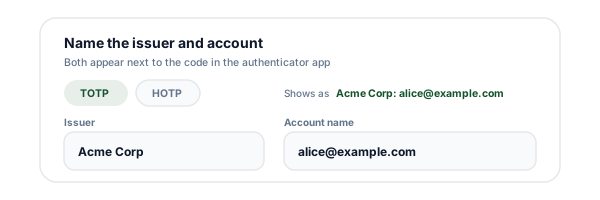
Name the issuer and account
Pick TOTP or HOTP, then enter your app or company name as the issuer and the user identifier, usually an email address, as the account. Both show up next to the code in the authenticator app, which is the difference between "GitHub: [email protected]" and an anonymous 6-digit mystery.
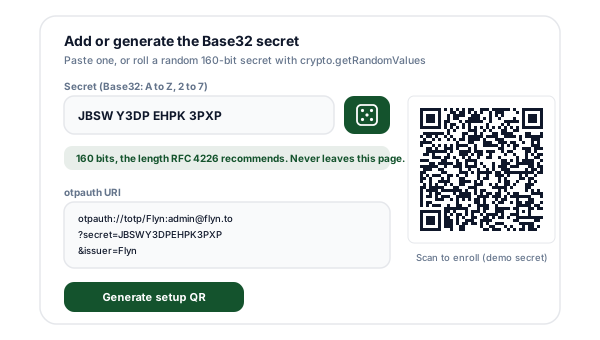
Add or generate the Base32 secret
Paste a secret you already hold, spaces, dashes, and = padding are stripped and the rest is validated against the Base32 alphabet, or press the dice button for a random 160-bit secret generated with crypto.getRandomValues right in your browser. Weak or malformed secrets get an inline warning before anything is built.
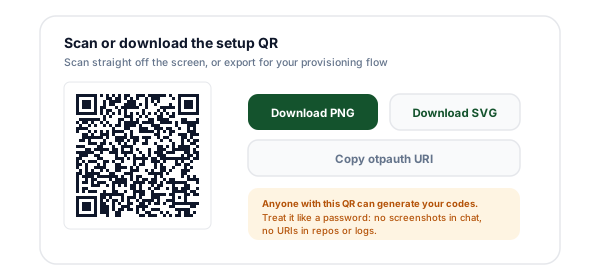
Scan or download the setup QR
Generate the otpauth URI and its QR code. Scan it straight off the screen with an authenticator app, copy the URI for a provisioning script, or download the code as PNG or SVG. Confirm the enrollment by having the user type one live code back.
What Is an otpauth Link?
Every time you have scanned a QR code to switch on two-factor authentication, your authenticator app was reading an otpauth link. It is a URI with the shape otpauth://totp/Issuer:account?secret=BASE32&issuer=Issuer, and it carries everything the app needs to start generating codes: who the account belongs to, the shared secret, and how the codes should be computed.
The format is defined in the Google Authenticator Key Uri Format document, and it became the de facto enrollment standard well beyond that one app. The type segment picks the algorithm family, totp for time-based codes as specified in RFC 6238 or hotp for counter-based codes as specified in RFC 4226. TOTP replaces HOTP's counter with the current time divided into steps, 30 seconds by default, which is why the codes in your app roll over twice a minute.
The heart of the URI is the secret parameter, the shared key encoded in Base32, an alphabet of A to Z and 2 to 7 with the = padding omitted. This value is the entire security of the second factor. The QR code is not an abstraction over it or a pointer to it, it IS it, printed as squares. That is why a setup QR deserves exactly the handling a password gets, and why this generator does all of its work in your browser: the secret you type or generate here is never transmitted, logged, or stored.
Everything else is tuning. The issuer names your service in the user's app, the algorithm, digits, and period parameters adjust how codes are computed, and hotp URIs add a mandatory counter. The parameter reference below lists each one with its default and one important honesty note: several of the optional parameters are documented as ignored by the most popular authenticator app, so the defaults are not just convenient, they are the compatible choice.
Anatomy of an otpauth URI
The full shape is otpauth://TYPE/LABEL?PARAMETERS. Seven pieces to know, from the Key Uri Format document.
| Piece | Status | What to know |
|---|---|---|
| otpauth:// | Scheme | The custom scheme authenticator apps register for. It never resolves in a normal browser tab, the URI exists to be scanned from a QR or tapped where an authenticator app claims it. |
| totp | hotp | Type | totp for time-based codes (RFC 6238), hotp for counter-based codes (RFC 4226). This choice decides whether the URI needs a period or a counter. |
| Issuer:account | Label | What the user sees in their app, the provider name and the account identifier separated by a colon, both URL-encoded. The spec forbids a colon inside either half, that character is reserved as the separator. |
| secret= | Required | The shared secret in Base32 (A to Z, 2 to 7). The spec says the = padding should be omitted. This is the value everything else protects, whoever holds it can compute the codes. |
| issuer= | Strongly recommended | The provider name again, as a parameter. The spec recommends carrying it in both the label prefix and here, because older Google Authenticator versions only read the prefix. |
| algorithm=, digits=, period= | Optional | Defaults are SHA1, 6, and 30. All three are legal to override, and the Key Uri Format doc notes Google Authenticator currently ignores algorithm and period, and ignores digits on Android and BlackBerry. |
| counter= | Required for hotp | The initial counter value both sides start counting from. Only valid on hotp URIs, and mandatory there. |
A finished example
otpauth://totp/Acme%20Corp:alice%40example.com?secret=JBSWY3DPEHPK3PXP&issuer=Acme%20Corp&algorithm=SHA1&digits=6&period=30The label reads Acme Corp:[email protected] once URL-decoded, the issuer is repeated as a parameter for older clients, and the algorithm, digits, and period spell out the defaults explicitly, which is legal and unambiguous. Scanned, it enrolls a time-based account that shows a 6-digit code rotating every 30 seconds.
otpauth Parameter Reference
Every parameter the Key Uri Format defines, with its default and the support caveats the document itself discloses.
| Parameter | Status | Detail |
|---|---|---|
| secret | Required | Base32 per the RFC the spec cites, alphabet A to Z and 2 to 7, padding omitted. RFC 4226 R6 requires at least 128 bits and recommends 160, which is 32 Base32 characters. |
| issuer | Strongly recommended | URL-encoded provider name. Send it both as the label prefix and as this parameter, older Google Authenticator versions only read the prefix. |
| algorithm | Optional, default SHA1 | SHA1, SHA256, or SHA512. The Key Uri Format doc says Google Authenticator currently ignores this parameter, so non-SHA1 values only work where the app documents support. |
| digits | Optional, default 6 | 6 or 8 per the spec. The doc notes the value is ignored by the Android and BlackBerry Google Authenticator builds, which use 6. |
| period | Optional, totp only, default 30 | Seconds each code is valid. RFC 6238 recommends 30 as the default time step. The Key Uri Format doc says Google Authenticator ignores this parameter. |
| counter | Required, hotp only | The initial counter value. The app increments it on every generated code, the server on every successful verification. |
Sources: the Google Authenticator Key Uri Format document (github.com/google/google-authenticator/wiki/Key-Uri-Format), RFC 6238 for TOTP, and RFC 4226 for HOTP and the secret length requirements.
TOTP vs HOTP
Same HMAC construction underneath, different moving factor on top. RFC 6238 defines TOTP as the time-based variant of the HOTP algorithm, with a time value derived from the clock replacing the counter.
| Aspect | TOTP | HOTP |
|---|---|---|
| Standard | RFC 6238, the time-based variant of HOTP | RFC 4226, the original HMAC-based one-time password |
| Moving factor | Current time divided into steps, 30 seconds by default | A counter both sides increment |
| Code lifetime | Expires when the time step rolls over | Valid until used, no clock involved |
| Required URI extras | None, period is optional with a 30 second default | counter= is mandatory |
| Failure mode | Clock drift between server and device | Counter drift when codes are generated but never submitted |
| Where you meet it | Nearly every authenticator app enrollment today | Hardware tokens and legacy deployments |
Unless you have a specific reason to count instead of tick, choose TOTP. It is what users expect, what every mainstream app enrollment uses, and it has no counter to drift out of sync.
The Secret Is the Whole Game
A 2FA setup QR is not like a QR on a poster. The poster QR points at something, this one contains the something: the shared secret, in full, encoded as squares. Anyone who scans it, from your screen, from a photo, from a screenshot in a chat log, can generate exactly the codes your authenticator generates, from that moment on, forever, with no further access to you. There is no revocation baked into the format. The only fix for a leaked secret is to generate a new one and re-enroll.
That is why this tool is built the way it is. Everything runs in your browser. The URI and the QR are constructed in client-side JavaScript, no network request carries your secret, and nothing you type here reaches our servers or logs. The history list keeps issuer and account names so you can rebuild a QR quickly, but it never stores secrets, and the analytics event fired when you press Generate carries the tool name and mode only.
Handle the output accordingly. Display setup QRs in person or over an encrypted channel, never in email bodies, wiki pages, or slide decks. Keep URIs out of shell history, CI logs, and commit history, an otpauth URI in a repository is a credential leak, not a config file. And on the server side, store each user's secret the way you store credentials: encrypted at rest, access-controlled, and rotated on suspicion of exposure.
Who Reaches for an otpauth Generator
Building 2FA into your app
Sanity-check the URIs your backend emits against a known-good construction before you debug your TOTP library, one field at a time.
Testing authenticator flows
Generate throwaway secrets and QRs to walk your signup and recovery flows end to end without touching production keys.
Provisioning team 2FA
IT admins enrolling staff devices can turn an existing Base32 secret into a scannable QR on a machine that never sends it anywhere.
Migrating authenticator apps
If you exported or backed up a Base32 secret, rebuild its setup QR and scan it into a new app instead of retyping 32 characters.
Shared service accounts
Where one break-glass account must live in several vaults, generate the QR once, enroll each vault, then destroy the screen session.
Docs and runbooks
Writing setup instructions for your product? Generate a QR from a dummy secret for the screenshot, so the image in your docs is real and scannable but worthless.
2FA Provisioning Best Practices
Six habits that separate a clean 2FA rollout from a support-ticket generator.
Generate the secret with a CSPRNG
The dice button uses crypto.getRandomValues for 160 bits of entropy, the length RFC 4226 recommends. Never derive a secret from a password, a timestamp, or Math.random.
Keep the defaults unless you control both ends
SHA1, 6 digits, 30 seconds is what every app handles. The Key Uri Format doc itself says Google Authenticator ignores algorithm and period, so exotic values fail silently: codes simply stop matching.
Always set the issuer
A user with twelve accounts in their authenticator needs your name next to the code. Set it once here and the tool writes it into both the label and the issuer parameter, as the spec recommends.
Treat the QR like the password it contains
The QR is just the secret wearing a costume. No screenshots in chat, no QRs in slide decks, no URIs in commit history or CI logs. Deliver over TLS, display once, then get it off the screen.
Confirm enrollment with a live code
After the user scans, have them type one generated code back before you switch 2FA on. That catches a corrupted secret or clock drift while the user is still standing there.
Store server-side secrets like credentials
Your server keeps a copy of every TOTP secret by design, that is how it verifies codes. Encrypt them at rest and scope access as tightly as you scope password hashes.
Why Use Flyn's otpauth Link Generator?
100% client side
The secret never leaves your browser. No server call, no logs, no stored secrets, which for this particular tool is not a nicety, it is the point.
Spec-faithful URIs
Label and issuer encoded per the Key Uri Format, colons rejected where the spec forbids them, counter enforced for HOTP, padding stripped from secrets.
Honest compatibility notes
The tool warns you inline when you pick a value the format doc says Google Authenticator ignores, before the codes mysteriously stop matching.
Real 160-bit secrets
One click generates a random secret at the RFC 4226 recommended length using crypto.getRandomValues, and the QR downloads as crisp PNG or vector SVG.
Frequently Asked Questions
What is an otpauth link?
An otpauth link, formally a key URI, is the address format authenticator apps read when you scan a 2FA setup QR code. The structure is otpauth://TYPE/LABEL?PARAMETERS, where TYPE is totp for time-based codes or hotp for counter-based codes, the label names the issuer and account, and the parameters carry the shared secret plus optional settings. The format comes from the Google Authenticator Key Uri Format document and is what most authenticator apps parse when they enroll a new account.
What has to go in the secret parameter?
The shared secret, encoded in Base32. The Key Uri Format spec points at the Base32 definition in RFC 3548 (carried forward in RFC 4648), which uses the letters A to Z and the digits 2 to 7, and it says the = padding is not required and should be omitted. Our tool strips spaces, dashes, and trailing padding automatically, then validates what remains against that alphabet. If your secret contains a 0, 1, 8, or 9, it is not Base32, it may be hex or a raw string that needs encoding first.
Should I pick TOTP or HOTP?
TOTP for almost everything. TOTP, defined in RFC 6238, derives the code from the current time, so codes rotate on their own every period, 30 seconds by default, and the server and app only need roughly synchronized clocks. HOTP, defined in RFC 4226, derives the code from a counter that both sides increment, which suits hardware tokens without clocks but means the counter can drift if codes are generated and never used. Every mainstream login flow you have seen with a rotating 6-digit code is TOTP.
What is the counter parameter and when is it required?
The counter is required for hotp URIs and has no meaning for totp ones. It sets the initial counter value, the starting point both the app and your server count from. Each generated code advances the app's counter, and each successful verification advances the server's. Most deployments start at 0. If you build an hotp URI without a counter, apps that follow the spec will reject it, which is why our tool refuses to generate one without it.
Which algorithm should I choose, SHA1, SHA256, or SHA512?
Leave it on SHA1 unless the app you are enrolling into documents otherwise. SHA1 is the default in the Key Uri Format, and RFC 6238 specifies HMAC-SHA-1 as the baseline with HMAC-SHA-256 and HMAC-SHA-512 as options implementations may use. The catch is client support: the Key Uri Format doc itself notes that Google Authenticator currently ignores the algorithm parameter, so a URI that declares SHA256 will still be computed with SHA1 there and the codes will not match your server. The safe path is SHA1 end to end.
Why does the issuer appear twice in the URI?
Once as a prefix inside the label, otpauth://totp/Issuer:account, and once as an issuer query parameter. The Key Uri Format doc strongly recommends sending both because older Google Authenticator versions ignore the issuer parameter and read only the label prefix, while the parameter is the forward-looking home for the value. Our tool writes both from the one issuer field, and it also enforces the spec rule that neither the issuer nor the account name may itself contain a colon.
Can I use 8-digit codes or a period other than 30 seconds?
You can put digits=8 and any period in the URI, both are legal parameters, but check what your target app honors before you rely on them. The Key Uri Format doc says the digits value may be 6 or 8 and that the Android and BlackBerry Google Authenticator builds ignore it, and that the period parameter is ignored too. RFC 6238 recommends 30 seconds as the default time step. Non-default values are only worth it when both your server library and your users' apps support them.
Is it safe to paste a real 2FA secret into this page?
The tool is built so that nothing you type is transmitted: the URI and the QR code are constructed with client-side JavaScript in your browser, there is no server call, and the history list stores issuer and account names only, never secrets. That said, the screen itself is the risk surface. Anyone who photographs the QR, shoulder-surfs the URI, or finds it in a pasted screenshot can generate your codes forever after. Generate setup codes in private, deliver them over a secure channel, and rotate the secret if you suspect exposure.
How long should the secret be?
RFC 4226 requirement R6 says the shared secret must be at least 128 bits and recommends 160 bits, and RFC 6238 adds that keys should match the length of the HMAC output, which is 160 bits for SHA1. In Base32 terms, 160 bits is 32 characters. The random secret button on this page generates exactly that: 20 bytes from crypto.getRandomValues, encoded to 32 Base32 characters. The tool warns you when a secret you paste falls under the 128-bit floor.
Which authenticator apps can scan the QR this tool makes?
Any app that implements the Key Uri Format, which is the de facto enrollment standard the format document describes. The QR encodes nothing but the otpauth URI itself, exactly as documented, so compatibility is decided by the app, not by anything specific to this generator. For maximum compatibility keep the defaults, SHA1, 6 digits, 30 seconds, since those are the values the format designates as defaults and the ones every implementation handles.
Does this enroll 2FA on my Google, GitHub, or other accounts?
No. Those services generate their own secret when you turn on 2FA in their security settings, and you must scan the QR they show you, because the same secret has to end up on their server and in your app. This tool is for the other side of the handshake: developers and IT admins who are building a login system, testing a TOTP library, provisioning shared service accounts, or re-creating a setup QR from a secret they already hold.
Is this tool really free, and do I need an account?
Free, no sign-up, no limits on how many URIs or QR codes you generate. It is one of the free tools we publish alongside the Flyn link shortener. Because the whole tool runs in your browser, there is nothing metered to charge for: no API calls, no stored data, no watermarks on the downloaded PNG or SVG.
Why does my server reject the codes the app generates?
The usual suspects, in order: the server and phone clocks disagree by more than the accepted window, TOTP tolerates only small drift; the secret was corrupted in transit, often by a 0 or 1 sneaking into a retyped Base32 string that only contains letters and 2 to 7; the URI declared SHA256 or 8 digits but the app silently used SHA1 with 6, which happens because some apps ignore those parameters; or, for HOTP, the counters have drifted apart. Rebuild the URI with defaults and a freshly generated secret to isolate which one it is.
Related Tools
More QR and link tools that run right in your browser.
QR Code Generator
The general-purpose one: QR codes for URLs, WiFi, vCards, email, phone, SMS, or plain text, with colors and sizing.
WiFi QR Code Generator
The same idea for network credentials: guests scan to join, and the password never leaves your browser either.
QR Code Reader
Decode any QR from an image or screenshot in your browser, handy for verifying the URI inside a setup code.
vCard QR Code Generator
Put a contact card behind one QR code, scan to save, classic vCard or an editable Smart QR.
Secrets stay here. Links go everywhere.
The setup QR never should be tracked, but your docs, guides, and rollout emails should. Flyn gives every link a short address and a click count, free, with analytics breakdowns and custom domains on Pro.
Tip: confirm every enrollment with one live code before switching 2FA on.