Free Office URI Link Generator
Build ms-word, ms-excel, ms-powerpoint, and ms-visio links that open a document from SharePoint, OneDrive, or any URL straight in the desktop app. Read-only, edit, or new-from-template, exactly as Microsoft's spec defines them.
The person clicking must be able to reach this URL themselves: a SharePoint, OneDrive, or intranet address they have permission to open, or a public one. The link launches their app, the app then fetches the file as them.
Everything runs in your browser. The document URL never reaches our servers, and history stays in this browser only.
An Office URI launches an app. It tells you nothing.
No page loads, so no click is counted anywhere. Best practice is to ship a plain https link to the same document alongside it for people without Office desktop, and if you shorten that fallback with Flyn, you finally see how many people actually open the doc.
How to Create an Office URI Link in 3 Steps
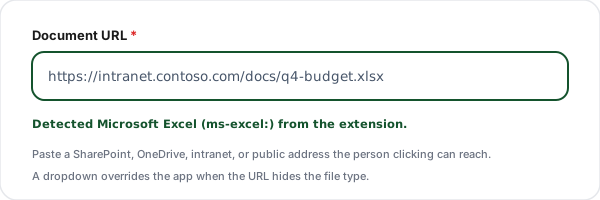
Paste the document URL
Paste the SharePoint, OneDrive, intranet, or public address of the file. The tool reads the extension and picks the app: .docx to Word, .xlsx to Excel, .pptx to PowerPoint, .vsdx to Visio, with a dropdown to override when the URL hides the file type.
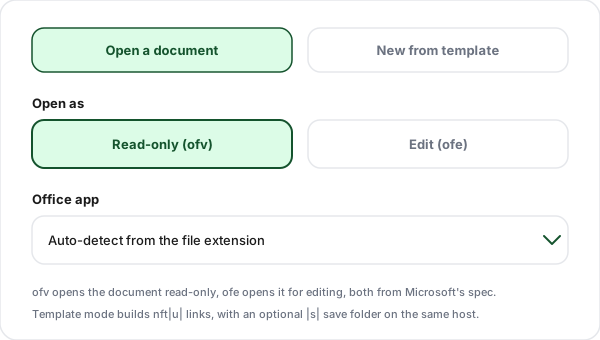
Choose the command
Pick read-only (ofv) or edit (ofe) for an existing document. Or switch to template mode and the link uses nft, which opens a fresh document from your template and can point the first save at a folder on the same host.
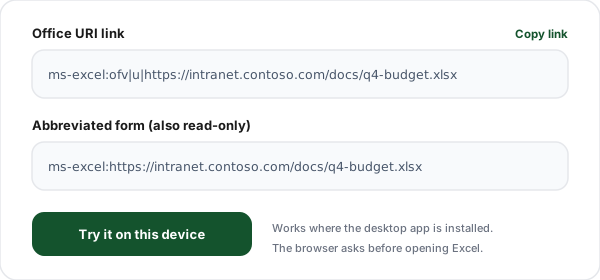
Copy the Office link
Copy the finished URI, the shorter abbreviated form for read-only links, or a ready HTML anchor for your intranet page or wiki. Try it on your own machine first: the matching desktop app opens and loads the document.
What Is an Office URI Link?
An Office URI link is an address that launches a Microsoft Office desktop application and hands it a document to open. Instead of https, the link starts with a scheme named after the app: ms-excel:ofv|u|https://contoso/Q4/budget.xlsx launches Excel and opens that workbook in read-only mode. The format is defined in Microsoft's Office URI Schemes specification, and when Office is installed, each scheme name is registered with the operating system to be handled by the product of the same name.
The value is the missing middle step. A plain https link to a document lands people in whatever the browser decides: a web preview, a download, a "how do you want to open this" dialog. An Office URI skips all of that and opens the file where the toolbars, macros, pivot tables, and Visio layers actually live. SharePoint 2013 itself uses these URIs as the links to documents stored in its libraries, which is why a well-built one feels native to anyone who works in SharePoint all day.
The format has exactly three commands: ofv opens the document for viewing, ofe opens it for editing, and nft creates a new document from a template. Arguments are separated by vertical bars, a character deliberately chosen because it never appears in a normal URL, so the document address can be passed through without percent-encoding.
The scheme is supported in Office 2010 Service Pack 2 and later, per the specification, including Office 2013 for Windows, SharePoint 2013, Office for iPhone, Office for iPad, and Office for Mac 2011. The catch to keep in mind: the link only means something on a machine where the app is installed and has registered the scheme. That makes Office URI links a precision tool for intranets and internal comms, not a general-audience one, and it is why every section below keeps recommending an https fallback next to it.
Anatomy of an Office URI
The full schema from Microsoft's spec is scheme-name:command-name|descriptor|argument, with every argument carrying its own descriptor and vertical bars between the pieces.
| Piece | Role | What to know |
|---|---|---|
| ms-word: | Scheme name | Which application should be launched. Registered with the operating system by the Office installation, one scheme per app: ms-word, ms-excel, ms-powerpoint, ms-visio, and five more for Access, Project, Publisher, SharePoint Designer, and InfoPath. |
| ofv | ofe | nft | Command | What the app should do: ofv opens the document read-only, ofe opens it for editing, nft creates a new document from a template. These three are the complete command list in Microsoft's spec. |
| |u| | Argument descriptor | Says the next piece is the document URI. Every command takes it, and the URI must use the http or https scheme. The vertical bars are the delimiters of the whole format, chosen because they never appear in a normal URL. |
| |s| | Optional save folder | Only valid on nft. Points at the folder offered as the default save location for the new document, and Microsoft requires it to be on the same host name as the template. The person saving can still pick somewhere else. |
| https://…/report.docx | Document URL | Passed through unescaped: the spec says the reserved characters : and / inside a command argument are data, not delimiters. The address must be reachable by the person clicking, with their permissions, from their network. |
A finished example
ms-word:nft|u|https://intranet.contoso.com/templates/expense-report.dotx|s|https://intranet.contoso.com/finance/expensesWord launches, creates a new document from the expense report template, leaves the template untouched, and offers the finance folder as the default save location. The save folder sits on the same host as the template, which Microsoft requires whenever |s| is supplied.
The Three Commands, Plus the Short Form
This is the complete command list in the specification. Anything else you see in a copied snippet is not part of the scheme, and the spec says unexpected argument descriptors are simply removed by the handler.
| Command | Name | What it does | Example |
|---|---|---|---|
| ofv | View Document | Opens the document at the URL in read-only or view mode. | ms-excel:ofv|u|https://contoso/Q4/budget.xlsx |
| ofe | Edit Document | Opens the document at the URL in editing mode. | ms-powerpoint:ofe|u|https://contoso/decks/all-hands.pptx |
| nft | New from Template | Creates and opens a new document based on the template at the URL. The template is not modified. Optional |s| sets the default save folder, same host as the template. | ms-word:nft|u|https://contoso/templates/memo.dotx|s|https://contoso/memos |
| (none) | Abbreviated form | Scheme name straight onto the https URL. Implies ofv and u, and allows no further arguments. | ms-word:https://contoso/handbook.docx |
All four apps this tool covers support all three commands. Of the nine schemes in the spec, only SharePoint Designer (ms-spd) and InfoPath (ms-infopath) lack the new-from-template command.
Office URI Link vs Plain https Link
Not competitors, companions. The strongest pattern on an intranet page is both: the Office URI as the primary action for desktop people, the https link right under it for everyone else.
| Aspect | Office URI (this tool) | Plain https link |
|---|---|---|
| What opens | The Office desktop app, loading the file from the URL | Whatever the browser does with the file: a web viewer, a download, or a preview |
| Best for | Intranets, wikis, and teams standardised on Office desktop | Mixed audiences, external recipients, mobile-heavy teams |
| Without Office installed | Nothing is registered to receive the link, so it fails | Still works, the browser handles the file |
| Read-only control | Built in: ofv opens view mode, ofe opens edit mode | Depends entirely on the hosting platform's sharing settings |
| Click analytics | None, the link launches an app, not a page | Shorten it with Flyn and every click is counted |
Where Office URI Links Earn Their Place
Intranet portals and wikis
Link the policy handbook so it opens read-only in Word instead of downloading another copy to everyone's desktop.
SharePoint library shortcuts
SharePoint builds these URIs for its own document libraries. Hand-built ones let you deep-link the same behaviour from anywhere else.
Internal email and newsletters
An "open in Excel" link in the monthly ops email takes the team straight to the live workbook, not to a browser tab they will close.
Runbooks and documentation
Ops docs that reference a spreadsheet or diagram can open it in the right app in one click, in read-only mode so nobody edits by accident.
Template distribution with nft
A "new expense report" link that opens a fresh document from the official template, with the save dialog already pointed at the right folder.
Visio architecture diagrams
Link the network diagram from your incident channel topic so it opens in Visio where layers and pages actually work.
Office URI Link Best Practices
Six habits that separate an intranet where links just work from one where every doc link spawns a help desk ticket.
Default to ofv, escalate to ofe deliberately
Read-only is the right mode for anything distributed widely. Reserve edit links for the small group that owns the document, and label them as edit links so nobody is surprised.
Know your audience runs Office desktop
On a machine without the app, nothing is registered to receive the link. Office URI links are intranet tools; for external or mixed audiences, lead with the https link.
Ship an https fallback next to it
A second, plain link to the same document costs one line and rescues everyone on a phone, a locked-down machine, or a platform where the scheme is not handled.
Check the URL as someone else
The app fetches the document as the person clicking, with their permissions and their network. Test the underlying https URL from another account before shipping the link.
Watch the length limits
Microsoft documents a 256 character cap on the URI argument, 216 for Excel, with longer values working app by app at best. Deep SharePoint paths hit this faster than you expect.
Keep pipes out of file names
The vertical bar is the delimiter of the whole scheme, and Microsoft forbids it in filenames along with \ / : ? < > " and *. Rename the file rather than fighting the encoding.
Why Use Flyn's Office URI Link Generator?
Spec-faithful output
Every scheme, command, and descriptor comes straight from Microsoft's Office URI Schemes specification: ofv, ofe, nft with its optional save folder, and the abbreviated read-only form. Nothing invented.
App auto-detected
Paste the URL and the right scheme is picked from the file extension, with a manual override for URLs that hide the file type.
100% client side
Your document URLs are internal by definition. They never leave the browser, and nothing you paste here is logged.
HTML snippet included
Copy a ready anchor tag for the intranet page or wiki, with your link text already in place, plus warnings when a URL crosses Microsoft's documented length limits.
Frequently Asked Questions
What is an Office URI link?
An Office URI link is a special address, such as ms-word:ofv|u|https://intranet.example.com/report.docx, that launches a Microsoft Office desktop application and tells it to open a document from a URL. The format comes from Microsoft's Office URI Schemes specification: a scheme name for the app, a command for what to do, and the document address separated by vertical bars. When Office is installed, each scheme name is registered with the operating system, so clicking the link hands it to the matching app.
Which apps have Office URI schemes?
Microsoft's specification registers nine scheme names: ms-word, ms-powerpoint, ms-excel, ms-visio, ms-access, ms-project, ms-publisher, ms-spd for SharePoint Designer, and ms-infopath. This generator covers the four document apps people actually link to from intranets and wikis: Word, Excel, PowerPoint, and Visio. All four support every command in the spec, whereas SharePoint Designer and InfoPath do not support the new-from-template command.
What is the difference between ofv and ofe?
They are the two open commands in the spec. ofv is "View Document" and opens the file in read-only or view mode, which is the safe default for anything you distribute widely. ofe is "Edit Document" and opens the same file in editing mode, which suits a working document your team is expected to change. Both take the same single argument, the document URL, after the |u| descriptor.
What does the nft command do?
nft is "New Document from Template". The app creates and opens a brand new document based on the template stored at the URL you give it, and the template file itself is never modified. You can add an optional second argument, |s| followed by a folder URL, which sets the default location offered when the person first saves, and Microsoft requires that folder to be on the same host name as the template. The person can still choose a different save location.
Where do Office URI links work?
Microsoft's specification says the scheme is supported in Office 2010 Service Pack 2 and later, including Office 2013 for Windows and SharePoint 2013, and also in Office for iPhone, Office for iPad, and Office for Mac 2011. In practice that means any reasonably current Office desktop installation handles them. SharePoint itself uses these URIs as the links to documents stored in its document libraries, which is why they feel native there.
What happens if the person clicking does not have Office installed?
The scheme names are registered with the operating system by the Office installation, so on a machine without the matching app there is nothing registered to receive the link. What the person sees then varies by browser and OS: often a prompt that finds no app, sometimes nothing at all. That is why these links belong in places where you know the audience runs Office desktop, such as a company intranet, and why pairing each one with a plain https link to the same document is good practice.
Why does the browser show a popup before opening Word or Excel?
Office URI links are external protocol links, the same mechanism as mailto: or zoom links, and most browsers ask permission before handing a page's link to a desktop application. The person typically sees something like "Open Microsoft Word?" with an option to allow it, and many browsers offer to remember the choice for the site. This is standard browser behaviour for every custom scheme and not something the link itself can suppress.
Does the person clicking need access to the document?
Yes, and this is the most common reason a link "does not work". The URI only tells the app which address to fetch; the app then requests that URL as the signed-in person. A SharePoint or OneDrive document opens only for people with permission to it, and an intranet address only resolves inside the network or VPN. Before shipping a link, check the document URL opens for someone other than you.
Do these links work on mobile?
Behaviour differs from the desktop and between platforms, so test on the devices your audience carries. Microsoft's specification lists Office for iPhone and Office for iPad among the supporting applications, but what happens on a phone depends on which apps are installed and how the mobile browser handles custom schemes. For an audience on mixed devices, a plain https link to the document is the more predictable companion.
What is the abbreviated form of an Office URI?
The spec defines a compact variant: the scheme name followed directly by the document URL, for example ms-word:https://intranet.example.com/report.docx. It implies the ofv view command and the u descriptor, and no further commands or arguments are allowed in that form. Use it when you want a shorter read-only link; use the full form for edit mode or templates.
Is there a length limit on the document URL?
Microsoft's implementation notes for Office 2013 cap URI command arguments at a maximum path length of 256 characters for all apps except Excel, where the limit is 216. The same notes say longer paths may be supported on an app-by-app basis and recommend testing before relying on it. This tool warns you when a URL crosses the documented limit for the app you picked.
Do I need to percent-encode the document URL?
No, and the spec is explicit about it: within command arguments the reserved characters : and / are part of the argument data, not delimiters, and are included unescaped. URLs must conform to RFC 3987, and characters identified as reserved should not be percent encoded. The one character to avoid entirely is the vertical bar, because it is the scheme's own delimiter, and Microsoft also lists \ / : ? < > | " and * as forbidden in filenames.
Why does this tool not map .csv to Excel?
The auto-detect here only infers the app from native Office document and template extensions, because Microsoft's Office URI documentation defines the schemes per application and never maps file extensions at all. A .csv is a plain text format rather than an Office document format, so we do not guess an app for it. If you have a file type you know your audience opens in a specific Office app, pick that app in the manual dropdown and the link is built the same way.
Is this generator free, and does my URL leave the browser?
It is free, there is no sign-up, and the tool is entirely client-side JavaScript: the link is assembled in your browser and your document URL never reaches our servers. Pressing Build fires one product analytics event containing the tool name and the options you picked, with no URL in it. Each generated link is also saved to a history list in your browser localStorage, capped at twenty entries, which you can clear from the panel.
Can I track how many people click an Office URI link?
Not through the link itself. An Office URI launches an application rather than loading a web page, so there is no page view, no referrer, and nothing reported back to you. If you also publish a plain https link to the same document, shorten that one with Flyn and you get a click count for it, which is usually the better measure of interest across an audience that is not all on Office desktop anyway.
Related Tools
More links that open the right app instead of another browser tab.
Add to Outlook Calendar Link Generator
The other Microsoft deep link: a one-click "add this event" URL for outlook.com and Office 365 calendars.
Deep Link Generator
Build app deep links with the right per-platform fallbacks for when the app is not installed.
ICS Calendar Link Generator
Generate a downloadable .ics event file that Apple Calendar, Outlook, and every iCal client can open.
App Store Link Generator
One smart link that routes iOS to the App Store, Android to Google Play, and desktop to your site.
Ship the fallback link with a click count
The Office URI opens the app for desktop people. Shorten the plain https link you ship next to it with Flyn, and every click on the fallback is counted. Free click counts and QR codes, with analytics breakdowns and custom domains on Pro.
Tip: default to ofv, and save ofe for the people who own the doc.