Substack Link Tracking That Travels Beyond Your Dashboard
Substack already counts opens and per-link clicks on every post you send. Flyn adds portable click analytics for the links Substack cannot follow: sponsor links, Notes, cross-posts, and every place your writing gets forwarded.
- Free plan, no card required
- Set up in minutes
- GDPR-ready analytics
- No ad interstitials
- Cancel anytime
Substack gives you real numbers: open rate, click-through rate, and per-link click counts on each post's stats page. But that data has hard edges. It measures subscribers who clicked from the email or app, it lives only inside Substack's dashboard, and it stops the moment a link leaves your publication. Substack allows no custom scripts inside posts or emails and never adds UTM parameters for you, so a sponsor asking how many clicks their link got, and from where, has to take a screenshot on faith. A Flyn short link closes that gap. It counts every click on that URL, from the email, the web archive, Notes, and forwarded copies, in one dashboard you own, keep, and can show to anyone.
Setup
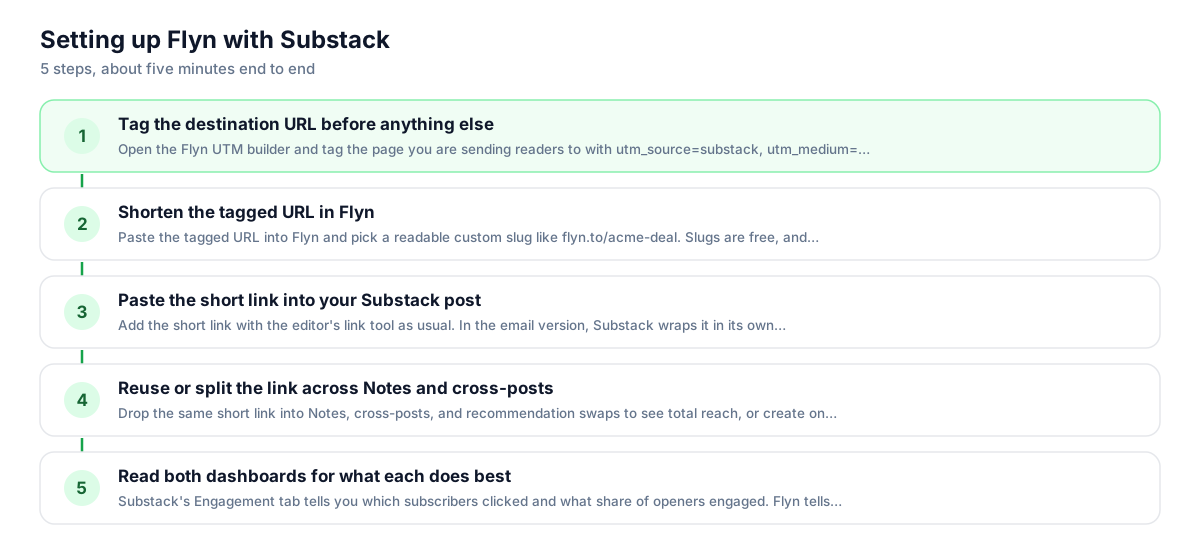
Use Flyn with Substack in 5 steps
- 1
Tag the destination URL before anything else
Open the Flyn UTM builder and tag the page you are sending readers to with utm_source=substack, utm_medium=email, and a campaign name. Substack never adds UTMs for you, so keep the tags in the destination before shortening; that is the most reliable setup, and the destination value wins if the same parameter is also appended to the short link.
- 2
Shorten the tagged URL in Flyn
Paste the tagged URL into Flyn and pick a readable custom slug like flyn.to/acme-deal. Slugs are free.
- 3
Paste the short link into your Substack post
Add the short link with the editor's link tool as usual. In the email version, Substack wraps it in its own per-recipient tracking redirect; that is normal, the click passes through Substack, then Flyn, then lands on your tagged page with both dashboards counting.
- 4
Reuse or split the link across Notes and cross-posts
Drop the same short link into Notes, cross-posts, and recommendation swaps to see total reach, or create one slug per surface (acme-note, acme-email) to compare them. Notes gives you no link-click data at all, so this is the only count you will get there.
- 5
Read both dashboards for what each does best
Substack's Engagement tab tells you which subscribers clicked and what share of openers engaged. Flyn tells you total clicks across every surface, including web readers, forwards, and Notes. Quote Substack for audience health, quote Flyn for sponsor and campaign totals.
UTM recipe
The UTM convention for Substack
Substack has no auto-UTM feature, so untagged links show up in your sponsor's or your own analytics as generic substack.com referrals or direct traffic. Tag the destination by hand, then shorten the tagged URL.
| Parameter | Value | Why |
|---|---|---|
| utm_source | substack | Lowercase platform name, the value analytics tools expect for newsletter traffic from Substack. |
| utm_medium | Use email for the newsletter itself; use social for links you post in Notes. | |
| utm_campaign | sponsor-acme | One stable name per sponsor slot or series, no dates, so reports group cleanly. |
| utm_content | top-cta | Optional: distinguish the button near the top from the mention in the footer. |
https://acme.com/landing?utm_source=substack&utm_medium=email&utm_campaign=sponsor-acme&utm_content=top-cta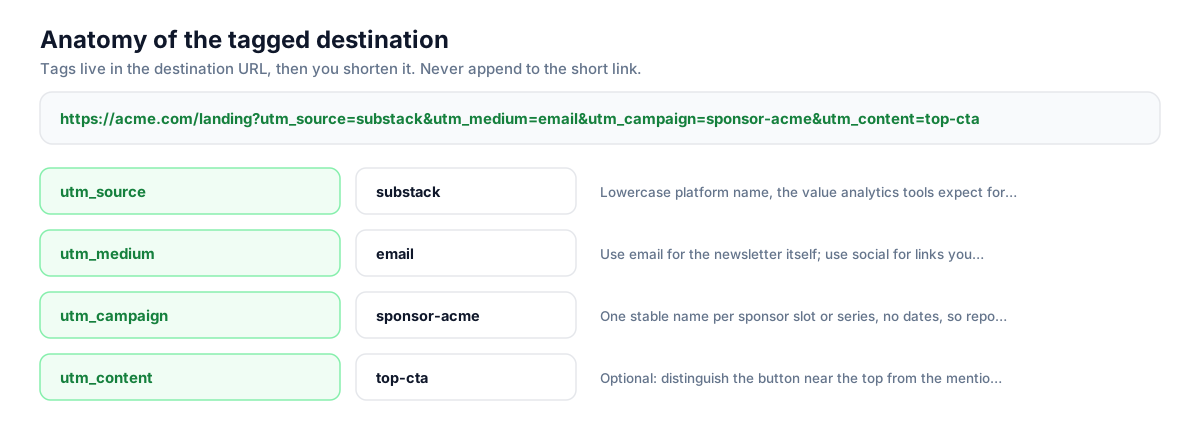
Build this in seconds with the free UTM builder, then shorten the tagged URL. You can also append parameters to the short link itself: Flyn forwards them to the destination, and if the same parameter is baked into the destination, that value takes priority.
Honest comparison
What Substack tracks vs. what a short link adds
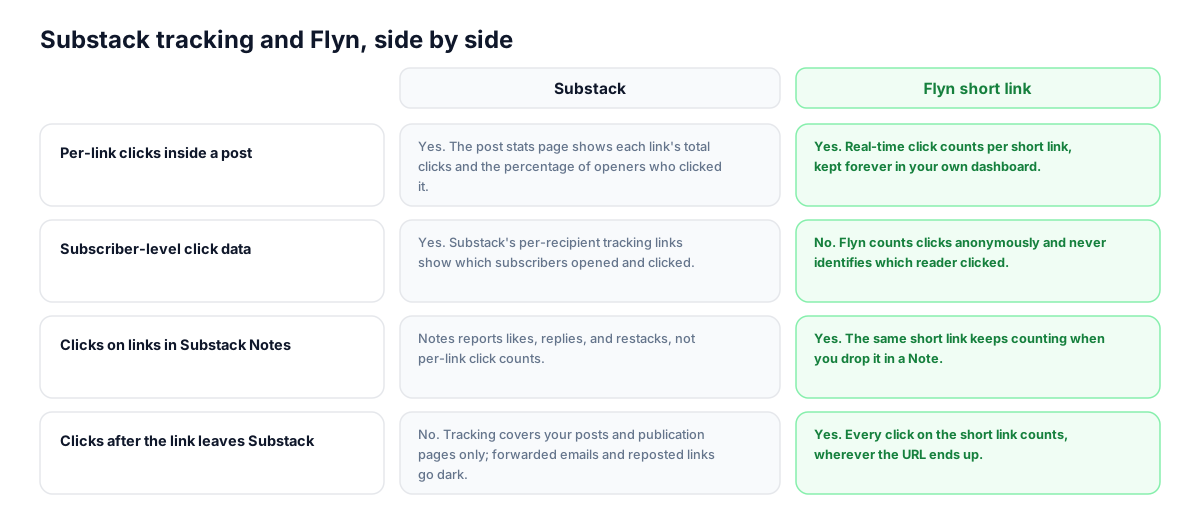
Substack's post analytics are genuinely good for a newsletter platform, and nothing here replaces them. The comparison below shows where each side is strong so you can use both without double counting or wishful thinking.
| Capability | Substack | Flyn short link |
|---|---|---|
| Per-link clicks inside a post | Yes. The post stats page shows each link's total clicks and the percentage of openers who clicked it. | Yes. Real-time click counts per short link, kept forever in your own dashboard. |
| Subscriber-level click data | Yes. Substack's per-recipient tracking links show which subscribers opened and clicked. | No. Flyn counts clicks anonymously and never identifies which reader clicked. |
| Clicks on links in Substack Notes | Notes reports likes, replies, and restacks, not per-link click counts. | Yes. The same short link keeps counting when you drop it in a Note. |
| Clicks after the link leaves Substack | No. Tracking covers your posts and publication pages only; forwarded emails and reposted links go dark. | Yes. Every click on the short link counts, wherever the URL ends up. |
| Automatic UTM tagging of outbound links | No. Substack does not append UTM parameters to the links you place in posts. | You bake UTMs into the destination before shortening, so analytics tools attribute clicks correctly. |
| Geo, device, and referrer per link | Post-level traffic sources exist, but not per outbound link. | Per-link geo, device, and referrer breakdowns on the Pro plan. |
Why it matters
What you get
Sponsor reports you can hand over
Substack shows sponsors a percentage of openers; sponsors want a number they can verify. A Flyn link gives you a total click count for their slot, across email, web, and forwards, without screenshots of your private dashboard.
One link counted on every surface
The post email, the web archive, the Note teasing it, and the cross-post on a friend's publication all hit the same short link. Substack reports each surface differently or not at all; Flyn adds them up in one place.
Analytics that outlive the send
A Substack post keeps earning clicks from search and the archive for years, long after the send-day stats settle. The short link keeps counting that evergreen traffic, so you know which old posts still drive readers to your products.
Geo and device proof on Pro
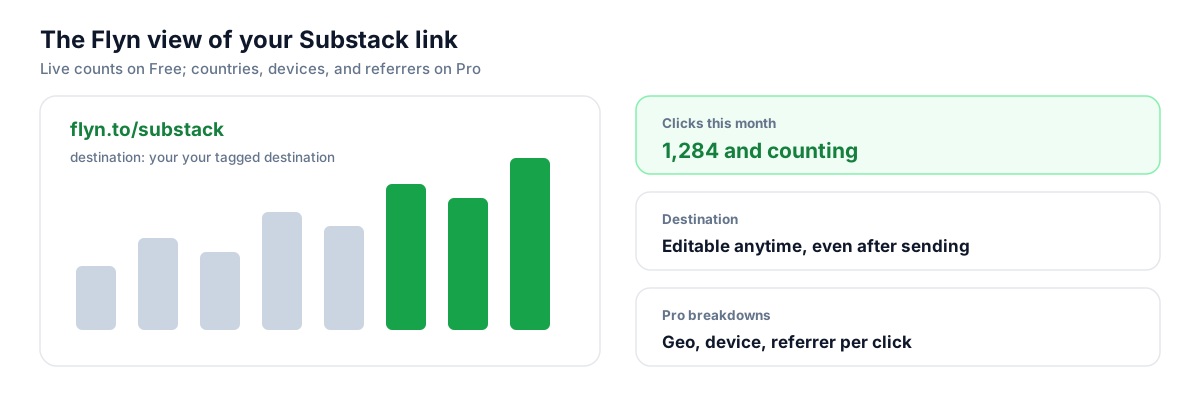
Substack cannot tell you which countries or devices clicked a specific outbound link. Flyn Pro breaks each short link down by geo, device, and referrer, which is exactly what a sponsor asks when they buy a US-audience slot.
Worth knowing before you start
- Email clicks double-hop: Substack wraps every link in the email version with its own per-recipient tracking redirect, so the path is Substack redirect, then Flyn, then your page. Both dashboards still count, and readers see no meaningful delay.
- Your numbers will not match Substack's, by design. Substack's click-through rate counts only subscribers who clicked after opening; Flyn counts every click from any surface, including web readers, Notes, and forwarded emails. Flyn's total should normally be higher.
- Bake UTM parameters into the destination URL before you shorten it for the most reliable setup. Flyn now forwards parameters appended to the short link too, so flyn.to/acme?utm_source=substack reaches the destination; just avoid setting the same utm name in both places, since the baked-in destination value wins.
- Because Substack wraps email links anyway, readers hovering in their inbox see a Substack URL either way. Branded short links pay off most on the web version, in Notes, and anywhere outside Substack where the URL is visible.
Automate sponsor links with the Flyn API
If you run a weekly sponsor slot, create each campaign link programmatically instead of by hand. One POST to Flyn's shorten endpoint with the tagged destination and a slug like sponsor-acme returns the short link for that week's post, and the clicks endpoint gives you the totals for the sponsor recap email.
Shorten API docsGo deeper
Features, tools, and guides that pair with this
Features
Free tools
Frequently asked questions
Does Substack track link clicks in my emails?
Yes. Substack wraps every link in the email version with a per-recipient tracking redirect, so it knows which subscribers clicked which links. Your post's stats page shows each link's total clicks and the percentage of openers who clicked. That data is solid for the email audience, but it stays inside Substack and covers only your own posts and pages.
Can I turn off Substack's link tracking?
Substack does not offer publishers a setting to disable link wrapping in emails, the way some email platforms do. In practice this does not interfere with a short link: the reader passes through Substack's redirect, then Flyn's, then lands on your page. Both systems record the click independently, so you lose nothing by leaving Substack's tracking as it is.
Does Substack add UTM parameters to my links automatically?
No. Unlike Mailchimp or Kit, Substack has no auto-UTM feature for the links you place in posts. If you send readers to a sponsor's site or your own store with a bare URL, their analytics will log the visit as a substack.com referral at best, or direct traffic at worst. Tag every destination by hand with utm_source=substack before you shorten it.
Will Substack's redirect break my Flyn short link?
No. In the email, the click goes through Substack's tracking redirect first, which then forwards to your Flyn link, which then resolves to your tagged destination. Redirect chains like this are routine and add no noticeable delay. Substack counts the click for its subscriber stats, Flyn counts it for your portable totals, and your UTM parameters arrive intact because they live in the destination URL.
Can I track clicks on links I share in Substack Notes?
Not with Substack's own stats. Notes reports engagement like likes, replies, and restacks, but it gives you no per-link click counts. A Flyn short link is effectively the only way to know whether a Note actually drove traffic. Use a dedicated slug for Notes, such as flyn.to/post-note, and you can compare Notes traffic against the email version of the same post.
Can I see which subscriber clicked my Flyn link?
No, and this is worth being clear about. Flyn counts clicks anonymously; it never identifies the person who clicked. Substack's own per-recipient tracking is what tells you which subscribers engaged, and Flyn does not replace that. Use Substack for subscriber-level engagement and list health, and use Flyn for total, portable click counts across every surface where the link appears.
How do I report sponsor link performance on Substack?
Create one Flyn short link per sponsor slot with the sponsor's landing page tagged utm_source=substack and utm_campaign set to the sponsor's name. After the post goes out, you can quote a verifiable total click count that includes email readers, web readers, and forwards, plus geo and device breakdowns on Pro. That beats screenshotting a percentage of openers from your private dashboard.
Do clicks on the web version of my post get counted?
Yes, and this is where short links add the most. Substack's click-through rate focuses on subscribers who clicked from the email or app, while your web archive keeps drawing readers from search, social, and restacks indefinitely. Every one of those web clicks hits the same Flyn link and shows up in your totals, so evergreen posts get credit for the traffic they keep sending.
Can I use my own domain for short links in my newsletter?
Yes. Links can read go.yourname.com/book instead of a generic shortener domain. Keep in mind that in the email version Substack wraps links in its own redirect, so inbox hover previews show a Substack URL regardless. Your branded domain is most visible on the web version, in Notes, and everywhere you share the link outside Substack.
Why are my Flyn click numbers higher than Substack's?
Because they measure different things. Substack's engagement click-through rate counts subscribers who clicked after opening the email or app notification, and excludes non-subscribers. Flyn counts every click on the short link from any source: web readers, Notes, forwarded emails, and people who got the link secondhand. A gap between the two is normal and usually means your post traveled beyond your list, which is good news.
Start tracking your Substack links free
Shorten your first links without an account, no card required. Free covers 25 links a month; Pro unlocks unlimited links and geo, device, and referrer breakdowns.