SendGrid Link Tracking Without the Double Hop
SendGrid click tracking rewrites every URL through its tracking domain and ties clicks to individual recipients while the event data lasts. Flyn gives each link a permanent, editable short URL with click analytics that survive long after SendGrid's activity window closes.
- Free plan, no card required
- Set up in minutes
- GDPR-ready analytics
- No ad interstitials
- Cancel anytime
SendGrid's click tracking is genuinely good at what it does: it rewrites every link in your email through ct.sendgrid.net or your branded link domain, then reports clicks per recipient in the Activity Feed and Event Webhook. The catch is what happens after. Message-level events expire in days unless you pay for extended history, destinations are frozen the moment a transactional email ships, and every tracked click takes an extra redirect hop. Shorten your UTM-tagged destination with Flyn first and you get a link you can repoint after send (fix a dead onboarding URL in a receipt from six months ago), a click count with a 30-day history (unlimited on Pro), and the option to disable SendGrid's wrap per message for a single clean hop. This guide covers the exact workflow, including the tracking_settings decisions.
Setup
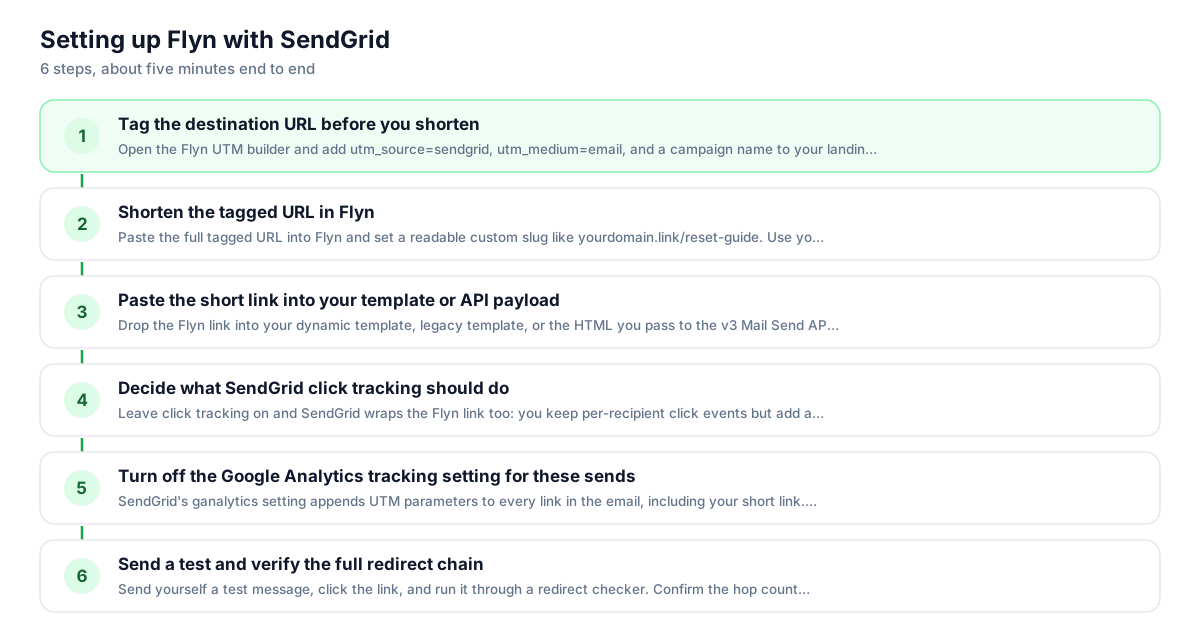
Use Flyn with SendGrid in 6 steps
- 1
Tag the destination URL before you shorten
Open the Flyn UTM builder and add utm_source=sendgrid, utm_medium=email, and a campaign name to your landing page URL. Baking parameters into the destination before shortening is the most reliable setup; if the same parameter is also appended to the short link, the destination value wins.
- 2
Shorten the tagged URL in Flyn
Paste the full tagged URL into Flyn and set a readable custom slug like yourdomain.link/reset-guide. Use your own custom domain rather than a generic shortener domain; recipients and spam filters both treat a branded domain as more trustworthy in email.
- 3
Paste the short link into your template or API payload
Drop the Flyn link into your dynamic template, legacy template, or the HTML you pass to the v3 Mail Send API. It behaves like any other URL, so substitution tags and handlebars conditionals around it keep working exactly as before.
- 4
Decide what SendGrid click tracking should do
Leave click tracking on and SendGrid wraps the Flyn link too: you keep per-recipient click events but add a second redirect hop. For a single clean hop, disable it per message with tracking_settings.click_tracking.enable set to false, or account-wide under Settings then Tracking.
- 5
Decide who sets the UTM tags: SendGrid or your destination URL
SendGrid's ganalytics setting appends UTM parameters to every link in the email, including your short link. Flyn forwards parameters appended to a short link onto the destination, so those tags now arrive. If you also baked UTMs into the destination URL, those take priority on a name clash, so pick one source: either let SendGrid tag the sends, or bake the UTMs into the destination and leave ganalytics off.
- 6
Send a test and verify the full redirect chain
Send yourself a test message, click the link, and run it through a redirect checker. Confirm the hop count matches your tracking_settings choice and that the final URL still carries your UTM parameters. Then watch clicks accumulate in the Flyn dashboard.
UTM recipe
The UTM convention for SendGrid
Use one consistent recipe so Google Analytics groups all SendGrid traffic together. Build the tagged URL first, then shorten it; never append parameters to the Flyn link itself.
| Parameter | Value | Why |
|---|---|---|
| utm_source | sendgrid | The platform that delivered the click. Keep it lowercase and identical across every send. |
| utm_medium | Lets GA roll SendGrid up with your other email providers under one medium. | |
| utm_campaign | welcome_series | The specific send or automation, for example password_reset or june_newsletter. |
| utm_content | cta_button | Optional. Distinguishes the hero button from the footer text link inside the same email. |
https://example.com/onboarding?utm_source=sendgrid&utm_medium=email&utm_campaign=welcome_series&utm_content=cta_button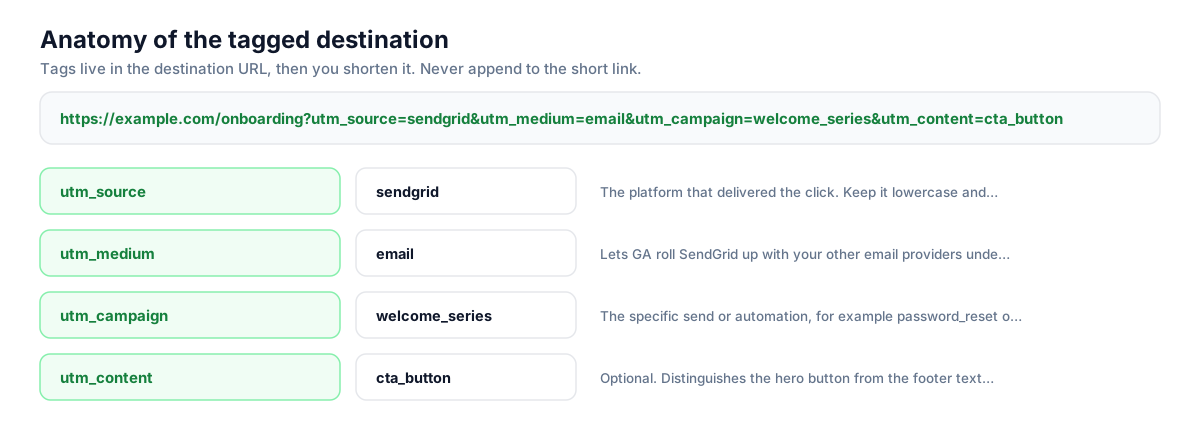
Build this in seconds with the free UTM builder, then shorten the tagged URL. You can also append parameters to the short link itself: Flyn forwards them to the destination, and if the same parameter is baked into the destination, that value takes priority.
Honest comparison
SendGrid click tracking vs Flyn short links
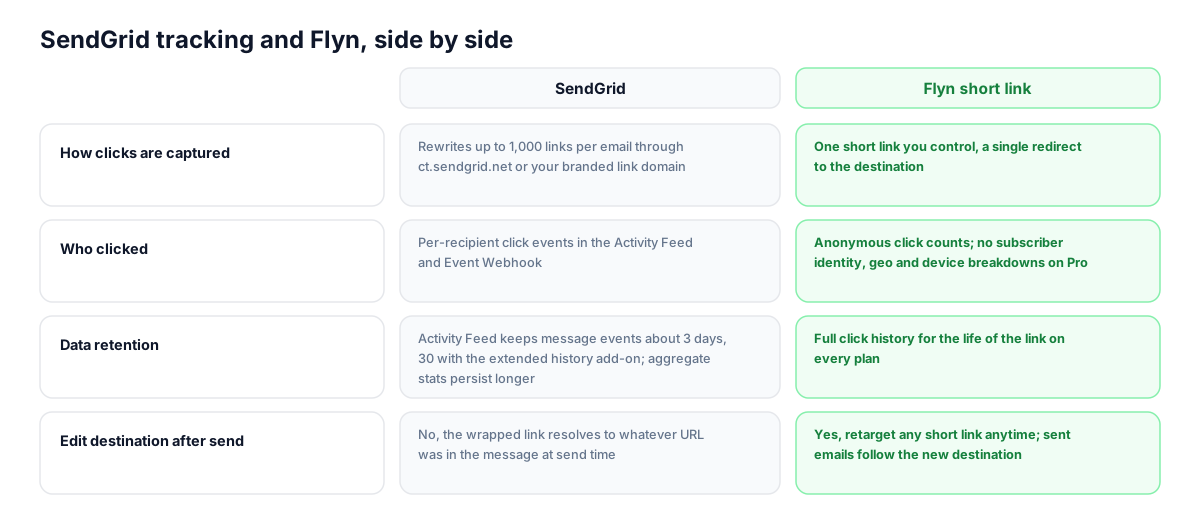
These are complementary systems, not substitutes. SendGrid answers who clicked in a specific send while the event data is retained; Flyn answers how a link performs across every send, channel, and month. Run both, or disable SendGrid's wrap per message when you want one clean redirect.
| Capability | SendGrid | Flyn short link |
|---|---|---|
| How clicks are captured | Rewrites up to 1,000 links per email through ct.sendgrid.net or your branded link domain | One short link you control, a single redirect to the destination |
| Who clicked | Per-recipient click events in the Activity Feed and Event Webhook | Anonymous click counts; no subscriber identity, geo and device breakdowns on Pro |
| Data retention | Activity Feed keeps message events about 3 days, 30 with the extended history add-on; aggregate stats persist longer | Full click history for the life of the link on every plan |
| Edit destination after send | No, the wrapped link resolves to whatever URL was in the message at send time | Yes, retarget any short link anytime; sent emails follow the new destination |
| Cross-channel view | Tracks clicks only in email sent through SendGrid | Same short link works in email, SMS, docs, and social with one combined count |
| Redirect hops | One extra hop through the tracking domain on every tracked click | One hop total if you disable SendGrid click tracking for that message |
Why it matters
What you get
Fix transactional links after they ship
Receipts, password resets, and onboarding emails live in inboxes for years, and SendGrid cannot change a URL once the message is sent. Point those emails at a Flyn short link and you can retarget the destination anytime, so a moved help doc never strands old emails.
Click history that outlives the Activity Feed
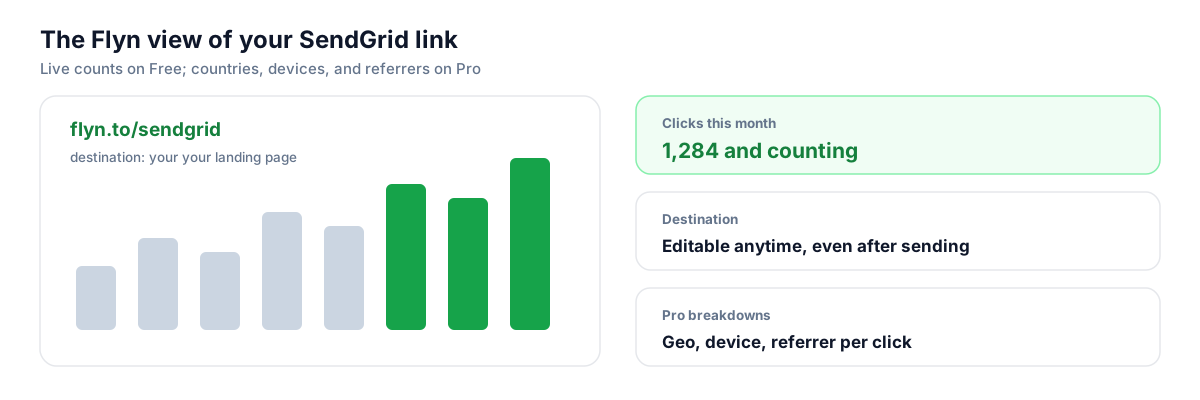
SendGrid's message-level events expire after roughly 3 days, or 30 with the paid extended history add-on. Flyn keeps every click on the link forever, so you can compare this quarter's welcome series against last quarter's without exporting events on a deadline.
Shorten programmatically at send time
You already build SendGrid payloads in code, so add one POST to Flyn's /api/shorten before the mail send call. Each campaign or template version gets its own trackable link automatically, with no dashboard clicking and no shared spreadsheet of URLs.
One branded, readable link everywhere
With click tracking on, the text/plain part of your email exposes the long rewritten tracking URL. A short branded Flyn link stays clean in plaintext, in forwarded emails, and when support pastes it into a chat, and it keeps counting clicks in all three places.
Worth knowing before you start
- If SendGrid click tracking stays enabled, it wraps your Flyn link like any other URL, so every click takes two redirect hops: the tracking domain first, then Flyn, then your page. It works fine, just know both dashboards will count the same click.
- SendGrid's Google Analytics tracking setting appends UTM parameters to every link at send time, and Flyn now forwards those onto the destination, so they reach analytics. If you also bake UTMs into the destination, those win on a name clash, so pick one source rather than tagging from both.
- Disabling click tracking via tracking_settings removes per-recipient click events for that message. Flyn reports counts, geo, and devices, but never which subscriber clicked; keep SendGrid's wrap on for sends where recipient-level data matters.
- Generic shortener domains have a poor reputation with spam filters. If you shorten links in email, use Flyn on your own custom domain, and set up SendGrid link branding so the tracking domain matches your sending identity too.
Shorten inside your send pipeline
SendGrid users live in the API, so treat link creation the same way. Before you call the v3 Mail Send endpoint, POST the UTM-tagged destination to Flyn's shorten endpoint with a custom slug, then drop the returned short URL into your dynamic template data. One extra request per campaign gives every send a permanent, editable, individually measurable link, and Flyn webhooks can push click events back into your own systems alongside SendGrid's Event Webhook.
Shorten API docsGo deeper
Features, tools, and guides that pair with this
Features
Free tools
Frequently asked questions
Does SendGrid click tracking wrap my Flyn short link too?
Yes. With click tracking enabled, SendGrid rewrites every URL in the message, short links included, through ct.sendgrid.net or your branded link domain. The click passes through SendGrid, then Flyn, then lands on your page with the UTM tags intact. Both dashboards record the click, so per-recipient reporting in SendGrid keeps working alongside Flyn's lifetime count.
How do I disable SendGrid click tracking for a single message?
In the v3 Mail Send API, include a tracking_settings object with click_tracking.enable set to false. That message ships with untouched URLs, so a click goes straight from the inbox to Flyn to your page in one hop. Account-wide toggles live under Settings then Tracking in the SendGrid UI, but per-message control is usually the better tool for mixed workloads.
What do I lose if I turn SendGrid click tracking off?
SendGrid stops recording click events for that message, so the Activity Feed, Event Webhook, and aggregate click stats show nothing for it, and recipient-level engagement data disappears. Flyn still counts every click with geo and device breakdowns on Pro, but anonymously. Keep the wrap on for marketing sends where subscriber engagement drives segmentation, and consider dropping it for transactional mail.
Why do my email links show a url1234 or ct.sendgrid.net domain?
That is SendGrid's click tracking rewrite. Without link branding, wrapped links route through SendGrid's shared tracking domains; with link branding, they route through a subdomain of your own domain via CNAME. The visible anchor text does not change in HTML email, but the underlying href does, and the full rewritten URL is exposed in the text/plain version.
Can Flyn tell me which SendGrid recipient clicked a link?
No. Flyn counts clicks anonymously and reports totals over time, plus geo, device, and referrer breakdowns on Pro. It never identifies an individual subscriber. If you need recipient-level click data for suppression or segmentation, that is exactly what SendGrid's Event Webhook and Activity Feed are for, so leave click tracking enabled on those sends and accept the double hop.
Should I use SendGrid's Google Analytics setting with Flyn links?
You can. The ganalytics setting appends utm_source, utm_medium, and friends to every URL at send time, and Flyn now forwards those onto the destination, so those tags reach GA. If you also bake UTM parameters into the destination URL, those win on a name clash, so pick one source and you get clean GA attribution without double-tagging.
How long does SendGrid keep click data compared to Flyn?
The Email Activity Feed retains message-level events for about 3 days on standard plans, extendable to 30 days with the paid additional history add-on, and exports cap at one million events. Aggregate stats persist longer but lose per-message detail. Flyn keeps the complete click history of every short link indefinitely on all plans, including Free, with no export deadline.
Do short links hurt deliverability in SendGrid emails?
Links from generic public shortener domains can, because spam filters see those domains abused constantly. Flyn on your own custom domain avoids that: the link reflects your brand. Pair it with SendGrid link branding and SSL click tracking so the tracking rewrite also uses your domain instead of sendgrid.net, keeping every hop consistent with your sending identity.
Can I create Flyn links automatically when I trigger a SendGrid send?
Yes, through Flyn's REST API. POST the UTM-tagged destination to the shorten endpoint, take the returned short URL, and inject it into your dynamic template data before calling the Mail Send API. There is no native SendGrid app or account connection involved; it is one HTTP request in your own code, which fits naturally into any pipeline already talking to SendGrid programmatically.
Why would I shorten a transactional link that already works?
Because transactional emails outlive their destinations. A receipt links to an order page, an onboarding email links to a setup guide, and a year later those URLs move. With a Flyn short link you update the destination once and every previously sent email follows it. You also get a lifetime click count per link, which reveals which transactional touchpoints recipients actually use.
Start tracking your SendGrid links free
Shorten your first links without an account, no card required. Free covers 25 links a month; Pro unlocks unlimited links and geo, device, and referrer breakdowns.