Notion Link Tracking: Know When Anyone Clicks a Link on Your Page
Notion tells you how many people viewed a page, but it records nothing when they click a link on it. Flyn short links fill that gap: paste them into any Notion page and every click gets counted, with editable destinations and QR codes as a bonus.
- Free plan, no card required
- Set up in minutes
- GDPR-ready analytics
- No ad interstitials
- Cancel anytime
Notion's page analytics answer one question: how many times was this page viewed. They say nothing about what visitors did next. Public Notion pages cannot run custom JavaScript or pixels, and even the Google Analytics option on paid Notion Sites counts pageviews, not clicks on outbound links. So if your Notion page is a portfolio, a job board, a resource hub, or a public wiki, the links on it are a black box. A Flyn short link solves this at the link level: the click registers on Flyn's redirect before the visitor lands on the destination. You get a click count per link, a clean URL that pastes well into Notion blocks, and the ability to change the destination later without touching the page.
Setup
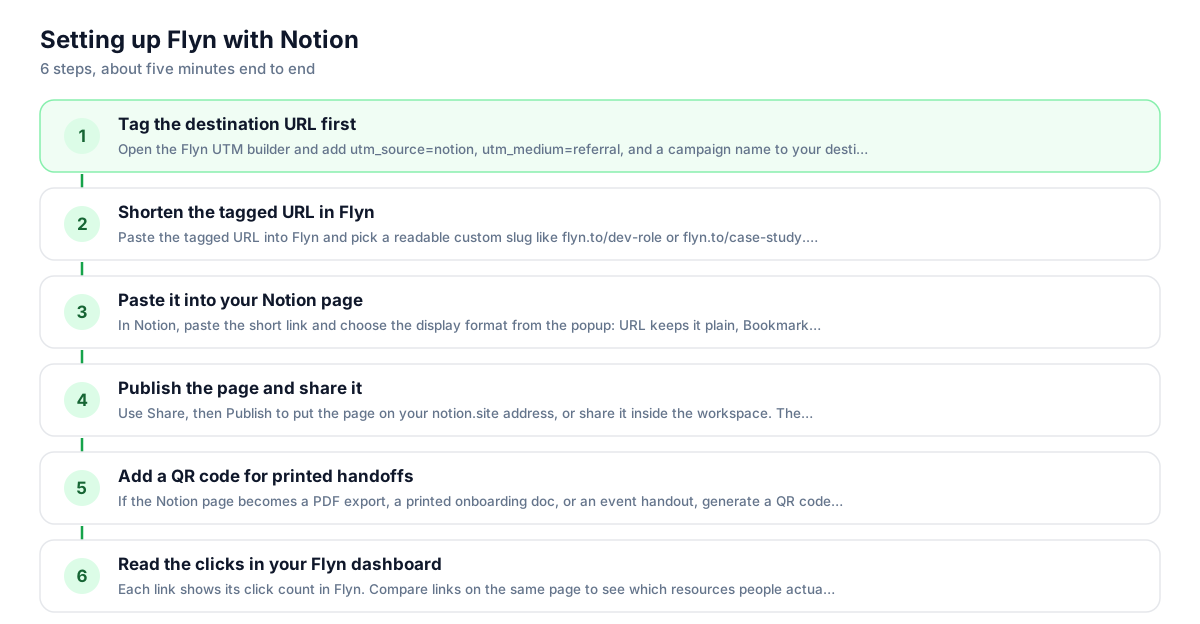
Use Flyn with Notion in 6 steps
- 1
Tag the destination URL first
Open the Flyn UTM builder and add utm_source=notion, utm_medium=referral, and a campaign name to your destination URL. Bake the tags into the destination before shortening; that is the most reliable setup, and the destination value wins if the same parameter is also appended to the short link.
- 2
Shorten the tagged URL in Flyn
Paste the tagged URL into Flyn and pick a readable custom slug like flyn.to/dev-role or flyn.to/case-study. Descriptive slugs matter in Notion because visitors often see the raw URL in inline links, table cells, and page exports.
- 3
Paste it into your Notion page
In Notion, paste the short link and choose the display format from the popup: URL keeps it plain, Bookmark makes a preview card, or select existing text and press Cmd or Ctrl plus V to link it. For tables and databases, use a URL property and paste the short link there.
- 4
Publish the page and share it
Use Share, then Publish to put the page on your notion.site address, or share it inside the workspace. The short link tracks clicks the same way in both cases, so one link works for your public site, internal wiki, and any duplicated copies of the page.
- 5
Add a QR code for printed handoffs
If the Notion page becomes a PDF export, a printed onboarding doc, or an event handout, generate a QR code for the same short link in Flyn. Scans count as clicks on the same link, so print and screen traffic land in one number.
- 6
Read the clicks in your Flyn dashboard
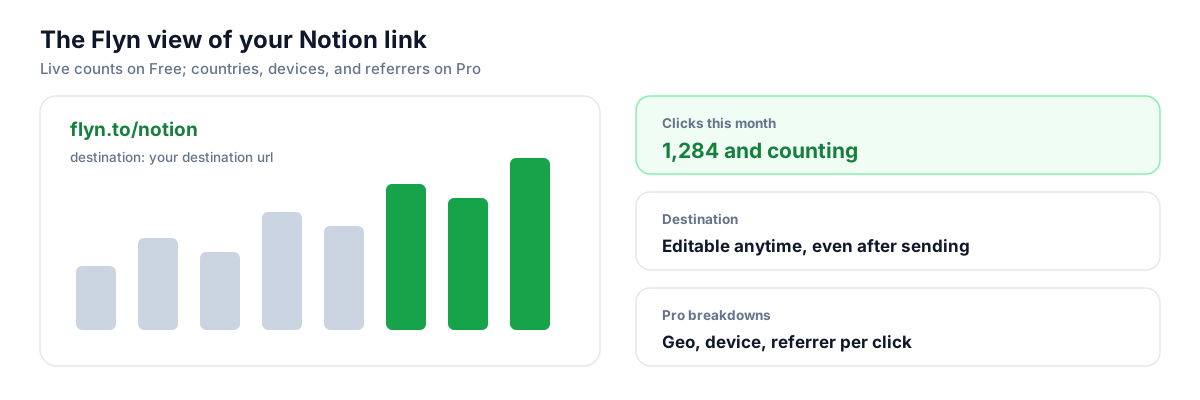
Each link shows its click count in Flyn. Compare links on the same page to see which resources people actually open. On Pro, referrer, country, and device breakdowns show whether clicks come from your public site, the shared workspace, or somewhere unexpected.
UTM recipe
The UTM convention for Notion
Tag destinations before you shorten so your analytics tool can attribute traffic to Notion. These values keep reporting consistent across every page and database.
| Parameter | Value | Why |
|---|---|---|
| utm_source | notion | The platform sending the click. Keep it lowercase and identical everywhere. |
| utm_medium | referral | Notion pages behave like referral surfaces. Use one value across all pages so mediums do not fragment. |
| utm_campaign | team-wiki | Name the page or project: portfolio, job-board, onboarding-doc. One campaign per page works well. |
| utm_content | resources-section | Optional. Distinguish two links to the same destination on one page, like a header button versus a footer mention. |
https://yourproduct.com/pricing?utm_source=notion&utm_medium=referral&utm_campaign=team-wiki&utm_content=resources-section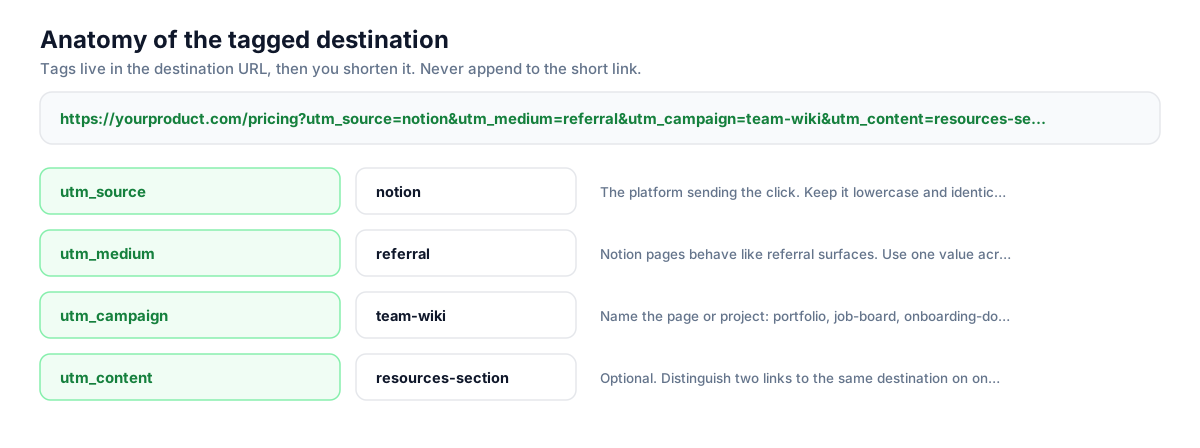
Build this in seconds with the free UTM builder, then shorten the tagged URL. You can also append parameters to the short link itself: Flyn forwards them to the destination, and if the same parameter is baked into the destination, that value takes priority.
Honest comparison
What Notion tracks vs what Flyn tracks
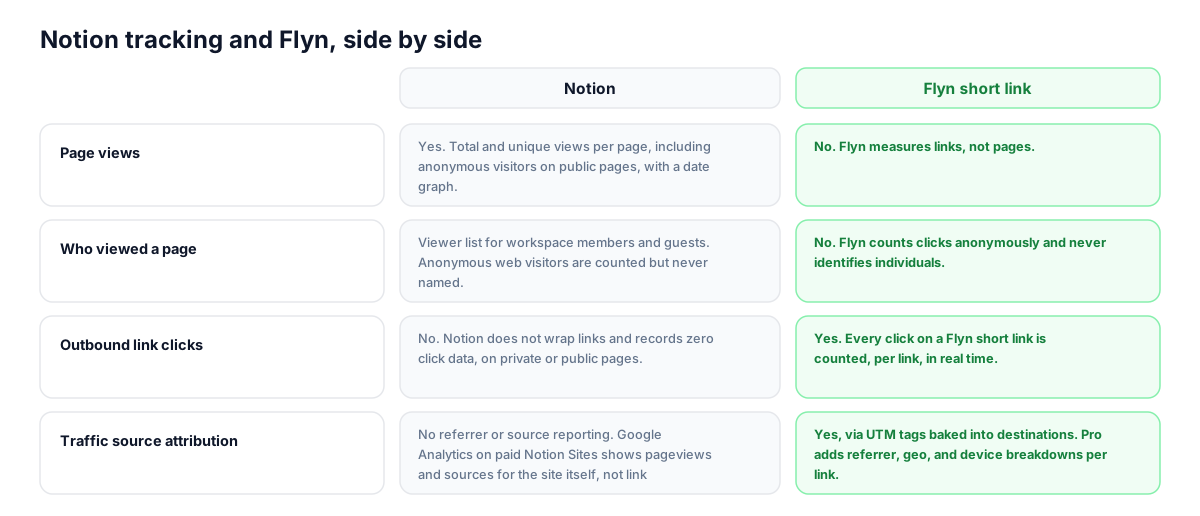
Notion is genuinely good at page-level engagement inside a workspace. It is silent on everything that happens after a click. Here is the honest split.
| Capability | Notion | Flyn short link |
|---|---|---|
| Page views | Yes. Total and unique views per page, including anonymous visitors on public pages, with a date graph. | No. Flyn measures links, not pages. |
| Who viewed a page | Viewer list for workspace members and guests. Anonymous web visitors are counted but never named. | No. Flyn counts clicks anonymously and never identifies individuals. |
| Outbound link clicks | No. Notion does not wrap links and records zero click data, on private or public pages. | Yes. Every click on a Flyn short link is counted, per link, in real time. |
| Traffic source attribution | No referrer or source reporting. Google Analytics on paid Notion Sites shows pageviews and sources for the site itself, not link clicks. | Yes, via UTM tags baked into destinations. Pro adds referrer, geo, and device breakdowns per link. |
| Editing a link after publishing | You can edit the page anytime, but a raw URL is fixed: change it and any copies or exports keep the old one. | Yes. Redirect the same short link to a new destination; every Notion page, export, and QR code keeps working. |
| Editor and creator activity | Yes on Business and Enterprise: who created and edited each page, plus workspace-wide analytics on Enterprise. | No. Flyn has no view into your Notion workspace. |
Why it matters
What you get
See clicks Notion never records
Notion's analytics stop at page views. A Flyn short link counts every click on your portfolio links, job postings, and resource lists, including clicks from anonymous public visitors Notion can only count as views.
Fix links on pages you no longer control
Notion pages get duplicated, exported to PDF, and copied into other workspaces. A raw URL in those copies is frozen forever. A Flyn short link stays editable: redirect it once and every copy points to the new destination.
One link for screen and print
Notion docs often end up printed or exported: onboarding packets, event schedules, handbooks. Add a Flyn QR code next to the short link and scans from paper count in the same dashboard as clicks from the live page.
Know which resources people actually use
A wiki with forty links has no feedback loop in Notion. Per-link click counts show which guides, tools, and docs your team or audience opens, so you can promote what works and prune what nobody touches.
Worth knowing before you start
- When you paste a short link as a Bookmark block, Notion fetches preview metadata from the short link, so the card can look sparse compared to the destination's own preview. For rich cards, paste the destination URL as the bookmark and keep short links for inline text, buttons, and database properties.
- Google Analytics on Notion Sites requires a paid Notion plan and reports pageviews and traffic sources for the site itself. It does not capture outbound link clicks, so it complements short links rather than replacing them.
- Flyn counts clicks anonymously. Notion's viewer list can name workspace members and guests who viewed a page; Flyn will never tell you which teammate clicked a link, only how many clicks happened and, on Pro, from where and on what device.
- Flyn Free includes 25 new links per month. A large wiki refresh can exceed that, so plan bigger link batches around the monthly limit or use Pro for unlimited links.
Auto-shorten links for Notion databases
If you build job boards, directories, or resource hubs with the Notion API, add one call to Flyn's shorten endpoint in your script: send the UTM-tagged destination, get back a short link, and write it into a URL property as you create each database row. Every listing ships with tracking from day one, and you can rotate stale destinations later without editing the database.
Shorten API docsGo deeper
Features, tools, and guides that pair with this
Features
Free tools
Frequently asked questions
Does Notion track link clicks?
No. Notion's page analytics record total and unique page views, and on Business and Enterprise plans they add creator and editor activity. Notion does not wrap outbound links and stores no click data for them, on private pages or public ones. To know whether anyone clicks a link on a Notion page, the link itself has to do the counting, which is exactly what a short link with a redirect does.
Can I add Google Analytics or a tracking pixel to a Notion page?
Partially. Public pages cannot run custom JavaScript or pixels. Notion Sites on paid plans offer a Google Analytics integration, which reports pageviews and traffic sources for your notion.site pages. Even with GA connected, outbound link clicks are not captured because you cannot add the event-tracking code that would require. Short links measure the clicks; GA measures the visits. The two work well together.
Can I see who visited my public Notion page?
Only partially. Notion's Analytics tab lists viewers who are workspace members or guests, with their last-viewed time. Anonymous visitors from the public web are included in the view counts but never appear in the viewer list. Flyn does not close that identity gap: it counts clicks anonymously too. What it adds is the click layer Notion lacks entirely, plus referrer, geo, and device breakdowns per link on Pro.
Do short links work on published Notion Sites?
Yes. A Flyn short link is a normal URL, so it works in inline text, Bookmark blocks, buttons, callouts, toggle lists, and URL properties in databases, whether the page is private, shared with guests, or published to your notion.site address. Clicks are counted the same way in every case, and the same link keeps working if the page is duplicated or moved.
How do I paste a link in Notion without the big preview card?
When you paste a URL, Notion shows a popup with options: choose URL to keep plain text, Mention for a compact chip, or Bookmark for the preview card. To hide the URL entirely, select some text first and paste the link over it with Cmd or Ctrl plus V. For database rows, add a URL property and paste the short link into it; readable slugs like flyn.to/apply-here look much better there than long tagged URLs.
Can I track clicks on a Notion template I share or sell?
Yes, and it is one of the best uses. Buyers duplicate your template into their own workspace, where you have zero visibility. If the links inside the template are Flyn short links, clicks keep counting from every duplicated copy, so you learn which resources template users actually open. You can also update a destination later, for example when a tutorial moves, and every copy in the wild follows.
Does Notion rewrite or wrap the links I add?
No. Notion serves your links exactly as you pasted them, with no redirect layer, no added parameters, and no click logging. That is why UTM tags survive intact, and also why Notion has no click data to show you. There is no toggle to enable link tracking in Notion; the capability does not exist, so the tracking has to live in the link itself.
Can I change a link after the page is published or exported?
With a raw URL, no: PDF exports, duplicated pages, and printed copies keep whatever URL was there at the time. With a Flyn short link, yes: edit the destination in your Flyn dashboard and the same short link immediately points everywhere new, in the live page, every duplicate, every export, and every QR code. The click history for the link stays intact through the change.
What does utm_source=notion actually do?
It labels the traffic. When someone clicks your tagged short link and lands on your site, your analytics tool reads the UTM parameters from the URL and attributes the session to notion as a source. Without tags, clicks from Notion pages often show up as direct traffic because referrer data gets dropped along the way. Tag the destination before shortening for the most reliable setup; the redirect now forwards parameters added to the short link too, but the destination value wins on a name clash.
Is Flyn free to use with Notion?
Yes. The Free plan includes 25 new links per month with custom slugs, QR codes, link expiration, and click counts, which covers a portfolio or a small wiki comfortably. Pro at $12 a month, or $9 a month billed annually, adds unlimited links plus referrer, geo, and device breakdowns, A/B testing between 2 destinations, password-protected links, and team workspaces.
Start tracking your Notion links free
Shorten your first links without an account, no card required. Free covers 25 links a month; Pro unlocks unlimited links and geo, device, and referrer breakdowns.