Flyn on Make: A Native App for Short Links in Scenarios
Flyn ships a native Make app, not an HTTP-module recipe. One instant trigger, two link modules, and a universal API module, so a scenario can create a branded short link, read its live stats, or run the moment someone clicks. Connecting takes one API key.
- Free plan, no card required
- Set up in minutes
- GDPR-ready analytics
- No ad interstitials
- Cancel anytime
The usual advice for connecting a link shortener to Make is to wire up the generic HTTP module and shape the JSON yourself. Flyn skips that: it is a published Make app with proper modules, so fields have labels, outputs are mapped, and errors come back as readable messages instead of raw status codes. The surface is small on purpose. Watch Events starts scenarios the instant a link is clicked, created, updated, or deleted, pushed over a webhook Flyn registers for you. Create a Link makes a branded short link from any destination. Get a Link returns the link with its live click stats, split into human clicks, bot clicks, and QR scans. And Make an API call reaches any other Flyn endpoint with authentication already handled. Until Make finishes its directory review, the app installs through an invite link; after that it will be searchable in the scenario editor like any listed app.
Setup
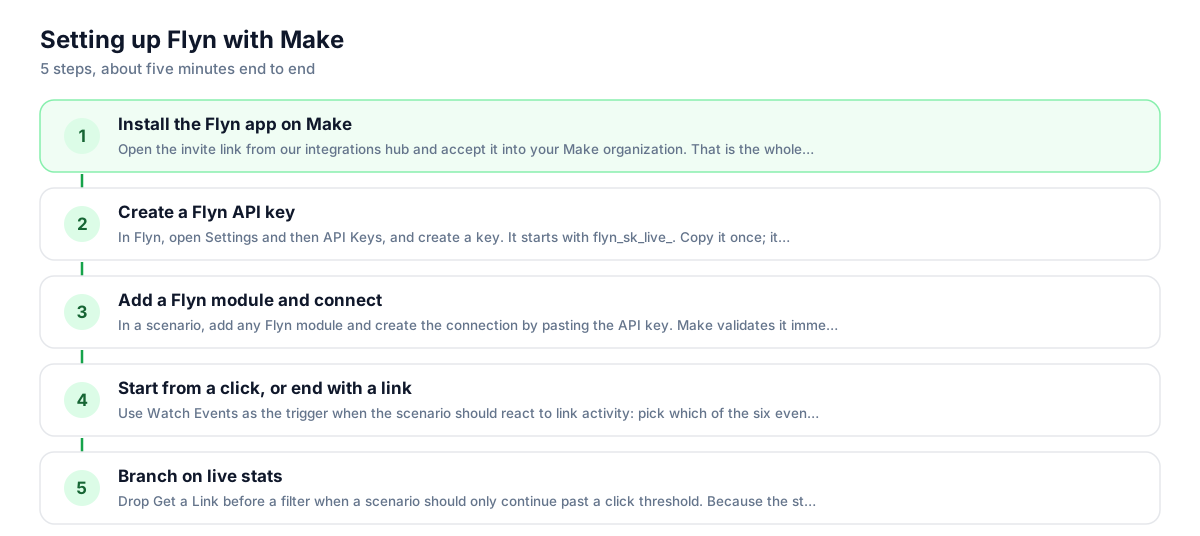
Use Flyn with Make in 5 steps
- 1
Install the Flyn app on Make
Open the invite link from our integrations hub and accept it into your Make organization. That is the whole install. Once Make approves the app for its public directory, this step disappears: you will simply search for Flyn in the scenario editor.
- 2
Create a Flyn API key
In Flyn, open Settings and then API Keys, and create a key. It starts with flyn_sk_live_. Copy it once; it is not shown again. API keys are a Pro feature, so a free account will not be able to create one.
- 3
Add a Flyn module and connect
In a scenario, add any Flyn module and create the connection by pasting the API key. Make validates it immediately with a live call to your account, so a wrong or revoked key fails right there instead of mid-scenario.
- 4
Start from a click, or end with a link
Use Watch Events as the trigger when the scenario should react to link activity: pick which of the four events should fire it, turn the scenario on, and Flyn pushes events to Make in real time. Or start from any other app and use Create a Link as an action, mapping the destination URL from the previous module.
- 5
Branch on live stats
Drop Get a Link before a filter when a scenario should only continue past a click threshold. Because the stats split humans from bots, the filter can act on real reach: a weekly scenario that posts a summary only for links whose human clicks actually moved.
UTM recipe
The UTM convention for Make
Tag destinations in the module that feeds Create a Link, so attribution survives the whole chain. Put the parameters in the destination URL field; values baked into the destination always win if a clashing parameter is ever appended to the short link later.
| Parameter | Value | Why |
|---|---|---|
| utm_source | make | Or the app that started the scenario, such as shopify or airtable, if you would rather attribute to the origin than to the automation. |
| utm_medium | automation | Keeps machine-made links separate from links you create by hand, so one busy scenario cannot quietly pollute a channel report. |
| utm_campaign | {{scenario_name}} | Map the scenario name so you can tell which automation produced a link months later. |
https://yourstore.com/products/new-drop?utm_source=make&utm_medium=automation&utm_campaign=order-confirmation-links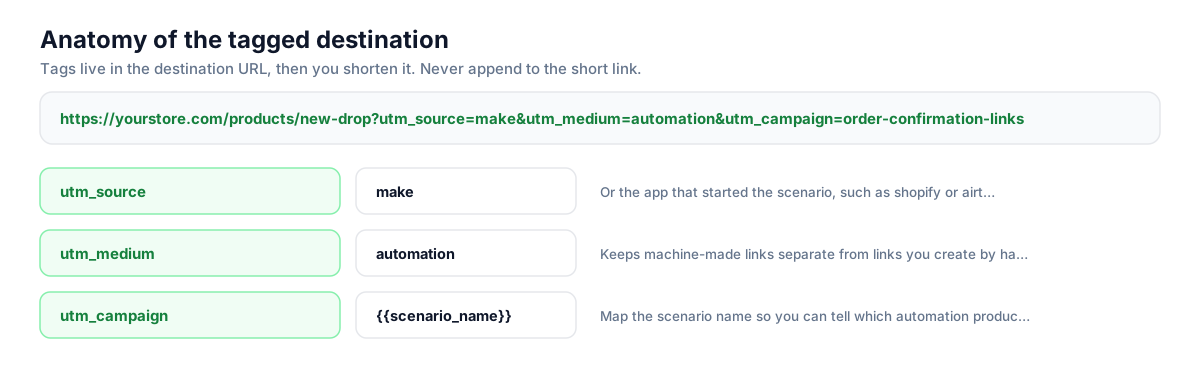
Build this in seconds with the free UTM builder, then shorten the tagged URL. You can also append parameters to the short link itself: Flyn forwards them to the destination, and if the same parameter is baked into the destination, that value takes priority.
Honest comparison
What the Make app can do
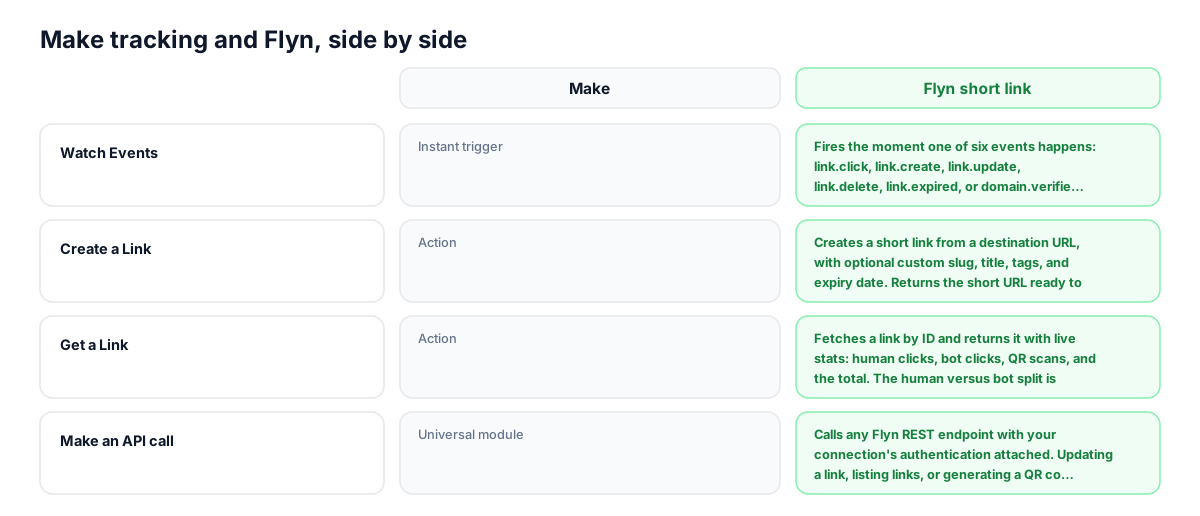
The complete surface of the published app. Every row is a module you can drop into a scenario today.
| Capability | Make | Flyn short link |
|---|---|---|
| Watch Events | Instant trigger | Fires the moment one of four events happens: link.click, link.create, link.update, or link.delete. Flyn registers the webhook automatically when you turn the scenario on and removes it when you delete the connection, no URL pasting. |
| Create a Link | Action | Creates a short link from a destination URL, with optional custom slug, title, tags, and expiry date. Returns the short URL ready to map into the next module. |
| Get a Link | Action | Fetches a link by ID and returns it with live stats: human clicks, bot clicks, QR scans, and the total. The human versus bot split is counted by Flyn's own filter, which most shorteners do not expose at all. |
| Make an API call | Universal module | Calls any Flyn REST endpoint with your connection's authentication attached. Updating a link, listing links, or generating a QR code all work through it while dedicated modules for them do not exist yet. |
Why it matters
What you get
Scenarios that react to clicks instantly
Watch Events is a real webhook push, not polling. In our own end to end test the scenario fired in under a second from the click. Alert a channel, log the click with its country and device, or start a follow-up the moment a link is opened.
Links that create themselves
A new order, row, or form submission can produce a branded short link automatically, with the short URL mapped straight into the next module, whether that is an email, a sheet, or an SMS.
Stats that separate humans from bots
Get a Link returns human clicks, bot clicks, and QR scans as separate numbers. Filters and routers can branch on real human reach instead of a total inflated by scanners and preview bots.
The whole API within reach
Make an API call covers everything the dedicated modules do not yet: update a link with PATCH, list links, or pull a QR code, all with authentication handled by the connection instead of pasted headers.
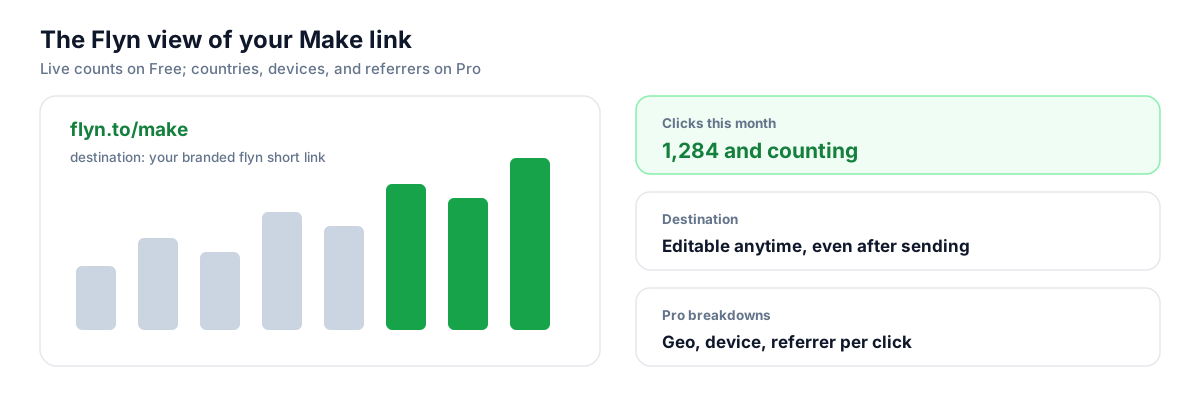
Worth knowing before you start
- Connecting Flyn to Make requires a Flyn API key, and creating an API key is a Pro feature. Free accounts can use Flyn's MCP server with an AI assistant on any plan, but not the Make app.
- Watch Events fires once per event, and Make counts every operation a scenario runs. A link with heavy traffic subscribed to link.click can consume operations quickly; filter right after the trigger, or subscribe only to the events you act on.
- Until Make completes its directory review, the app installs only through the invite link on our integrations hub. Scenarios you build now keep working through the review and after approval.
- Do not use a Flyn short link for eBay Partner Network affiliate links, whether through Make or by hand. eBay's Network Agreement permits only a named list of shorteners and Flyn is not currently on it.
Prefer to skip Make entirely?
Everything the Make app does is available directly. The REST API creates, updates, and deletes links and returns their stats, and webhooks push the same four events to any endpoint you control. If you are already writing code, calling the API is fewer moving parts than a scenario, and it does not consume Make operations. Flyn also runs an MCP server, so an AI assistant can create and look up links by signing in on any plan, no API key needed.
Shorten API docsGo deeper
Features, tools, and guides that pair with this
Features
Free tools
Frequently asked questions
Does Flyn have a Make integration?
Yes. Flyn publishes a native Make app with four modules: the Watch Events instant trigger, the Create a Link and Get a Link actions, and a Make an API call universal module. It is a real app with labeled fields and mapped outputs, not a recipe built on Make's generic HTTP module.
Why does installing need an invite link?
The app is published on Make and fully usable, but Make lists apps in its public directory only after a manual review, and that queue takes weeks. Until approval, Make's mechanism for distributing a published app is an invite link, which is on our integrations hub. Scenarios built now keep working through and after the review.
Do I need a paid Flyn plan to use Make?
Yes. Connecting uses a Flyn API key, and creating an API key requires Pro, Lifetime, or Team. Pro is $9 a month billed annually or $12 monthly. If you want an automation-style connection without paying, Flyn's MCP server works on the free plan by signing in through OAuth, which lets an AI assistant create and look up links, though it is not the same thing as a scenario.
Is the Watch Events trigger real time or polling?
Real time. When you turn the scenario on, Flyn registers a webhook subscription for the events you picked and pushes each one to Make as it happens; when the connection is removed, the webhook is cleaned up automatically. In our own end to end test, a click on a short link started the scenario in under a second.
Which events can start a scenario?
Four: link.click, link.create, link.update, and link.delete. You choose any combination when creating the webhook. Click events carry the country, city, device, and referrer of the click; the create, update, and delete events carry the link object itself.
Can a scenario update or delete an existing link?
Yes, through the Make an API call module: PATCH /links/{id} changes the destination, slug, title, tags, or expiry, and DELETE /links/{id} removes it, with authentication handled by your connection. Dedicated Update and Delete modules do not exist in the current version; adding modules later requires Make re-approval, so the first release kept the surface small.
What stats does Get a Link return?
The link object with live counters: human clicks, bot clicks, QR scans, and total clicks, plus the slug, destination, short URL, tags, and expiry. The human versus bot split comes from Flyn's own filtering, so a router can branch on genuine reach rather than a number inflated by scanners and link previews.
Will a busy link burn through my Make operations?
It can. Watch Events fires once per event and Make counts every operation a scenario runs, so a link taking thousands of clicks a month consumes operations at that rate if you subscribe to link.click. Put a filter immediately after the trigger, or subscribe only to the events you act on, such as link.create.
How is the Make app different from Flyn's Zapier app?
They cover the same core jobs with different surfaces. Zapier's app is larger today: two triggers, four actions including Update, Delete, and Create QR Code, and two searches. The Make app counters with a broader instant trigger, four event types against Zapier's click and link triggers, and a universal module that reaches the entire API. If your team already lives in one platform, use that one; there is no capability you can only get by switching.
Start tracking your Make links free
Shorten your first links without an account, no card required. Free covers 25 links a month; Pro unlocks unlimited links and geo, device, and referrer breakdowns.