Klaviyo Link Tracking With Short Links That Outlive Your Flows
Klaviyo already tells you which subscriber clicked which email or text. Flyn adds branded short links with editable destinations and click counts that keep working outside Klaviyo's reports.
- Free plan, no card required
- Set up in minutes
- GDPR-ready analytics
- No ad interstitials
- Cancel anytime
Klaviyo's click tracking is genuinely good: it wraps every email link through trk.klclick.com, ties each click to a subscriber profile, and reports revenue per message. But flow emails run for months, and the day a landing page URL changes, every live welcome and abandoned-cart email points at a dead page. In SMS, every character counts against a 160-character segment, and Klaviyo only tracks links it shortens itself. And Klaviyo's automatic UTM tagging appends parameters at send time, which can collide with tags baked into your destination. A Flyn short link fixes all three: the destination stays editable after send, the link stays short in texts, and the UTMs you bake into the destination arrive intact and take priority on any name clash.
Setup
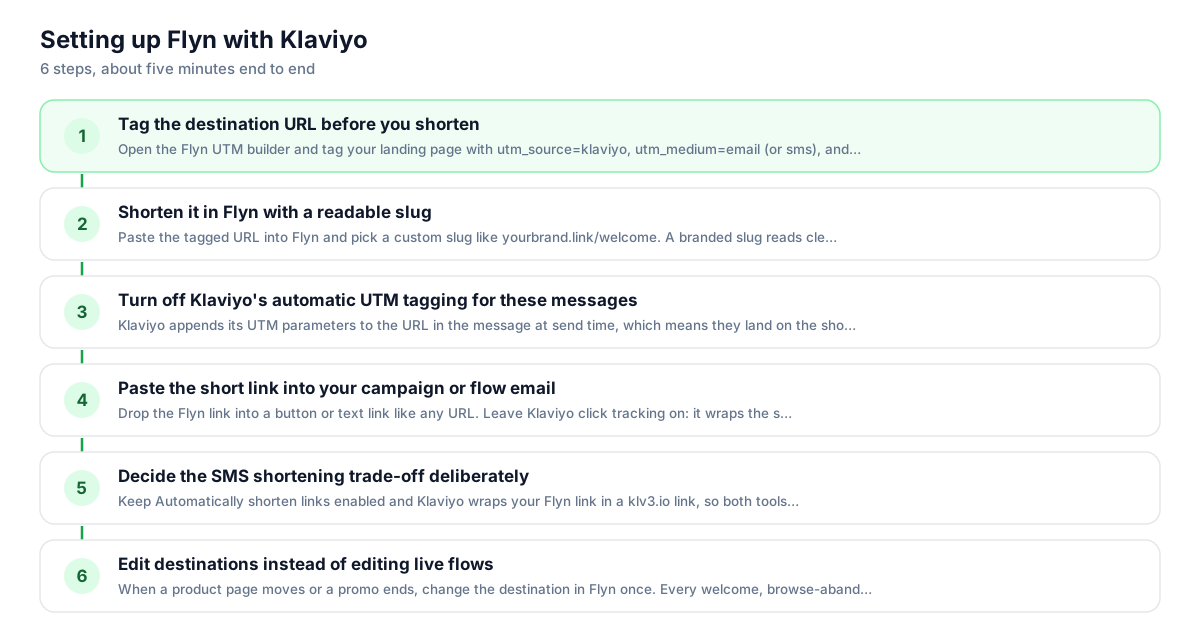
Use Flyn with Klaviyo in 6 steps
- 1
Tag the destination URL before you shorten
Open the Flyn UTM builder and tag your landing page with utm_source=klaviyo, utm_medium=email (or sms), and a campaign name like welcome-flow. Bake the tags into the destination before shortening; that is the most reliable setup, and the destination value wins if the same parameter is also appended to the short link.
- 2
Shorten it in Flyn with a readable slug
Paste the tagged URL into Flyn and pick a custom slug like yourbrand.link/welcome. A branded slug reads cleanly in a text message and tells subscribers where they are going, which matters more in SMS where there is no anchor text to hide behind.
- 3
Decide what to do with Klaviyo's automatic UTM tagging
Klaviyo appends its UTM parameters to the URL in the message at send time, and Flyn now forwards those onto your site, so they reach your analytics. If you also bake UTMs into the destination, those win on a name clash, so to avoid double-tagging either leave Klaviyo's tagging on or turn it off under Settings > Other > UTM tracking, or per message via the campaign Tracking section or the flow message settings.
- 4
Paste the short link into your campaign or flow email
Drop the Flyn link into a button or text link like any URL. Leave Klaviyo click tracking on: it wraps the short link through trk.klclick.com the same way it wraps everything, so subscriber-level clicks, Clicked Email triggers, and revenue attribution all keep working.
- 5
Decide the SMS shortening trade-off deliberately
Keep Automatically shorten links enabled and Klaviyo wraps your Flyn link in a klv3.io link, so both tools count the click. Disable it and the text shows your branded link, but Klaviyo loses click, conversion, and revenue tracking for that message. Flyn counts either way.
- 6
Edit destinations instead of editing live flows
When a product page moves or a promo ends, change the destination in Flyn once. Every welcome, browse-abandonment, and post-purchase email already in subscribers' inboxes follows the new target immediately, with no flow edits, no re-cloning messages, and no dead links from last quarter's sends.
UTM recipe
The UTM convention for Klaviyo
Match Klaviyo's own conventions so your GA4 reports stay consistent with messages Klaviyo tags natively. Since June 2025 Klaviyo's default utm_medium is the message type, so use email or sms, not campaign or flow. Build these into the destination URL, then shorten.
| Parameter | Value | Why |
|---|---|---|
| utm_source | klaviyo | Klaviyo's own static default; keeps all Klaviyo traffic under one source in GA4 |
| utm_medium | Use sms for text sends; mirrors Klaviyo's post-June-2025 message-type default | |
| utm_campaign | welcome-flow | Name the flow or campaign; lowercase with hyphens, no spaces |
| utm_content | hero-button | Optional: distinguish links within one message, like hero button vs footer text |
https://yourstore.com/collections/new-arrivals?utm_source=klaviyo&utm_medium=email&utm_campaign=welcome-flow&utm_content=hero-button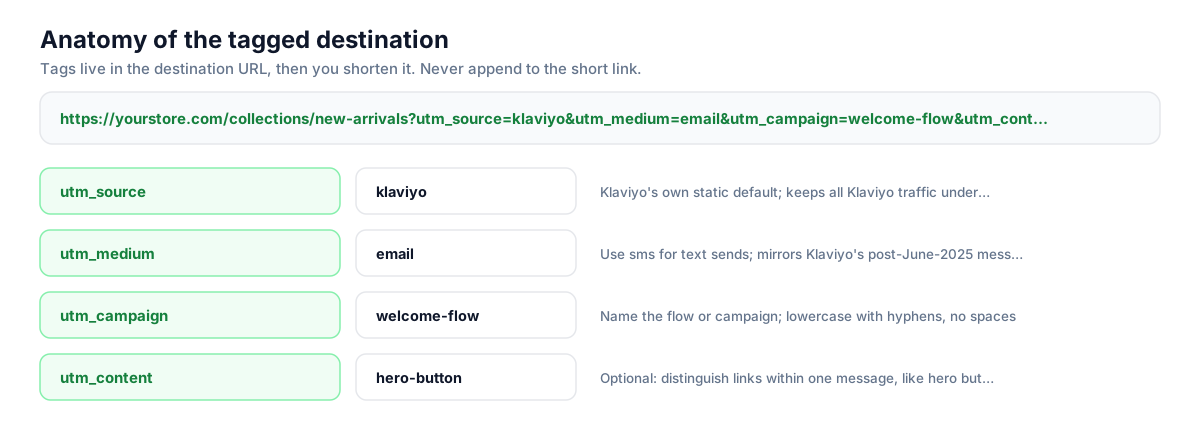
Build this in seconds with the free UTM builder, then shorten the tagged URL. You can also append parameters to the short link itself: Flyn forwards them to the destination, and if the same parameter is baked into the destination, that value takes priority.
Honest comparison
What Klaviyo tracks vs what Flyn adds
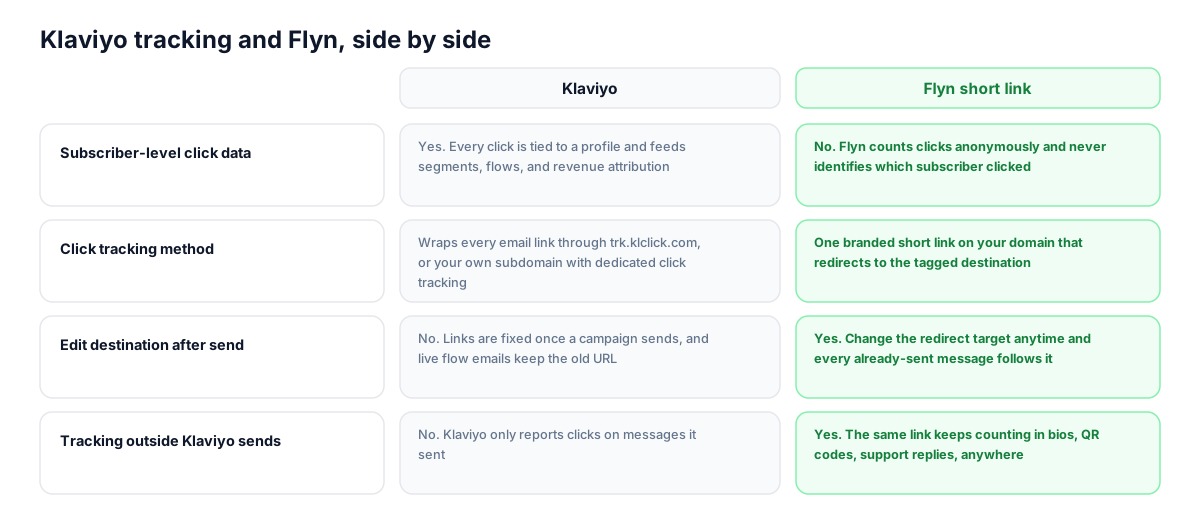
Klaviyo and Flyn measure different layers of the same click. Klaviyo knows who clicked inside the messages it sends. Flyn counts every click on the link itself, wherever it appears, and lets you change where it goes. Use both and keep each one doing what it does best.
| Capability | Klaviyo | Flyn short link |
|---|---|---|
| Subscriber-level click data | Yes. Every click is tied to a profile and feeds segments, flows, and revenue attribution | No. Flyn counts clicks anonymously and never identifies which subscriber clicked |
| Click tracking method | Wraps every email link through trk.klclick.com, or your own subdomain with dedicated click tracking | One branded short link on your domain that redirects to the tagged destination |
| Edit destination after send | No. Links are fixed once a campaign sends, and live flow emails keep the old URL | Yes. Change the redirect target anytime and every already-sent message follows it |
| Tracking outside Klaviyo sends | No. Klaviyo only reports clicks on messages it sent | Yes. The same link keeps counting in bios, QR codes, support replies, anywhere |
| SMS links | Auto-shortens to klv3.io (or a branded subdomain); this shortening is required for SMS click and revenue tracking | Short custom-slug links save segment characters and keep counting even where Klaviyo tracking is off |
| Geo, device, and referrer breakdowns | Engagement reporting per message, plus profile location data | Per-link geo, device, and referrer breakdowns on the Pro plan |
Why it matters
What you get
Fix live flow emails without touching the flow
Welcome series and abandoned-cart flows send for months after you build them. When a URL changes, edit the Flyn destination once and every already-delivered email redirects to the new page. No cloning messages, no broken links in sends from March.
Save SMS segment characters
Klaviyo bills by message segment, and 160 characters go fast. A full product URL with UTM parameters can eat two segments on its own. A Flyn short link on your domain holds the whole tagged destination in roughly 20 characters.
UTMs that actually reach your analytics
Klaviyo's auto-UTM feature appends parameters to whatever URL is in the message, and Flyn now forwards those to your site. Baking tags into the Flyn destination is still the most reliable path and guarantees GA4 sees utm_source=klaviyo on every click, since the destination value wins on any clash.
One click count across every channel
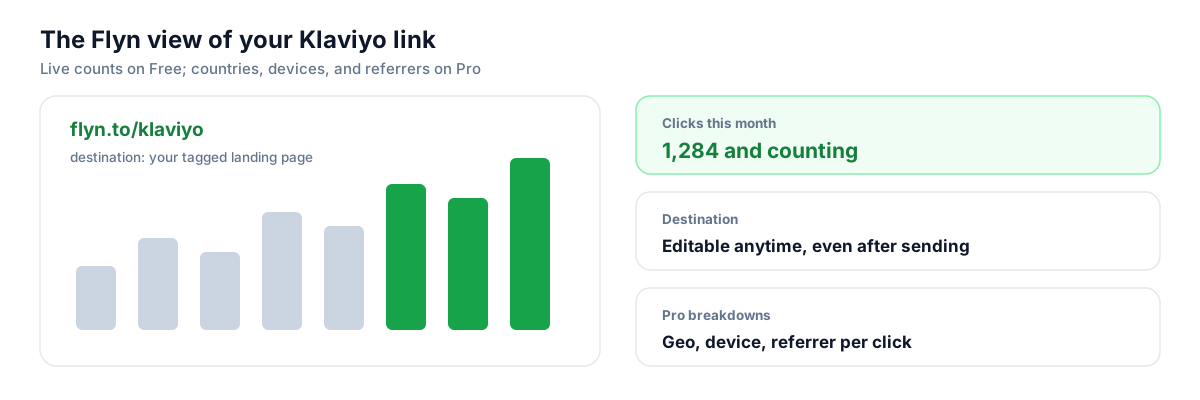
Klaviyo only reports clicks on messages Klaviyo sent. Reuse the same Flyn link in your email, SMS, Instagram bio, and a QR code on packaging, and the Flyn dashboard shows the combined total plus each source on Pro.
Worth knowing before you start
- Klaviyo's automatic UTM tagging appends parameters to the link in your message. Flyn now forwards those onto your final destination, so they reach analytics; you can leave the setting on. If you also bake UTMs into the destination, those win on a name clash, so avoid tagging the same utm name from both sides.
- In SMS, Klaviyo can only track clicks, conversions, and revenue on links it shortens itself. If you disable Automatically shorten links to show your branded Flyn URL, Klaviyo's SMS reporting for that message goes dark; Flyn still counts every click.
- In email, expect a double hop: Klaviyo wraps your short link through trk.klclick.com, then Flyn redirects to the destination. It adds tens of milliseconds, not something subscribers notice, but both dashboards will count, and totals will not match exactly because each filters bot and scanner clicks differently.
- Flyn does not replace Klaviyo's subscriber-level data. Clicked Email flow triggers, engaged segments, and per-profile revenue attribution all come from Klaviyo's own tracking, so leave Klaviyo click tracking enabled in email.
Batch-create tagged links for every flow message
An ecommerce account with ten flows can hold fifty-plus messages, each needing its own tagged link. Instead of building them by hand, script it: POST to Flyn's /api/shorten endpoint with the destination, UTM parameters, and a slug per message (welcome-1, welcome-2, cart-1), then paste the returned short links into Klaviyo. One run per flow keeps naming consistent and auditable.
Shorten API referenceGo deeper
Features, tools, and guides that pair with this
Features
Free tools
Frequently asked questions
Does Klaviyo still track clicks if I use a Flyn short link in an email?
Yes. With click tracking enabled, Klaviyo wraps your short link through trk.klclick.com the same way it wraps any URL, so subscriber-level click reports, Clicked Email flow triggers, and revenue attribution keep working. The click passes through Klaviyo, then Flyn, then lands on your tagged page. Both dashboards record it.
Should I turn off Klaviyo's automatic UTM tracking when using short links?
Not necessarily. Klaviyo appends its UTM parameters to the URL in the message at send time, which means they get attached to the short link itself, and Flyn now forwards those appended parameters onto your site, so they do reach analytics. The one thing to avoid is double-tagging: if you also bake UTMs into the destination, those win on a name clash. Pick one source, either Klaviyo's tagging or baked-in destination UTMs, which you can manage under Settings > Other > UTM tracking or per message.
What are Klaviyo's default UTM values?
When UTM tracking is on, utm_source and utm_medium are always included; utm_campaign, utm_id, and utm_term are optional toggles. The stock utm_source is klaviyo. Since June 2, 2025 the default utm_medium is the message type (email, sms, and so on) instead of the old campaign and flow values, unless you customized settings before that date. Mirror these values in the tags you bake into Flyn destinations.
Can Klaviyo track a Flyn link in an SMS message?
Only indirectly. Klaviyo cannot track third-party short links in SMS on its own; its click and revenue tracking requires its Automatically shorten links setting, which wraps your link in a klv3.io URL (or a branded subdomain). Leave it on and Klaviyo shortens your Flyn link, so both tools count. Turn it off and only Flyn counts.
How many characters does a short link save in Klaviyo SMS?
A single SMS segment is 160 characters, and multi-segment texts lose overhead to concatenation headers, so two segments carry 306. Klaviyo's own shortened links run about 24 to 25 characters. A Flyn link on a short custom domain with a tight slug can come in under 20, and it replaces a full destination URL with UTM parameters that might otherwise consume an entire segment.
Can I change a link in a live Klaviyo flow without editing the flow?
Yes, if the link is a Flyn short link. Edit the destination in your Flyn dashboard and every message that contains that link, including emails delivered weeks ago from a welcome or abandoned-cart flow, immediately redirects to the new page. Klaviyo's own links are fixed at send time, so this is the main reason to use a shortener in long-running flows.
Will Flyn tell me which Klaviyo subscriber clicked?
No. Flyn counts clicks anonymously: totals on Free, plus geo, device, and referrer breakdowns on Pro. It never identifies the individual subscriber. Klaviyo's native click tracking is what ties clicks to profiles and powers segments and flow triggers, so keep it enabled and treat Flyn as the portable, editable layer on top.
What is trk.klclick.com and can I replace it?
It is Klaviyo's shared click-tracking domain. Every link in a tracked email is rewritten to pass through it before redirecting onward. If you want your own name on the hover URL, Klaviyo's dedicated click tracking feature swaps in a subdomain you own. That choice is independent of Flyn: either way, the wrapped link then resolves to your Flyn short link.
Why don't my Klaviyo and Flyn click counts match?
They measure at different points and filter differently. Klaviyo filters known bot clicks from inbox security scanners using its own heuristics, while Flyn counts at the redirect with its own filtering. Sequences also diverge when a link is clicked outside Klaviyo sends, which only Flyn sees. Treat Klaviyo as the who-clicked source of truth and Flyn as the total-demand counter; directional agreement is what to expect.
Do short links hurt Klaviyo deliverability?
Generic shared shorteners can, especially in SMS, because carriers see the same domain used by thousands of unrelated senders. The fix is a branded domain, so your links carry your own name and reputation. In email, Klaviyo's wrapping means the visible tracking domain matters too, which is what its dedicated click tracking addresses.
Start tracking your Klaviyo links free
Shorten your first links without an account, no card required. Free covers 25 links a month; Pro unlocks unlimited links and geo, device, and referrer breakdowns.