Kit (ConvertKit) Link Tracking That Follows Your Links Everywhere
Kit tells you exactly which subscriber clicked inside a broadcast or sequence, and its link triggers turn those clicks into tags and automations. Flyn adds one running click count for the same short link across your bio, YouTube descriptions, and every email you send.
- Free plan, no card required
- Set up in minutes
- GDPR-ready analytics
- No ad interstitials
- Cancel anytime
Kit, the platform formerly called ConvertKit, already gives creators strong email click data: it rewrites every link through its click.convertkit-mail.com tracking domain and records exactly which subscriber clicked. What it cannot do is follow that link outside the inbox. Paste the same product URL into your Instagram bio, a YouTube description, or a podcast show note and those clicks never appear in Kit, and each broadcast report only covers that one send. A Flyn short link gives the URL its own permanent counter. Create it once, bake UTM tags into the destination, then reuse it in every broadcast, sequence, and social channel. Kit keeps telling you who clicked in email. Flyn tells you how many people clicked in total, from everywhere, over the link's whole life.
Setup
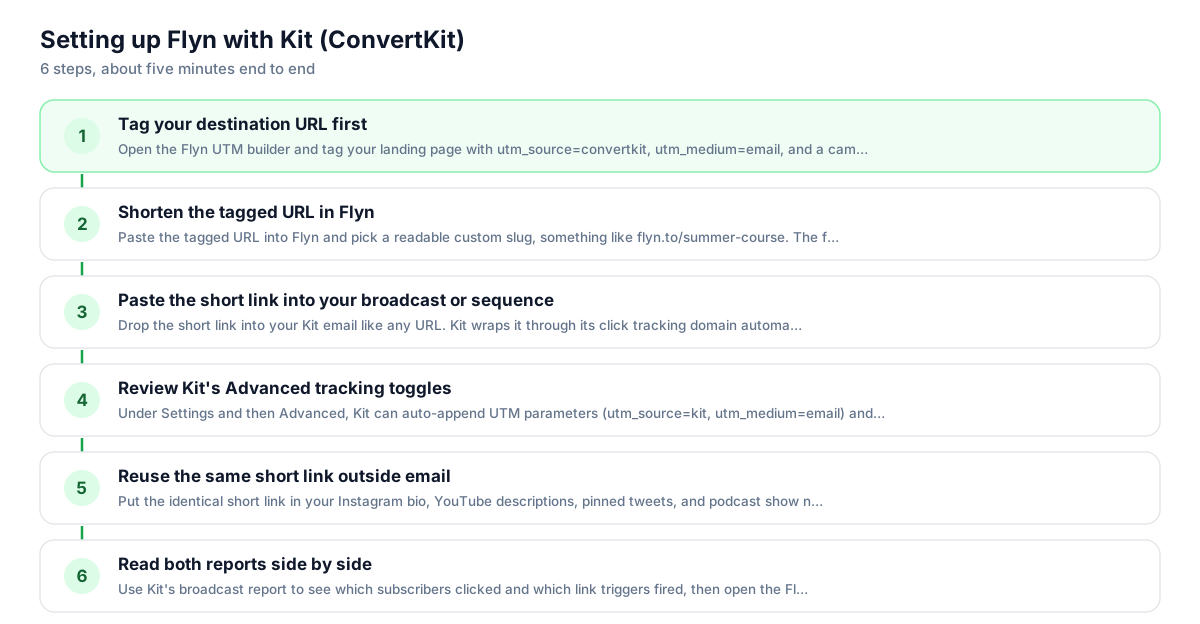
Use Flyn with Kit (ConvertKit) in 6 steps
- 1
Tag your destination URL first
Open the Flyn UTM builder and tag your landing page with utm_source=convertkit, utm_medium=email, and a campaign name. Bake the tags into the destination before shortening; that is the most reliable setup, and if the same parameter is also appended to the short link the destination value wins.
- 2
Shorten the tagged URL in Flyn
Paste the tagged URL into Flyn and pick a readable custom slug, something like flyn.to/summer-course. The free plan covers 25 links a month with custom slugs and QR codes, enough for a weekly newsletter plus the evergreen links you reuse across channels.
- 3
Paste the short link into your broadcast or sequence
Drop the short link into your Kit email like any URL. Kit wraps it through its click tracking domain automatically, so subscriber-level click reporting keeps working. In the link settings you can still choose a tag to apply on click, or point a link trigger rule at it.
- 4
Review Kit's Advanced tracking toggles
Under Settings and then Advanced, Kit can auto-append UTM parameters (utm_source=kit, utm_medium=email) and a ck_subscriber_id to links. Flyn now forwards those appended parameters onto the destination, so both reach your site; if you also baked UTMs into the destination, those win on a name clash, so avoid double-tagging.
- 5
Reuse the same short link outside email
Put the identical short link in your Instagram bio, YouTube descriptions, pinned tweets, and podcast show notes. Every click lands on the same Flyn counter, so you finally see the combined pull of a launch instead of one isolated broadcast report.
- 6
Read both reports side by side
Use Kit's broadcast report to see which subscribers clicked and which link triggers fired, then open the Flyn dashboard for the lifetime total across all channels. On Pro, the geo, device, and referrer breakdowns show where non-email clicks actually came from.
UTM recipe
The UTM convention for Kit (ConvertKit)
Tag the destination before you shorten it. Kit's own auto-UTM setting uses utm_source=kit, and it attaches parameters to the link href in the email (the short link), which Flyn now forwards onto the destination. Baking your own tags into the destination stays the most reliable version and wins on any name clash, so avoid tagging the same name twice.
| Parameter | Value | Why |
|---|---|---|
| utm_source | convertkit | Or kit if you want to match Kit's auto-UTM convention; pick one and never mix them |
| utm_medium | Keep email for broadcasts and sequences; use social when the same short link goes in your bio | |
| utm_campaign | summer-course-launch | Name the send or launch; Kit's auto version generates subject line plus campaign ID, yours should be human-readable |
| utm_content | hero-button | Optional: distinguish the button from the text link when the same destination appears twice in one email |
https://yoursite.com/summer-course?utm_source=convertkit&utm_medium=email&utm_campaign=summer-course-launch&utm_content=hero-button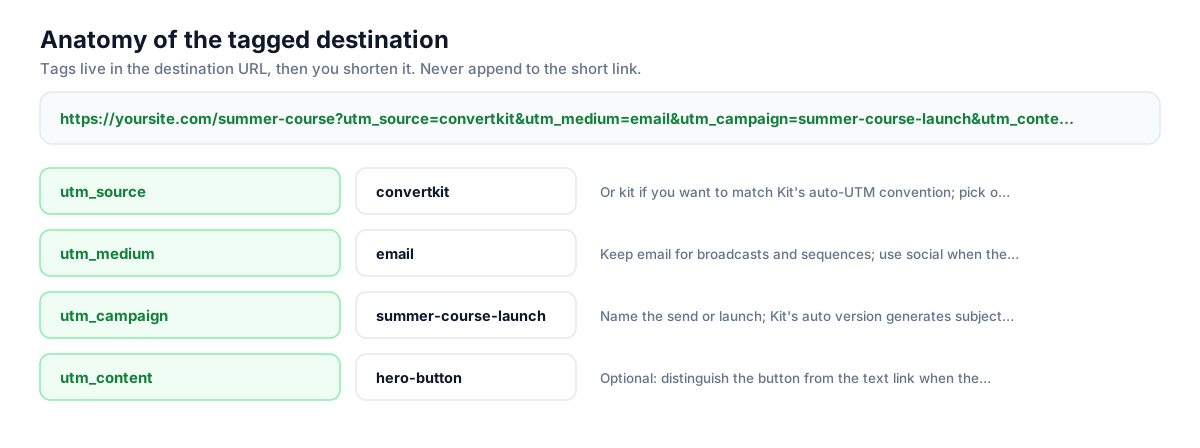
Build this in seconds with the free UTM builder, then shorten the tagged URL. You can also append parameters to the short link itself: Flyn forwards them to the destination, and if the same parameter is baked into the destination, that value takes priority.
Honest comparison
What Kit tracks vs what Flyn tracks
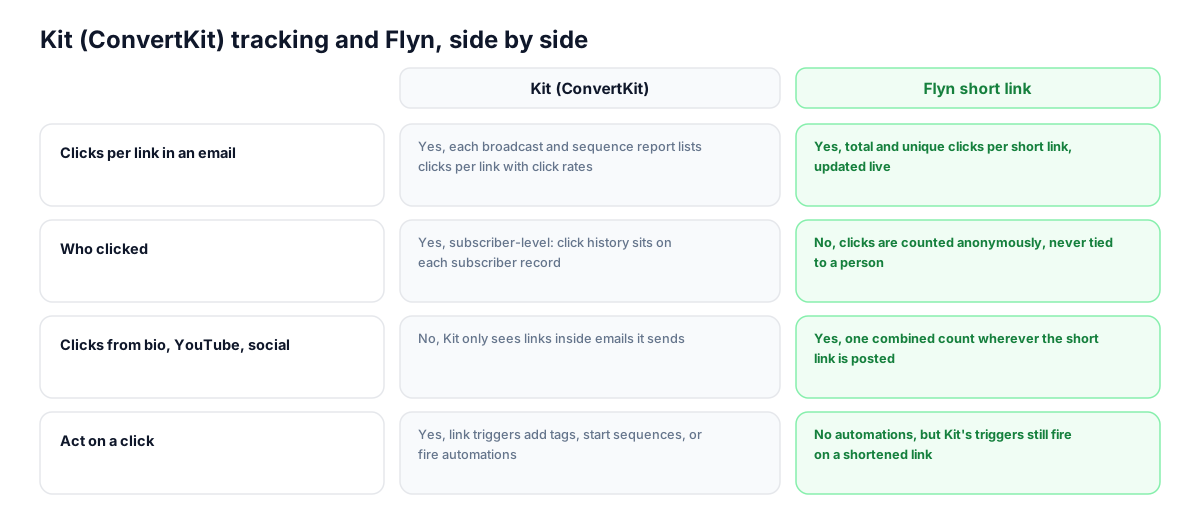
Kit's click tracking is genuinely good inside email: every link is wrapped through its tracking domain, clicks are recorded against individual subscriber records, and link triggers act on them instantly. Flyn does not replace any of that. It gives the same URL a channel-independent counter that keeps running when the link leaves the inbox.
| Capability | Kit (ConvertKit) | Flyn short link |
|---|---|---|
| Clicks per link in an email | Yes, each broadcast and sequence report lists clicks per link with click rates | Yes, total and unique clicks per short link, updated live |
| Who clicked | Yes, subscriber-level: click history sits on each subscriber record | No, clicks are counted anonymously, never tied to a person |
| Clicks from bio, YouTube, social | No, Kit only sees links inside emails it sends | Yes, one combined count wherever the short link is posted |
| Act on a click | Yes, link triggers add tags, start sequences, or fire automations | No automations, but Kit's triggers still fire on a shortened link |
| Lifetime history across sends | Partial, reports are per broadcast; Creator Pro adds an insights dashboard | Yes, one lifetime timeline per link across every campaign |
| Geo, device, referrer per click | No per-click breakdowns in broadcast reports | Yes on Pro: country, device, and referrer for every click |
Why it matters
What you get
One link, one count, every channel
Creators run the same offer in a broadcast, a bio link, and a YouTube description. Kit only reports the email slice. A reused Flyn short link merges all of it into a single lifetime count you can quote in sponsor conversations.
Link triggers keep working
Kit wraps whatever URL you paste, short links included, so tag-on-click and link trigger rules fire exactly as before. You lose nothing on the automation side by shortening; the click passes through Kit, then Flyn, then lands on your page.
History that outlives a broadcast
Kit's reports live per send, so comparing this month's launch to January means opening reports one at a time. A Flyn link keeps a continuous click timeline, which makes evergreen sequences and re-sent broadcasts easy to judge.
Geo and device for non-email clicks
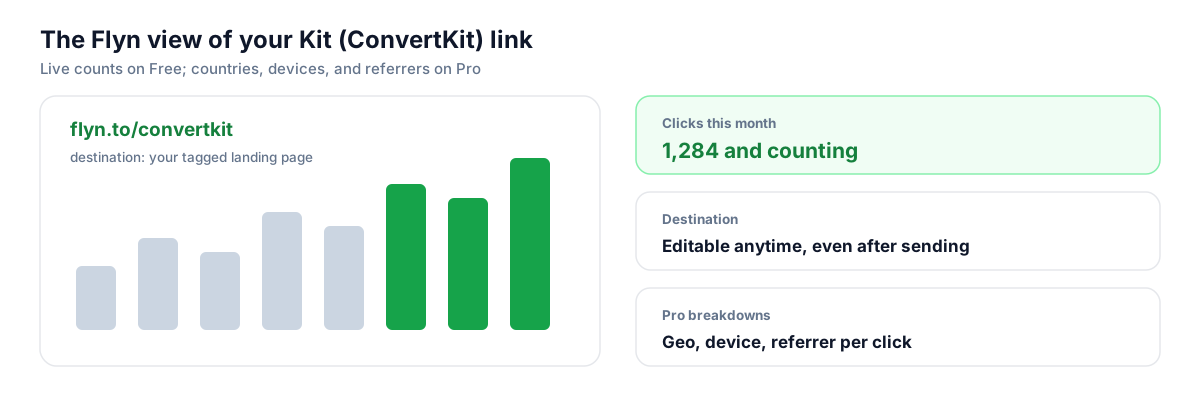
Kit's broadcast report does not break clicks down by country or device. Flyn Pro shows geo, device, and referrer for every click on the link, which matters most for the bio and YouTube traffic Kit never sees at all.
Worth knowing before you start
- Every email click makes two hops: Kit's click.convertkit-mail.com wrapper first, then the Flyn redirect, then your page. That adds milliseconds, not seconds, but keep the destination on HTTPS and avoid chaining a third redirect on your own site.
- Kit's Advanced settings can auto-append UTM parameters and ck_subscriber_id to email links. Flyn now forwards those appended parameters onto the destination, so they reach your site; baking UTMs into the destination is still the most reliable path, and those win on a name clash if you tag the same name twice.
- Flyn never tells you which subscriber clicked. Kit's subscriber-level click history and link triggers remain your only source for segmentation, so treat Flyn as the cross-channel counter, not a replacement for Kit's reports.
- Expect the two click numbers to differ. Kit counts subscriber clicks in one email; Flyn counts every source plus the occasional inbox security scanner that follows links, so Flyn's total should normally read higher.
Mint a fresh short link per broadcast with the API
If you send weekly and want per-send counts instead of one merged number, script it: one POST per broadcast creates a tagged, slugged short link (for example flyn.to/newsletter-127) you paste into Kit. Each send then gets its own lifetime counter while the evergreen links stay untouched.
Shorten API referenceGo deeper
Features, tools, and guides that pair with this
Features
Free tools
Frequently asked questions
Does Kit still track clicks if I use a Flyn short link?
Yes. Kit rewrites every link in a broadcast or sequence through its click tracking domain, and a short link is just another URL to it. Subscriber-level click reporting keeps working exactly as before. The click passes through Kit's wrapper, then the Flyn redirect, then lands on your tagged page, and both tools record it independently.
Do Kit link triggers work with shortened links?
Yes. A link trigger fires when the subscriber hits Kit's tracking wrapper, before the Flyn redirect ever runs, so tag-on-click, sequence enrollment, and automation entry all behave normally. You can select the tag directly in the email editor's link settings or point a link trigger rule at the short link URL from the Rules page.
Kit renamed from ConvertKit. Did link tracking change?
ConvertKit rebranded to Kit in October 2024, but the tracking mechanics did not change: links are still rewritten through the click.convertkit-mail.com infrastructure and clicks still attach to individual subscriber records. Broadcasts, sequences, and link triggers all work the same way, so guides written for ConvertKit still describe how Kit handles your links today.
Should I enable Kit's automatic UTM parameters with short links?
You can. That setting appends utm_source=kit, utm_medium=email, and a generated utm_campaign to the link href in the email, meaning the short link itself. Flyn now forwards those appended parameters to your site, so Google Analytics sees them. If you also bake your own UTM tags into the destination, those win on a name clash (Kit never overrides parameters you set manually), so just avoid tagging the same name from both places.
Will ck_subscriber_id pass through a Flyn short link?
Yes. Kit's subscriber ID option appends ck_subscriber_id to email links, and Flyn now forwards appended parameters onto the destination during the redirect, so the value reaches your page. If a specific link powers on-site personalization, WordPress content gating, or subscriber tagging through that parameter, a shortened link now carries it through just like a full-length URL.
Why does Flyn show more clicks than my Kit broadcast report?
Kit counts clicks from subscribers of that one email. Flyn counts every visit to the short link: the broadcast, your bio, YouTube descriptions, plus the occasional inbox security scanner that follows links before a human does. A higher Flyn number is normal and is exactly the cross-channel picture you wanted; compare trends rather than expecting the totals to match.
Can Flyn tell me which subscriber clicked?
No. Flyn counts clicks anonymously and never identifies people, so it does not replace Kit's subscriber-level click history. Kit remains your source for who clicked, which tags to apply, and which automations to run. Flyn answers the question Kit cannot: how many total clicks did this link earn across email, social, and everywhere else combined.
I am on Kit's free Newsletter plan. Do I still get click reports?
Yes. The Newsletter plan, free up to 10,000 subscribers, includes broadcast reporting with opens and clicks, and link wrapping works on every plan. Creator Pro adds extras like deliverability reporting and an insights dashboard. Flyn's free plan pairs well with it: 25 short links a month with click counts, custom slugs, and QR codes at no cost.
Do short links hurt deliverability in Kit emails?
Less than you might think, because Kit rewrites every href through its own tracking domain, so filters primarily evaluate Kit's sending reputation. Some filters still scan the full redirect chain, though, so a generic shortener domain with a bad neighborhood can add risk. Connecting your own custom domain in Flyn keeps the chain branded and consistent with your sender identity.
Can I turn off Kit's click tracking and rely on Flyn alone?
Kit lets you disable open tracking on individual emails, but its help center documents no toggle that stops link rewriting for click tracking. You do not need one: the two systems stack cleanly. Keep Kit's tracking for subscriber-level data and link triggers, and let the Flyn redirect underneath count the same click toward your cross-channel total.
Start tracking your Kit (ConvertKit) links free
Shorten your first links without an account, no card required. Free covers 25 links a month; Pro unlocks unlimited links and geo, device, and referrer breakdowns.