One Short Link Across Brevo Email, SMS, and WhatsApp
Brevo already tracks clicks per campaign: rewritten email links with contact-level reports, a built-in SMS shortener, and read receipts on WhatsApp. Flyn adds the piece Brevo does not have: one branded short link that carries the same count across all three channels and whose destination you can still edit after the send goes out.
- Free plan, no card required
- Set up in minutes
- GDPR-ready analytics
- No ad interstitials
- Cancel anytime
Brevo (the platform formerly called Sendinblue) is one of the few tools where the same audience gets email, SMS, and WhatsApp from one dashboard. Its click data is solid but siloed: email reports show clicks per link with a heatmap, SMS clicks live in a per-campaign CSV behind a random Brevo shortener URL, and WhatsApp campaign reports show sent, delivered, and read, not link clicks. Run the same offer on all three channels and you have three disconnected numbers, plus zero clicks visible on WhatsApp. A Flyn short link fixes the seams: one UTM-tagged destination, one branded link pasted into every channel, one click count, and the ability to change where the link points after 10,000 messages have already left.
Setup
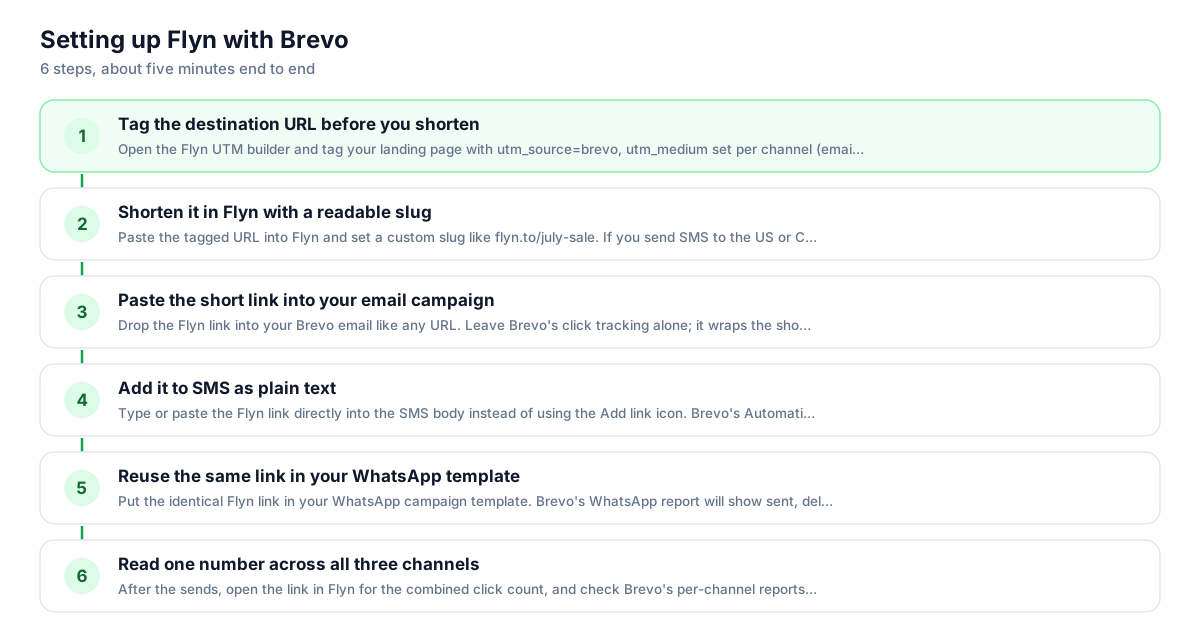
Use Flyn with Brevo in 6 steps
- 1
Tag the destination URL before you shorten
Open the Flyn UTM builder and tag your landing page with utm_source=brevo, utm_medium set per channel (email, sms, or whatsapp), and your campaign name. Bake the tags into the destination before shortening; that is the most reliable setup, and the destination value wins if the same parameter is also appended to the short link.
- 2
Shorten it in Flyn with a readable slug
Paste the tagged URL into Flyn and set a custom slug like flyn.to/july-sale. If you send SMS to the US or Canada, attach your own custom domain; carriers there filter shared shortener domains aggressively.
- 3
Paste the short link into your email campaign
Drop the Flyn link into your Brevo email like any URL. Leave Brevo's click tracking alone; it wraps the short link and contact-level reports keep working. Skip the Activate Google Analytics tracking toggle, since your UTMs are already baked into the destination.
- 4
Add it to SMS as plain text
Type or paste the Flyn link directly into the SMS body instead of using the Add link icon. Brevo's Automatically shorten links option only rewrites links inserted with that icon, so plain text keeps your branded slug visible and your click count in Flyn.
- 5
Reuse the same link in your WhatsApp template
Put the identical Flyn link in your WhatsApp campaign template. Brevo's WhatsApp report will show sent, delivered, and read; Flyn's dashboard fills in the missing metric, actual clicks on the link.
- 6
Read one number across all three channels
After the sends, open the link in Flyn for the combined click count, and check Brevo's per-channel reports for contact-level email detail. If the promo changes, edit the Flyn destination once and every channel updates instantly.
UTM recipe
The UTM convention for Brevo
Use one consistent recipe so Brevo traffic is unmistakable in Google Analytics. Tag the destination first, then shorten; that keeps naming under your control, and the destination value wins if the same parameter is also appended to the short link.
| Parameter | Value | Why |
|---|---|---|
| utm_source | brevo | Lowercase, always. This also matches what Brevo's own Google Analytics option sends, so historical data stays comparable. |
| utm_medium | email, sms, or whatsapp | One value per channel. This is how you split channels later while the short link stays identical. |
| utm_campaign | summer-sale | Match your Brevo campaign name, lowercase with hyphens, no dates in evergreen links. |
https://yourstore.com/sale?utm_source=brevo&utm_medium=sms&utm_campaign=summer-sale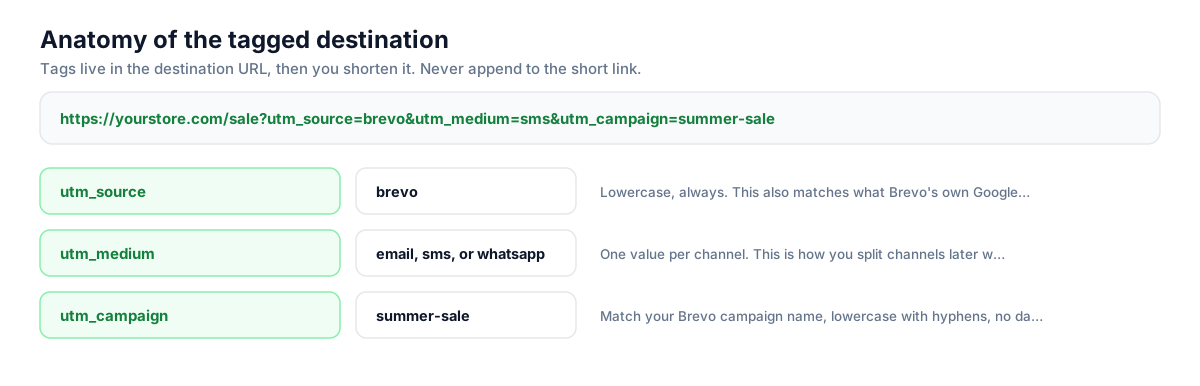
Build this in seconds with the free UTM builder, then shorten the tagged URL. You can also append parameters to the short link itself: Flyn forwards them to the destination, and if the same parameter is baked into the destination, that value takes priority.
Honest comparison
What Brevo tracks vs what Flyn adds
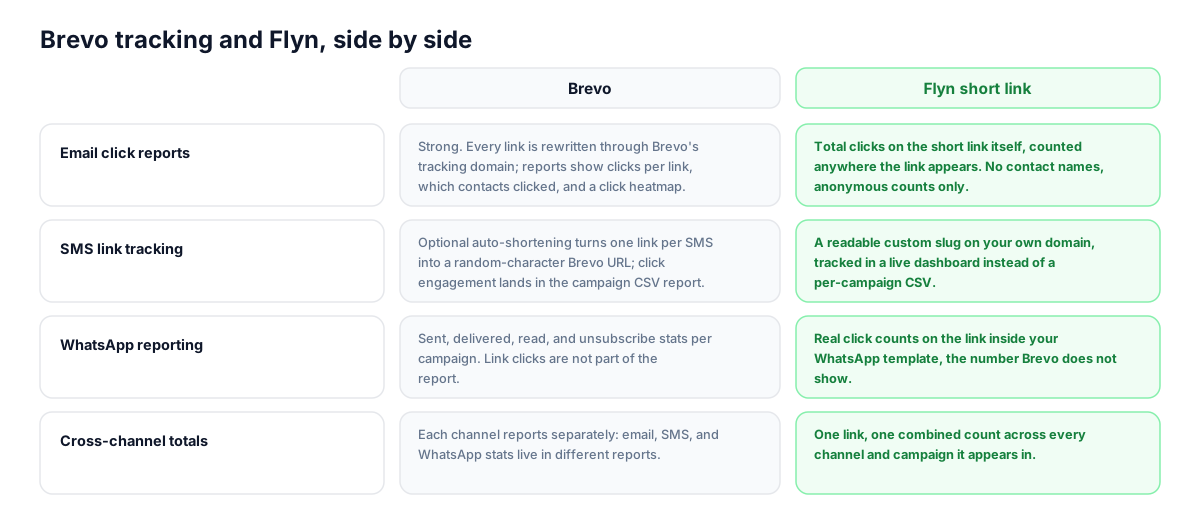
Brevo earns its reputation on email reporting, and its per-channel stats are genuinely good. The gaps show up between channels and after the send button is pressed. Here is the honest split.
| Capability | Brevo | Flyn short link |
|---|---|---|
| Email click reports | Strong. Every link is rewritten through Brevo's tracking domain; reports show clicks per link, which contacts clicked, and a click heatmap. | Total clicks on the short link itself, counted anywhere the link appears. No contact names, anonymous counts only. |
| SMS link tracking | Optional auto-shortening turns one link per SMS into a random-character Brevo URL; click engagement lands in the campaign CSV report. | A readable custom slug on your own domain, tracked in a live dashboard instead of a per-campaign CSV. |
| WhatsApp reporting | Sent, delivered, read, and unsubscribe stats per campaign. Link clicks are not part of the report. | Real click counts on the link inside your WhatsApp template, the number Brevo does not show. |
| Cross-channel totals | Each channel reports separately: email, SMS, and WhatsApp stats live in different reports. | One link, one combined count across every channel and campaign it appears in. |
| Editing links after send | Once a campaign is sent, the URLs in it are fixed forever. | Edit the destination anytime; every already-delivered message follows the new target. |
| Subscriber-level attribution | Email clicks are tied to individual contacts and feed segments and automations. | Not offered. Flyn never identifies which contact clicked; keep Brevo tracking on for that. |
Why it matters
What you get
Segment-proof SMS links
A Brevo SMS is 160 GSM characters, 153 once it splits, and 70 with unicode. A 90-character tagged URL can double your per-message cost by itself. A Flyn link is under 20 characters with every UTM hidden inside the destination.
One link identity across three channels
Brevo reports email, SMS, and WhatsApp separately. Paste the same Flyn link into all three and you get a single combined click count for the offer, next to Brevo's per-channel detail.
Fix the destination after the send
Sent Brevo campaigns cannot be edited, and SMS cannot be recalled. If the landing page moves or the promo code changes, edit the Flyn destination once and every delivered email, text, and WhatsApp message follows the new URL.
Click counts where Brevo shows none
Brevo's WhatsApp campaign report covers sent, delivered, read, and unsubscribes, but not link clicks. Put a Flyn link in the template and the missing click metric shows up in your Flyn dashboard.
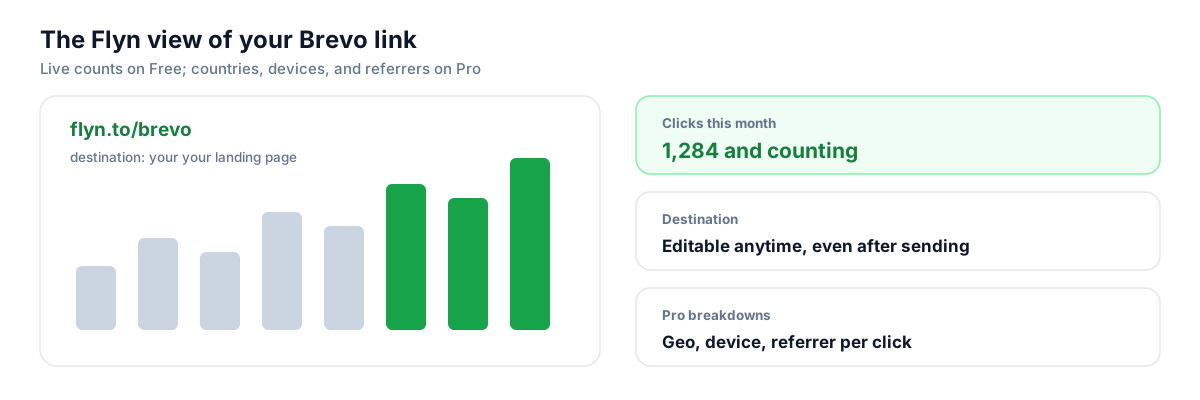
Worth knowing before you start
- In email campaigns, Brevo rewrites every URL through its own tracking domain, including your Flyn link. The click hops through Brevo, then Flyn, then lands on your page. Both counters record it and the extra hop adds only milliseconds, but expect Brevo's reported clicks and Flyn's count to differ slightly since they measure at different points.
- Be deliberate about Brevo's Activate Google Analytics tracking toggle. That feature appends utm parameters to the links in your email, and Flyn now forwards those onto the destination. If you also bake tags into the destination, those win on a name clash, so pick one source to avoid double-tagging.
- In SMS, only links inserted with the Add link icon get auto-shortened by Brevo. Paste your Flyn link as plain text so it stays branded and trackable. Brevo itself warns against generic public shorteners for US and Canada sends; a custom domain on your Flyn link avoids that carrier filtering.
- Flyn counts clicks anonymously. Brevo's email reports tell you which contact clicked and can trigger automations from it; Flyn does not replace that, it complements it with a channel-agnostic total.
Shorten links via API before your Brevo sends
Brevo senders who create campaigns or transactional messages through the Brevo API can add one call to the workflow: POST the UTM-tagged destination to Flyn's shorten endpoint, get back a branded short link, and inject it into the campaign HTML, SMS body, or WhatsApp template variables before the send. Slugs are settable in the same request, so links like flyn.to/cart-reminder are generated programmatically at volume.
Shorten API referenceGo deeper
Features, tools, and guides that pair with this
Features
Free tools
Frequently asked questions
Does Brevo track link clicks on its own?
Yes, per channel. In email, Brevo rewrites every URL through its tracking domain and reports clicks per link, which contacts clicked, and a click heatmap. In SMS, its optional shortener tracks engagement in a downloadable campaign report. WhatsApp campaign reports show sent, delivered, read, and unsubscribes, but not link clicks. Flyn adds a single cross-channel count on top of that and fills the WhatsApp click gap.
Will Brevo's click tracking break my Flyn short link in emails?
No. With click tracking on, Brevo wraps your short link the same way it wraps any URL, so subscriber-level reports keep working. The click passes through Brevo, then Flyn, then lands on your page. Both systems count it. Expect small differences between the two numbers because Brevo counts at its redirect and Flyn counts at yours.
Should I enable Brevo's Google Analytics tracking option with Flyn links?
You can. That toggle appends utm_source, utm_medium, and utm_campaign to the links in your email, and Flyn now forwards those through the redirect onto your destination, so Google Analytics sees them. Just avoid double-tagging: if you also bake the same values (utm_source=brevo, your medium and campaign) into the destination URL, those win on a name clash, so use one source, not both.
How do I stop Brevo from shortening my link in an SMS campaign?
Paste the Flyn link into the SMS body as plain text. Brevo's Automatically shorten links feature only rewrites a link inserted with the Add link icon, replacing it with a random-character URL on a Brevo domain. Plain text keeps your branded slug visible to the recipient and keeps the click count in your Flyn dashboard instead of a per-campaign CSV.
How many SMS characters does a short link actually save?
A single SMS holds 160 GSM characters, dropping to 153 per segment once it splits and to 70 if the message contains unicode or emoji. A UTM-tagged destination URL easily runs 90 to 120 characters, which alone forces a second billable segment. A Flyn link like flyn.to/july-sale is about 17 characters with all tags hidden inside the destination, leaving real room for your message.
Can I see which Brevo contact clicked my Flyn link?
No. Flyn counts clicks anonymously and never identifies the person behind a click. Brevo's email reports do tie clicks to individual contacts, and those clicks can feed segments and automations, so keep Brevo's native tracking enabled for that. Use Flyn for what Brevo cannot do: one combined, channel-agnostic count and a destination you can still edit.
Can I track WhatsApp link clicks in Brevo?
Not natively. Brevo's WhatsApp campaign statistics cover sent, delivered, read, and unsubscribes, and the downloadable report breaks those down per recipient, but link clicks are not included. Putting a Flyn short link in your WhatsApp template gives you the click count Brevo omits, and since clicks are counted at the link, the same number works for template messages and automation sends alike.
Can I change a link after my Brevo campaign has been sent?
Not in Brevo. Once an email, SMS, or WhatsApp campaign is sent, its URLs are frozen, and SMS cannot be recalled at all. A Flyn short link decouples the printed link from the destination: edit the target in your Flyn dashboard and every message already sitting in an inbox or phone follows the new URL on the next click.
Is Brevo the same as Sendinblue, and did tracking change with the rename?
Yes, Sendinblue rebranded to Brevo in 2023. The click-tracking model is the same in kind: email links are rewritten through a Brevo redirect domain rather than the old Sendinblue domains, and reports still show per-link and per-contact clicks. Everything in this guide applies whether your account dates from the Sendinblue era or was created on Brevo.
What does the Flyn free plan cover for a Brevo sender?
Free includes 25 links per month, custom slugs, QR codes, link expiration, and click counts, which covers a typical monthly campaign calendar across email, SMS, and WhatsApp. Pro at $12 a month, or $9 a month billed annually, adds unlimited links, geo, device, and referrer breakdowns, A/B testing between two destinations, smart routing, retargeting pixels, and team workspaces.
Start tracking your Brevo links free
Shorten your first links without an account, no card required. Free covers 25 links a month; Pro unlocks unlimited links and geo, device, and referrer breakdowns.