Free Waze Link Generator
Build an official waze.com/ul deep link that opens Waze at your coordinates or address and starts navigation. Paste a Google Maps URL to convert it. Runs in your browser, no sign-up.
Everything runs in your browser. Addresses and coordinates never reach our servers, and history stays in this browser only.
Waze links are long, and Waze will not count the clicks.
A coordinates link is a mouthful in an SMS and hopeless on a poster. Wrap it in a Flyn short link and you get an address people can actually read, a QR code for print, and a click count that tells you how many drivers each listing, flyer, or email really sent.
How to Create a Waze Navigation Link in 3 Steps
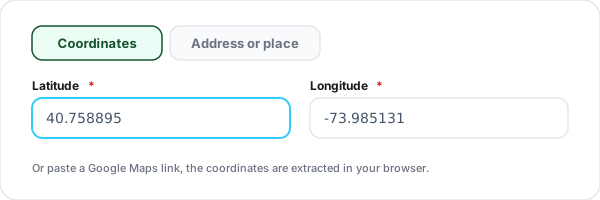
Enter the destination
Type a latitude and longitude, or paste a Google Maps URL and the tool extracts the coordinates in your browser. Prefer a plain address? Switch to the address tab, the text is sent as a Waze search.
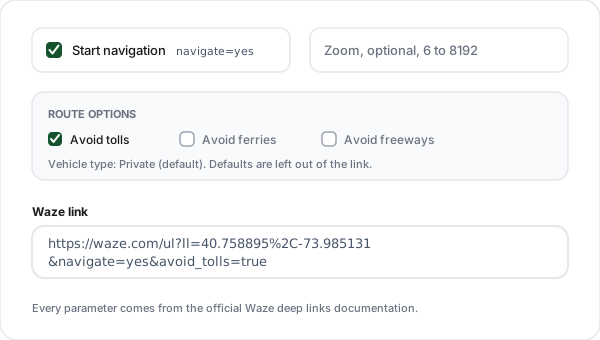
Set navigation and route options
Keep Start navigation on so the link begins turn by turn guidance the moment Waze opens, or switch it off for a view-on-map link. Optionally set the documented zoom level, or open Route options for avoid tolls, ferries, freeways, and vehicle type, all straight from the official parameter table.
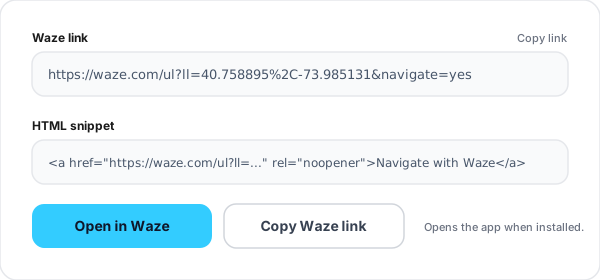
Copy the link or the HTML button
Copy the waze.com/ul link for SMS, email, or print, grab the ready HTML anchor for your site, or hit Open in Waze to test the exact experience your drivers will get.
What Is a Waze Deep Link?
A Waze deep link is a plain https URL that opens Waze at a place you choose, optionally starting turn by turn navigation to it. The whole thing is one address: https://waze.com/ul?ll=40.758895%2C-73.985131&navigate=yes. Waze publishes the format in its official deep links documentation, and because the link is just a URL it works anywhere a URL works: a website button, an email, an SMS, a QR code, or another app.
What happens on tap depends on the device, and the documentation spells it out. On desktop, Waze opens as a web page. On a phone with the Waze app installed, the app opens. On a phone without the app, the Waze web page opens instead. That built-in fallback is the reason to prefer the https form over the waze:// app scheme, which is documented for app-to-app use and does nothing at all when the app is missing.
The parameters are deliberately few. ll pins exact coordinates, q runs a search for whatever text you pass, navigate=yes starts the route, and z sets the zoom. A separate table of routing parameters covers tolls, ferries, freeways, unpaved roads, and vehicle type. Values must be URL encoded, which is the part hand-written links most often get wrong and the part this generator does for you.
The practical difference between the two location modes matters more than it looks. A coordinates link says this exact point on earth, which is what you want for a gate, a dock, a stall, or a building entrance. A search link says whatever Waze finds for this text, which is fine for a well-known address and risky for a new build or a chain with five branches in town. When the destination is yours, take the thirty seconds to pin coordinates.
Anatomy of a waze.com/ul URL
Five pieces cover almost every Waze link you will ever build. Parameters combine with an ampersand, and values must be URL encoded.
| Piece | Role | What to know |
|---|---|---|
| https://waze.com/ul | Base URL | The documented base for every Waze deep link. It decides where to land: desktop opens the Waze web page, a phone with the app opens the app, a phone without it opens the web page. |
| ll=LAT%2CLNG | Coordinates | Latitude and longitude with the comma percent encoded, matching the docs example ll=40.75889500%2C-73.98513100. Pins the exact point, no search involved. |
| q=... | Search | URL encoded search terms, spaces as %20. Waze searches for the text, so the docs example q=66%20Acacia%20Avenue finds that address. Use ll instead when the exact point matters. |
| navigate=yes | Start driving | Starts a navigation session to the destination. Omit it and the link centers the map on the spot instead. The docs never show a "no" value, absence is the off switch. |
| z=... | Zoom | Map magnification from 6 (closest) to 8192 (farthest). Smaller is closer, the reverse of most map URLs. One official example also spells it zoom=. |
A finished example
https://waze.com/ul?ll=40.758895%2C-73.985131&navigate=yes&z=10Coordinates for Times Square with the comma percent encoded, navigation switched on, and the map zoomed to level 10. Tap it on a phone with Waze installed and the app opens already routing.
Every Documented Waze Deep Link Parameter
The complete set from the official Waze deep links documentation, nothing added. If a snippet you found elsewhere uses a parameter that is not in this table, it is not documented and may silently do nothing.
| Parameter | Values | What it does |
|---|---|---|
| ll | latitude,longitude | Center the map on, or navigate to, an exact point. Comma percent encoded as %2C in the docs example. |
| q | URL encoded search terms | Search for an address or place. Values must be URL encoded, spaces become %20. |
| navigate | yes | Start a navigation session. The docs show only yes; leave the parameter out to just show the location. |
| z | 6 to 8192 | Magnification level. 6 is closest (most magnification), 8192 is farthest. One official example uses the zoom= spelling. |
| favorite | work, home | Navigate to a favorite saved in the Waze app that opens the link. Personal shortcuts, not public sharing. |
| avoid_tolls | true/t, false/f | Avoid toll roads. Default is false, tolls allowed. |
| avoid_ferries | true/t, false/f | Avoid ferries. Default is false, ferries allowed. |
| avoid_freeways | true/t, false/f | Avoid freeways. Default is false, freeways allowed. |
| avoid_dangerous_turns | true/t, false/f | Avoid dangerous turns. The one routing flag whose default is true. |
| avoid_trails | avoid_all, allow, avoid_long | Unpaved road preference. Default avoid_all. |
| vehicle_type | private, taxi, motorcycle | Vehicle to route for. Default private. |
| utm_source | your app or site name | Recommended by Waze so partner usage can be identified when support issues come up. |
The generator emits ll or q, navigate, z, the three avoid flags, and vehicle_type. Defaults are omitted from the link because the documentation already applies them when a parameter is absent, and with no routing parameters at all Waze uses the driver's own settings.
Waze Link or Google Maps Link?
Both are share-ready URLs, and plenty of venue pages offer the pair side by side so visitors pick their app. Building the Google Maps side? Use our Google Maps link generator.
| Aspect | Waze deep link | Google Maps link |
|---|---|---|
| Opens | The Waze app, or the Waze web page as fallback | Google Maps in the app or browser |
| Best for | Drivers you want navigating in one tap | General location sharing across walking, transit, and driving |
| Routing controls in the link | Tolls, ferries, freeways, unpaved roads, vehicle type | Travel mode: driving, walking, bicycling, transit |
| Exact pin | ll=lat,lng | Coordinates in the query or directions URL |
| Build it with | This tool | Our Google Maps link generator |
The two links also convert into each other, in one direction at least: paste a Google Maps URL that carries coordinates into this tool and it becomes a Waze link in your browser, no geocoding service involved.
Where a Waze Link Earns Its Place
Get directions buttons on venue pages
Restaurants, clinics, gyms, and offices: a Navigate with Waze button next to the address turns a lookup into an arrival. Coordinates put the pin on your door, not the block.
Event invites and registration emails
Drop the Waze link beside the venue address in confirmation emails, so attendees tap once in the parking lot instead of retyping the address on the day.
Delivery and field service dispatch
Send drivers an SMS with a coordinates link for each stop. The exact lat/lng matters when the dropoff is a warehouse gate or a service entrance that address search misses.
Real estate listings and open houses
New builds and rural properties often geocode badly. A coordinates link takes buyers to the actual driveway, and a QR on the yard sign does the same for drive-bys.
Printed flyers, menus, and signage
Pair the link with a QR code so a poster can start navigation. Shorten it first and the same QR tells you how many people scanned.
Taxi and courier fleets
Dispatch links with vehicle_type=taxi or motorcycle route drivers under the rules that apply to them, and avoid_tolls keeps cost-sensitive routes honest.
Waze Link Best Practices
Six habits that separate a navigation button drivers trust from one that strands them on the wrong block.
Prefer coordinates over address search
The q parameter runs a search, and a search can land on the wrong branch or the wrong block. An ll link is unambiguous. Paste your Google Maps URL into the tool and ship the exact point.
Match navigate to the button label
A button that says Navigate or Get directions should carry navigate=yes. A button that says View on map should leave it off, nobody expects a tap to start a route announcement in their pocket.
Let the tool do the encoding
Spaces must be %20 and the coordinate comma is %2C in the documented examples. Hand-built links with raw spaces or stray ampersands are the usual reason a Waze link half works.
Leave routing flags off unless you mean them
With no routing parameters, Waze uses the driver's own settings, which is what most audiences want. Force avoid_tolls only when you know the route and the audience, like your own fleet.
Test with and without the app
Open your link on a phone with Waze installed, a phone without it, and a desktop browser. All three are documented behaviours and all three should land somewhere sensible.
Shorten before print or SMS
A waze.com/ul URL with coordinates is long, ugly in an SMS, and impossible to retype from a poster. A short link is readable, and it counts clicks, which Waze does not do for you.
Why Use Flyn's Waze Link Generator?
Documented parameters only
Every parameter this tool emits comes from Waze's official deep links documentation, checked against the docs, not copied from forum snippets that half work.
100% client side
Coordinates and addresses never leave the browser. No geocoding API, no server log, nothing stored beyond the history in your own localStorage.
Google Maps converter built in
Paste a Maps URL and the coordinates are extracted from the @lat,lng, q=, and !3d/!4d patterns automatically.
Pairs with QR and click tracking
Wrap the Waze URL in a Flyn short link for click counts, then print it as a QR code for signage and flyers.
Frequently Asked Questions
What is a Waze deep link?
A Waze deep link is an ordinary https URL that opens Waze at a specific place or starts turn by turn navigation to it. The base address, from the official docs at developers.google.com/waze, is https://waze.com/ul, and everything else is query parameters: ll for coordinates, q for a search, navigate=yes to start driving, z for zoom. Because it is a plain URL, it works from a web page, an email, an SMS, a QR code, or another app.
Does the link open the Waze app or the website?
Depends on the device, and that behaviour is exactly what the docs describe. On desktop the link opens Waze as a web page. On a phone with the Waze app installed, the app opens. On a phone without the app, the Waze web page opens instead. That fallback is why this tool outputs the https form rather than the raw app scheme, one link covers all three cases.
What about waze:// links?
The waze:// scheme is documented for app-to-app communication when you are certain the Waze app is installed, for example inside your own mobile app after checking for it. The docs are blunt about the downside: if the app is not installed, tapping a waze:// link does nothing. For anything public, a website, an email, a QR code, use the https://waze.com/ul form this tool generates, which falls back to the web when the app is missing.
What does navigate=yes actually do?
It tells Waze to start a navigation session to the location instead of just showing it. Leave the toggle off and the parameter is omitted, so the link centers the map on the spot and marks it, which suits a "view on map" button. The docs only ever show navigate=yes, so this tool treats off as leaving the parameter out entirely rather than sending a made-up navigate=no.
Should I use coordinates or an address?
Coordinates when precision matters, an address when convenience matters. The ll parameter pins an exact latitude and longitude, so the driver lands on your gate, your parking entrance, or your stall, not the middle of the street. The q parameter runs a search for the text you pass, the docs call the feature Search, so the result depends on how well that text matches. For businesses with ambiguous names or new addresses, coordinates win.
Can I convert a Google Maps link into a Waze link?
Yes. Paste a Google Maps URL into the field on the coordinates tab and the tool extracts the latitude and longitude in your browser. It reads the @lat,lng viewport marker, coordinate pairs in q=, query=, ll=, destination= or center= parameters, and the !3d/!4d pin markers that Google Maps place URLs carry. No geocoding service is called, so a Maps link that contains only a place name and no coordinates cannot be converted, use the address tab for those.
How does the zoom parameter work?
The z parameter sets the magnification of the map view. The documented range runs from 6, which is the closest view with the most magnification, to 8192, which is the farthest. Note the direction: smaller means closer, which trips people up because most map URLs work the other way around. Waze's own examples also spell it zoom= in one place, but the parameter syntax section documents z, so that is what this tool emits.
Can the link make Waze avoid tolls or freeways?
Yes. The official parameter table lists avoid_tolls, avoid_ferries, and avoid_freeways, each taking true or t to avoid and false or f to allow, with allow as the default. This tool adds them under Route options and only writes a parameter when you switch it on, since the documented default already applies when it is absent. The docs also note that with no routing parameters at all, Waze simply uses the driver's own settings.
What is vehicle_type for?
It tells Waze what kind of vehicle to route for. The documented values are private, the default passenger vehicle, plus taxi and motorcycle. It is mainly useful for fleets: a taxi dispatch link or a courier app can route drivers with the rules that apply to their vehicle. When you leave it on private, the tool omits the parameter, because that is already the default.
Can a link navigate to someone's Home or Work?
The docs document a favorite parameter with two supported values, work and home, for example https://waze.com/ul?favorite=work&navigate=yes. The favorites are the ones saved in the Waze app that opens the link, so the link navigates each person to their own saved Work or Home. That makes it handy for personal shortcuts and automations, and useless for sending someone to your office, which is why this generator sticks to coordinates and addresses.
Do I need an API key or a Waze account?
No. A Waze deep link is a plain URL, there is nothing to authenticate and nothing to register. This generator is also free with no sign-up: it builds the URL entirely in your browser, your addresses and coordinates never reach our servers, and the history panel lives in your browser's localStorage, capped at the last twenty links. Pressing Build fires one product analytics event carrying only the tool name and the mode, nothing from your input.
Can I count how many people use my Waze link, or put it on a poster?
Waze's deep link docs offer no click reporting, a deep link is fire and forget. The fix is to wrap the Waze URL in a Flyn short link: the short link counts every click before redirecting into Waze, so you learn how many drivers your listing, flyer, or SMS actually sent. For posters and table tents, drop the link, short or long, into our free QR code generator so drivers can scan instead of typing.
Related Tools
Build the navigation link here, then shorten it, print it, or pair it with its Google Maps twin.
Google Maps Link Generator
The sibling platform: build a share-ready Google Maps link for a location, a directions route, or coordinates.
QR Code Generator
Turn your Waze link into a scannable code for posters, table tents, yard signs, and delivery packaging.
App Store Link Generator
One smart link that routes iOS to the App Store, Android to Google Play, and desktop to your site.
Add to Google Calendar Link
Pair the navigation link with a one-click calendar invite that carries the venue and start time.
Shorten the link, then count the drivers
Wrap your Waze link in a Flyn short link and every listing, flyer, and SMS reports how many people it actually sent into navigation. Free click counts and QR codes, with analytics breakdowns and custom domains on Pro.
Tip: coordinates beat address search whenever the destination is yours.