Free Twitch Subscribe Link Generator
Turn your channel name into a direct link to your Twitch subscription page, where tiers and gift subs live, plus a free follow link, HTML, and Markdown. No coding, 100% in your browser.
Type your channel name or paste your channel URL. We build twitch.tv/subs/yourchannel, the direct link to your subscription page.
Want to know which callout sends viewers to your sub page?
Shorten your sub link with Flyn and get a clean branded URL plus click analytics, see whether panels, chat commands, or Discord actually moves your community.
How to Make a Twitch Sub Link in 3 Steps
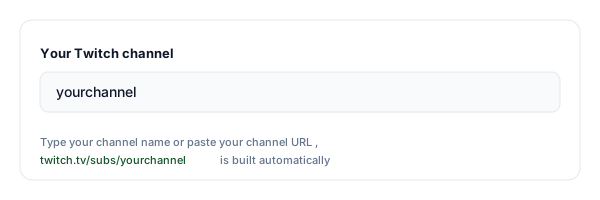
Enter your channel name
Type your Twitch channel name or paste your channel URL. The tool accepts bare names, twitch.tv links, and existing /subs/ URLs.
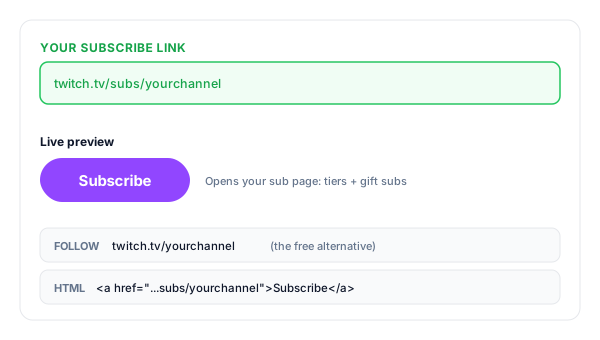
Copy your sub link
We build twitch.tv/subs/yourchannel, the direct link to your subscription page, plus a free follow link and ready-to-paste HTML and Markdown.
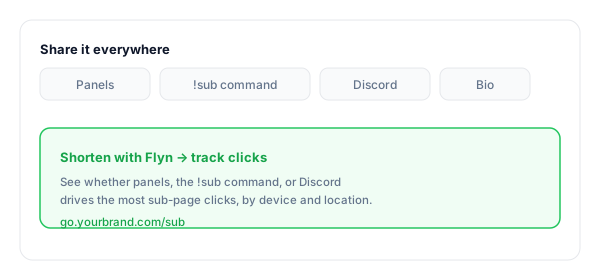
Share it everywhere
Add it to your panels, !sub chat command, Discord, and bios. Shorten it with Flyn to see which placement actually drives sub-page clicks.
What Is a Twitch Subscribe Link?
A Twitch subscribe link is a URL in the format twitch.tv/subs/yourchannel. Instead of opening your channel and hoping viewers find the Subscribe button, it takes them straight to your subscription page, the official Twitch page with your tiers, sub perks, and gift-sub options.
Your regular channel URL, twitch.tv/yourchannel, is a different ask entirely: it opens the stream, where the free Follow button lives. Subscriptions are Twitch's paid way to support a creator, billed monthly across three tiers, while following costs nothing. Keeping the two links separate lets you point brand-new viewers at the free ask and your established community at the paid one.
One honest caveat: the sub page is only meaningful for Affiliate and Partner channels with subscriptions enabled. If subs are not enabled yet, there is nothing on the page to buy, so share the follow link until you reach Affiliate. And no link, this one included, can get anyone subscribed by itself; it removes a step for viewers who already want to support you.
A complete subscribe link:
https://www.twitch.tv/subs/yourchannelWhere to Share Your Twitch Sub Link
A sub link only earns its keep where your warmest viewers already are. These are the placements that work, and the ones worth tracking separately.
| Placement | Why it works |
|---|---|
| Channel panels | The classic spot under your stream. A Subscribe panel with a clear link is visible to everyone who scrolls your About section. |
| Chat command (!sub) | Lets you or your mods drop the link the second someone asks about subbing, the highest-intent moment you get. |
| Discord server | Your most loyal community lives here. Pin the link in a #links or #support channel where it never scrolls away. |
| Offline screen | Catches visitors who arrive between streams with a clear next step instead of a dead end. |
| Social bios | Funnel X, TikTok, and Instagram followers to your sub page while a clip of yours is doing the rounds. |
| On-stream overlay | Pair a sub goal overlay with a short link viewers can actually read and type from the stream. |
Pro tip
Use a different Flyn short link for each placement (one for panels, one for the !sub command, one for Discord). Same destination, separate click counts, so you know exactly which callout sends viewers to your sub page.
Sub Link Best Practices
Do
Don't
Send new viewers to the free follow link first
Point first-time visitors straight at a paywall
Set up a !sub command so the link is one message away
Make viewers dig through panels mid-stream
Shorten and brand it for saying on stream
Spell out twitch.tv/subs/yourname on camera
Remind viewers that gift subs and Prime subs exist
Assume everyone knows about gifting
Check the page from a logged-out browser
Ship the link without seeing what viewers see
Track clicks to learn which callout converts
Guess whether panels or chat drives subs
Turn Sub-Page Clicks Into Insight
See which callout works
Shorten the link with Flyn and compare clicks from panels, chat, and Discord, so you know where sub intent comes from.
Branded & memorable
Turn twitch.tv/subs/yourname into go.yourbrand.com/sub, short enough to say mid-stream.
Easy from any device
Most viewers lurk on phones; a short link is easy to tap from chat, bios, and Discord.
One link, many placements
Use one short link on your panel, chat command, and overlay, or one per placement, and read the click counts. Counting clicks is free on every Flyn link.
Frequently Asked Questions
What is a Twitch subscribe link?
Is a sub button link the same as a subscriber link?
What is the difference between a follow link and a subscribe link?
Is subscribing on Twitch free?
Does the sub link work for every Twitch channel?
How do I get subscriptions enabled on my channel?
Can viewers subscribe for free with Prime Gaming?
Will this link get me more subscribers?
Where should I put my Twitch sub link?
How do I add a !sub command to my chat?
Can I track clicks on my Twitch sub link?
More Free Link Tools
Explore other free tools from Flyn to build, share, and track your links.
YouTube Subscribe Link
One-click subscribe links for the YouTube side of your streaming brand.
Twitter Follow Link
Turn your @username into a one-click follow prompt for X (Twitter).
Click to Tweet Link Generator
Pre-filled tweet links so fans can share your stream in one tap.
Instagram DM Link
Let viewers open a DM to your Instagram in a single tap.
Grow your channel with trackable links
A sub link removes the hunt for the Subscribe button. A Flyn link tells you which panel, command, or post sent the click, so you can double down on what works.