Free Reddit Share Link Generator
Turn any URL into a pre-filled Reddit post link. Readers click, Reddit's composer opens with your link and title ready, they pick a community and press Post. No coding, 100% in your browser.
Paste the page you want people to share. We build the official reddit.com/submit link with everything encoded.
Pre-fills the post title. Reddit caps titles at 300 characters.
Pre-selects the community, e.g. webdev or r/webdev. Leave empty to let sharers pick.
Want to know which page earns Reddit shares?
Shorten your share link with Flyn and get a clean branded URL plus click analytics, see exactly which article, email, or README turns readers into sharers.
How to Make a Reddit Share Link in 3 Steps
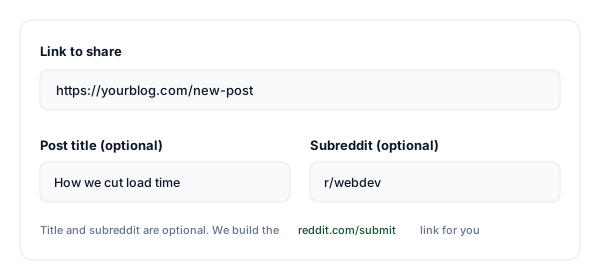
Paste your URL, title, and subreddit
Enter the page you want shared and a suggested post title. Optionally pre-select a subreddit; the tool validates the name and URL-encodes everything correctly.
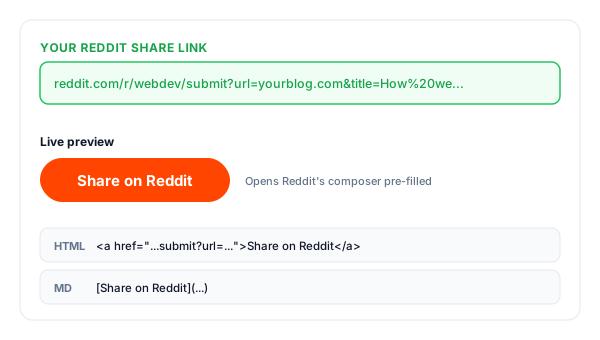
Copy your share link
We build the official reddit.com/submit link, plus an HTML "Share on Reddit" button and a Markdown version for READMEs and docs.
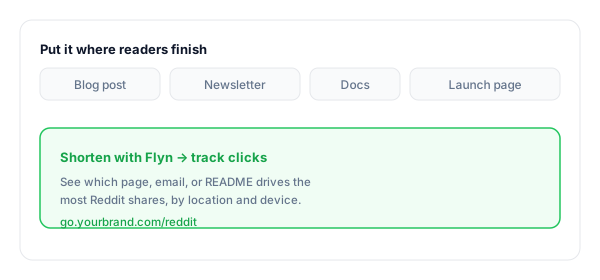
Put it where readers finish
Add it to the end of posts, newsletter footers, and launch pages. Shorten it with Flyn to track which placement drives the most Reddit shares.
What Is a Reddit Share Link?
A Reddit share link is a URL that points at Reddit's official submit endpoint, reddit.com/submit, with your page address and a suggested title passed as query parameters. Clicking it opens Reddit's post composer with the link and title already filled in.
The step it removes is the whole point: instead of asking readers to copy your URL, open Reddit, start a post, and paste everything in, they click once and land in a composer that is ready to go. Add a subreddit and the base changes to reddit.com/r/SUBREDDIT/submit, so that community is pre-selected too.
It never posts on anyone's behalf. The sharer reviews the post, edits the title if they want, adds flair where the community requires it, and presses Post themselves. That final human click is what keeps the mechanism inside Reddit's rules, Reddit does not allow automatic posting from a link.
A complete Reddit share link:
https://www.reddit.com/submit?url=https%3A%2F%2Fyourblog.com%2Fpost&title=How%20we%20cut%20load%20timeWhere to Put Your Reddit Share Link
A share button only earns clicks if it sits where the intent is. These are the placements that convert readers into sharers, and the ones worth tracking separately.
| Placement | Why it works |
|---|---|
| End of blog posts | Readers who finished the article are the ones most likely to recommend it. A share button catches them at peak intent. |
| Newsletter footer | Subscribers already like your content; one pre-filled click turns them into distributors. |
| Launch & changelog pages | Make it effortless for early users to post your launch to r/SideProject or your niche community. |
| Documentation & guides | Tutorials get shared to help-seeking subreddits; a pre-filled link keeps your preferred title attached. |
| Open source READMEs | A Markdown share link in the README lets users post your project with a title you control. |
| Podcast & video show notes | Send listeners to share the episode page with the title you wrote, not one they improvise. |
Pro tip
Use a different Flyn short link for each placement (one for blog posts, one for the newsletter, one for the README). Same reddit.com/submit destination, separate click counts, so you can see which surface actually gets your pages shared instead of guessing.
Reddit Share Link Best Practices
Do
Don't
Write the title the way that community talks
Reuse one clickbait headline everywhere
Read the subreddit rules on self-promotion
Assume every community allows link posts
Keep titles well under 300 characters
Cram the whole article intro into the title
Leave the subreddit open on general buttons
Force one community on every sharer
Shorten and track the share link
Guess which page earns Reddit clicks
Let the sharer review, add flair, and post
Expect the post to submit automatically
Turn Share Clicks Into Insight
See what gets shared
Shorten the link with Flyn and count clicks per page and placement, find where your share button earns its keep.
Branded & memorable
Turn the long reddit.com/submit URL into go.yourbrand.com/reddit, clean enough for emails and slides.
Know your audience
See the countries, devices, and referrers behind every click on your shortened links (Pro).
A/B test placements
Split-test where your share button converts best, end of post vs newsletter vs README (Pro).
Frequently Asked Questions
What is a Reddit share link?
How does the reddit.com/submit URL work?
Can I pre-select a subreddit?
Does the link post to Reddit automatically?
Does it work on mobile and in the Reddit app?
What happens if someone is not logged in to Reddit?
Is there a limit on the post title?
Is using a share link allowed by Reddit?
Can I track how many people click my Share on Reddit button?
How do I add a Share on Reddit button to my website?
What if the subreddit I typed does not exist or is private?
More Free Link Tools
Explore other free tools from Flyn to build, share, and track your links.
YouTube Subscribe Link
One-click subscribe links that pop YouTube's Subscribe dialog for your channel.
Tweet Link Generator
Pre-filled tweet links so readers can share your page on X in one click too.
Twitter Follow Link
One-click follow links for your X profile, no hunting for the button.
Instagram DM Link
Let readers open a direct message to your Instagram in one tap.
Get shared on Reddit, and know it happened
A share link removes the friction between a reader and a Reddit post. A Flyn link on top tells you which page, email, or README actually earned the share, so you can do more of what works.