Free Google Form Prefill Link Generator
Turn a one-off Google Forms pre-filled link into a reusable template. Every entry field becomes an editable input, and any value can become a merge token your email tool fills in per recipient.
Everything runs in your browser. Your form link and the values you type never reach our servers, and the history above lives only in this browser's localStorage.
Google Forms counts submissions, not opens.
Wrap your prefilled URL in a Flyn short link and you see the other half of the funnel: opens versus responses, so you know whether the form is the problem or the invite is.
How to Build a Prefilled Google Form Link in 3 Steps
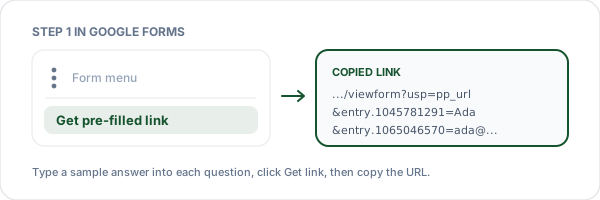
Get the pre-filled link from Google Forms
Open your form in edit mode, click the three-dot menu at the top right, choose "Get pre-filled link", type a sample answer into every question you want to prefill, then click "Get link" and copy it. Your entry IDs come from Google, which is why the flow starts there.
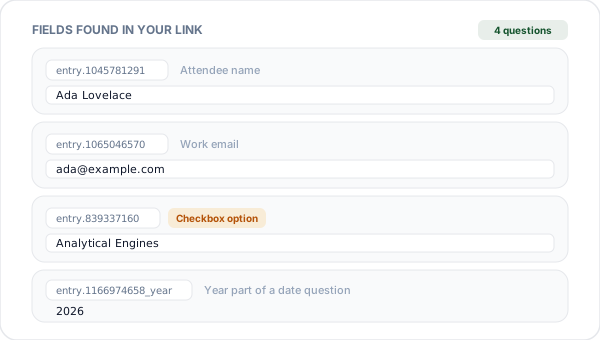
Paste it and edit every field
We parse out every entry parameter, including the split date and time parts and the repeated IDs that checkbox questions produce. Each one becomes a labelled input pre-loaded with the sample answer, so you can rename it, rewrite it, or clear it entirely.
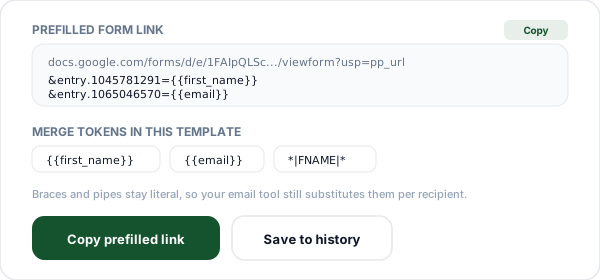
Swap values for merge tokens and copy
Replace any answer with a token such as {{first_name}} or *|FNAME|*. We encode the rest of the value but leave the token delimiters untouched, so your email tool or CRM still substitutes them. Copy the URL and the one-off link becomes a template.
What Is a Prefilled Google Form Link?
A prefilled link is an ordinary Google Forms view URL carrying extra query parameters that populate answers before the respondent sees the page. The shape looks like this:
Each entry.NNNNNNNNN is one question, and the number is an internal ID assigned when the question was created, which is why it looks random and says nothing about the question itself. The usp=pp_url flag is not required. Checked against a live public form on 12 August 2026, the answer prefilled the same with the flag, without it, and with a bogus usp value; dropping the flag also prefilled the same when the request was sent with an Android Chrome user agent and with an iOS Safari user agent. This tool puts usp=pp_url at the front of every URL it builds. When a value is not landing, look at the entry ID, the encoding, and whether the value matches one of the form's options exactly.
Published forms use /forms/d/e/LONG_ID/viewform, which is the responder-facing address. Older or internally shared forms sometimes use /forms/d/DOC_ID/viewform, which is derived from the document ID. This tool accepts both shapes, rebuilds whichever one you pasted, and refuses an editor URL outright, so one does not go out by mistake.
Prefilling is a convenience layer, not a security layer. The respondent sees every value, can change all of it, and nothing is recorded until they press Submit. Use it to remove typing friction, and validate anything that matters again once the response lands in your sheet.
Turning a One-off Prefill Into a Reusable Template
Google gives you a link with your sample answers baked in. That is useful exactly once. The moment you want to send it to two hundred people with their own names in it, you need a template, and that is what merge tokens are for.
Replace the value of a field with your email platform's personalization token instead of a literal answer. Where you would have typed Ada Lovelace, type *|FNAME|*. When the campaign sends, the platform rewrites the token per recipient, so each person clicks a link that already knows who they are.
The catch that trips almost everybody up is encoding. A URL builder that naively percent-encodes the whole value turns {{first_name}} into %7B%7Bfirst_name%7D%7D, and the email platform no longer recognises the pattern it is supposed to substitute. Your recipients get the literal encoded string typed into the form. This tool encodes only the parts of a value that sit outside a token, so the delimiters survive and the substitution still fires.
Beyond email, the same template works anywhere a system does string substitution before a click: CRM workflows, help desk macros, spreadsheet formulas that build a per-row link, or an Apps Script that mails a personalised form invite to each row of a sheet.
Merge token syntax by platform
| Platform | First name token | Notes |
|---|---|---|
| Mailchimp | *|FNAME|* | Merge tags. *|EMAIL|*, *|LNAME|*, and any custom audience field. |
| HubSpot | {{ contact.firstname }} | Personalization tokens, referenced by internal property name. |
| Klaviyo | {{ first_name }} | Django-style template tags with an optional default filter. |
| Brevo | {{ contact.FIRSTNAME }} | Contact attributes are upper-case by convention. |
| ActiveCampaign | %FIRSTNAME% | Percent-wrapped personalization tags, conventionally upper-case. |
| Salesforce Marketing Cloud | %%FirstName%% | Personalization strings resolved from the send data extension. |
All six shapes are recognised and left unencoded by this tool. Check your own account for the exact field names, since custom properties differ per audience.
Which Question Types Can Be Prefilled
Most Google Forms question types can be prefilled. The differences are in how the value has to be formatted, and in file upload, which cannot work from a URL at all.
| Question type | Prefill | How the value is sent |
|---|---|---|
| Short answer, paragraph | Yes | Any text. Spaces and punctuation are percent-encoded for you. |
| Multiple choice, dropdown | Yes | Value must match the option text exactly, including case. |
| Checkboxes | Yes | Repeat the same entry ID once per selected option. |
| Linear scale | Yes | Send the number you want selected, for example 4. |
| Multiple choice grid | Yes | One entry ID per row, value is the column label. |
| Date | Yes | Splits into entry.ID_year, entry.ID_month, entry.ID_day, or send one entry.ID=1998-03-07. Send the year as four digits: 98 is read as the year 0098, with no error. |
| Time, duration | Yes | Splits into entry.ID_hour and entry.ID_minute, plus entry.ID_second for a duration. |
| File upload | No | A URL cannot carry a file. |
Prefill Mistakes That Break the Link Silently
A bad prefill usually fails quietly rather than erroring, leaving the field blank, which is why these are so easy to ship without noticing.
The option text does not match
Prefilling a dropdown with "yes" when the option reads "Yes" leaves the question blank with no error at all. Copy option labels out of the form rather than retyping them, and watch for trailing spaces that survived a paste.
You copied the share link, not the prefill link
The URL from the Send button and the forms.gle short link contain no entry parameters, so there is nothing to edit. The URL produced by "Get pre-filled link" is the one that carries the entry IDs this tool reads.
A question was deleted and recreated
Recreating a question mints a brand new entry ID, so an older link stops prefilling that field with no warning. Rewording a question is safe, rebuilding it is not. Regenerate the pre-filled link after any structural edit.
The merge token got percent-encoded
If the braces or pipes in your token are encoded, the email platform stops recognising it and your recipients see raw characters in the form. Keep the token option switched on here so only the surrounding text is encoded.
The multi-section page parameter was lost
Forms split into sections carry a pageHistory parameter that decides which page opens. Strip it and your respondent can land on the wrong section with the prefilled answers hidden behind a Next button. Any extra parameters in your pasted link are preserved.
Why Use Flyn's Prefill Link Generator?
Built for the part Google leaves out: making the link reusable, readable, and measurable once it goes out the door.
Token-safe encoding
Encodes the text around your merge tokens but leaves the tokens themselves as literal text, so your email tool or CRM can still substitute them.
100% in your browser
Your form link and every value you type stay on your device. No request carries them to us.
Handles the odd shapes
Split date and time parts, repeated checkbox IDs, sentinel markers, and the pageHistory parameter multi-section forms need are all preserved.
Measurable after the send
Google Forms reports submissions. Wrap the prefill URL in a Flyn short link and you see opens too, so you can tell a bad invite from a bad form.
Frequently Asked Questions
Where is "Get pre-filled link" in Google Forms?
Why do Google Form entry IDs look like random numbers?
What is a prefilled Google Form link?
Can I prefill checkboxes, dropdowns, and multiple choice?
Can I prefill a date or a time question?
Does the respondent see the prefilled values, and can they change them?
Is a prefilled link secure for sensitive data?
How do I use merge tokens with Mailchimp?
Why do my merge tokens arrive as %7B%7Bname%7D%7D?
Is there a character limit on a prefilled URL?
Why did my prefilled link stop working after I edited the form?
Can I prefill a file upload, linear scale, or grid question?
Does a prefilled link submit the form automatically?
Can I shorten a prefilled Google Form link?
Does this tool send my form or my data anywhere?
More Free Link Tools
Everything else you need around a form invite, free and with no sign-up.
UTM Builder
Tag the prefill URL so you can tell which campaign drove each response.
Mailto Link Generator
The same prefill idea for email: subject, body, CC, and BCC baked into a link.
URL Encoder and Decoder
Decode a mangled entry value to see exactly what Google will receive.
QR Code Generator
Print the prefilled form on a flyer, a badge, or a table tent as a scannable code.
Ready to see who actually opens the form?
Build the prefilled link here for free, then wrap it in a Flyn short link to count every open. Free click counts and QR codes, with country, device, and referrer breakdowns plus custom domains on Pro.